How to Secure Your BI Dashboards When Querying Multiple Sources
Why Multi-Source BI Security Is One of the Hardest Problems in Embedded Analytics
Multi-source BI security is the practice of controlling who sees what data when your dashboards pull from more than one data source — and it’s one of the most underestimated challenges in embedded analytics today.
If you’re an analytics or product lead embedding dashboards into a customer portal, here’s the core problem in plain terms:
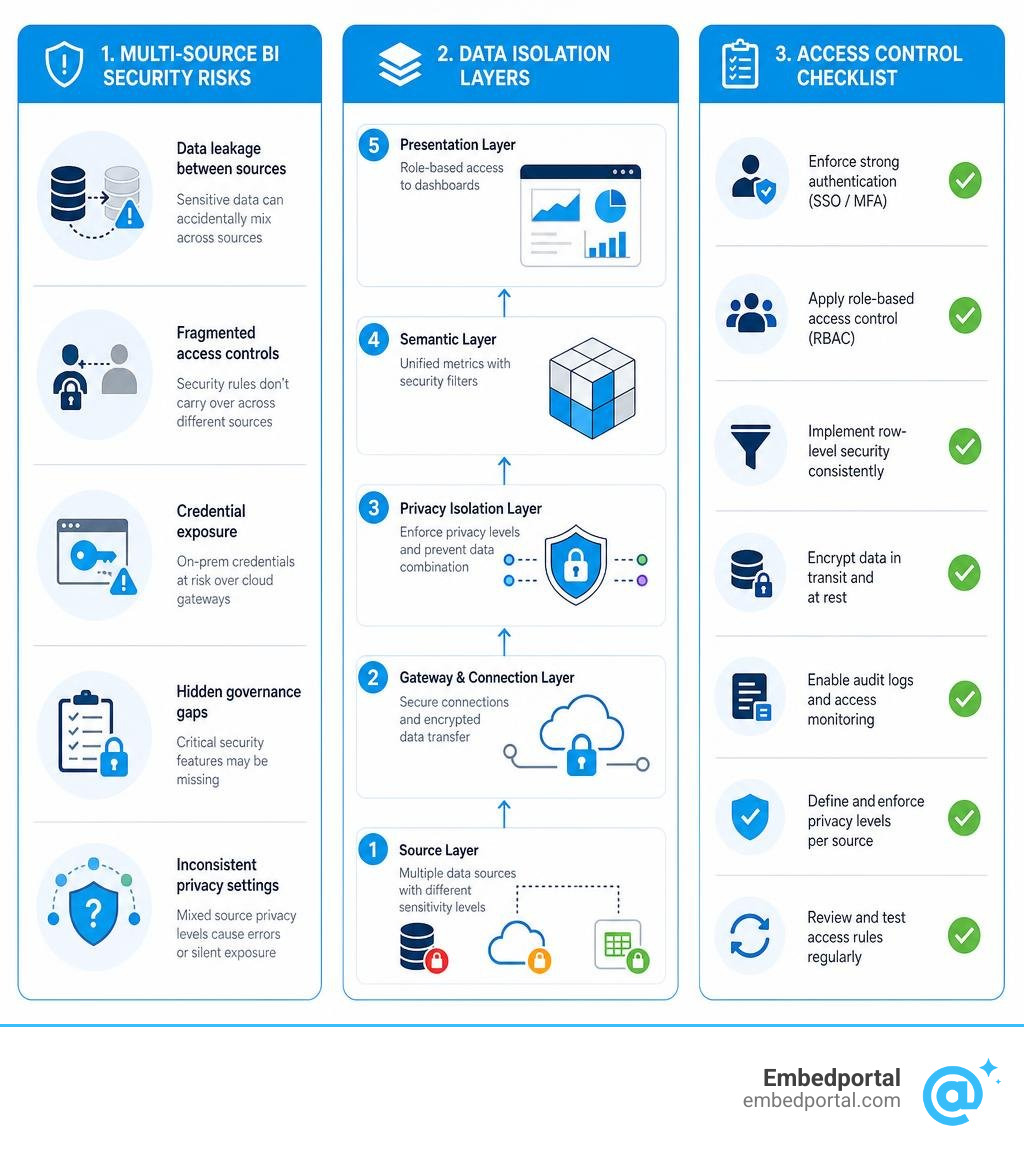
Quick answer — the key risks in multi-source BI security:
- Data leakage between sources — sensitive data from a private database can accidentally “fold into” a less restricted source during query execution
- Fragmented access controls — row-level security rules don’t automatically carry over when you combine sources from different BI vendors
- Credential exposure — on-premises credentials can be mishandled when routed through cloud gateways without proper encryption
- Hidden governance gaps — open-source BI tools often gate critical features like SSO, audit logs, and row-level security behind paid tiers
- Inconsistent privacy configurations — mixing Public, Organizational, and Private data sources without explicit isolation rules creates unpredictable blocking errors — or worse, silent data exposure
Most teams discover these problems after they’ve already shipped dashboards to customers.
The challenge compounds quickly. You might have a SQL Server on-premises, a SaaS CRM in the cloud, and a spreadsheet sitting in someone’s OneDrive — all feeding the same dashboard. Each source has different sensitivity levels. Each has different auth requirements. And your customers expect a seamless, branded experience that just works, without ever seeing data that isn’t theirs.
As Microsoft’s own Power Query documentation warns, incorrectly setting privacy levels can lead to sensitive data being leaked outside of a trusted environment. And that’s just one layer of the problem.
This guide walks through every layer — from Power Query privacy isolation to gateway encryption to open-source BI governance gaps — so you can build a secure, scalable multi-source dashboard architecture.
Common multi source bi security vocab:
Data Isolation and Privacy Levels in Power Query
When we build dashboards that merge multiple databases, we often think our biggest headache will be writing the joins. But the real challenge is preventing Power Query from accidentally sending data from our highly secure internal database over to a public API during query optimization.
To keep this from happening, we must understand how to create proper isolation zones. If you want to dive deeper into how this impacts your end users, check out our guide on dashboard data access.
Understanding Power BI Privacy Levels for Data Isolation
Power Query uses privacy levels to define the boundary lines between your data sources. Think of these levels as security clearance ratings for your databases. There are four primary levels you can assign to any data source:
- Private: This is your locked vault. It contains highly sensitive or confidential data. Power Query will completely isolate this source. Data from a Private source cannot be folded into or combined with any other data source during query execution, even if that other source is also marked Private.
- Organizational: This is for your internal company data. It restricts data sharing to only other sources marked Organizational or Public. It prevents your internal HR or sales data from being leaked to external services, but allows safe merging within your corporate data ecosystem.
- Public: This is for public-facing data, like weather APIs, public census databases, or open market feeds. Anyone can see this data, meaning Power Query is free to fold other queries into it to optimize performance.
- None: This is the default state when you first connect to a source. It has no security rules defined, which means Power Query will prompt you to set a level before safely running complex, multi-source merges.
By defining these zones, we tell the query engine exactly how far it is allowed to go when trying to optimize our data retrieval.
Preventing Accidental Data Leakage in Multi Source BI Security
The reason these levels exist isn’t just for compliance paperwork; it’s to stop a technical process called query folding.
Query folding is when Power Query translates your data transformation steps (like merges, filters, and joins) into a single SQL statement to run directly on the source database. It is fantastic for performance. However, if you try to merge a SQL Server table (Organizational) with a local Excel sheet (Private), Power Query might attempt to optimize the query by sending the Excel keys over to the SQL Server to filter the data there.
Because the Private level is more restrictive than the Organizational level, Power Query blocks the information exchange between the data sources. If it didn’t, sensitive keys or values from your private Excel sheet would be sent across the network to your SQL Server, potentially exposing them to unauthorized database administrators.
A major security risk occurs when developers get frustrated by these blocking errors. To make the error go away and speed up development, they might enable Fast Combine by selecting “Ignore the Privacy levels”.
While this potentially improves performance, it completely disables the isolation zones. Enabling Fast Combine could expose sensitive or confidential data to an unauthorized person because Power Query is now free to transmit data between your private databases and public APIs without restriction.
For more information on setting up robust row-level filters once your data is safely imported, see our guide on Power BI Row Level Security.
Power Query Desktop vs. Power Query Online Configurations
Managing these settings looks slightly different depending on whether you are working in a desktop environment or a cloud-based service.
In Power Query Desktop (such as Power BI Desktop or Excel), you have access to both global and file-level settings:
- Global Privacy Levels: These apply to your local machine across all projects. You can configure these in the Options menu under Global > Privacy.
- File-Level Privacy Levels: These are saved within the specific
.pbixor.xlsxfile. They ensure that if you share the file with another developer, the security boundaries remain intact.
In Power Query Online (used in Power BI Service, Power Apps, and Dataflows), privacy levels are tied directly to your cloud connections. You configure them through the “Get data” experience or the “Manage connections and gateways” page.
Because Power Query Online runs in a shared cloud infrastructure, it enforces these boundaries strictly. A crucial operational note: whenever you change the privacy level of an existing connection in either environment, you will often be prompted to re-enter your credentials to re-verify that you have the authority to access that source under its new security classification.
Securing Hybrid Connections with the On-Premises Data Gateway
Many enterprise deployments require a hybrid approach: some data lives in cloud-native platforms, while highly sensitive legacy databases remain on-premises behind physical firewalls. The On-Premises Data Gateway acts as the secure bridge between these two worlds.
To understand how this fits into your broader sharing strategy, take a look at our article on shared dashboard access.

Credential Encryption and Outbound Communication Architecture
The most common concern when setting up a hybrid gateway is whether your database passwords will be exposed to the cloud.
Fortunately, the gateway handles credentials with a zero-trust design. When you enter credentials for an on-premises source, they are encrypted using asymmetric keys generated locally on the gateway machine. These encrypted credentials are saved securely in the cloud, but the decryption key never leaves your local network. Decryption only occurs locally on the gateway machine during runtime.
Furthermore, the gateway runs as a local Windows service under the default account NT Service\PBIEgwService. It communicates with the cloud entirely through outbound connections. It establishes a secure channel to the Azure Service Bus over port 443.
Because it only uses outbound ports, you do not need to open any inbound firewall ports to your local network. For organizations with strict compliance requirements, you can also enable the “Force HTTPS” setting to ensure that all gateway traffic is strictly encrypted in transit via TLS 1.3, with no fallback to weaker transport protocols.
Governance and Access Control for Multi-Source Gateways
When managing multiple data sources through a single gateway, robust governance is essential to prevent horizontal privilege escalation. We recommend implementing the following best practices:
- Use Domain-Managed Service Accounts: Instead of running the gateway under local service accounts, configure it to run under an Active Directory-managed service account. This allows you to enforce centralized password rotation policies and track gateway activity in your standard domain logs.
- Deploy Gateway Clusters: For high availability and load balancing, group multiple gateway machines into a cluster. This ensures that if one server goes offline, your multi-source dashboards will continue to refresh without interruption.
- Implement Role-Based Access Control (RBAC): Limit who can create data sources on the gateway. In the admin portal, restrict gateway usage permissions to specific data creators, preventing unauthorized users from connecting to backend databases.
- Logical Data Source Grouping: Keep your development, testing, and production data sources separated. Do not mix highly sensitive financial databases with general marketing feeds on the same gateway instance if they can be isolated onto separate virtual environments.
Security Architecture and Governance for Multi-Source BI
As organizations grow, they often find themselves managing a hybrid BI ecosystem. Marketing might use Tableau, product teams might build dashboards in Metabase, and finance might rely on Power BI. Securing this multi-vendor landscape is incredibly complex.
To see how to manage users across different platforms, read our guide on user management for BI.

Security and Governance Across BI Environments
When you are pulling data from multiple BI platforms, keeping your security policies synchronized is a massive challenge.
Most modern commercial platforms support enterprise-grade security protocols like SAML SSO, granular audit logs, and multi-tenant data segregation. However, if you are using open-source tools, you must pay close attention to how they handle governance features:
- Basic Row-Level Security: Some open-source tools offer native row-level security (RLS) configured via dataset-level SQL predicates. While flexible, this requires manual SQL configuration and maintenance for every new data source.
- Gated Governance Features: In many open-source BI editions, advanced governance features like SAML SSO, detailed audit logs, and native row-level security are gated behind paid commercial tiers, forcing you to upgrade to expensive enterprise plans.
- Fragmented Plugin Stacks: Using open-source tools for general business intelligence often results in teams managing a fragmented stack of community plugins, which complicates compliance audits and increases security risks.
To protect these portals from credential stuffing and unauthorized access, enterprises are increasingly looking toward advanced identity verification. For example, recent developments in Multi-Modal Biometric Authentication demonstrate how combining multiple biological factors (like face, iris, and fingerprint) with deep learning architectures can achieve up to 99.5% accuracy, highlighting the industry’s shift toward absolute identity assurance before displaying sensitive analytical data.
Hidden Engineering Costs and Maintenance of Custom Security Infrastructure
While open-source BI tools can save you thousands of dollars in licensing fees upfront, they often introduce significant hidden engineering and maintenance costs over time:
- Custom Connectors: The “last mile” of data integration with mixed cloud and on-premises systems frequently requires weeks of custom development. You might start with community-maintained plugins, but you’ll eventually drift into writing custom scripts to keep up with API updates.
- Security Patching: With open-source tools, your DevOps team is entirely responsible for monitoring vulnerabilities, testing patches, and maintaining uptime.
- Metric Governance: Without a centralized semantic layer, different dashboards will inevitably show conflicting KPI definitions. We call this “dashboard drift”—where two charts argue about the same metric because their underlying SQL joins were written differently.
Evaluating Security Trade-offs for Multi Source BI Security
When evaluating whether to build your multi-source security architecture using open-source tools or commercial platforms, consider the following trade-offs:
| Requirement | Open-Source BI | Commercial Platforms |
|---|---|---|
| Upfront Cost | Very Low (Free tiers available) | High (Per-user or capacity licensing) |
| SSO Integration | Often gated behind paid tiers | Standard out-of-the-box feature |
| Row-Level Security | Requires custom SQL predicates or paid add-ons | Native, GUI-driven configurations |
| Maintenance Overhead | High (DevOps, patching, hosting) | Low (SaaS or managed hosting) |
| Scalability | Manual clustering and load balancing | Automated scaling managed by vendor |
For high-security environments, you also need to think about how your access control systems handle anomalies. Research on Context-Aware Decision Fusion for Access Control shows that modern security frameworks must be smart enough to arbitrate access when security signals conflict. If your BI dashboard is querying multi-source data across hybrid networks, having a context-aware security layer ensures that anomalous user behavior automatically triggers a lockdown of your most sensitive database connections.
Frequently Asked Questions about Multi-Source BI Security
What is Fast Combine and why is it a security risk?
Fast Combine is a setting in Power Query that bypasses your privacy level configurations to speed up query execution.
While it improves performance by allowing the query engine to freely fold and merge data across different sources, it is a significant security risk. By ignoring your isolation zones, Fast Combine can cause sensitive data from a Private source to be sent to a Public or Organizational source during query optimization, potentially exposing confidential information to unauthorized users.
How does Row-Level Security (RLS) apply to multi-source dashboards?
Row-Level Security (RLS) restricts which rows of data a user can see based on their identity or role. When querying multiple sources, RLS becomes significantly more complex because you must ensure that your filters are applied consistently across all connected databases.
If you are merging data in your BI tool, you must configure RLS rules that map your users’ identities to the filtering keys of each individual data source. To learn how to set this up without tanking your dashboard’s performance, check out our guide on Row Level Security Best Practices.
Can I use a single gateway for both cloud and on-premises sources securely?
Yes, you can use a single On-Premises Data Gateway to manage connections to both cloud-native and on-premises sources.
However, to do so securely, you must enforce strict role-based access control (RBAC) on the gateway. Ensure that only authorized developers have permission to create and edit data sources, use domain-managed service accounts for credential management, and group your data sources logically to prevent users from accessing databases they shouldn’t see.
Conclusion
Securing a multi-source BI environment is a balancing act. You have to keep your data isolated, encrypt your credentials, and make sure your row-level security rules actually work across different databases — all while keeping your dashboards fast and easy to use.
If you are trying to build this yourself by writing custom security layers and API integrations, you are looking at weeks of engineering overhead and a constant stream of security patches.

That is why we built Embedportal.
Embedportal is a SaaS company that provides a white-label embedding platform for BI dashboards. Our unique platform allows you to embed multi-vendor analytics (including Tableau, Power BI, QuickSight, and Metabase) with unified branding, centralized row-level security, and single sign-on (SSO) in under an hour.
Instead of spending your valuable engineering time configuring gateways, managing SSO handshakes, and worrying about query folding leaks, you can let Embedportal handle the security layer for you.
Ready to secure your multi-source dashboards without the engineering headache? Secure your multi-source dashboards with Embedportal’s Row-Level Security today.