How to Implement Row-Level Encryption in MS SQL Server
What Is Row-Level Encryption in SQL Server (And Why It Matters)
Row-level encryption in SQL Server means encrypting the actual data stored in specific rows or columns, so that even if someone gains direct database access, they can’t read the sensitive values without the right cryptographic keys.
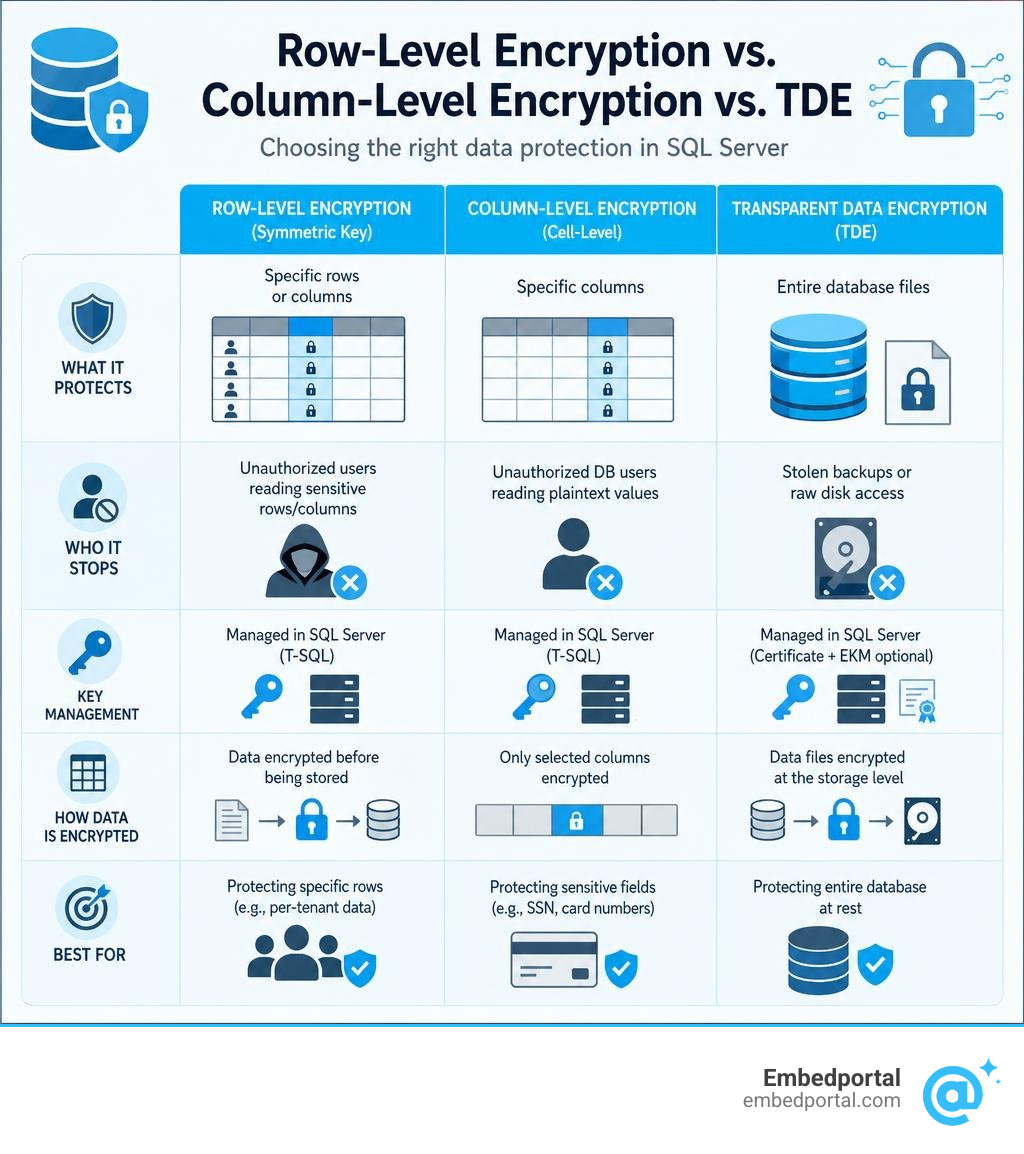
Here’s a quick breakdown of the three main ways to protect data at rest in SQL Server:
| Approach | What It Protects | Who It Stops |
|---|---|---|
| Transparent Data Encryption (TDE) | Entire database files on disk | Stolen backup files or raw disk access |
| Column-Level (Cell-Level) Encryption | Specific columns using symmetric keys | Unauthorized DB users reading plaintext values |
| Always Encrypted | Specific columns, keys stored client-side | Even DBAs and cloud operators |
The short answer: If you need to protect specific sensitive fields — like Social Security Numbers, credit card numbers, or per-tenant data — from being read by privileged database users or in the event of a breach, you need column or row-level encryption, not just TDE.
This is a real challenge for SaaS teams. You might already have Row-Level Security (RLS) policies filtering which rows a user can see — but if someone with elevated database access runs a direct query, unencrypted data is still exposed. Encryption adds a second layer that RLS alone can’t provide.
The two primary approaches in SQL Server are:
- Symmetric key encryption using
EncryptByKey/DecryptByKey— managed entirely in T-SQL - Always Encrypted — where the database engine never sees plaintext values, because encryption happens on the client side
Both approaches have real trade-offs around query performance, indexing, and operational complexity. This guide walks through both.
Quick look at row level encryption sql server:
Row-Level Encryption vs. Column-Level and Transparent Data Encryption (TDE)
To build a secure architecture, we need to understand exactly where our cryptographic boundaries lie. In SQL Server, developers often use the terms “row-level encryption,” “cell-level encryption,” and “column-level encryption” interchangeably. This is because SQL Server does not have a native statement specifically called “Encrypt Row.” Instead, we encrypt specific columns within a row, often binding the encryption process to a unique row identifier using an authenticator. This ensures that ciphertext cannot be swapped between different rows by a malicious actor.
Let’s contrast this with Transparent Data Encryption (TDE). TDE operates at the file level. It encrypts the entire database, including the MDF files, LDF files, and backup sets, protecting your data from physical theft of hard drives or backup tapes. However, once the SQL Server service starts and decrypts the database into memory, any user with standard query permissions can view your data in plaintext. TDE provides zero protection against an insider threat, a compromised administrative account, or a SQL injection attack.
By contrast, cell-level encryption (as documented in the Microsoft guide on how to Encrypt a Column of Data – SQL Server | Microsoft Learn) requires explicit actions to decrypt the data. The database engine stores the values as varbinary data. To read the plaintext, a user or application must possess explicit permissions to open the cryptographic key and call the decryption functions. This makes row-level or cell-level encryption ideal for highly sensitive data fields, such as customer payment details or healthcare records, where access must be restricted to specific application contexts.
Choosing Your Approach to Row Level Encryption SQL Server
When implementing row level encryption sql server, we primarily choose between two architectural models: server-side symmetric encryption (using T-SQL keys and certificates) or client-side encryption (using Always Encrypted).
Implementing Row Level Encryption SQL Server with Symmetric Keys
The classic, server-side approach relies on SQL Server’s internal cryptography hierarchy. This hierarchy starts with the Service Master Key (SMK), which protects the Database Master Key (DMK). Under the DMK, we create certificates, which we then use to encrypt symmetric keys.
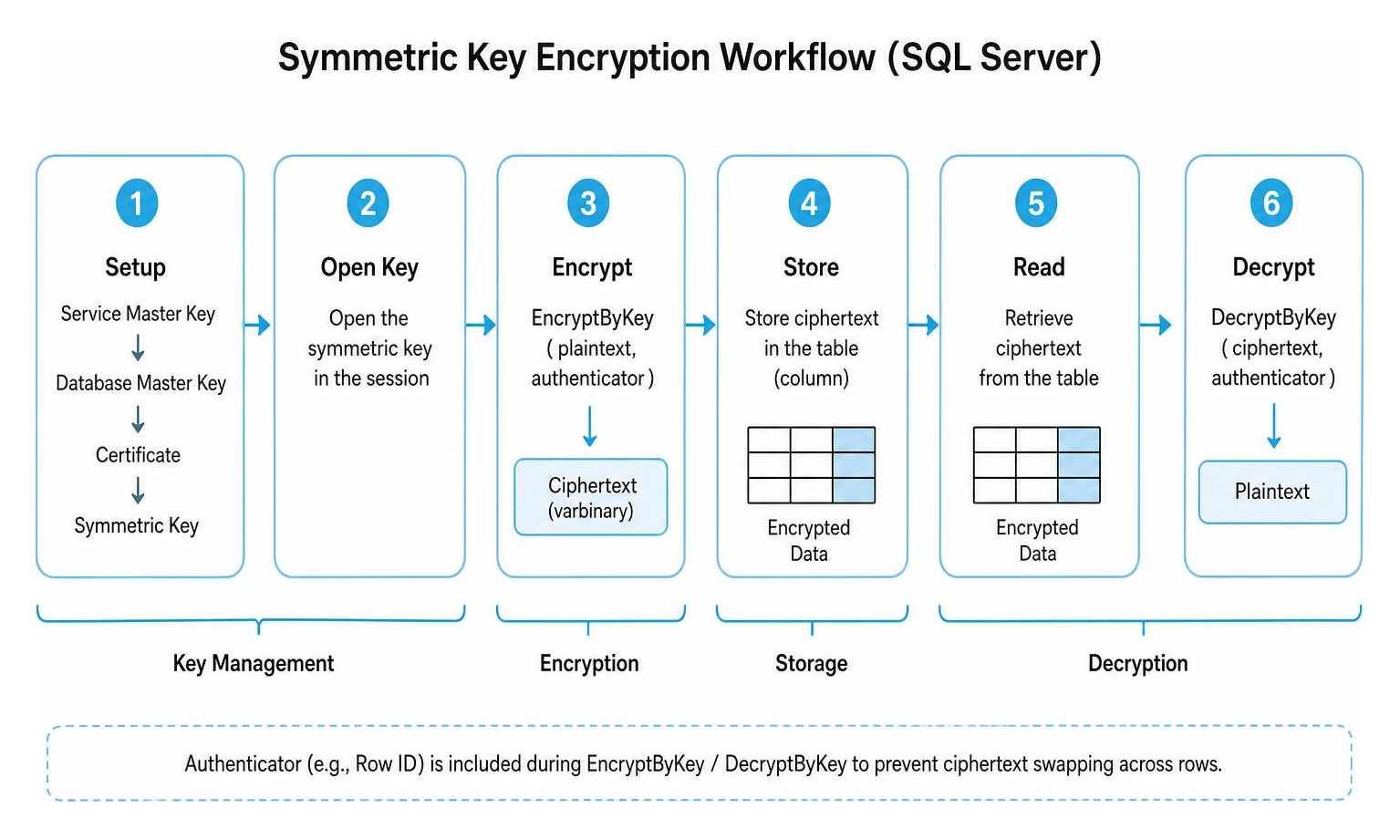
With this approach, the database engine handles the encryption and decryption processes using built-in T-SQL functions like EncryptByKey and DecryptByKey. It is highly flexible because we can write complex database logic, triggers, and stored procedures around the encrypted columns.
To prevent a malicious user from copying encrypted data from one row and pasting it into another (a ciphertext swapping attack), we can use an “authenticator.” An authenticator is a unique value associated with the row, such as a primary key ID, that is hashed alongside the plaintext during encryption. If a bad actor moves the ciphertext to a different row with a different ID, the decryption function will detect the mismatch and return NULL.
Always Encrypted as a Modern Alternative for Row Level Encryption SQL Server
For organizations looking to protect data from high-privileged users like database administrators (DBAs) or cloud infrastructure providers, Microsoft introduced Always Encrypted. This technology is detailed in the official documentation on Always Encrypted – SQL Server | Microsoft Learn.
Always Encrypted shifts the cryptographic operations entirely to the client-side application driver (such as ADO.NET or JDBC). The database engine never sees the plaintext data or the cryptographic keys. The keys are split into two types:
- Column Encryption Keys (CEK): Used to encrypt the actual data in the columns and stored in encrypted form within the database.
- Column Master Keys (CMK): Used to encrypt the CEK. The CMK is stored in an external trusted key store, such as Azure Key Vault or the local Windows Certificate Store on the application server.
Always Encrypted offers two encryption types:
- Deterministic Encryption: Always generates the same encrypted value for a given plaintext. This allows point lookups, equality joins, and indexing, but it is vulnerable to pattern-guessing attacks on columns with low cardinality (such as True/False fields or gender markers).
- Randomized Encryption: Generates a unique, unpredictable ciphertext every time, even for the same plaintext. This is highly secure but prevents any direct querying, sorting, or indexing within standard SQL Server instances.
To address these search limitations, SQL Server 2019 and later support Always Encrypted with secure enclaves. Secure enclaves act as a protected, isolated memory space within the SQL Server process. The database engine can safely delegate rich operations—such as pattern matching (LIKE), comparison operators, sorting, and indexing—to the enclave, where the data is temporarily decrypted and processed in a secure hardware or software boundary.
Step-By-Step Guide to Symmetric Row-Level Encryption
If you decide to use server-side symmetric encryption, you must configure the cryptographic objects in a precise order.
Step 1: Creating Cryptographic Objects
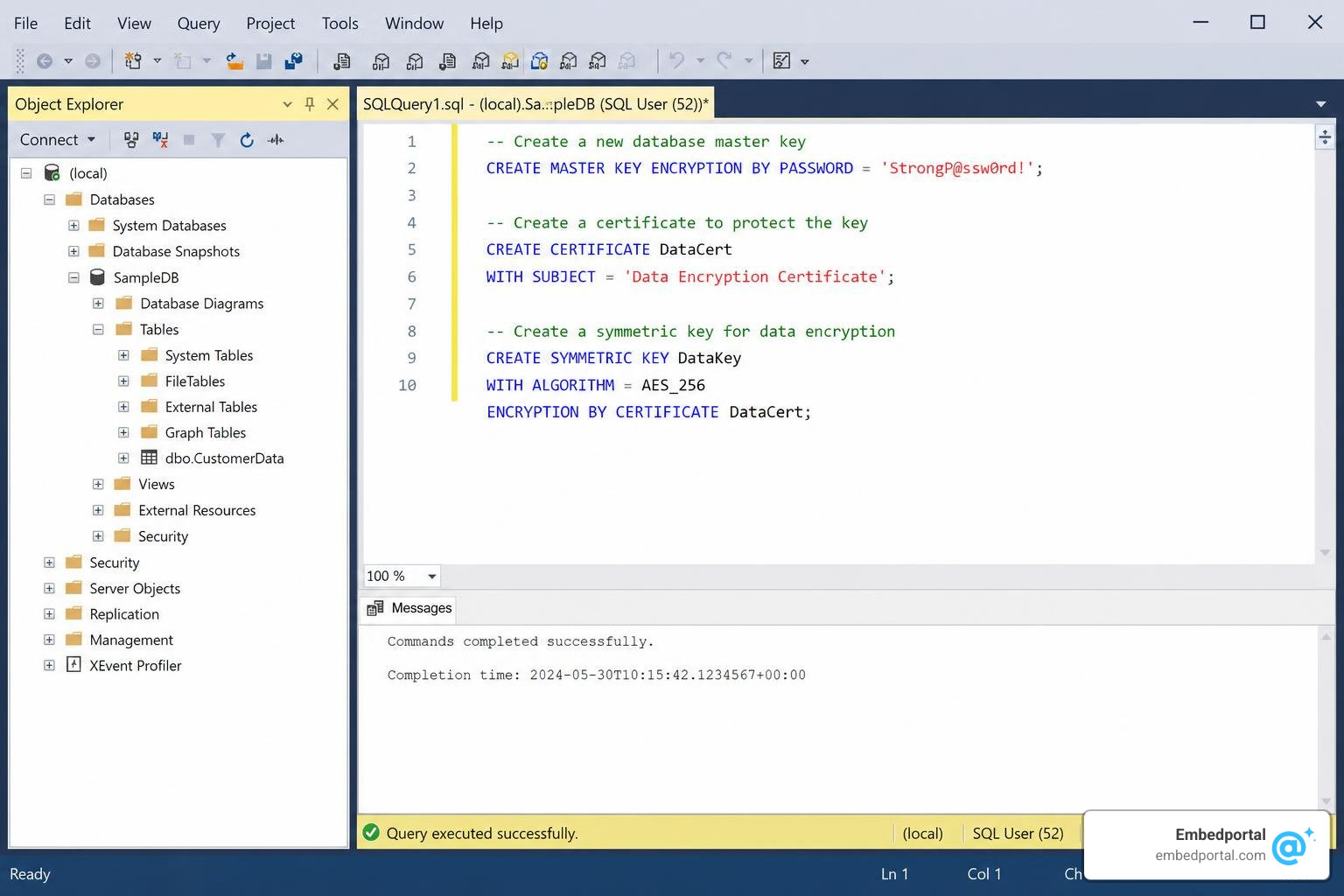
First, we must establish our database-level cryptographic hierarchy. Run these commands sequentially in SQL Server Management Studio (SSMS):
Create the Database Master Key (DMK): You must secure this key with a strong, complex password.
CREATE MASTER KEY ENCRYPTION BY PASSWORD = 'InsertYourSuperSecurePasswordHere2026!';Create a Self-Signed Certificate: This certificate will act as the protector for our symmetric key.
CREATE CERTIFICATE RowEncryptionCert WITH SUBJECT = 'Certificate for Row Level Encryption';Create the Symmetric Key: We recommend using the AES_256 algorithm for strong security.
CREATE SYMMETRIC KEY RowSymmetricKey WITH ALGORITHM = AES_256 ENCRYPTION BY CERTIFICATE RowEncryptionCert;
Always ensure you back up your Database Master Key and certificates immediately after creation. If you lose these keys, any data encrypted with them will be permanently unrecoverable.
Step 2: Encrypting and Decrypting Data with Authenticators
Once your cryptographic objects are in place, you can begin encrypting columns. Let’s look at how to use an authenticator to bind the encrypted data to a specific row.
Suppose we have a table called CustomerData with a primary key column CustomerID. We want to encrypt the SocialSecurityNumber column.
Add a Varbinary Column to Store the Ciphertext: Symmetric encryption outputs binary data. We need a varbinary column of sufficient size (typically varbinary(128) or varbinary(160)) to store this output.
ALTER TABLE CustomerData ADD EncryptedSSN varbinary(128) NULL;Perform the Encryption: To encrypt the data, we open our symmetric key, execute an update using the EncryptByKey function, and then close the key. We pass the CustomerID as the authenticator.
OPEN SYMMETRIC KEY RowSymmetricKey DECRYPTION BY CERTIFICATE RowEncryptionCert;UPDATE CustomerData SET EncryptedSSN = EncryptByKey(Key_GUID('RowSymmetricKey'), SocialSecurityNumber, 1, CONVERT(varbinary, CustomerID));CLOSE SYMMETRIC KEY RowSymmetricKey;Decrypt and Verify the Data: To read the plaintext back, we open the key and use DecryptByKey, passing the same CustomerID authenticator.
OPEN SYMMETRIC KEY RowSymmetricKey DECRYPTION BY CERTIFICATE RowEncryptionCert;SELECT CustomerID, CONVERT(varchar(11), DecryptByKey(EncryptedSSN, 1, CONVERT(varbinary, CustomerID))) AS DecryptedSSN FROM CustomerData;CLOSE SYMMETRIC KEY RowSymmetricKey;
If an unauthorized user attempts to bypass the authenticator or passes an incorrect CustomerID, the DecryptByKey function will return NULL, successfully preventing data tampering or unauthorized exposure.
Combining Encryption with Row-Level Security (RLS)
While row-level encryption protects your data at rest from being read by unauthorized users, Row-Level Security (RLS) controls which rows are returned to a user in the first place based on their execution context. Combining these two features creates a robust defense-in-depth security model.

To learn more about the fundamentals of RLS, check out our comprehensive guide on Row Level Security.
In a combined model, we use RLS to dynamically filter rows so that users only see records relevant to them, and we use row-level encryption to ensure that even if the RLS policy is bypassed or misconfigured, the underlying data remains encrypted.
To implement RLS, we create an inline table-valued function containing our security predicate, using the SCHEMABINDING option to prevent changes to the underlying tables. We then apply this function to our target table using a security policy with filter predicates (to restrict read operations) and block predicates (to restrict write operations).
For a deeper dive into managing these policies, read our guide on Rls Best Practices.
Multi-Tenant Databases and Sensitive Personal Data Protection
In multi-tenant SaaS applications, separating customer data is critical for regulatory compliance (such as HIPAA or GDPR). If you store multiple customers’ data in a single database, you can implement a dedicated security architecture.
For architectural patterns on this, see Multi Tenant Row Level Security.
By combining RLS with row-level encryption, you can ensure that Tenant A’s application session can only query Tenant A’s rows, and that those specific rows are encrypted using a key unique to Tenant A. This completely isolates tenant data, satisfying strict compliance audits and ensuring that a breach of one tenant’s session does not expose another tenant’s data.
SQL Server Standard vs. Enterprise and Azure SQL Environments
Your choice of environment impacts how you manage keys and scale your encryption strategy.
- SQL Server Standard Edition: Supports basic symmetric key encryption and standard Always Encrypted. However, advanced features like Always Encrypted with secure enclaves (which require hardware-enforced virtualization) are best utilized in Enterprise editions or Azure SQL environments.
- Azure SQL Database: Integrates natively with Azure Key Vault. This allows you to store your Column Master Keys (CMKs) securely in the cloud, automating key rotation and management without managing local certificate stores.
- Partitioned Views: If you are running SQL Server Standard and need separate Transparent Data Encryption (TDE) keys per tenant, you cannot do this within a single database. Instead, you can split your data across multiple databases (each with its own TDE key) and use partitioned views to present them as a single logical table to your application.
Performance, Permissions, and Security Best Practices
To maintain a secure and performant row-level encryption architecture, follow these guidelines:
- Minimize Table Joins in Predicates: When using RLS alongside encryption, avoid complex joins inside your inline table-valued functions, as this can degrade query performance.
- Manage Permissions Strictly: To encrypt or decrypt data, users require CONTROL permissions on the database or explicit ALTER permissions on the table, alongside permissions to open the symmetric key. Never grant the VIEW DEFINITION permission globally, as this can expose key metadata.
- Clear Plan Cache and Refresh Metadata: After performing in-place column encryption changes, clear your procedure cache using
ALTER DATABASE SCOPED CONFIGURATION CLEAR PROCEDURE_CACHEand executesp_refresh_parameter_encryptionto ensure query plans use the updated parameter encryption metadata. - Avoid Recursion and Type Conversions: Ensure your predicate functions do not trigger recursive loops or implicit type conversions, which can cause severe CPU overhead.
Frequently Asked Questions about Row-Level Encryption
What is the difference between Row-Level Security (RLS) and row-level encryption?
Row-Level Security (RLS) is an access control mechanism. It uses security policies to filter which rows are visible to a user, but the data itself remains stored in plaintext. Row-level encryption is a cryptographic protection mechanism. It converts the actual data values within a row into ciphertext, requiring a cryptographic key to decrypt and read the plaintext, regardless of the user’s query filters.
Can I index columns that are encrypted at the row level?
If you use manual symmetric encryption (EncryptByKey), you cannot directly index the encrypted varbinary column for standard search operations. If you use Always Encrypted, you can index columns configured with Deterministic Encryption to support point lookups. For rich queries, sorting, and indexing on randomized encrypted data, you must use Always Encrypted with secure enclaves.
How does row-level encryption affect query performance in SQL Server?
Row-level encryption introduces CPU overhead due to the cryptographic algorithms running during write (encryption) and read (decryption) operations. It also prevents the query optimizer from performing index scans on encrypted columns unless deterministic Always Encrypted or secure enclaves are used, which can result in full table scans and increased query latency.
Conclusion
Implementing row level encryption sql server is a highly effective way to secure sensitive data against insider threats, administrative privilege abuse, and external breaches. By carefully choosing between server-side symmetric encryption and client-side Always Encrypted, and combining your cryptographic strategy with Row-Level Security policies, you can build a highly secure, compliant database architecture.
For SaaS teams looking to expose secure, multi-tenant analytics to their customers without the headache of building complex filtering and security layers from scratch, Embedportal can help. We provide a white-label embedding platform for BI dashboards, enabling your team to embed multi-vendor analytics (including Tableau, Power BI, QuickSight, and Metabase) with unified branding, robust row-level security, and seamless single sign-on (SSO) in under an hour.
Ready to simplify your data access control? Explore how we handle Row Level Security and start delivering secure, embedded dashboards to your users today.