Secure Embedded Analytics: A Step-by-Step Tableau RLS Tutorial
What It Means to Embed Tableau with RLS — and Why It’s Harder Than It Looks
Embedding Tableau with RLS (row-level security) means showing each user only the rows of data they’re allowed to see — inside a dashboard embedded in your web app. It’s the difference between a customer portal that feels trustworthy and one that accidentally exposes a competitor’s revenue numbers.
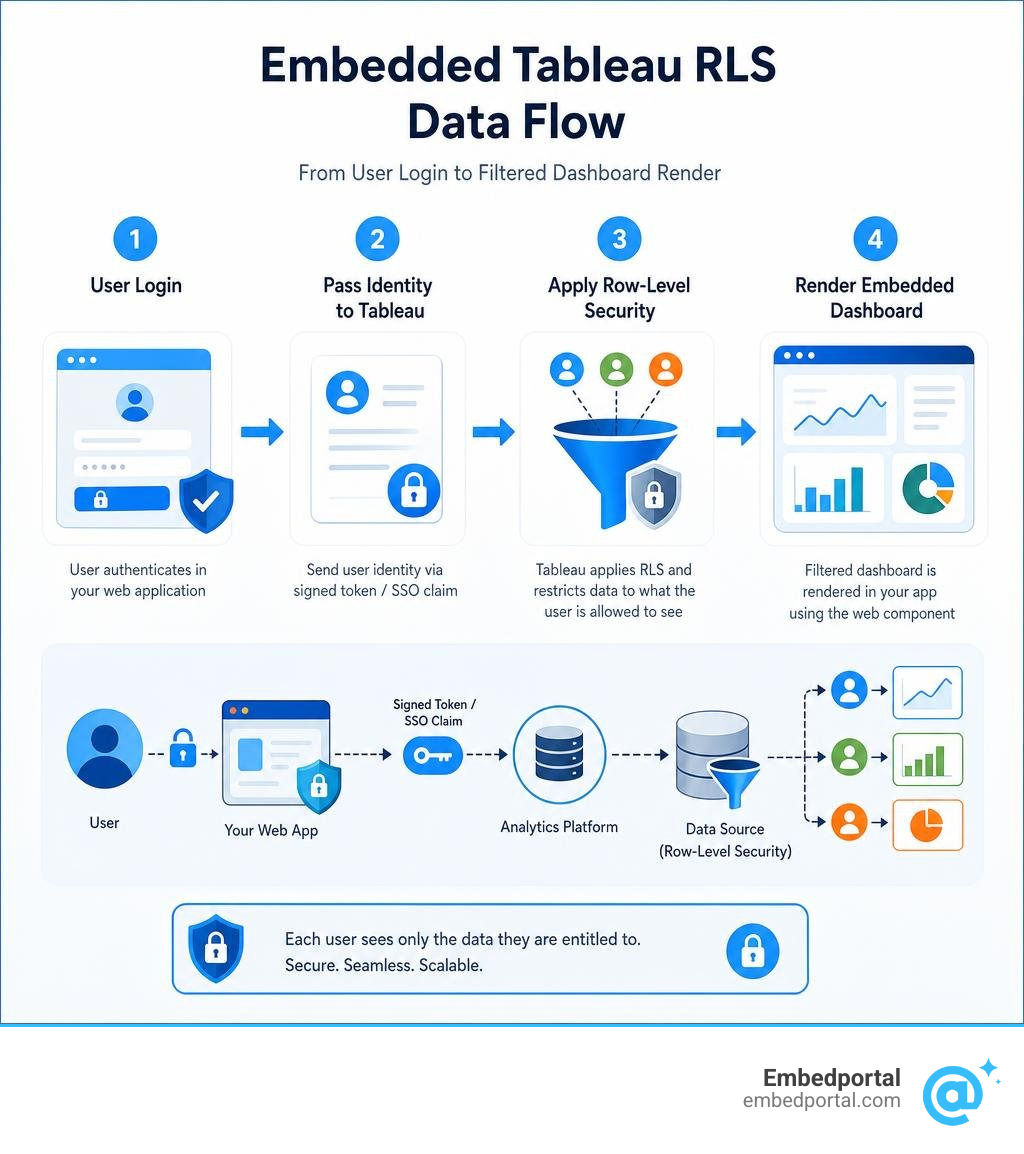
Here’s the quick answer for how it works:
- Authenticate the user — your app identifies who is logged in (via JWT / Connected Apps)
- Pass user identity to Tableau — through a signed token or SSO claim
- Apply a row-level filter — Tableau restricts data to only what that user is entitled to see
- Render the embedded dashboard — using the
The challenge is that each of those four steps has multiple options, and choosing the wrong one at any layer creates either a security gap or a maintenance nightmare.
For SaaS teams, the stakes are especially high. You’re not just protecting internal data — you’re serving multiple customers from a single dashboard, where one misconfigured filter could expose Tenant A’s data to Tenant B. Tableau’s own documentation frames it simply: row-level security lets users viewing the same dashboard each see only the data they’re allowed to see.
The good news? Tableau offers several well-defined RLS methods — from manual user filters to centralized data policies on virtual connections — and a clear recommended path for embedding: Connected Apps with JWT authentication.
This guide walks through every layer of that stack, so you can implement it correctly the first time.
Why You Must Embed Tableau with RLS for Web Applications
When we build customer-facing portals or internal line-of-business applications, embedding a dashboard is often the fastest way to deliver high-quality analytics. But without proper row-level security, we run into massive structural and security roadblocks.
In a multi-tenant application, different customers (tenants) log into the same portal. If we do not embed tableau with rls, we are left with only two choices, both of which are deeply flawed:
- Build a separate dashboard for every single customer. This approach does not scale. If you have 500 customers, you have to maintain 500 identical dashboards. A simple color change or new KPI means updating 500 files.
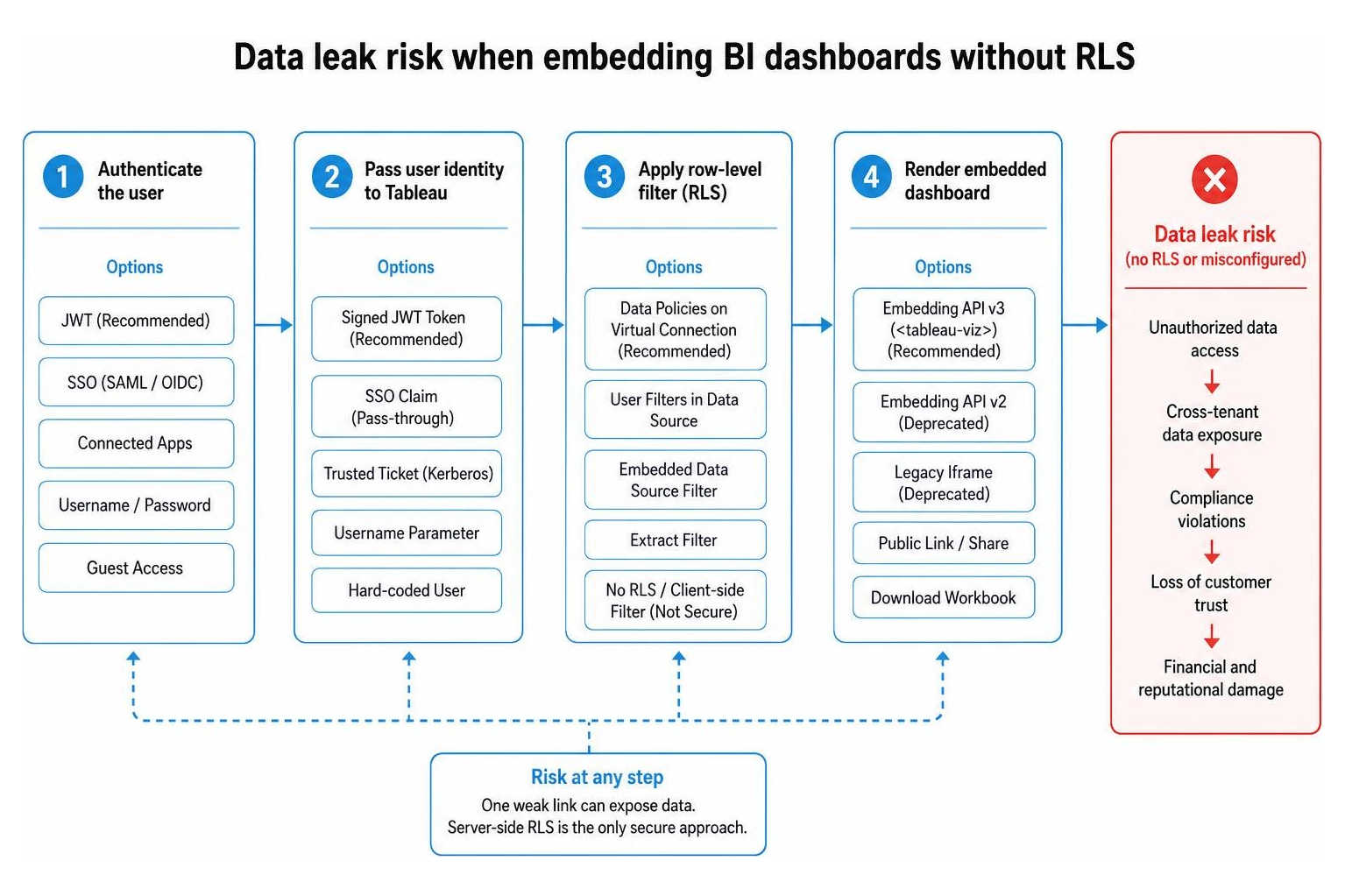
- Use client-side filters. This is a massive security risk. Client-side filters only hide data in the browser. Anyone with basic knowledge of browser developer tools can inspect the network requests or modify the filter parameters to view other customers’ private data.
This is why understanding Row Level Security is so critical. RLS ensures that the data filtering happens securely on the server side, before any data is sent to the user’s browser.
If you are asking yourself, Do I Need Row-Level Security (RLS) in Tableau?, the answer is a resounding yes if your dashboard contains data belonging to different regions, departments, or external clients who should never see each other’s metrics.
Without RLS, your application is highly vulnerable to data leaks. A single user could easily manipulate iframe source URLs to view unauthorized rows, leading to compliance violations, lost customer trust, and severe financial penalties.
Core Methods for Implementing Row-Level Security in Tableau
Tableau provides several ways to restrict data access. Choosing the right one depends on your database architecture, whether you use live connections or extracts, and your licensing level.
To help you navigate these choices, we have compiled a comparison of the primary methods used when you embed tableau with rls:
| RLS Method | Management Level | Recommended For | Pros | Cons |
|---|---|---|---|---|
| Manual User Filters | Workbook level | Small, static internal teams | Simple to set up in Tableau Desktop | High maintenance; does not scale for dynamic users |
| Dynamic User Filters | Data Source level | Multi-tenant apps, large teams | Scales automatically; uses built-in functions | Requires maintaining an entitlement table |
| Virtual Connection Data Policies | Centralized Server level | Enterprise-wide governance | Low maintenance; separation of security and analytics | Requires Tableau Data Management add-on |
| Database-Level RLS | Database level | Existing DB-level security investments | Reuses existing security; works with live queries | Harder to use with extracts; requires viewer impersonation |
If you want to dive deeper into how these options function specifically within Tableau, check out our guide on Row Level Security Tableau.
Designing Entitlement Tables and User Filters to Embed Tableau with RLS
For most dynamic embedding scenarios, we use a hybrid approach combining a main data table with an entitlement table (also called a security junction table).
An entitlement table maps your users’ login identifiers (like usernames or email addresses) to the dimension values they are allowed to see. For example, if you have a sales dashboard, your entitlement table might map Sales Rep A to the Western Region and Sales Rep B to the Eastern Region.
To implement this, you join your main data table with the entitlement table in Tableau. You then create a dynamic user filter using a calculated field. Tableau provides built-in user functions like USERNAME() and ISMEMBEROF() to identify the currently logged-in user.
A typical dynamic filter calculation looks like this:
USERNAME() = [Entitlement Username]
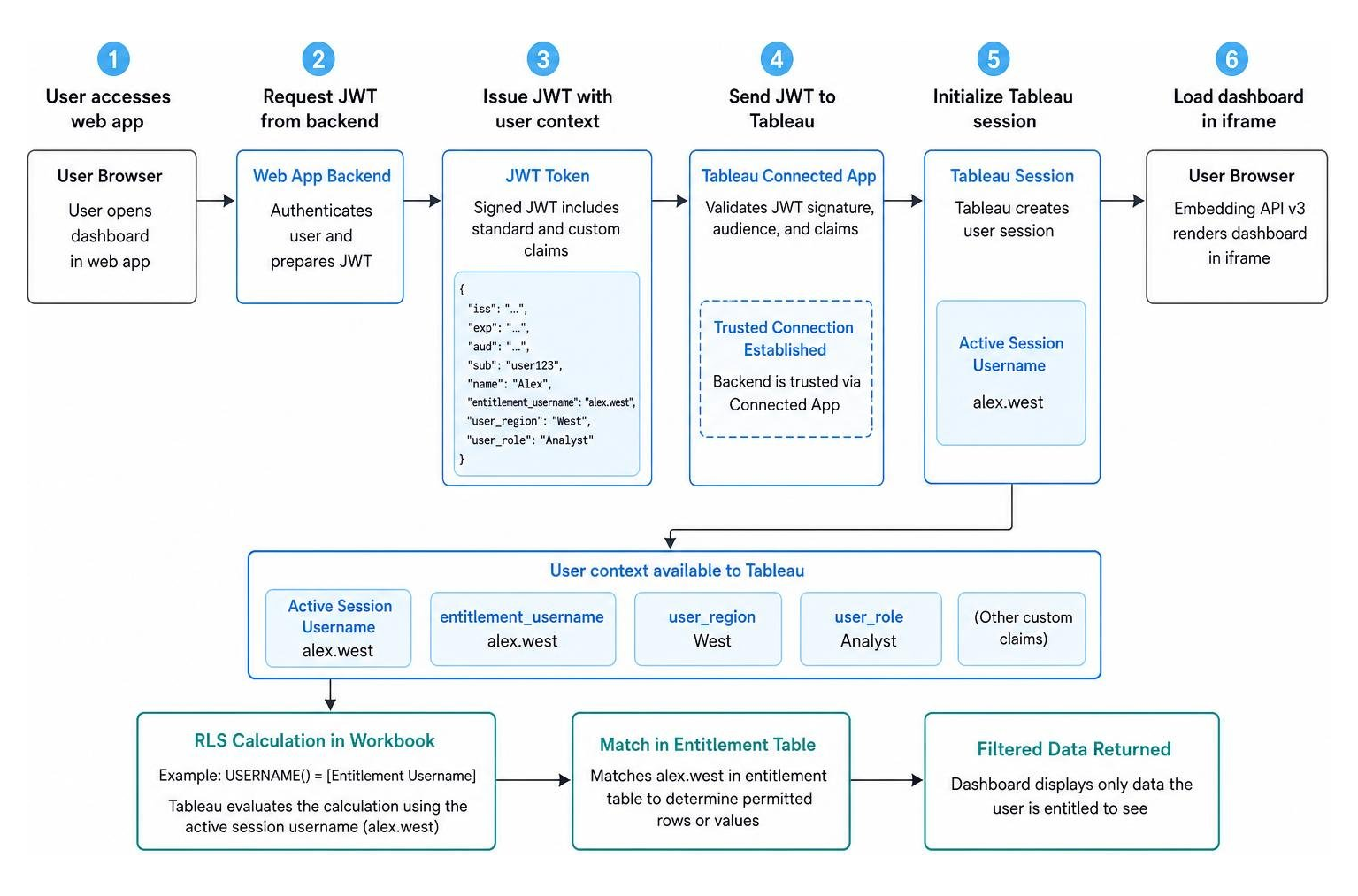
When a user views the dashboard, Tableau evaluates this calculation, matching their active session username with the entitlement table, and filters the main data accordingly. For a deep dive into structuring these security tables, consult the official RLS Best Practices for Data Sources and Workbooks.
Live Connections vs. Extracts Performance in RLS
When you embed tableau with rls, how your data is stored heavily impacts dashboard performance.
With a Live Connection, Tableau sends a query to your database every time a user interacts with the dashboard. The RLS filter is appended to the SQL query (e.g., WHERE user_region = ‘West’). This keeps your data real-time and leverages your database’s processing power, but it can cause latency if your database is slow or if hundreds of users query it simultaneously.
With Extracts, Tableau packages the data into its high-performance Hyper engine. Historically, joining a massive data table to an entitlement table inside an extract could cause “row duplication blow-up,” significantly increasing the extract size and generation time.
Fortunately, starting with Tableau 2018.3, the data engine can create multi-table extracts. This means you can keep your data tables and your entitlement tables separate within the extract, preventing the join from materializing during the extract build process. This keeps your extract files compact and fast.
Leveraging Database-Level RLS and Impersonation
If your organization has already invested heavily in database-level security, you do not need to rebuild those rules inside Tableau. You can pass the user’s identity directly to the database.
Using features like Microsoft SQL Server Impersonation (EXECUTE AS) or Oracle Virtual Private Database (VPD) via Initial SQL, Tableau can establish a database connection that impersonates the specific web app user. For example, when using Oracle VPD, you can write Initial SQL to call a session identifier package that passes the Tableau username down to the database session.
This approach is highly secure because the database itself enforces the security boundaries, but it requires a live connection and ensures that every viewer has matching credentials or permissions in the underlying database. To see this architecture in action, watch the Centralized Row-Level Security video resource.
Technical Implementation: Connected Apps, JWT, and Embedding API v3
To securely embed tableau with rls in July 2026, we use Tableau Connected Apps combined with the modern Embedding API v3.
Connected Apps establish a trusted relationship between your web application backend and Tableau Cloud or Tableau Server. Instead of forcing users to log into Tableau manually, your backend generates a signed JSON Web Token (JWT) when a user loads your app. This token tells Tableau, “We have authenticated this user, and here is who they are.”
To learn more about setting up this primary embedding pattern, read our resource on Tableau Embed.
Passing User Context and JWT Claims to Embed Tableau with RLS
The JWT is the vehicle that carries your user’s identity and custom security attributes directly into Tableau. When configuring your backend token service, you include specific claims in the JWT payload.
Beyond standard claims like issuer, expiration, and client ID, you can pass custom user attributes. These attributes can be captured by Tableau and used directly in your dynamic RLS calculations.
For instance, you can include a custom claim for the user’s region or department. In your Tableau data source, you can then reference these JWT-passed attributes to filter rows dynamically without even needing a complex entitlement table join.
The Embedding API v3 makes it incredibly simple to pass this token using the token attribute on the web component to your generated JWT. For detailed documentation on token structures and scope claims, refer to Authentication and Embedding.
Architectural Patterns and Starter Repos for Rapid Deployment
Building a secure embedding architecture from scratch can be daunting, but you do not have to start from a blank page.
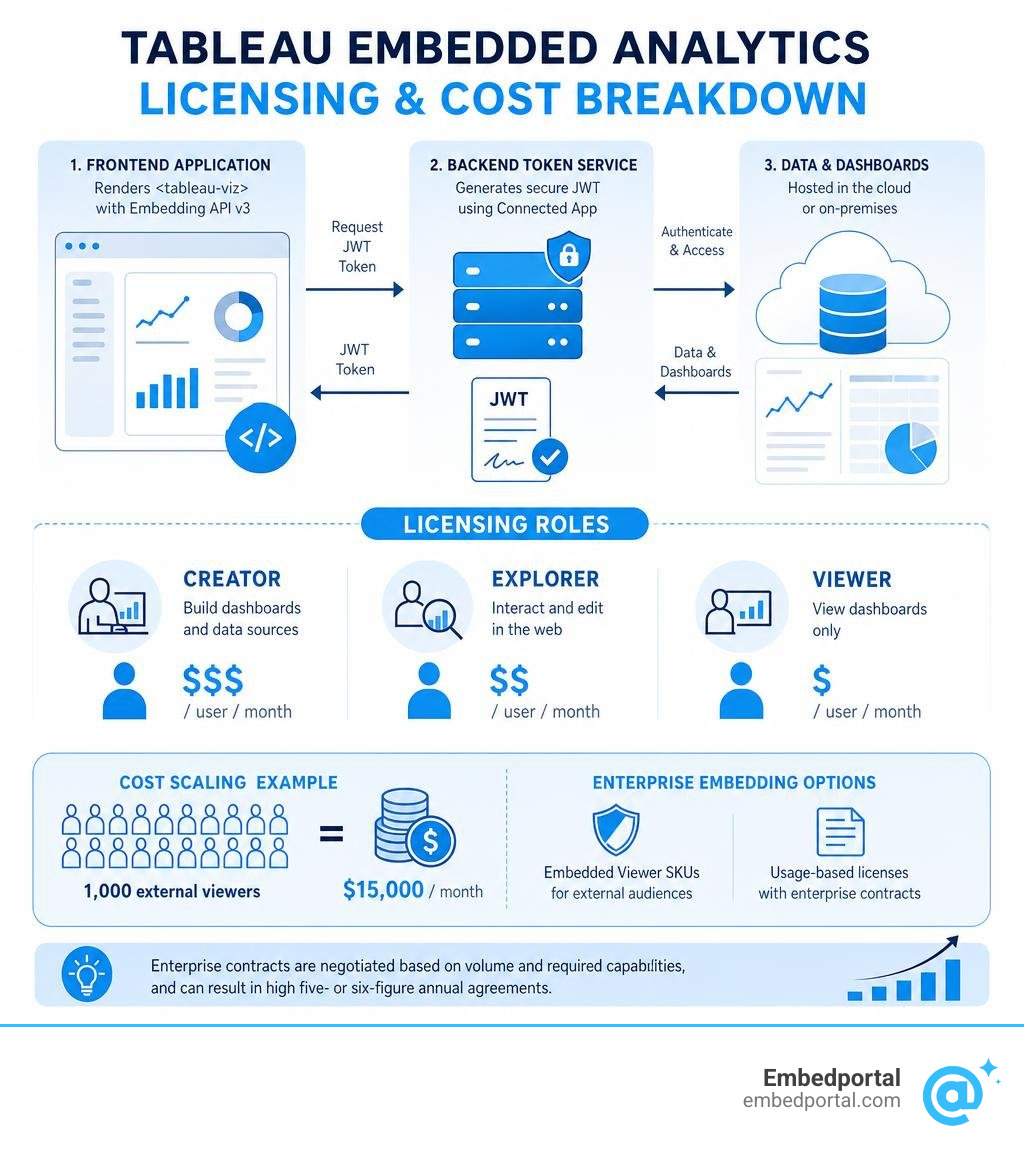
A standard production architecture consists of:
- A Frontend Application: Built in React, Angular, or Next.js, importing the Embedding API v3 library and rendering the
- A Backend Token Service: Built in Node.js, Python, or .NET, which securely holds your Connected App secrets, generates the JWT, and exposes an endpoint for the frontend to fetch the token.
- Tableau Cloud or Server: Hosting your published data sources and dashboards.
To accelerate your development, you can leverage official starter repositories such as those found in the Tableau Embedded Analytics Playbook. These resources provide boilerplate code for both your backend token generation and your frontend web components, helping you get a secure prototype running in hours rather than weeks.
Licensing and Cost Considerations for Embedded Tableau Dashboards
Before deploying your embedded analytics solution, it is vital to understand Tableau’s licensing model, as costs can scale rapidly.
Tableau generally licenses users under three main roles:
- Creators (~$75/user/month): Needed for your internal BI developers who build the dashboards.
- Explorers (~$42/user/month): For users who need web editing capabilities.
- Viewers (~$15/user/month): For users who only view dashboards.
When embedding dashboards for external customers, standard user-based pricing can become prohibitively expensive. If you have 1,000 external clients, paying $15 per user per month equals $15,000 monthly just for viewing.
To address this, Tableau offers specialized Embedded Viewer SKUs and usage-based licensing agreements. However, these enterprise contracts are often highly negotiated and can easily reach high five- or six-figure annual contracts depending on your volume and whether you require enterprise add-ons like the Data Management package.
For a comprehensive breakdown of what to expect financially, read our guide on Embedded Analytics Pricing.
Frequently Asked Questions about Embedded Tableau RLS
Can I use RLS with Tableau extracts?
Yes, you can absolutely use RLS with extracts. To avoid performance degradation and massive extract sizes, you should build multi-table extracts using the Hyper engine. By keeping your data tables and entitlement tables separate within the extract, you avoid materializing expensive joins, keeping your file sizes small and your dashboard interactions fast.
How do I secure web editing when using RLS?
If you grant web editing or download workbook permissions to your users, they can easily bypass workbook-level RLS by removing the user filters. To prevent this, you should always publish your data sources separately to Tableau Cloud or Server, apply the RLS filters at the data source level, and restrict users from downloading or editing the published data source itself.
What is the difference between permissions and RLS in Tableau?
Permissions in Tableau control content access and functional capabilities—such as who can view a project, edit a workbook, or download a PDF. Row-level security, on the other hand, controls data visibility within a single asset. RLS ensures that when two different users open the exact same dashboard, they only see the specific rows of data they are authorized to view.
Conclusion
Implementing row-level security is the most critical step in launching a secure, production-grade embedded analytics portal. While Tableau provides powerful native tools like Connected Apps, JWT authentication, and dynamic user filters to achieve this, configuring and maintaining this infrastructure across hundreds of users and multiple tenants can quickly become a complex, high-maintenance engineering project.
That is where we can help. Embedportal provides a powerful, white-label embedding platform designed to eliminate the complexity of custom BI integrations.
With Embedportal, we enable your team to embed multi-vendor analytics—whether you are using Tableau, Power BI, QuickSight, or Metabase—with unified branding, robust row-level security, and seamless SSO in under an hour. We handle the heavy lifting of token generation, security mapping, and visual customization so your developers can focus on building your core application.
Ready to simplify your analytics deployment? Explore our Embedded Analytics platform, learn more about our White Label Tableau solutions, or get started today with our Secure Row-Level Security Solutions.