
A Tableau customer portal with row-level security and your branding
EmbedPortal embeds Tableau Cloud and Tableau Server views inside your own branded portal. You set default filters and parameters per user, apply row-level security attributes, and control toolbar, sizing and exports for each dashboard, all from one settings panel.
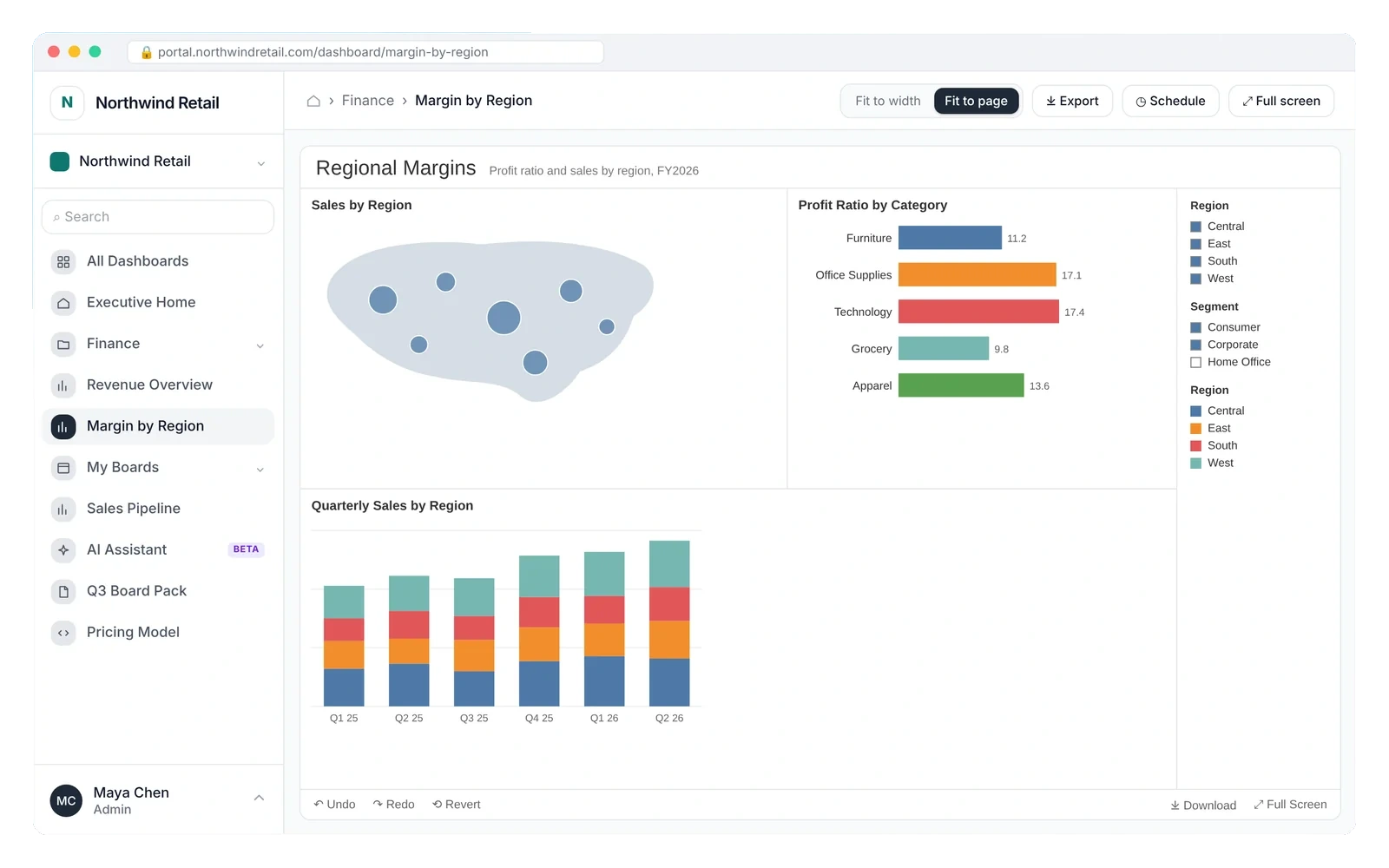
How to embed Tableau
Most teams finish these steps in under an hour.
Create a connected app in Tableau
In Tableau Cloud or Server, create a connected app so EmbedPortal can sign trusted requests for your users.
Connect Tableau in EmbedPortal
Add the connected app details under Integrations and run a test.
Add a dashboard and pick the view
Choose the workbook view, the folder it lives in, and who can see it.
Turn on Use RLS attribute
Pass each group's RLS keys, such as region or customer ID, to Tableau when the view loads.
Set defaults and exports
Add default parameters and filters per user, pick toolbar and page sizing, and allow or block on-demand exports.
What it looks like in EmbedPortal
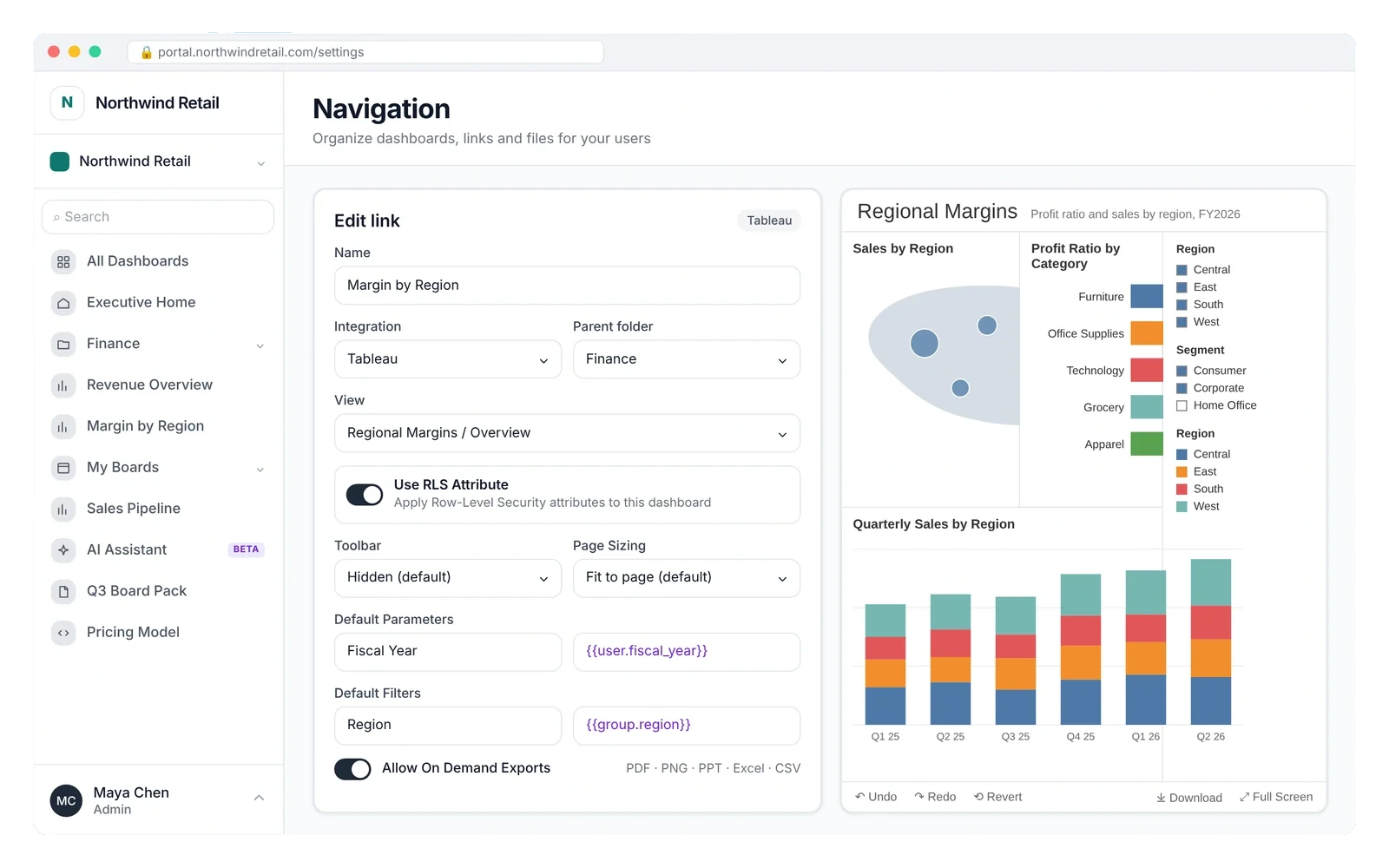
Tableau features
Default filters per user
Set filter values on load using the exact field name from the view, such as Region. Values can come from the user or their group. Use them for convenience, not for security.
Default parameters per user
Set Tableau parameter values on load, such as Fiscal Year, using the parameter name from the workbook.
Row-level security attributes
Send RLS keys with every request so Tableau returns only the rows a viewer is allowed to see.
Toolbar and page sizing
Hide the toolbar by default and fit the view to the page, or show it for analysts who need it.
On-demand exports
Let viewers export to PDF, image, PowerPoint, crosstab Excel or CSV. Disable it per dashboard when needed.
Schedules and sharing
Deliver Tableau views on a schedule to groups or individual recipients.
Tableau licensing still applies
EmbedPortal does not charge per viewer. Tableau does license every viewer, and a portal does not change that. Your agreement decides which model covers external users.
Each viewer holds a Viewer license, or Explorer or Creator for people who build content.
For embedded analytics, Tableau can meter external viewers by analytical impressions, such as dashboard loads, exports and subscriptions, instead of per person.
Viewers are covered by capacity blocks rather than per account. Creators and Explorers are still licensed per user.
Based on Tableau’s license models as of November 2026. Ask your Tableau account team which model fits your external audience.
Access control: which views, and which rows
Which views a viewer can open is set in EmbedPortal. Each customer is an organization or group, and each view is shared with specific groups and folders. With SAML single sign-on, identity provider groups map to portal groups.
Which rows a viewer sees is enforced by Tableau. Turn on Use RLS attribute, and EmbedPortal sends the group’s keys as user attributes in the connected app token. Read them in a data source filter, such as [Customer ID] = USERATTRIBUTE('customer_id'), or use user filters or data policies.
Default filters and parameters only set what a view shows first. A viewer may be able to change them, so they do not protect data. Test each group by impersonating a user before you invite viewers.
More detail: row-level security examples and how EmbedPortal handles your data.
Why teams embed Tableau with EmbedPortal
Embedding Tableau the hard way means writing JWT signing, building a user model and keeping filters in sync with every workbook. Most teams only want their customers to open a link and see their own numbers.
EmbedPortal gives you that in a settings panel. Pick the view, map the RLS attributes, set the defaults and publish it to the right groups. Tableau still does the rendering and enforces the data rules.
EmbedPortal works with the licensing model you already have, including Tableau's usage-based licensing for external audiences, and puts Tableau dashboards next to reports from your other BI tools.
Related reading: Tableau embedded alternative, one portal for Power BI and Tableau, EmbedPortal vs Zuar Portal, EmbedPortal vs Curator and pricing.
Common questions
Can I embed Tableau dashboards in a web app without coding?
Yes. Connect Tableau once, then add views from the EmbedPortal admin. Your users open the portal or the embedded component and see the dashboards they have access to.
How do I apply row-level security to embedded Tableau?
Turn on Use RLS attribute for the dashboard. EmbedPortal passes each viewer's attributes, such as region or customer ID, and Tableau filters the data using your user functions or data policies.
What is the difference between default filters and default parameters?
Filters use the field name from the view, such as Region. Parameters use the parameter name from the workbook, such as Fiscal Year. Both can be set per user when the dashboard loads.
Does EmbedPortal support Tableau Server as well as Tableau Cloud?
Yes. You can connect either one through a connected app.
Can viewers export embedded Tableau dashboards?
If you allow it. Exports to PDF, PNG, PowerPoint, crosstab Excel and CSV can be turned on or off for each dashboard.
Share your first dashboard this week.
Connect your BI tool, set up groups and row-level security, and invite viewers. One flat price with unlimited viewers.