Embedded Analytics Platform SaaS: The Ultimate Buyer’s Guide
Why Every SaaS Team Is Racing to Embed Analytics in 2026
Choosing the right embedded analytics platform SaaS solution is one of the most consequential product decisions a team can make right now.
Your users want answers inside your product — not in a separate tab, not in a downloaded spreadsheet, not after filing a support ticket.
That’s the core promise of embedded analytics: put the data where decisions actually happen.
But in 2026, the bar has moved. Static dashboards aren’t enough anymore. SaaS buyers expect self-service exploration, AI-powered natural language queries, real-time anomaly detection, and a seamless branded experience that looks like it was built in-house.
And the stakes are real. Product-led SaaS companies that embed analytics report up to 3x increases in analytics feature usage within the first two months. Teams see 30–40% fewer data-related support tickets. Building that capability in-house? It costs an estimated $2–3M per year in engineering salaries and infrastructure to maintain at scale.
The catch: most teams are asking the wrong question. They debate “build vs. buy” when many are actually facing a more specific problem — they already have Tableau, Power BI, or Metabase, and they need to unify those dashboards inside a single branded customer portal, with consistent auth, row-level security, and zero context switching.
That’s exactly what this guide is built for.
What is Embedded Analytics and Why Does It Matter in 2026?
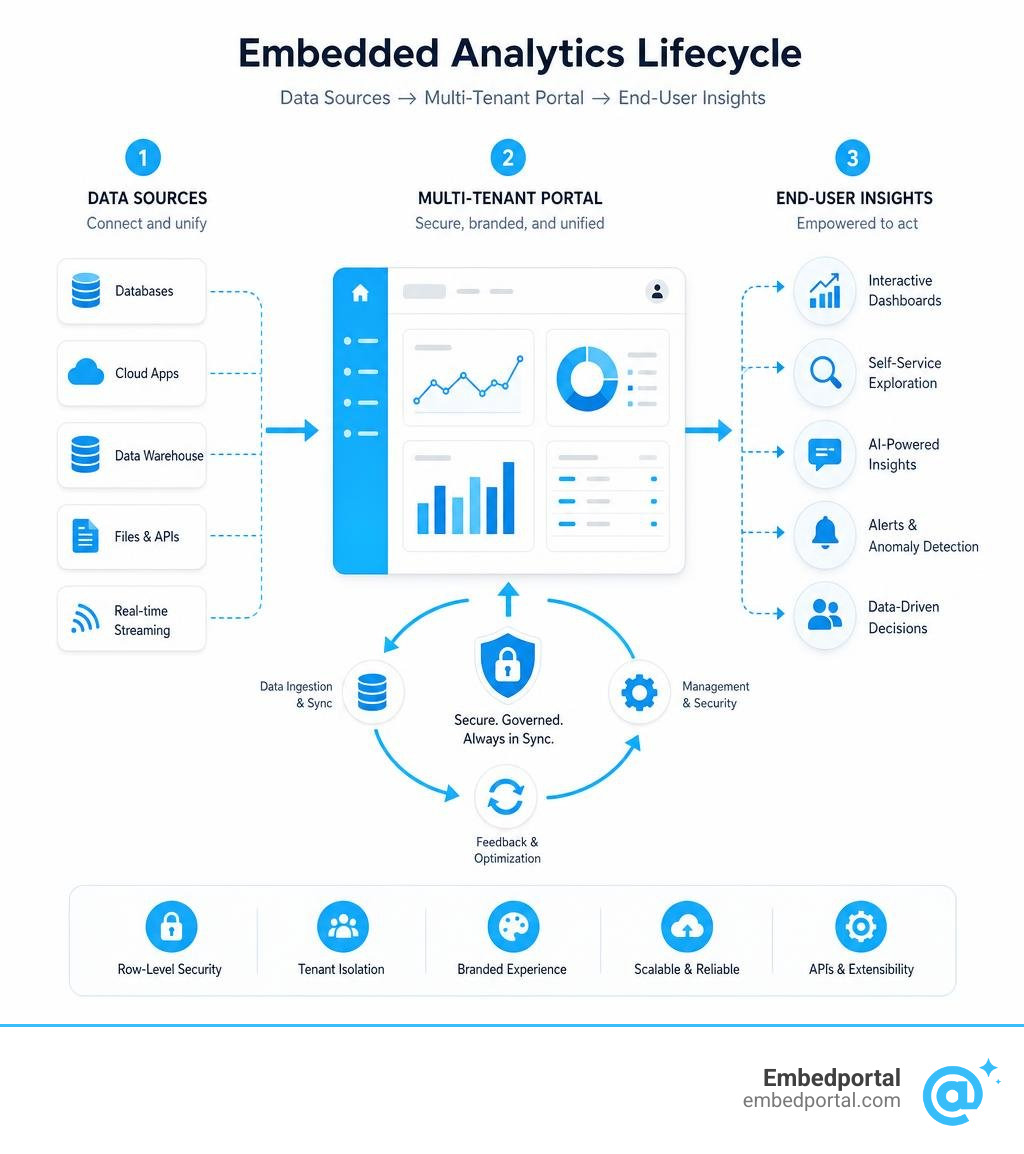
At its core, embedded analytics is the integration of real-time data visualization, reporting, and analytical capabilities directly into a software-as-a-service (SaaS) application. Rather than forcing your users to export raw CSV files or log into a separate Business Intelligence (BI) tool, you provide them with customer-facing dashboards and self-service reporting right where they already work.
In 2026, the distinction between traditional internal BI and customer-facing embedded analytics is sharper than ever. Traditional BI tools are designed for internal analysts who tolerate slow queries and complex, clunky interfaces. Your external customers, however, expect consumer-grade user experience, instant load times, and intuitive interactive insights.
Furthermore, scaling a SaaS product means managing extreme data isolation. Every customer must only see their own data, and they expect to slice and dice those insights dynamically. When done right, an embedded analytics platform SaaS solution makes your product feel more valuable, turning raw data into a core feature that drives product adoption and customer satisfaction.
Core Use Cases for Modern SaaS Products
SaaS companies across California and the global market are leveraging embedded analytics to solve specific business problems. Let’s look at the most common patterns:
- Operational Analytics: Showing real-time performance metrics directly in the user workflow. For example, a logistics platform might embed route performance and delay predictions directly into a dispatch screen, allowing fleet managers to make immediate adjustments.
- Financial Services and Spend Analysis: Fintech platforms use embedded dashboards to show spending trends, transaction histories, and cash flow forecasts to merchants.
- Interactive Sales Dashboards: CRMs embed pipeline health scores and deal velocity directly inside a sales representative’s opportunity view to guide their next best action.
- Executive Reporting: Providing high-level, presentation-ready PDFs and automated email reports for leadership teams who need to track return on investment (ROI).
- User Activity Tracking: Project management and HR platforms show team productivity, task completion rates, and platform engagement directly to account administrators.
To explore how these use cases map to your specific product vertical, check out our deep dive on Embedded Analytics for SaaS.
Choosing the Right Embedded Analytics Platform SaaS for Your Product
Evaluating an embedded analytics platform SaaS solution requires balancing technical requirements with business goals. You must consider the developer experience, customization capabilities, licensing models, security architecture, deployment flexibility, and long-term scalability.
A common pitfall is choosing a platform based solely on how pretty the charts look in a demo. In production, you will care far more about how easily your developers can integrate the platform, how securely it handles multi-tenant data, and whether the pricing scales predictably as your user base grows.
Key Benefits of an Embedded Analytics Platform SaaS
Investing in a dedicated embedding platform yields massive returns across your entire business lifecycle:
- Skyrocketing Customer Retention: When users rely on your application for their daily reporting, your software becomes deeply integrated into their business operations. It becomes a system of record they cannot easily replace.
- New Monetization Opportunities: Many SaaS companies package advanced self-service analytics as a premium add-on tier, instantly boosting their Average Contract Value (ACV).
- Drastically Reduced Support Load: Instead of filing tickets for custom data exports, users can answer their own questions using self-service exploration tools. Real-world implementations show a 30-40% reduction in data-related support tickets almost immediately.
- Accelerated Feature Adoption: By showcasing user value directly through in-app dashboards, companies report up to a 3x increase in feature usage within the first two months.
To learn more about how embedded data drives growth, read our comprehensive guide on Embedded Analytics.
Architectural Requirements for an Embedded Analytics Platform SaaS
Security is the absolute baseline for any customer-facing application. In a multi-tenant SaaS environment, failing to isolate data between tenants is a critical security failure that can create serious compliance risk under frameworks and regulations such as GDPR and the California Consumer Privacy Act (CCPA), as well as SOC 2 compliance expectations.
Your chosen platform must support robust Multi-Tenant Analytics out of the box. This requires several layers of defense:
- Row-Level Security (RLS) and Column-Level Security (CLS): Security must be enforced at the database query execution layer, not just hidden in the user interface. When a user loads a dashboard, the platform must dynamically inject filtering parameters (such as
tenant_idoruser_role) to ensure they only retrieve authorized data. - JSON Web Tokens (JWT) and Single Sign-On (SSO): Your application must securely authenticate users and pass their permission scopes to the embedded dashboard using signed, short-lived tokens, eliminating the need for a separate login process.
- Tenant Isolation: Whether you use a shared database with row-level filtering or a separate database per customer, your embedding platform must dynamically map user sessions to the correct data source at runtime.
To understand how to budget for these technical layers, take a look at our breakdown of Embedded Analytics Pricing.
Comparing Embedding Methods: iFrames vs. SDKs vs. Web Components
How you integrate the analytics into your frontend codebase determines your long-term maintenance overhead and the quality of your user experience.
- iFrame Integration: The fastest way to get started. You generate a secure, signed URL on your backend and drop it into an iframe tag. While highly secure and simple to implement, iframes can feel like disconnected blocks on your page and offer limited customizability.
- SDK-Based Customization: Software Development Kits (such as React, Angular, or Vue SDKs) allow for two-way communication between your host application and the embedded charts. For example, clicking a bar on an embedded chart can trigger a native modal or update a state variable in your main application.
- Native Web Components: A modern, framework-agnostic middle ground. Web components run directly in the browser’s DOM without the performance overhead or styling limitations of iframes, providing a completely native look and feel.
For a detailed breakdown of how to choose the right integration method for your tech stack, read our guide on Embedded BI.
Build vs. Buy vs. Multi-Vendor Portal: The Strategic Decision
When product teams realize they need customer-facing dashboards, they typically face a three-way crossroad:
- Build in-house: Task your frontend and data engineers with writing custom charting code and managing the database connections from scratch.
- Buy a single-vendor BI embedding tool: Pay for a traditional single-vendor BI embedding platform to embed their specific charts.
- Deploy a Multi-Vendor Portal: Use a specialized portal layer to securely embed dashboards you already have in Tableau, Power BI, Metabase, or QuickSight into a unified, white-labeled client portal.
Let’s evaluate these choices objectively.
The True Cost of Building In-House
Building a basic bar chart is easy. Building a production-grade, secure, and scalable analytical experience is incredibly hard.
Most product teams drastically underestimate the long-term maintenance overhead of building in-house. While a single engineer might ship a basic dashboard in a sprint, maintaining that infrastructure at scale costs an estimated $2-3M per year in engineering salaries, QA testing, security audits, and database optimization.
Every hour your core engineering team spends building database connectors, caching layers, export engines, and custom scheduling tools is an hour they are not spending on your core product’s unique value proposition. You end up burning your runway on standard reporting plumbing instead of shipping competitive features.
To learn more about the trade-offs of this decision, read our analysis on the Embedded Analytics Platform.
Traditional BI Embedding vs. Multi-Vendor Platforms
If you decide to buy, the next hurdle is tool fragmentation.
In modern SaaS companies, different teams often use different BI tools. Your sales team might love Salesforce and Tableau, your product analysts might use Metabase, and your finance team might rely on Power BI.
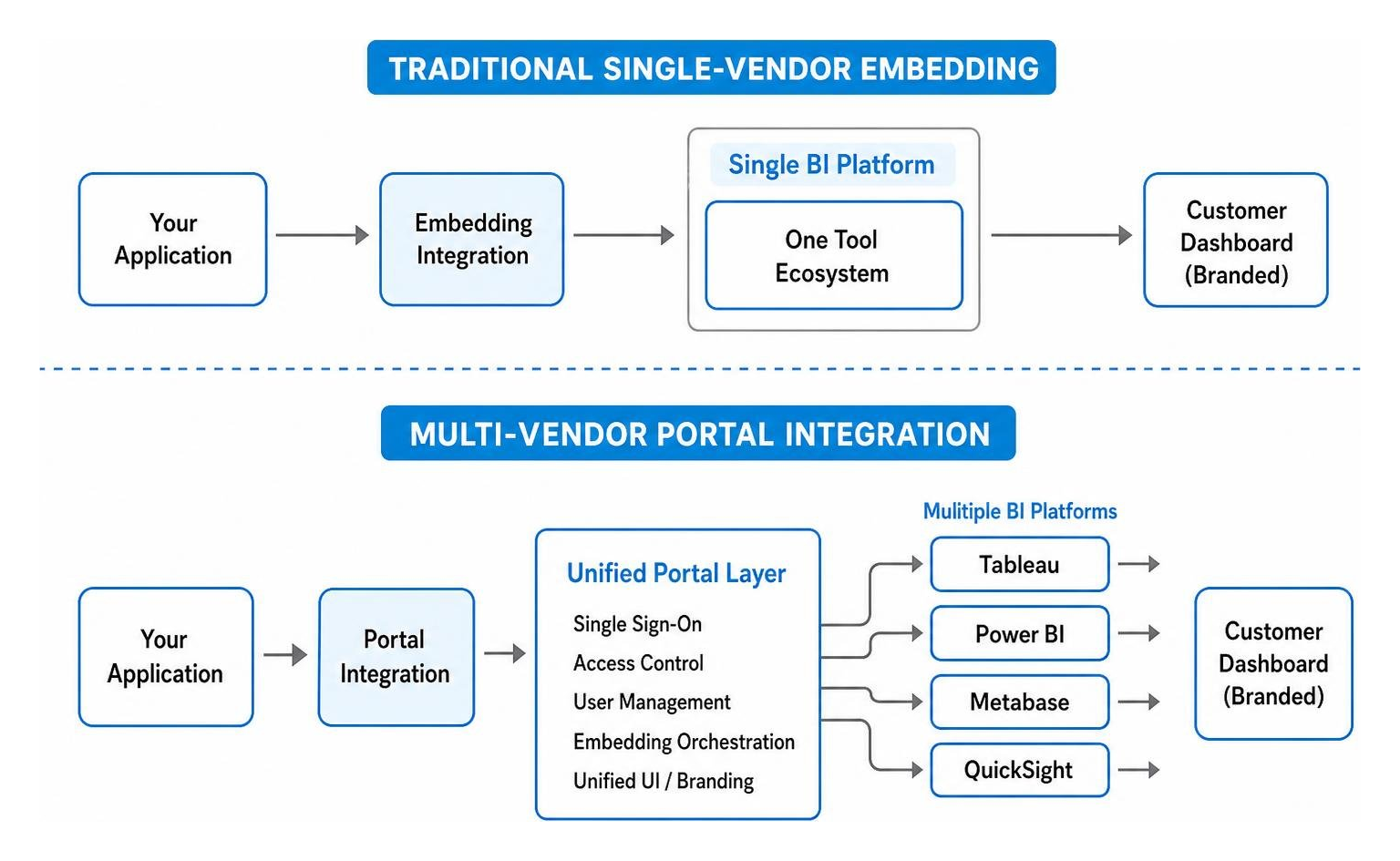
If you use traditional single-vendor BI embedding, you are locked into a single tool’s ecosystem. If you want to show a Metabase chart and a Tableau dashboard to your customers, you are forced to manage two separate embedding setups, write separate authentication logic, and try to make two completely different UI frameworks look cohesive.
This is where a multi-vendor platform like Embedportal changes the game. It acts as a unified portal layer, allowing you to bring in dashboards from any major BI tool (Tableau, Power BI, QuickSight, Metabase) and present them to your customers under one beautifully branded, secure, and SSO-enabled roof in under an hour.
Here is how these strategic paths compare:
| Feature / Criteria | Building In-House | Traditional BI Embedding | Multi-Vendor Portal (Embedportal) |
|---|---|---|---|
| Time to Market | 6 to 18 Months | 1 to 3 Months | Under 1 Hour |
| Upfront Dev Cost | Extremely High ($300k+) | Medium | Very Low |
| Annual Maintenance | $2M – $3M / year | High vendor fees | Low, predictable SaaS subscription |
| Multi-Vendor Support | No (Must code each) | No (Locked to one vendor) | Yes (Tableau, Power BI, Metabase, etc.) |
| Branding Control | 100% Custom | Limited by vendor CSS | Complete white-labeling |
| Authentication Setup | Custom coded | Complex SSO mapping | Unified, instant SSO |
To explore how to simplify your dashboard deployment, check out our guide on SaaS BI Embedding, or read more about how an Analytics Embedding Platform can shortcut your development cycle.
Frequently Asked Questions about SaaS Embedded Analytics
How do you handle multi-tenant security and data isolation?
Multi-tenant security must be enforced at the query level, not just hidden in the frontend UI. Modern platforms utilize secure JSON Web Tokens (JWTs) generated on your backend. These tokens contain encrypted metadata about the logged-in user, such as their tenant ID and role permissions.
When a dashboard requests data, the embedding platform reads the JWT, verifies its signature, and dynamically appends those filtering parameters to the database query. This ensures that a customer can never access another customer’s data, even if they attempt to manipulate the frontend code.
Can embedded analytics be fully white-labeled?
Yes. High-quality embedding platforms allow you to completely remove any third-party branding. You can customize the color palettes, typography, borders, and loading animations using custom themes, CSS injection, or declarative props. The goal is to make the analytics module look and feel like an organic, native part of your own software application.
How do you embed dashboards from multiple different BI tools?
Embedding dashboards from multiple BI tools traditionally required writing separate integration pipelines, setting up distinct authentication servers, and dealing with conflicting design systems.
With Embedportal, we solve this by providing a unified wrapper. You simply connect your existing dashboards from Tableau, Power BI, Metabase, or QuickSight to our platform. We handle the single sign-on (SSO), map your row-level security parameters, and output a single, beautifully branded portal that you can embed into your application in minutes.
Conclusion
In 2026, delivering data insights to your users is no longer optional — it is a primary driver of SaaS growth, user engagement, and customer retention. However, you do not have to sacrifice your engineering roadmap or spend millions of dollars building and maintaining custom charting infrastructure.
If your team is ready to bypass months of development time and instantly deliver a world-class, fully branded analytics experience to your customers, Embedportal is the ultimate shortcut.
Whether you are pulling dashboards from Tableau, Power BI, QuickSight, or Metabase, we enable you to unify them into a single secure portal with robust row-level security and seamless SSO in under an hour.

Ready to see how easy it is? Learn how to go from Zero to Embedded Analytics in Under an Hour and find out why we are consistently rated among the Best Embedded Analytics Tools for modern SaaS teams.
To get started today, explore our main platform features at Embedportal Embedded Analytics.