Analytics Embedding Platform: Your Shortcut to Beautiful Dashboards
Why Choosing the Right Analytics Embedding Platform Can Make or Break Your Product
An analytics embedding platform is the layer between your BI tools and your customers — and picking the wrong one costs your team months of custom work, fragmented security, and a product experience that never quite feels native.
The data backs up why this decision matters. 57% of product leaders say embedded analytics directly impacted their revenue. Another 61% reported higher user engagement after embedding analytics into their products.
But most teams still hit the same wall: they stitch together embedding from multiple BI vendors, each with its own auth system, row-level security rules, and branding quirks. The result is a patchwork that slows down every new customer rollout.
This guide breaks down the platforms, methods, and tradeoffs so you can ship a clean, branded analytics experience — without rebuilding it from scratch every time.
What is an Analytics Embedding Platform?
At its core, an analytics embedding platform is a specialized software solution designed to integrate data visualizations, interactive dashboards, and self-service reporting directly into external-facing software applications.
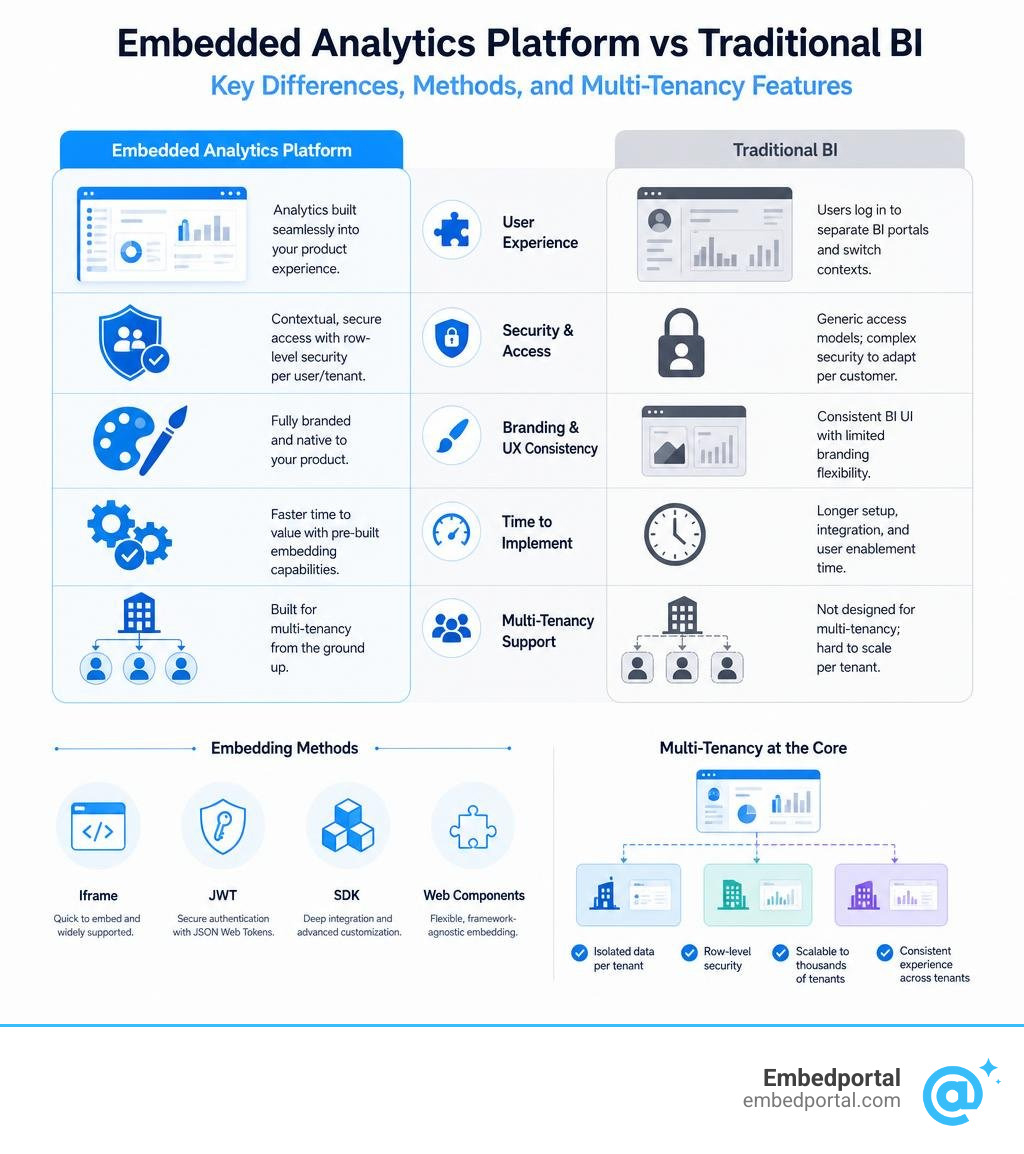
For years, companies relied on traditional business intelligence tools to understand their operations. While traditional BI is excellent for internal analysts who have the time and training to navigate complex data environments, it creates massive friction when forced onto external customers. Traditional BI requires users to log into separate portals, perform manual context switching, and learn unfamiliar user interfaces just to answer basic questions about their data.
When users have to leave your core application to view reports, engagement drops. An embedding platform solves this by weaving insights directly into the user’s natural workflow. Whether it is a project management tool showing real-time budget tracking inline or a logistics application displaying delivery performance directly inside the operational screen, the goal is to make data insights feel native and effortless.
As of July 2026, the market has shifted dramatically toward customer-facing data experiences. Industry data shows that 55% of global respondents already offer embedded analytics in their products. This is no longer a luxury feature; it is a baseline expectation.
Furthermore, 44% of product leaders expect direct revenue gains from embedding analytics, using data as a premium tier or an upsell opportunity. By utilizing modern Embedded Analytics and robust Embedded Data Analytics strategies, product teams can drastically reduce engineering bottlenecks and focus on what makes their core software unique.
To learn more about how organizations are integrating these tools, you can explore resources on Embedded Analytics and Reporting.
Purpose-Built vs. Retrofitted Solutions
When evaluating the market, we must distinguish between platforms that were purpose-built for embedding and legacy BI platforms that added embedding as an afterthought.
Legacy BI platforms were originally engineered as internal-facing analyst tools. When the demand for customer-facing dashboards emerged, these vendors retrofitted their systems by wrapping their existing charts in basic iframes. This approach introduces significant architectural overhead. Because the underlying engines were not designed for high-concurrency, multi-tenant environments, teams often face slow load times, rigid permission structures, and a complete lack of developer-friendly customizability.
A purpose-built embedding platform, on the other hand, treats the developer experience as a first-class citizen. These platforms provide a clean separation between the data presentation layer and the analytical engine. This headless architecture ensures that your application can query the data warehouse, apply metric logic through a governed semantic layer, and render the results with minimal performance lag.
When you choose a system designed from day one for SaaS BI Embedding, you avoid the common pitfalls of legacy systems, such as runaway server costs, complex session management, and fragile deployment pipelines.
The Power of White-Label Analytics
For external-facing applications, branding consistency is non-negotiable. If your customers see another software vendor’s logo, colors, or fonts inside your application, it breaks trust and cheapens the product experience.
True white-labeling means the analytics layer is completely indistinguishable from the rest of your application. This goes far beyond simply uploading your company logo. A comprehensive White Label Analytics setup includes:
- Custom domains and white-labeled URLs so users never see a third-party domain in their browser address bar.
- Deep CSS styling and custom themes that match your product’s exact color palette, typography, and border radiuses.
- Localization capabilities that dynamically adjust date formats, currencies, time zones, and languages based on the active tenant.
- Fully customizable interactive behaviors, such as custom drill-downs, hover states, and click-to-action events that link the dashboard directly to your application’s operational workflows.
When implemented correctly, white-labeled analytics look and feel like they were built entirely in-house by your own engineering team.
Core Architecture: Embedding Methods and Multi-Tenancy
To build a secure, scalable analytical experience, you must design a solid underlying architecture. This requires a deep understanding of how data is isolated between different customers and how those visualizations are rendered on the screen.
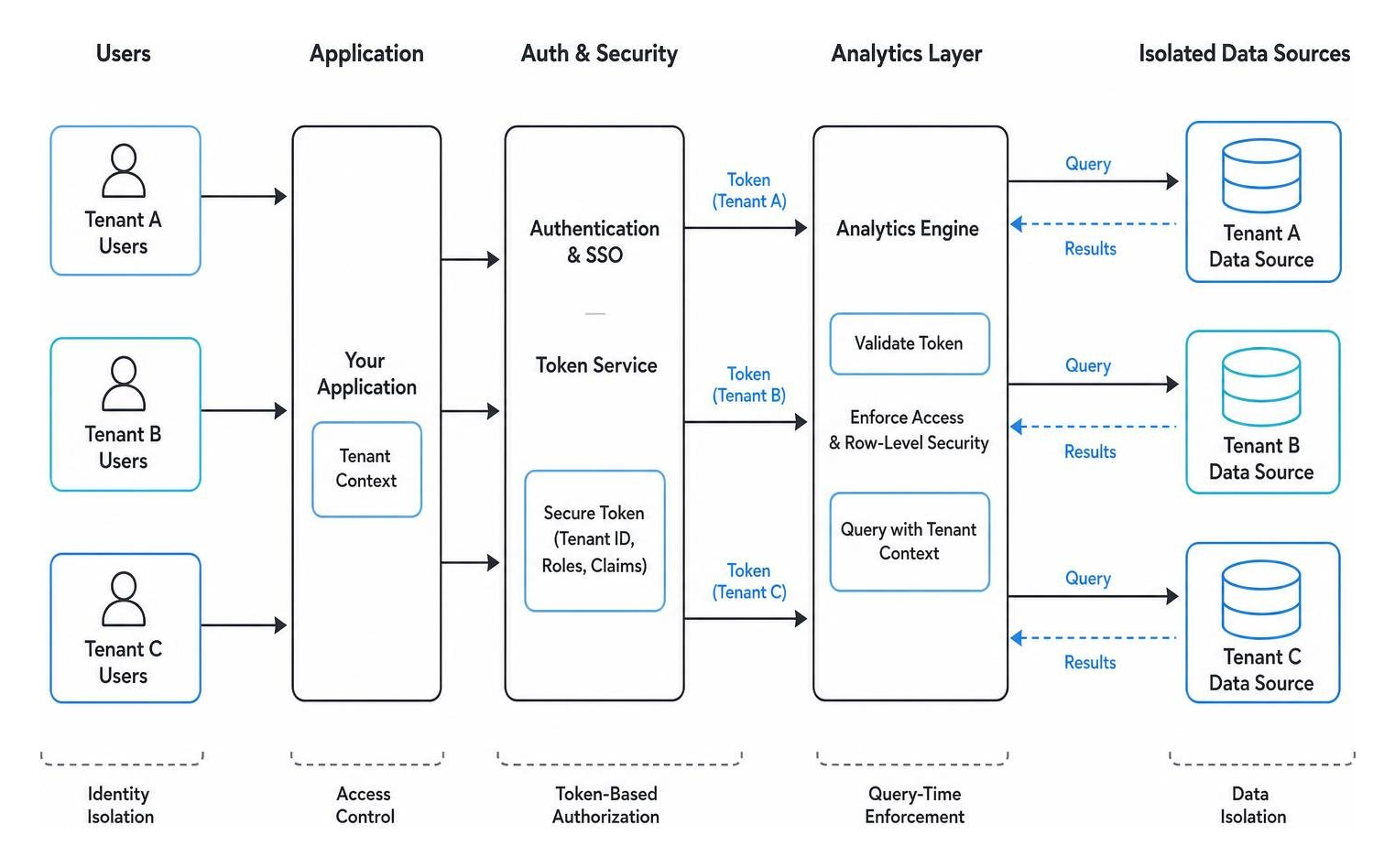
In a multi-tenant SaaS application, different customers (tenants) share the same application infrastructure, but their data must remain strictly isolated. Under no circumstances should Tenant A ever be able to view, query, or even infer the existence of Tenant B’s data.
To achieve this, your embedding architecture must support robust tenant isolation, seamless Single Sign-On (SSO) integration, and dynamic row-level security. This ensures that when a user logs in, your application handles authentication, generates a secure token, and passes that context down to the analytics layer to restrict the data at the database level. For more details on managing these environments, see our guides on Multi-Tenant Analytics and AWS Embedded Analytics.
Comparing Iframe, SDK, and API-Driven Embedding
The method you choose to render dashboards in your application dictates your development timeline, customization limits, and overall performance.
| Embedding Method | Customization Level | Implementation Speed | Performance & UX | Best For |
|---|---|---|---|---|
| Iframe Embedding | Low | Extremely Fast (Minutes) | Medium (Isolated sandbox, potential layout shifts) | Rapid prototyping, standard dashboards, multi-vendor setups |
| SDK / Web Components | High | Moderate (Days to Weeks) | High (Seamless integration, shared styling) | Highly interactive SaaS products, custom event handling |
| API-Driven (Headless) | Unlimited | Slow (Weeks to Months) | Maximum (Fully custom front-end, direct data queries) | Bespoke data applications, unique proprietary visualizations |
Using an Embedded Analytics Platform usually means choosing between these three paradigms depending on your resources and user requirements.
Iframes provide a secure sandbox that keeps your application’s code isolated from the analytics engine, which is excellent for security and speed. However, they can be difficult to style dynamically.
SDKs and native web components offer a middle ground, allowing developers to write clean code that interacts directly with the hosting page’s JavaScript environment.
API-driven approaches give you total control over the user interface but require your engineering team to build and maintain every single chart component from scratch.
Securing Multi-Tenant Environments at the Query Layer
Security in customer-facing analytics cannot be enforced purely at the user interface level. If a platform merely hides a filter UI component to restrict data, a tech-savvy user can easily inspect the network payload, alter the query parameters, and access unauthorized records.
True security must be enforced at the query execution layer before any data leaves the warehouse. This is accomplished using JSON Web Tokens (JWTs) and signed URLs.
When a user requests a dashboard, your backend application generates a short-lived, cryptographically signed token containing the user’s tenant ID, role, and allowed data scope. The embedding platform receives this token, verifies its signature against your shared secret, and appends those security attributes directly to the SQL queries sent to the database. This ensures that row-level security (RLS) is applied dynamically and securely for every single chart load.
Open-Source vs. Proprietary: The Build vs. Buy Dilemma
When product teams realize their customers need robust reporting, they face a classic engineering dilemma: do we build this ourselves using open-source charting libraries, or do we buy a commercial platform?

Building in-house analytics using open-source charting libraries often seems attractive to engineering teams at first. It promises zero licensing fees and total control over the code.
However, teams almost always underestimate the long-term maintenance overhead. While building a single interactive bar chart takes a few days, building the infrastructure around it – user permissions, multi-tenancy, high-concurrency query caching, automated PDF delivery, and self-service drag-and-drop report builders – takes months of dedicated engineering resources.
By utilizing a commercial Embedded Analytics Platform, you eliminate these engineering bottlenecks and dramatically accelerate your time-to-market. This allows your developers to focus on your core product’s unique value proposition rather than rebuilding standard BI infrastructure. For a deeper dive into these tradeoffs, check out our analysis of Embedded Analytics for SaaS.
Evaluating the Open-Source Shortlist
For teams committed to an open-source path, several categories of business intelligence and visualization tools can be adapted for embedding:
- SQL-first dashboarding tools: Useful for technical teams that want to write queries directly and publish standard charts quickly, but they often require additional work to support non-technical customer workflows.
- Self-hosted visualization frameworks: Flexible for engineering-led teams that need deep control over chart behavior, though hosting, patching, scaling, and access control remain your responsibility.
- Semantic-layer-driven tools: Helpful when your organization already governs metrics through a modeled data layer, but visualization depth and customer-facing customization can vary widely.
- Lightweight reporting interfaces: Fast to deploy for simple use cases, yet often limited when customers need polished self-service exploration, scheduling, or advanced embedded workflows.
While these open-source approaches can be powerful, they present significant challenges when you need to embed dashboards from multiple different BI environments or enforce unified governance across disparate systems without massive custom coding.
Navigating Pricing Models and Hidden Costs
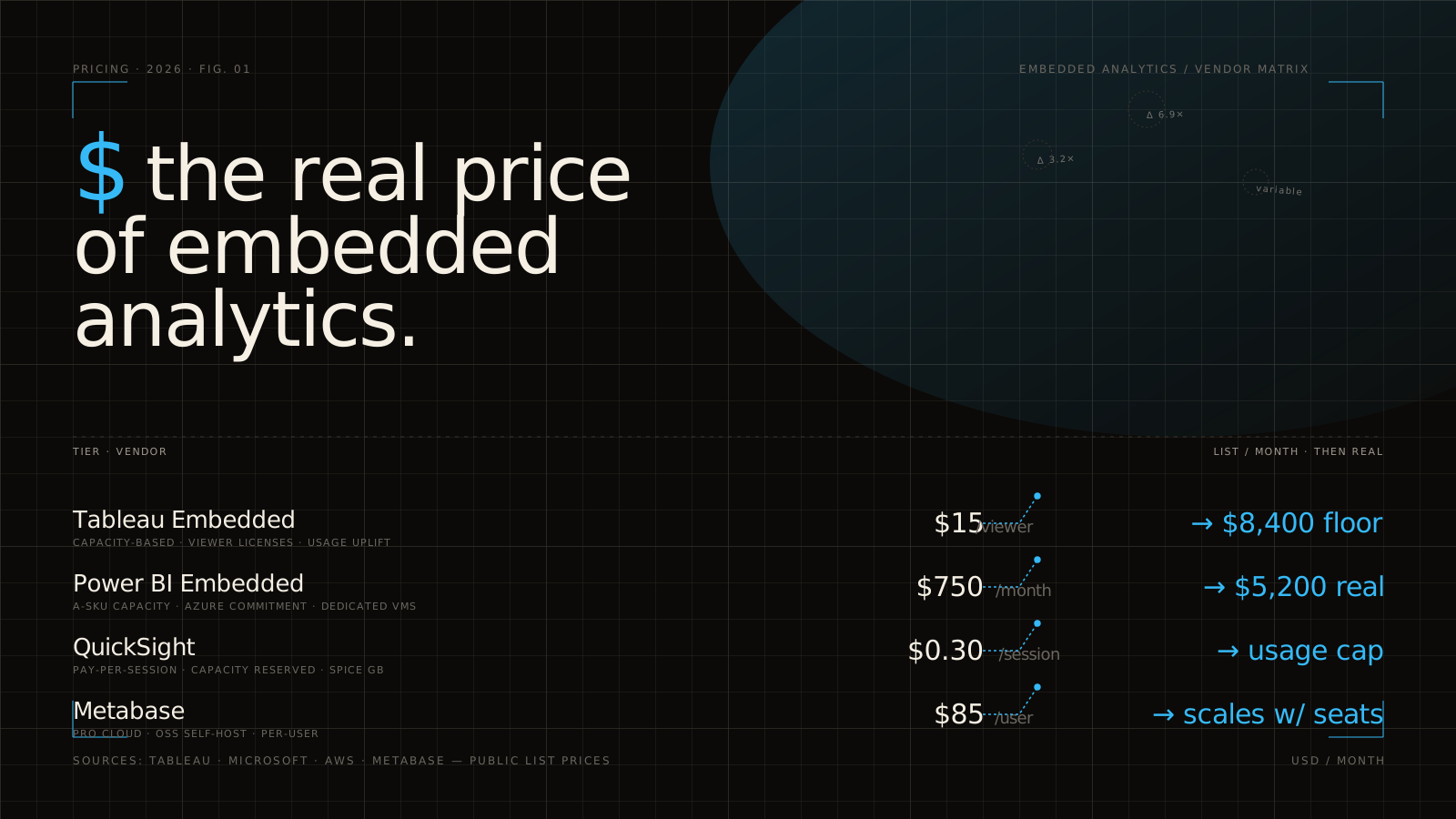
Commercial embedding platforms use a variety of pricing models, and failing to understand their long-term implications can result in massive, unexpected bills as your product scales.
- Per-User Licensing: This model charges a fee for every external user who views a dashboard. While affordable for early-stage startups with few clients, it quickly becomes financially unviable for SaaS applications serving thousands of active users.
- Usage-Based Pricing: Charges are based on actual system resources consumed, such as query runtimes, background worker hours, or database connections. This aligns your costs with actual usage but can make budgeting unpredictable.
- Platform Fees: A flat, predictable annual or monthly fee for unlimited viewers and tenants. This is highly scalable and allows you to grow your user base without worrying about escalating license costs.
When evaluating vendors, always ask them to price out the exact same scenario (e.g., 100 tenants with 5,000 total active viewers) to uncover hidden fees like separate charges for admin users, white-labeling add-ons, or custom domains. To plan your budget effectively, read our comprehensive guide on Embedded Analytics Pricing.
Selecting the Right Analytics Embedding Platform for SaaS
When selecting the Best Embedded Analytics Tools for your SaaS application, look past the polished design demos and evaluate how the platform handles real-world production environments.
A viable SaaS embedding platform must scale seamlessly as your data grows, maintain absolute tenant boundaries under high concurrency, and integrate directly with your modern data warehouse without requiring slow, expensive data extraction processes. It should also provide robust developer workflows, including Git version control, CI/CD compatibility, and programmatic API access for tenant management.
How an Analytics Embedding Platform Handles AI and Governance
The rise of generative AI has changed what users expect from dashboards. Customers no longer just want static charts; they want to ask questions of their data in plain English and receive instant, accurate answers.
However, layering AI into customer-facing analytics introduces major security and governance risks. If an AI model queries raw database tables directly, it might bypass your row-level security rules, accidentally exposing sensitive tenant data. It can also suffer from “hallucinations,” generating incorrect business metrics because it does not understand your specific calculations for complex KPIs like ARR or active churn.
To solve this, modern Embedded Analytics Platform architectures rely on a governed semantic layer. The AI does not query the raw database; instead, it queries the semantic layer, which contains pre-defined, verified business logic.
This ensures that the AI’s natural language queries are translated into accurate, consistent SQL that automatically respects all tenant boundaries and security rules.
Frequently Asked Questions about Embedded Analytics

What is the difference between SDK-based and iframe-based embedding?
Iframe embedding loads an isolated, pre-built dashboard from your BI tool inside a secure window on your web page. It is incredibly fast to implement and highly secure because the parent application cannot access the iframe’s internal state. However, it offers limited design customization and can feel clunky if you need deep, real-time interactivity.
SDK-based embedding integrates the analytics components directly into your application’s frontend code. This allows your developers to style the charts natively, listen to user interaction events, and build highly responsive, custom user interfaces, though it requires more engineering time to set up and maintain.
How secure is embedded analytics in a multi-tenant SaaS environment?
It is highly secure, provided you enforce security at the database or query level rather than the user interface level. By using cryptographically signed JSON Web Tokens (JWTs) generated on your secure backend server, you can pass tenant identities and row-level security attributes directly to the database query engine. This guarantees that a user can only query and view data that belongs explicitly to their tenant ID.
Should we build analytics in-house or buy a platform?
While building simple charts in-house using open-source libraries is relatively straightforward, building a production-grade, secure, multi-tenant analytics experience requires massive ongoing engineering resources. Buying a platform eliminates the engineering bottlenecks of building query caching, permission systems, and scheduling infrastructure from scratch. This allows your team to focus on your core product, reducing your time-to-market from months to days.
Conclusion
Building a world-class analytical experience for your customers does not have to mean spending quarters of engineering time wrangling APIs, rebuilding styling sheets, and manually configuring security rules for every new client.
At Embedportal, we believe in a simpler approach. Instead of building complex data pipelines or forcing you to migrate your existing dashboards, our platform acts as a secure, white-labeled portal that sits directly over your existing BI tools.
Whether your team uses enterprise BI suites, cloud-native analytics services, or open-source reporting tools, we make it easy to embed your entire BI stack with unified branding, robust row-level security, and seamless SSO integration in under an hour.
Ready to ship beautiful, secure, and fully customized customer-facing analytics this week? Explore our embedded BI portal and see how we can help you accelerate your product’s growth.