
Stop Rebuilding Dashboards and Start Using SaaS BI Embedding
Why SaaS BI Embedding Is Now a Baseline Customer Expectation
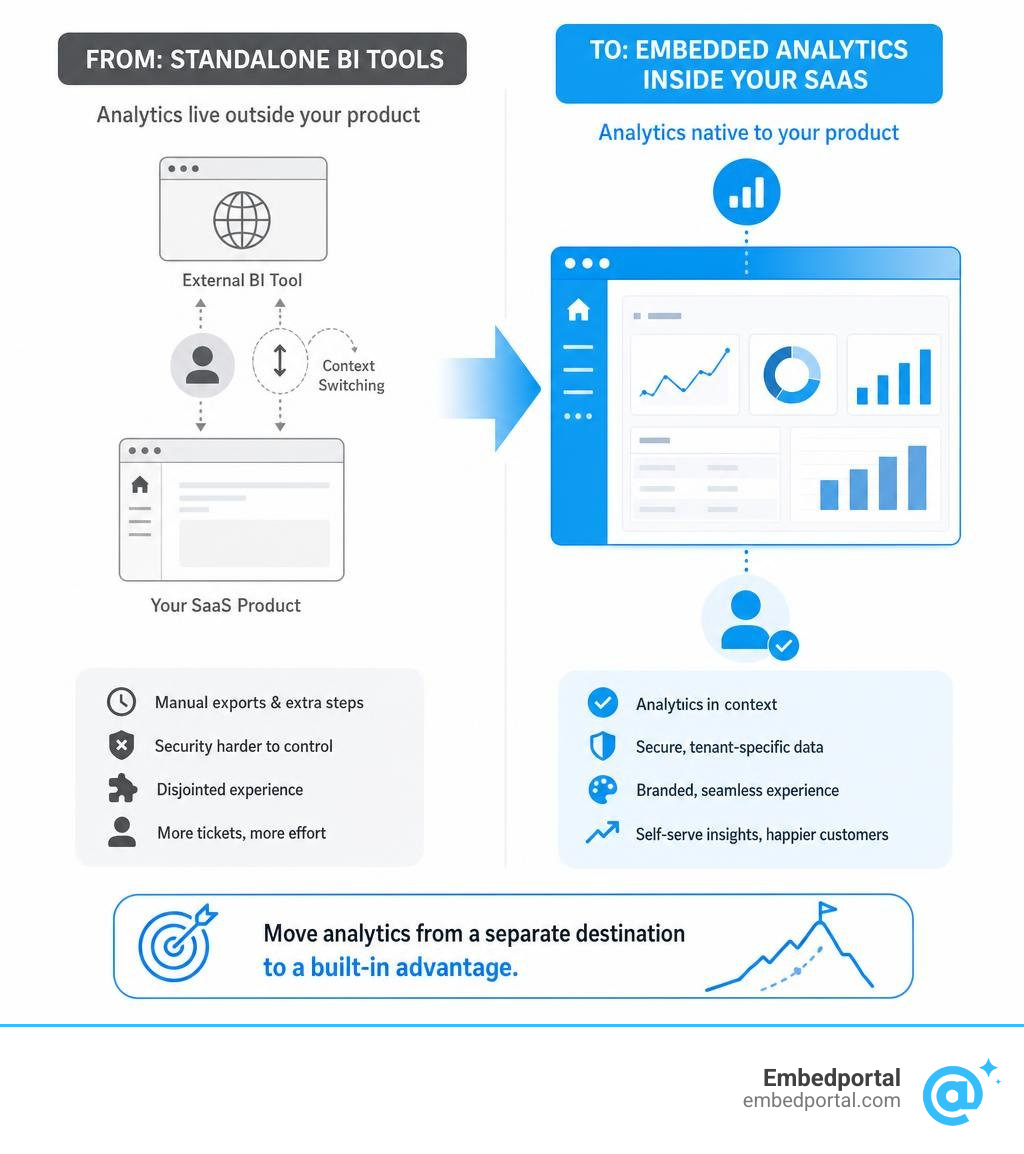
SaaS BI embedding is the practice of integrating business intelligence dashboards and reports directly inside your SaaS product, so customers analyze their data without ever leaving your application.
Here is a quick answer to what it involves and why it matters:
| What | Why It Matters |
|---|---|
| Dashboards live inside your product UI | No context switching for customers |
| Each tenant sees only their own data | Security and compliance by design |
| Analytics match your brand, not a BI vendor’s | Feels native, not bolted on |
| Customers self-serve reports and filters | Fewer support tickets for your team |
| Analytics become a product feature | Drives retention and new revenue |
Somewhere in the growth of most B2B SaaS products, customers start asking for the same thing: a way to see and report on their own data without leaving the app. At first, your team patches together exports, Looker links, or a shared Tableau view. Then the requests multiply. Then a competitor ships a real embedded dashboard and you hear about it on a sales call.
By July 2026, 78% of SaaS companies already embed dashboards inside their applications. This is no longer a differentiator — it is an expectation.
The problem is that doing it well is harder than it looks. Custom embedding work is slow. Row-level security behaves differently across vendors. Branding stays consistent in staging but breaks in production. And if your product pulls from multiple BI tools — say, Power BI for some reports and Tableau for others — the fragmentation compounds quickly.
This guide walks through exactly how to solve that, from understanding the fundamentals to choosing the right platform and locking down security across tenants.
What is SaaS BI Embedding and Why Does It Matter in 2026?
In the early days of SaaS, providing “analytics” meant giving users a CSV export button and wishing them luck. If they wanted charts, they had to hire a data analyst, load the CSV into a desktop spreadsheet, and build their own graphs.
Today, that approach is a quick way to lose customers. Modern software buyers expect actionable insights to be delivered directly within their daily workflows. This is where saas bi embedding comes in. Instead of forcing users to export data or navigate to an external business intelligence tool, we bring the dashboards directly to them.
When we integrate analytics directly into our application interfaces, we eliminate context-switching. Users do not have to log into a separate platform, remember another password, or figure out how to join tables. The data they need to make decisions is right there, rendered beautifully on the page they are already using.
This integration transforms how customers perceive the value of our software. It turns a simple transactional tool into a system of record and intelligence. Delivering these insights directly within your application is no longer optional—it is a strategic necessity for modern customer-facing analytics.
To learn more about how this architecture works under the hood, read our breakdown of More info about Embedded Analytics for SaaS.
How Embedded Analytics Differs from Standalone BI
To understand why traditional business intelligence tools fall short for SaaS applications, we have to look at who they were built for.
Traditional, standalone BI tools (like desktop versions of Power BI or Tableau) were designed for internal data analysts. They assume the user is an employee who has direct access to the database, understands SQL or complex data modeling, and has a dedicated license.
Embedded analytics, on the other hand, is built for external customers. These users are not data analysts; they are store managers, HR specialists, sales representatives, or marketing coordinators. They do not want to build queries from scratch. They want fast, intuitive, and interactive answers to specific business questions.
| Feature | Standalone BI | Embedded Analytics |
|---|---|---|
| Primary User | Internal business analysts | External SaaS customers & end-users |
| Authentication | Separate corporate login (SSO/Active Directory) | Seamlessly inherited from the host SaaS application |
| Data Access | Broad access to company-wide data warehouses | Strictly isolated to the user’s specific account (multi-tenancy) |
| User Interface | Standardized vendor UI and navigation | Fully white-labeled to match the host SaaS brand |
| Customization | Built by analysts for internal consumption | Interactive self-service filters, drill-downs, and exports |
When we try to use a standalone BI setup for external customers without a dedicated embedding layer, we run into immediate roadblocks. We cannot easily isolate data, we cannot strip out the vendor’s branding, and we force our users to leave our application to view their reports.
Key Benefits of SaaS BI Embedding for Modern Applications
Embedding analytics directly into your SaaS product yields massive dividends for both your customers and your business.
- Skyrocketing Customer Retention and Product Stickiness: Customers who rely on embedded dashboards for their daily operational decisions are significantly less likely to churn. Your app becomes the central hub of their business intelligence.
- Drastic Reductions in Support Overhead: When customers can filter, slice, and export their own data, they stop filing support tickets. Teams report a 30-40% reduction in data-related support tickets after launching self-service embedded analytics.
- Increased Feature Adoption: Removing the friction of switching to an external tool has a compounding effect. Product-led SaaS companies report up to 3x increases in analytics feature usage within the first two months of deployment.
- Unlocking New Revenue Streams: Many SaaS providers package advanced analytics as a premium tier. This allows you to monetize your data infrastructure directly, turning a cost center into a profit engine.
To see this in action, look at how a real SaaS company embeds analytics in their platform to give people better insights. Additionally, you can read how a prominent billing company embeds Metabase in their SaaS platform to give people insights directly inside their billing workflows, instantly saving hundreds of hours of manual reporting.
The Build vs. Buy Dilemma: What Does Custom Analytics Actually Cost?
When product managers realize they need to offer dashboards to their users, the first instinct is often: “Our engineers are great. Can’t we just build this ourselves?”
It sounds simple. You grab a charting library like Chart.js or D3.js, write some SQL queries, build an API endpoint, and render a few bar charts.
But what starts as a two-week sprint quickly morphs into an endless, multi-year engineering project.

The Hidden Costs of Building In-House
Building a basic static chart is easy. Building a production-grade, multi-tenant analytics suite that scales is incredibly difficult.
When you choose to build in-house, your engineering team must design, write, and maintain:
- A Multi-Tenant Data Layer: Ensuring that User A from Company X can never, under any circumstance, see the data of Company Y.
- Interactive Query Engines: Allowing users to filter by date ranges, group by custom attributes, and drill down into specific data points without crashing your transactional database.
- Export & Scheduling Infrastructure: Building systems to generate PDFs, CSVs, and automated email reports.
- A Custom Visualization Builder: Because as soon as you ship static dashboards, 80% of your buyers will demand customizable dashboards.
According to industry research, developers find themselves spending thirty or more hours a week on customer-specific reporting requests, performance optimization, and resolving data inconsistencies.
Worse yet, building embedded analytics in-house typically takes three to six months just to reach a first, basic customer-facing dashboard. Over time, maintaining this custom-built setup at scale costs $2-3M per year in engineering salaries and infrastructure maintenance. That is capital and focus stolen directly from your core product roadmap.
For a deeper breakdown of these financial trade-offs, check out our guide on More info about Embedded Analytics Pricing.
The Strategic Advantages of Buying a SaaS BI Embedding Platform
Buying a dedicated embedding platform completely flips the script. Instead of spending months building infrastructure, you plug into an existing, optimized engine.
- Unmatched Time-to-Market: Buying an embedded analytics platform shortens your time to the first customer-facing dashboard from months to one to two weeks.
- Preserved Developer Focus: Your engineering team stays focused on building the unique, proprietary features of your core SaaS product, rather than reinventing the business intelligence wheel.
- Enterprise-Grade Capabilities Out of the Box: You instantly gain advanced features like AI-powered insights, natural language querying, automated PDF scheduling, and deep white-labeling without writing a single line of charting code.
By leveraging a platform built specifically for this purpose, you get the best of both worlds: a highly polished, fully customized dashboard experience for your users, shipped in a fraction of the time. Learn more about how this works by reading about our More info about Embedded Analytics Platform.
Essential Features of a Robust SaaS BI Embedding Solution
If you decide to purchase or use an embedding platform, you shouldn’t just buy the first tool you find. Customer-facing analytics require a highly specific set of capabilities to ensure a seamless user experience.
| Feature | Why It Is Essential | What to Look For |
|---|---|---|
| True White-Labeling | Preserves brand trust and product cohesion | Custom CSS, font matching, and domain masking |
| Multi-Tenant Isolation | Prevents catastrophic data leaks | Row-level security (RLS) enforced at the query level |
| Self-Service Capabilities | Reduces custom report requests | Drag-and-drop dashboard editing for end-users |
| Unified Multi-Vendor Support | Prevents vendor lock-in and tool sprawl | Ability to embed dashboards from Power BI, Tableau, Metabase, and QuickSight side-by-side |
For a comprehensive overview of how these features integrate into modern platforms, read about Embedded BI: Benefits, Use Cases & SaaS Integration.
White-Labeling and Deep Theming
If your embedded dashboards look like they were built by a third-party vendor, your user experience will feel disjointed. True white-labeling means stripping out all third-party logos, watermarks, and links.
Your analytics should inherit your application’s design system. This includes custom CSS injection, matching your brand’s exact typography, utilizing your specific color palettes, and aligning spacing and borders. The goal is simple: your customers should have no idea that the analytics engine running behind the scenes isn’t something you built from scratch.
To explore how we achieve this level of customization, read More info about White Label Analytics.
Flexible Embedding Methods: iFrames vs. SDKs vs. Web Components
How you technically integrate the dashboards into your codebase dictates how much control your developers have over the user experience.
- iFrame Embedding: The quickest way to get started. You generate a secure, tokenized URL and load the dashboard inside an HTML