Securing Your Data with Row Level Security Embedding Solutions
Why Embedding Analytics with RLS Is a Make-or-Break Decision for SaaS Teams
Embed analytics with rls (row-level security) is the practice of displaying data dashboards inside your product while ensuring each user sees only the data they’re allowed to see — enforced at the query level, not just the UI level.
How it works in plain terms:
- A user logs into your SaaS product
- Your backend generates a signed token encoding that user’s identity and tenant
- The analytics platform receives the token and applies RLS rules before running any query
- The user sees only their data — no filtering tricks, no UI hiding, no workarounds
The core components you need:
- A role definition in your data model (e.g., “Customer A can only see rows where
tenant_id = 'A'“) - A token generation step on your server that passes the user’s identity securely
- An analytics platform that enforces those rules on every query path — including exports, drill-downs, and API calls
Most SaaS teams underestimate how hard this is to get right. It’s tempting to filter data in the frontend — hide a column here, add a WHERE clause to a dashboard query there. But as one real-world example makes painfully clear: a user clicks “Export to CSV” on a dashboard with a hidden tenant filter, the export query runs without the filter, and all tenant data is exposed.
That’s not a hypothetical. It’s a pattern that happens when RLS is treated as a UI problem instead of a data architecture problem.
If you’re managing dashboards across multiple customers — each expecting to see their numbers and nothing else — the way you implement RLS will determine whether your embedded analytics is production-safe or a liability waiting to surface.
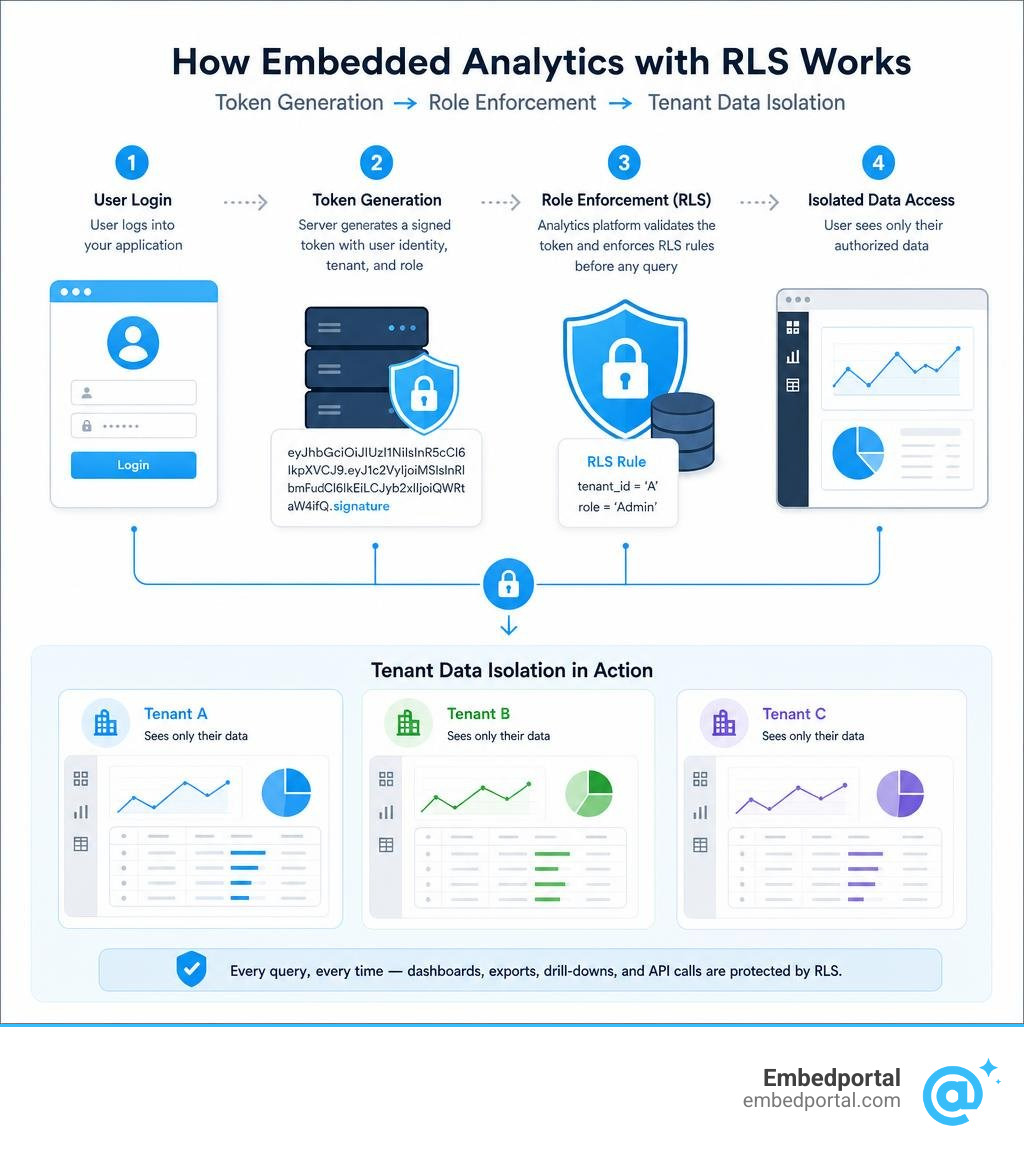
Basic embed analytics with rls glossary:
How to Embed Analytics with RLS: Core Concepts and Architecture
To build a secure, scalable reporting system, we must understand how data access controls function when dashboards are rendered inside external applications. When we talk about What Is Row-Level Security for Embedding?, we are looking at a system that dynamically restricts data access based on the logged-in user’s identity.
In a standard business intelligence setup, users log directly into a BI tool where their permissions are tied to corporate active directory groups. However, when we implement Embedded Analytics for external customers, those customers do not have accounts in our BI tool. Instead, they authenticate directly with our SaaS application.
This is where Embedded Analytics for SaaS requires a fundamental shift in architecture. The host application must act as the trusted gatekeeper. It verifies who the user is, determines what data they are allowed to see, and securely passes those parameters down to the underlying database or BI engine. The database then filters the rows before returning any results to the browser.
Why SaaS Teams Choose to Embed Analytics with RLS
SaaS products naturally handle multi-tenant workloads. Whether you are building an HR platform, an e-commerce dashboard, or a logistics tracker, tenant isolation is the primary security requirement. Without robust Multi-Tenant Row Level Security, you risk severe data leakage incidents where Tenant A accidentally views the proprietary financial records of Tenant B.
Beyond basic security, implementing dynamic Multi-Tenant Analytics is a massive engineering saver. Rather than building, deploying, and maintaining 500 separate dashboards for 500 different customers, we can build a single master dashboard. By relying on RLS, the database dynamically filters the records based on the session parameters of the viewing user. This keeps our analytics lightweight, easy to maintain, and completely isolated across boundaries.
The Danger of Front-End Filtering vs. True Database-Level Security
Many engineering teams fall into the trap of using front-end filters because they are incredibly easy to implement. We have seen teams pass a tenant ID in an iframe URL query string, like ?tenant_id=123, and assume the data is secure because the dashboard only displays records matching that ID.
This is a critical security vulnerability. Any tech-savvy user can open their browser’s developer tools, inspect the network requests, modify the tenant ID in the API query, or bypass the iframe altogether. If the underlying API does not validate permissions at the database or platform level, it will happily return another customer’s data.
To ensure complete Dashboard Data Access control, we must enforce filtering at the query generation layer. When a user requests a dashboard, our backend must generate a signed, tamper-proof token containing the user’s secure attributes. The BI engine uses this token server-side to append strict database filters to every SQL query it runs.
Architecture Patterns for Multi-Tenant Data Isolation
When designing a system to embed analytics with rls, we generally choose between three core architecture patterns to isolate tenant data.
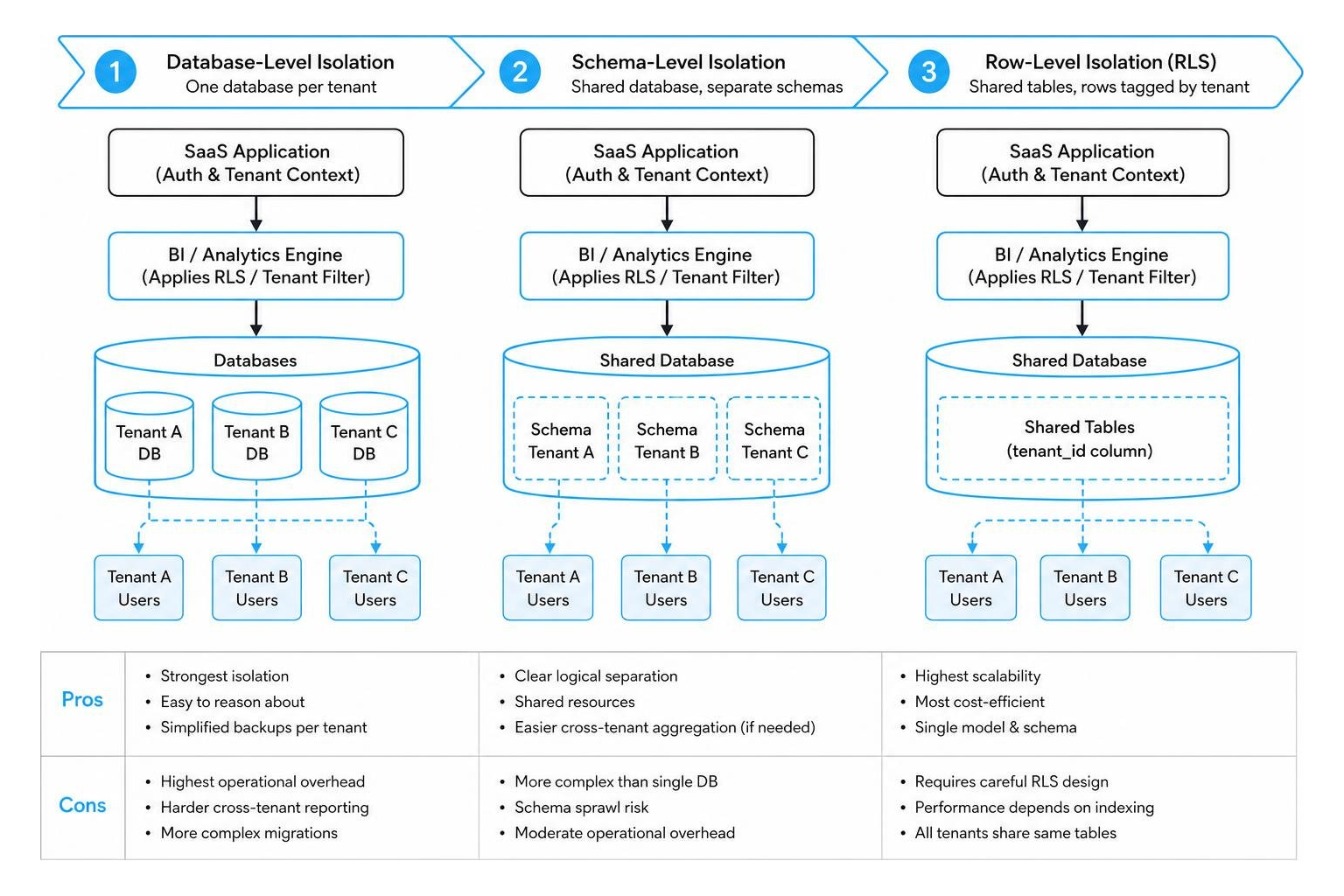
The first pattern is Database-Level Isolation, where each tenant has a completely separate database. The second is Schema-Level Isolation, where tenants share a database but have isolated schemas. The third is Row-Level Isolation, where all tenants share the same tables, and every row is tagged with a tenant identifier.
Enforcing a Centralized Row Level Security pattern across these models ensures that no matter how your data is structured, the query engine automatically applies the appropriate tenant constraints.
Workspace Isolation vs. Shared Semantic Models
If you are using tools like Power BI, you must choose between isolating data via separate workspaces or using a single, shared semantic model with dynamic RLS.
For large-scale applications with thousands of customers, workspace-based isolation using service principal profiles is highly effective. In this setup, each customer gets their own dedicated workspace, reports, and semantic models. This provides absolute data isolation and allows you to customize individual reports for high-value clients.
Conversely, for small to medium applications, maintaining thousands of workspaces can become an administrative headache. In these scenarios, using a single shared semantic model with dynamic RLS is the preferred approach. You maintain one master report, and the system dynamically filters the rows for each customer at runtime.
The Role of the Semantic Layer in Enforcing RLS
A semantic layer acts as an intermediary between your raw database tables and your visualization tools. It defines your business metrics, relationships, and security rules in a single, governed place.
When you use an integrated Embedded BI solution, the semantic layer ensures that RLS rules are applied globally. If you define a rule stating that a regional manager can only see data for their specific region, that rule is enforced across every single visual, chart, and filter on the dashboard. It prevents scenarios where a custom calculation or a new chart accidentally bypasses the security rules you worked so hard to establish.
Implementing Row-Level Security in Power BI Embedded
Power BI Embedded is a popular choice for enterprise applications, but configuring it securely requires a deep understanding of its authentication models. In an “App-owns-data” scenario, your application uses a single master user or service principal to authenticate against Power BI, meaning your end-users do not need their own Power BI licenses.
To configure this properly, you must follow the official guidelines for Using standard cloud based row-level security with embedded content in Power BI embedded analytics – Power BI | Microsoft Learn. This involves setting up Row Level Security Power BI roles inside your model and utilizing Power BI Embedding APIs to pass user identities.
Step-by-Step Guide to Embed Analytics with RLS in Power BI
To implement dynamic RLS in your embedded Power BI reports, follow these key steps:
- Open your report in Power BI Desktop and navigate to the Modeling tab.
- Select Manage Roles and create a new role (e.g., “CustomerRole”).
- In the DAX editor for your tenant table, write a dynamic filtering expression such as
[TenantID] = USERNAME()or[UserEmail] = USERPRINCIPALNAME(). - Publish the report to your dedicated Power BI workspace.
- In your web application’s backend, configure your authentication flow to capture the logged-in user’s TenantID.
- When a user requests to Embed Power BI Report, call the Power BI REST API to generate an embed token, passing the user’s TenantID as the “username” parameter in the effective identity object.
By using the USERNAME() DAX function dynamically, Power BI will replace it with whatever string value your backend passes during the token generation call.
Generating and Passing Embed Tokens with Effective Identities
The magic of securing Power BI Embedded lies in the generation of the embed token. When your backend calls the REST API (specifically using the GenerateTokenRequestV2 endpoint), you must supply an EffectiveIdentity object.
According to Microsoft’s documentation on Security in Power BI embedded analytics, the effective identity must contain:
- The username string (the value that will be mapped to your DAX
USERNAME()function) - An array of roles (e.g.,
["CustomerRole"]) - The dataset ID to which the RLS rules apply
An important security detail to remember: when you supply an effective identity with an embed token, Power BI applies the RLS permissions of that identity to the data immediately. This happens even if the service principal or master user generating the token is a workspace admin, member, or contributor. RLS cannot be bypassed once the identity is bound to the token.
Advanced RLS Scenarios and Platform Integrations
As your SaaS application grows, you will inevitably run into more complex data security scenarios.

For instance, if your application uses composite models that pull data from both import tables and live DirectQuery connections, you must generate embed tokens that account for multiple datasets. When calling the token generation API for composite models, you must specify an effective identity for each RLS-enabled dataset, and set the XMLA permissions to read-only for any auxiliary datasets.
If your data resides in an enterprise warehouse, you might choose to Embed a Power BI report with an Azure Analysis Services (AAS) database – Power BI | Microsoft Learn. In this model, dynamic RLS is often handled using the customData function in DAX, allowing you to pass up to 1,024 characters of custom context in the embed token.
If you are working across multiple BI platforms, you will also need to understand how other tools handle these scenarios, such as configuring Row Level Security Tableau using user filters or entitlement tables.
How to Embed Analytics with RLS in Power Pages
Microsoft Power Pages allows organizations to quickly spin up external-facing portal websites. If you want to share secure reports with external users who do not have Entra ID accounts, you can follow the steps outlined in How to: Embed Power BI in Power Pages | Microsoft Learn.
To make RLS work in this setup:
- Set up your Power BI report relationship cross-filter direction to “Both” between your Contact table and your transactional data tables.
- Define a DAX rule using
[Username] = username(). - When embedding the report using the Liquid tag in Power Pages, set the “Apply roles” parameter to true and specify your RLS role name.
This maps the Power Pages logged-in contact record directly to the Power BI session, making it easy to manage Power BI External Users without complex custom token broker applications.
Handling RLS Across Exports, Drill-Downs, and API Calls
One of the most common ways data leakages occur is through secondary actions like CSV exports, pdf downloads, and drill-downs. If your embedded analytics solution relies on cosmetic UI filters, clicking “Export to CSV” will often trigger a direct database query that bypasses the visual filters entirely, exporting all tenant data.
To prevent this, we must adhere to strict RLS Best Practices. When RLS is enforced at the database or semantic layer, any export request, drill-down visual, or API call is forced to run through the exact same query generator. The system appends the tenant WHERE clause to the underlying SQL, ensuring that exported CSVs contain only the data the user is authorized to see.
Build vs. Buy: Evaluating Embedded Analytics Platforms
When deciding how to implement secure embedded dashboards, SaaS engineering teams must evaluate whether to build a custom in-house RLS broker or purchase a specialized platform.
| Evaluation Dimension | Custom In-House RLS Solution | Native Platform RLS (e.g., Embedportal) |
|---|---|---|
| Initial Engineering Time | 3 to 6 months of dedicated development | Under 1 hour to set up and embed |
| Maintenance & Upgrades | High; requires ongoing updates as APIs change | Low; managed entirely by the platform |
| Multi-Vendor Support | Extremely difficult; requires custom code for each BI tool | Native support for Tableau, Power BI, QuickSight, and Metabase |
| Security & Auditing | High risk of manual coding errors and data leaks | SOC 2 compliant, automated token validation |
| Scalability | Manual database tuning and cache key management | Built-in caching, tenant-isolated query routing |
Building in-house often seems appealing at first, but the hidden costs of maintenance, API upgrades, and security audits can quickly derail your product roadmap. Choosing a dedicated Embedded Analytics Platform allows your engineers to focus on your core product while leaving the complexities of data isolation to the experts. By reviewing the Best Embedded Analytics Tools, you can find a solution that fits your exact tech stack.
Key Evaluation Criteria: Pricing, Security, and Scalability
When evaluating your options, look closely at how platforms price their embedding features. Many traditional BI tools charge per-user or seat-based fees, which can become prohibitively expensive for SaaS applications with thousands of external users. Instead, look for platforms that offer flat-rate, per-tenant, or capacity-based pricing models that align with your SaaS unit economics.
Security is another critical pillar. Ensure the platform supports secure JSON Web Token (JWT) authentication. This allows your backend to sign data access tokens using standard cryptographic keys, preventing any unauthorized modification of tenant parameters. As we often say, The Iframe is the Easy Part What Embedded Analytics Needs is a robust, secure, and scalable backend that handles identity propagation flawlessly.
Frequently Asked Questions about Embedded RLS
What is the difference between static and dynamic RLS?
Static RLS involves creating distinct roles for specific values (e.g., “USEastRole” with a hardcoded filter [Region] = "East"). This works well if you only have a few regions or departments, but it becomes impossible to manage when you have hundreds of customers.
Dynamic RLS uses DAX or SQL functions (like USERNAME()) to filter data on the fly. You build a single role, and your application passes the specific tenant or user ID during authentication, making Row Level Security highly scalable and easy to maintain.
Does assigning users to roles in Power BI Service affect embedded RLS?
No. In an “App-owns-data” embedding scenario, the end-users viewing your dashboard do not have accounts in the Power BI Service. Therefore, assigning users to roles inside the Power BI portal has no effect. All security parameters must be explicitly defined and passed inside the effective identity configuration of the embed token. For more details on managing external access, see our guide on Power BI Guest Access.
How do you prevent cross-tenant data leakage in embedded dashboards?
To absolutely prevent cross-tenant data leakage, you must generate all embed tokens and JWTs on your secure, server-side backend. Never allow the frontend client to specify the tenant ID directly. Your server must validate the user’s active session, retrieve their authorized tenant ID from your database, and sign the token using an encryption secret that is never exposed to the browser. To learn more about secure user provisioning, read about User Management for BI.
Conclusion
Securing your customer-facing dashboards doesn’t have to be a multi-month engineering headache. By enforcing row-level security at the database and semantic layers, you protect your customers’ sensitive data while keeping your reporting architecture clean and maintainable.
At Embedportal, we provide a powerful, white-label embedding platform designed for modern SaaS teams. Based in California, USA, our platform allows you to embed multi-vendor analytics—including Tableau, Power BI, QuickSight, and Metabase—with unified branding, robust Row Level Security, and seamless SSO in under an hour.
Ready to deliver secure, beautiful dashboards to your customers? Let us help you simplify your embedding journey today.