
Apply row-level security to embedded dashboards in every BI tool
Row-level security (RLS) makes sure each viewer sees only the rows they are allowed to see. In EmbedPortal you map RLS fields once per group, such as region, email, department or plan, and those values are passed to your BI tool every time a dashboard is embedded.
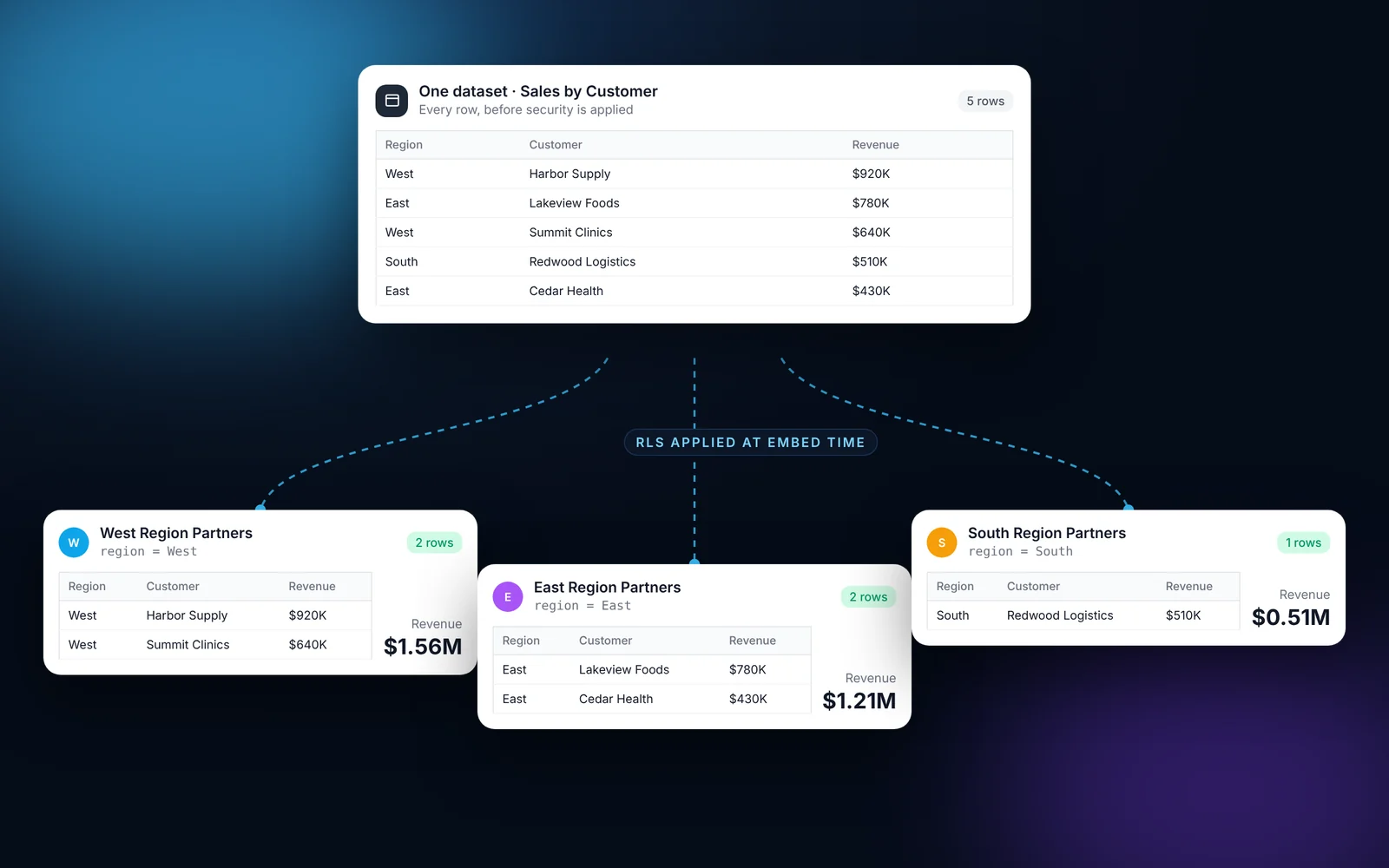
How it works
Most teams finish these steps in under an hour.
Define RLS in your BI tool
Create roles, user filters or data policies in Power BI, Tableau, QuickSight, Looker, Domo or Metabase as you normally would.
Open the group's RLS tab
In EmbedPortal, go to Groups, pick a group and open RLS.
Add fields
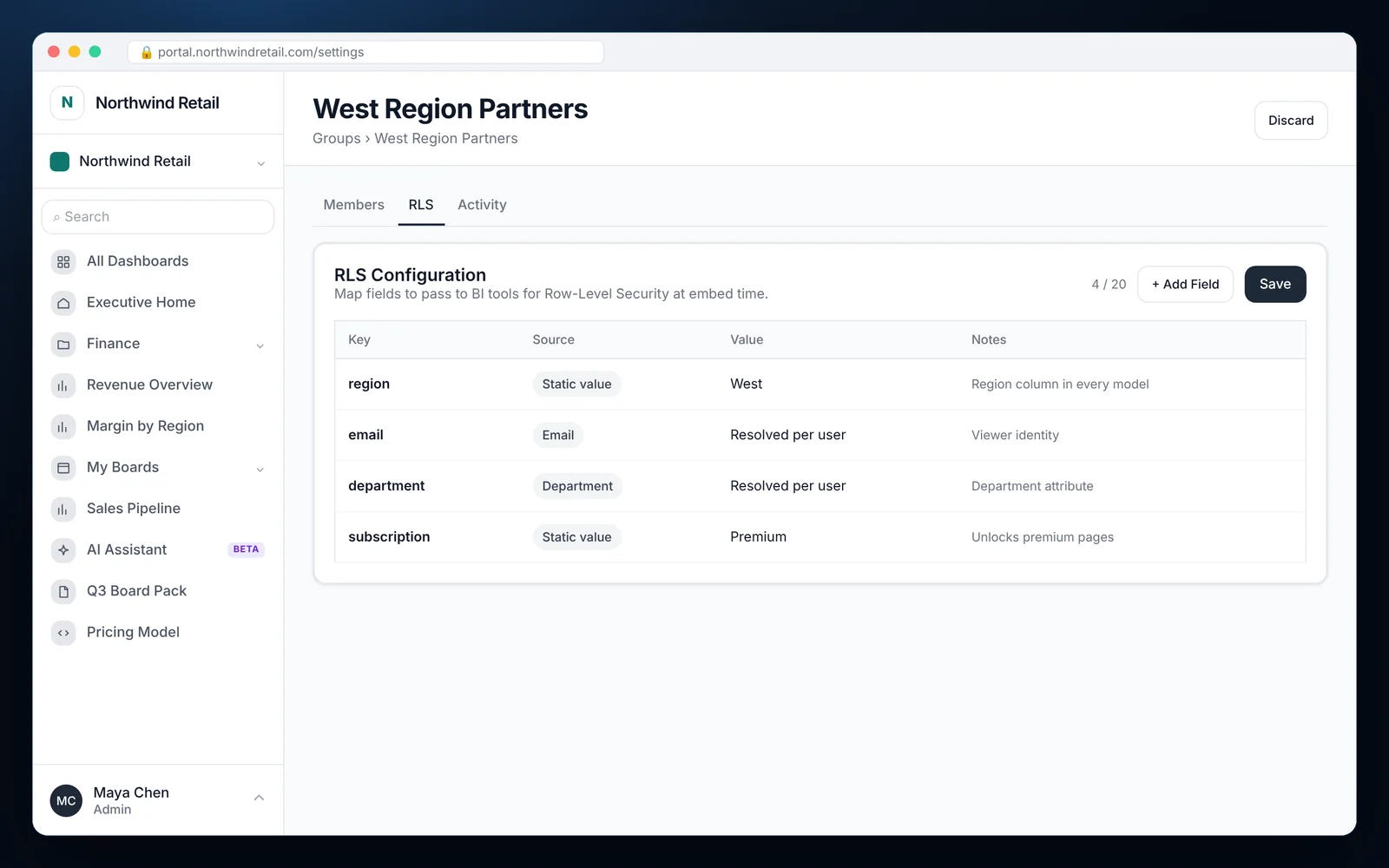
Add up to 20 keys. Each key takes its value from a static value or from a user attribute such as email or department.
Turn on Use RLS attribute
On each dashboard, switch on Use RLS attribute so the values are sent when it loads.
Check it with impersonation
Impersonate a user in the group to see exactly what they see.
What it looks like in EmbedPortal
Row-level security features
Static or per-user values
Use a fixed value for the whole group, like West, or resolve it per viewer, like their email.
Up to 20 fields per group
Cover tenant, region, department, plan tier and more.
Works across tools
The same map feeds Power BI embed tokens, Tableau claims, QuickSight session tags, Looker user attributes, Domo filters and Metabase locked parameters.
Set per dashboard
Turn RLS on only for dashboards that need it.
Applied to schedules
Scheduled exports respect each recipient's RLS values.
Verified with impersonation
Test your rules by viewing the portal as a real user.
Why RLS belongs in the portal
Without a central place for RLS, every report ends up with its own copy of the rules. Someone forgets one, and a customer sees another customer's numbers.
EmbedPortal keeps the who-sees-what decisions in one place. Your BI tool keeps the filtering logic. That split is easier to audit and harder to get wrong.
Common questions
What is row-level security in embedded analytics?
It is a rule that filters the data in a dashboard based on who is viewing it. Two customers can open the same dashboard and each see only their own rows.
How do I apply row-level security in Power BI embedded?
Create roles in the Power BI dataset that filter on USERPRINCIPALNAME() or CUSTOMDATA(). EmbedPortal passes the viewer's identity and RLS values in the embed token.
How do I apply row-level security in embedded Tableau?
Use user filters or data policies that read user attributes. Turn on Use RLS attribute for the dashboard and EmbedPortal sends the values when the view loads.
Can one dashboard serve many customers?
Yes. That is the main point of RLS. Build the dashboard once, and each group sees only its slice of the data.
How do I test RLS before customers see it?
Use impersonation to open the portal as a user in the group and check the numbers.
Share your first dashboard this week.
Connect your BI tool, set up groups and row-level security, and invite viewers. One flat price with unlimited viewers.