The Quick Guide to Embedding Metabase in Multi-Tenant Applications
Why Metabase Multi-Tenant Embedding Is Hard to Get Right
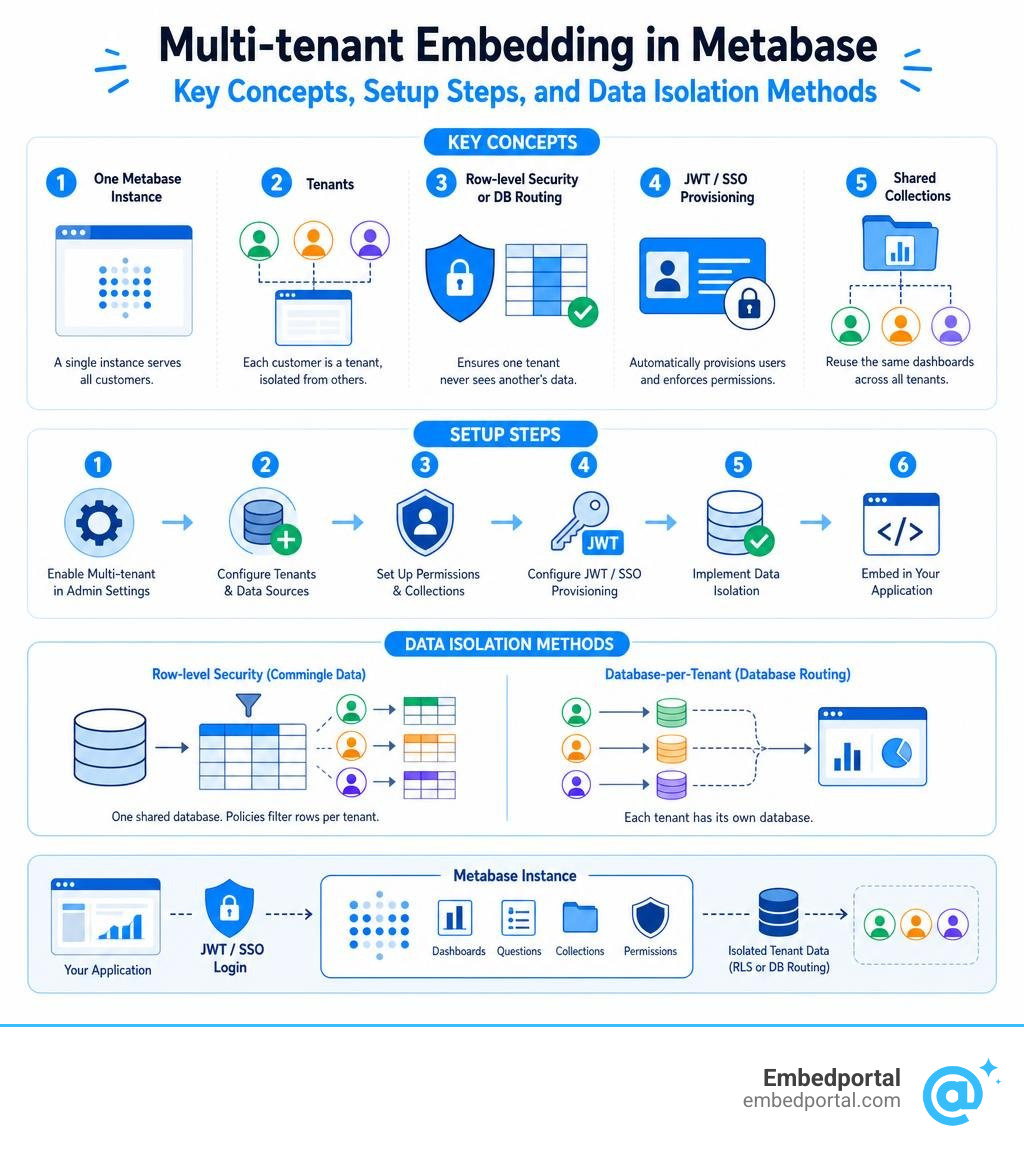
Metabase multi-tenant embedding lets a single Metabase instance serve many customers at once — each one seeing only their own data — inside your branded SaaS product.
Here’s what that looks like in practice:
- One Metabase instance hosts all your dashboards and questions
- Tenants represent individual customers, each isolated from the others
- Row-level security (or database routing) ensures Customer A never sees Customer B’s data
- JWT/SSO automatically provisions users and enforces permissions at login
- Shared collections let you reuse the same dashboards across all customers without rebuilding them
That’s the goal. The reality is that getting all five pieces working together — especially across dozens or hundreds of customers — takes real engineering effort.
Multi-tenancy isn’t a feature you can just switch on. As teams who’ve built customer-facing analytics at scale have learned the hard way, you can’t bolt multi-tenancy onto a BI tool that wasn’t designed for it. The permission model, the auth layer, and the data isolation strategy all have to fit together from the start.
Metabase does offer first-class multi-tenant support on its Pro and Enterprise plans — but it comes with meaningful configuration complexity, pricing implications, and a few sharp edges that trip up even experienced teams.
This guide walks you through every step: from enabling the multi-tenant strategy in Metabase’s admin settings, to wiring up JWT provisioning, to configuring row-level security for commingled data or per-customer databases. We’ll also cover the limitations honestly, so you can plan around them.
Common metabase multi tenant embedding vocab:
Understanding Metabase Multi Tenant Embedding
To build a solid Embedded Analytics for SaaS experience, we first need to understand what metabase multi tenant embedding actually is and how it differs from other embedding strategies.
In Metabase, we generally have three paths for embedding:
- Guest Embedding (Public/Signed): This is the simplest approach. You generate a signed iframe URL for a specific dashboard or question. While it works for basic use cases, it doesn’t scale well for complex SaaS applications because you cannot easily manage individual user identities, custom parameters, or collaborative spaces.
- Single-Tenant Embedding: Under this model, you treat all external users as part of a single organization. If you want to isolate data, you must manually pass filters through signed JWT tokens or spin up entirely separate Metabase instances for each customer. This quickly becomes an operational nightmare as your customer base grows.
- Multi-Tenant Embedding: This is the gold standard for SaaS. Available on Metabase’s Pro and Enterprise plans, it introduces a native “Tenant” abstraction. Metabase itself understands that your users belong to distinct, isolated customer organizations (tenants). It allows you to reuse a single set of master dashboards while dynamically filtering the underlying data and isolating user-generated content based on who is logged in.
Understanding Tenants, Users, and Groups in Metabase
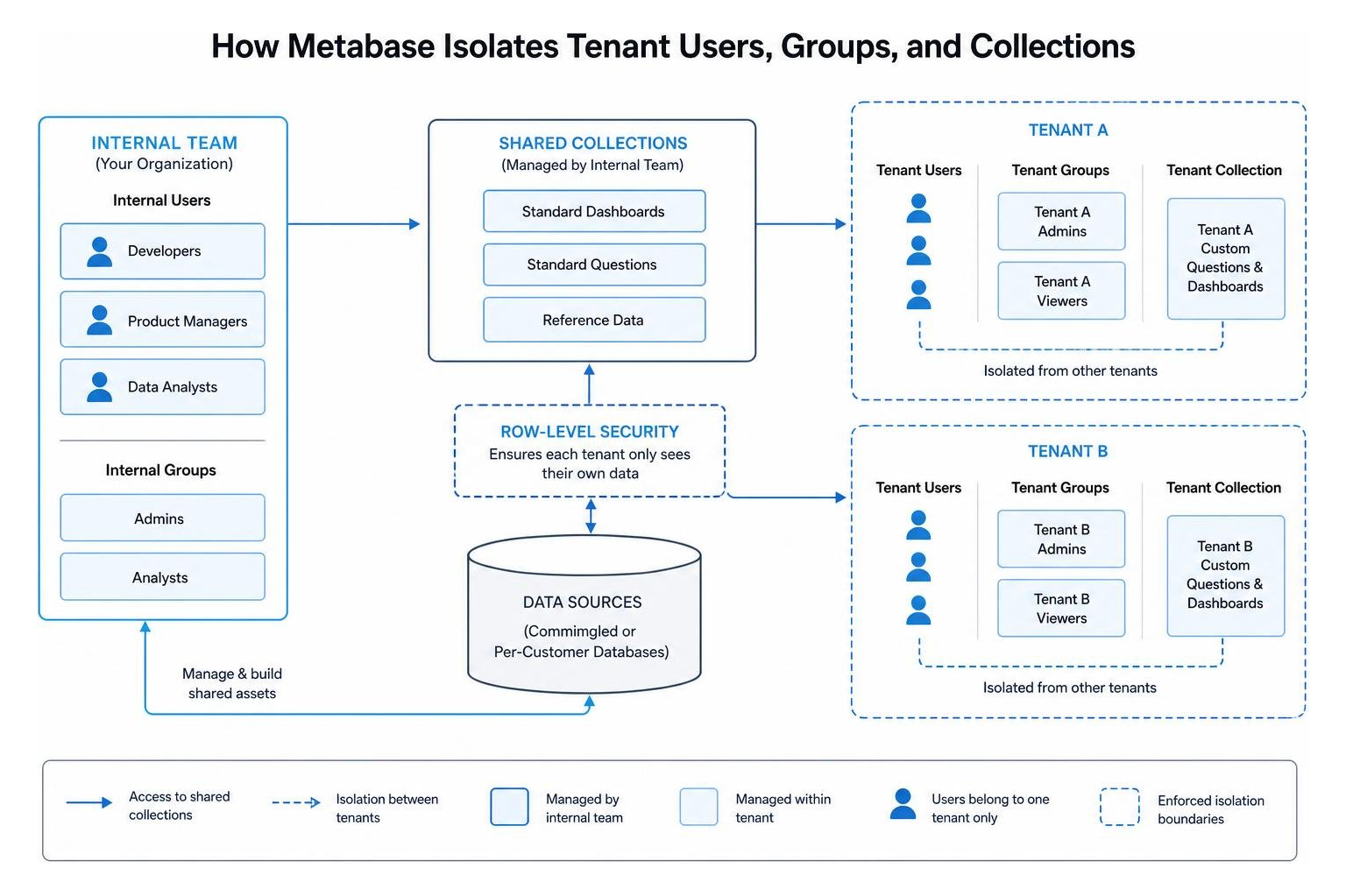
To make multi-tenancy work smoothly, Metabase relies on a specific hierarchy of users, groups, and collections. According to the Tenants | Metabase Documentation , these entities work together to keep data secure:
- Tenant Users: These are your customers’ end users. They log in via your parent SaaS application and access Metabase through embedded components. They are strictly isolated and cannot see users, groups, or collections belonging to other tenants.
- Internal Users: This is your team—your developers, product managers, and data analysts. Internal users build the core dashboards, manage settings, and have the power to cross tenant boundaries to set up global assets.
- Tenant Groups: When you create a tenant, Metabase allows you to organize that tenant’s users into groups (for example, “Tenant A – Admins” and “Tenant A – Viewers”). This lets you define role-based access control within a single customer’s organization. Crucially, tenant users can never be added to internal groups, and internal users cannot join tenant groups.
- Shared Collections: These are master folders managed by your internal team. You put your standard SaaS dashboards here. Every tenant can access these dashboards, but because of row-level security, Tenant A only sees Tenant A’s data when viewing them.
- Tenant Collections: Metabase automatically creates a dedicated, isolated collection for each tenant. If you grant your customers the ability to build their own questions or save custom reports, those assets live inside their specific tenant collection, completely hidden from all other customers.
How to Configure Multi-Tenant Strategy and JWT Provisioning
Setting up metabase multi tenant embedding requires transitioning your Metabase instance into multi-tenant mode and establishing an automated way to provision users as they access your application.
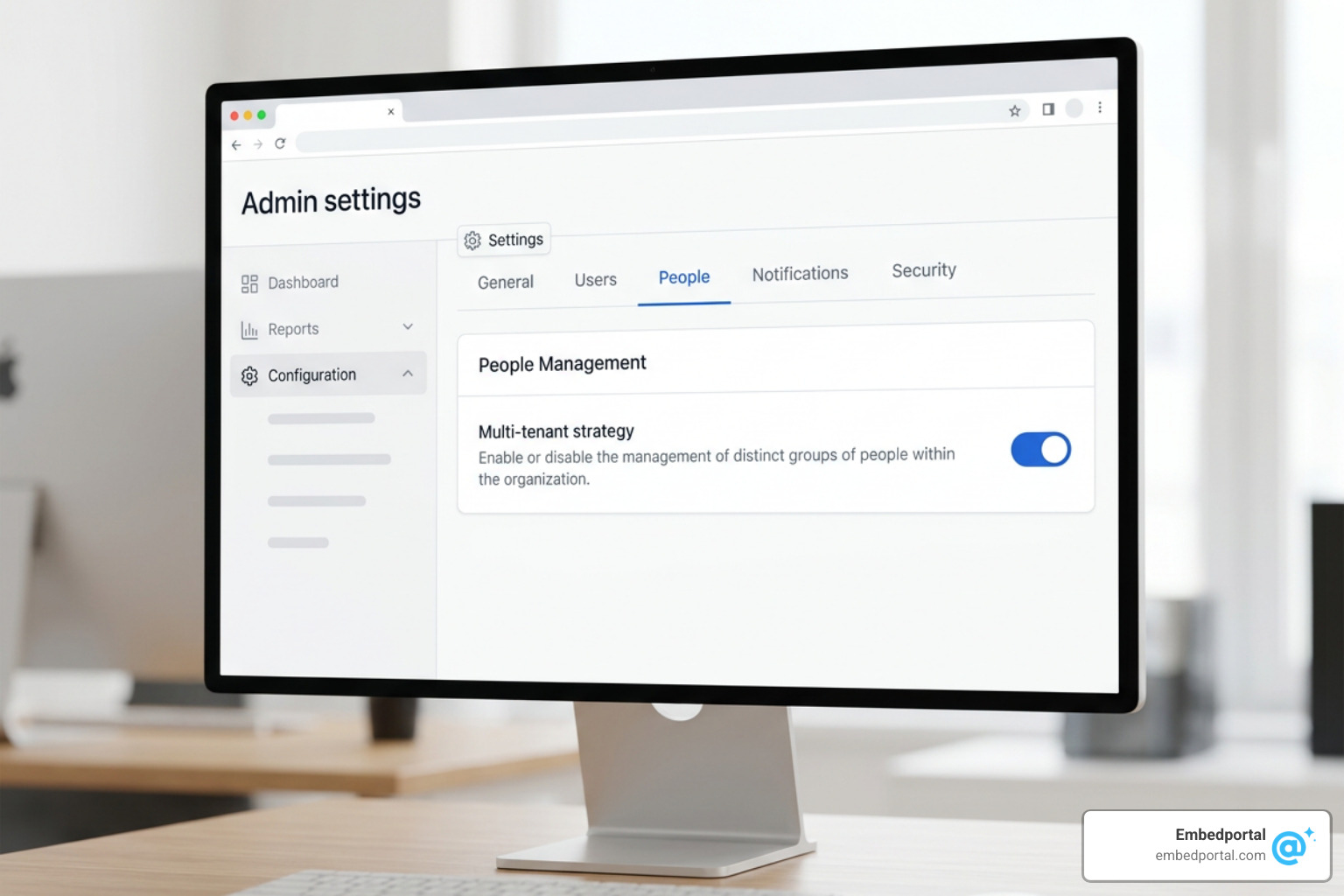
To begin, we configure the global settings in the Metabase Admin UI. By default, Metabase operates in single-tenant mode. To change this, log in as an Admin, navigate to Admin settings, click on the People tab, select the gear icon, and enable the Multi-tenant strategy.
Step-by-Step Guide to Metabase Multi Tenant Embedding Setup
Once the multi-tenant strategy is active, you can begin creating and structuring your tenants. This can be managed directly in the UI or programmatically. If you are handling User Management for BI manually during development, the workflow looks like this:
- Create a New Tenant: In the Admin panel, go to the Tenants section and click “Create Tenant”.
- Define the Tenant Slug: Provide a unique, URL-friendly identifier (e.g.,
customer-alpha). This slug is highly important; it acts as the primary key for routing and filtering. - Configure Tenant Attributes: Add custom key-value pairs to the tenant profile (e.g.,
region: us-west,plan_tier: enterprise). These attributes can be referenced later in your data permission rules. - Set Up Shared Collections: Create your master dashboards under the “External Collections” directory. This ensures they are flagged as shareable across your tenant network.
- Enable Remote Sync (Optional): If you manage your BI assets as code, you can sync these shared collections directly to a GitHub repository to version-control your dashboards across environments.
Provisioning Tenants and Users Automatically via JWT SSO
While manual UI setup works for testing, production SaaS applications must automate this process. We do this by configuring Single Sign-On (SSO) using JSON Web Tokens (JWT).
When an authenticated user loads your SaaS application, your backend generates a signed JWT. When Metabase receives this token, it automatically provisions the tenant, creates the user account, assigns them to the correct tenant groups, and applies their specific attributes on the fly. This ensures seamless External User Access without manual intervention.
A standard multi-tenant JWT payload contains the following claims:
email: The user’s unique email address.first_nameandlast_name: The user’s profile details.groups: An array of tenant-specific groups this user belongs to (e.g.,["Admins"]).@tenant: A special object containing the tenant configuration.slug: The unique tenant identifier (e.g.,tenant-123). This must match your database’s tenant identifiers.name: The display name of the customer organization.attributes: A dictionary of custom attributes used for row-level security (e.g.,{"department": "sales", "clearance_level": "high"}).
By passing these claims in the signed JWT token, Metabase ensures that every session is cryptographically bound to a specific tenant and set of data permissions.
Securing Tenant Data with Row-Level Security and Database Routing
Data isolation is the most critical aspect of multi-tenant embedding. You must guarantee that no customer can ever see another customer’s data.
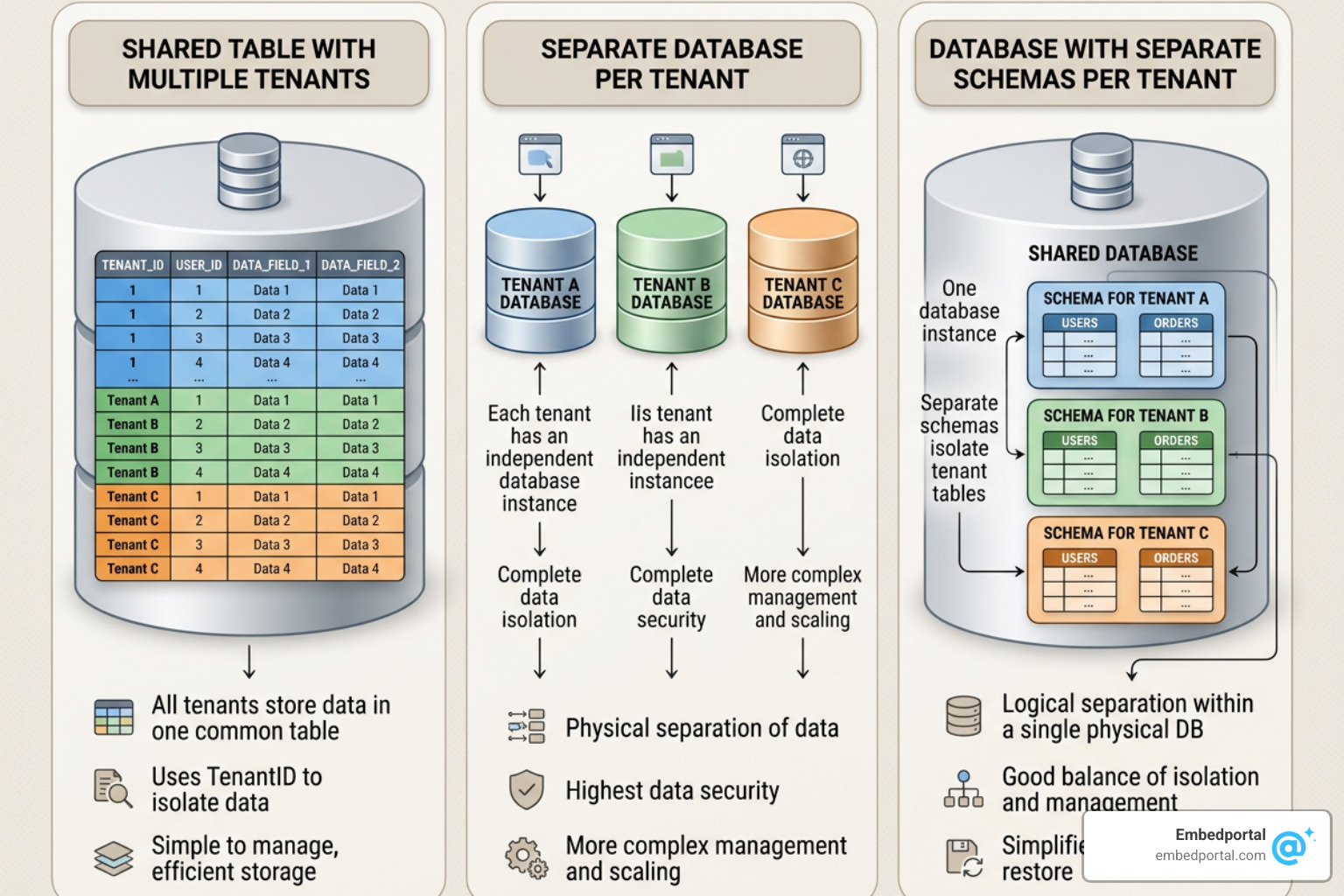
Depending on how your SaaS application stores customer data, Metabase offers three primary strategies for enforcing Multi-Tenant Row Level Security:
- Commingled Data (One database/table for all customers): All tenant data lives in the same tables, distinguished by a
tenant_idorcustomer_idcolumn. - One Database Per Customer: Each tenant has an entirely separate physical database with an identical schema.
- One Schema Per Customer: All tenants live in the single database, but their tables are separated into distinct database schemas.
Implementing Row-Level Security with Tenant Attributes
If your SaaS application uses a commingled data architecture, you will rely heavily on Row Level Security. Metabase makes this straightforward by allowing you to map tenant attributes directly to table filters.
According to the Configuring permissions for embedding | Metabase Documentation , the setup process is as follows:
- In the Metabase Admin panel, go to Permissions > Data.
- Select the database and table you want to restrict (e.g., the
orderstable). - Set the permission level for the All Tenant Users group to Sandboxed.
- Define the sandboxing rule. You can tell Metabase to filter the table so that the
tenant_idcolumn in your database matches the@tenant.slugattribute passed in the user’s JWT.
For native SQL queries, you can achieve the same result by using SQL template tags. When writing a custom SQL question, you can write:
Metabase will automatically replace {{ tenant_attribute }} with the logged-in user’s specific tenant slug, preventing any possibility of cross-tenant data leakage.
Database Routing and Connection Impersonation
If your architecture isolates customers into their own physical databases, row-level filtering isn’t the right tool. Instead, you will use Database Routing.
With database routing, you build your dashboards and questions once using a “template” database connection. In your JWT SSO configuration, you map each tenant’s slug or attributes to their specific database connection string. When a user from Tenant A logs in, Metabase intercepts the queries and routes them to Tenant A’s database. For this to work, the database schemas across all customer databases must be identical.
If you want to manage security at the database engine level rather than inside Metabase, you can use Connection Impersonation. This maps Metabase user attributes directly to database-level roles. When a query is run, Metabase opens a database connection using that specific user’s database role, ensuring the database itself enforces the data access boundaries. This is especially useful if you want to grant advanced users direct Dashboard Data Access or SQL editor capabilities safely.
Managing Collection and Subscription Permissions Across Tenants
Beyond raw data security, you must also control what dashboards, collections, and automated reports your tenants can interact with. This is handled via collection permissions:
- Shared Collections: To give tenants access to your standard dashboards, grant the All Tenant Users group “View” access to your Shared Collections folder. Because your underlying data is sandboxed, two different tenants looking at the exact same dashboard inside this collection will see entirely different, isolated data.
- Tenant Collections: Ensure that each tenant has “Curate” access to their own automatically generated tenant collection. This allows them to save their own custom questions without cluttering your shared folders or exposing their work to other customers.
- Subscription Permissions: If you allow customers to subscribe to dashboard alerts or email reports, Metabase ensures that these Shared Dashboard Access subscriptions are executed within the security context of the receiving tenant, preventing filtered PDF reports from accidentally leaking commingled data.
Best Practices, Limitations, and Alternatives for SaaS Embedding
When integrating Metabase into your SaaS platform, you must choose between Modular Embedding and Full App Embedding.
According to the Full app embedding | Metabase Documentation , full app embedding places the entire Metabase interface into an iframe. While powerful, this requires careful handling of browser security policies.
If you are embedding across different domains (e.g., your app is on app.mysaas.com and Metabase is on bi.mysaas.com), you must configure your CORS settings properly and set your Metabase cookie settings to SameSite=None and Secure.
Alternatively, Metabase’s newer Modular Embedding allows you to embed specific components (like a single chart, query builder, or dashboard) natively using a lighter Javascript SDK, providing a more seamless user experience.
Securing the Metabase Multi Tenant Embedding Architecture
To ensure your embedded analytics environment remains secure, follow these core architectural guidelines:
- Short Session Lifespans: Set the
MAX_SESSION_AGEin Metabase to a low value (e.g., 60 to 120 minutes) to prevent abandoned iframe sessions from remaining active indefinitely. - Secure Token Exchange: Never generate JWT tokens on the client side (in the browser). Your frontend should request the signed embed token from your secure backend API, which validates the user’s session before requesting the token from Metabase.
- Leverage postMessage API: Use Metabase’s supported
postMessageevents to communicate between your parent application and the embedded iframe. This allows you to dynamically resize iframes, capture click events, and pass state changes without reloading the page.
Limitations of Metabase Multi-Tenant Embedding
While Metabase is highly capable, it is important to understand its limitations before committing to a production architecture:
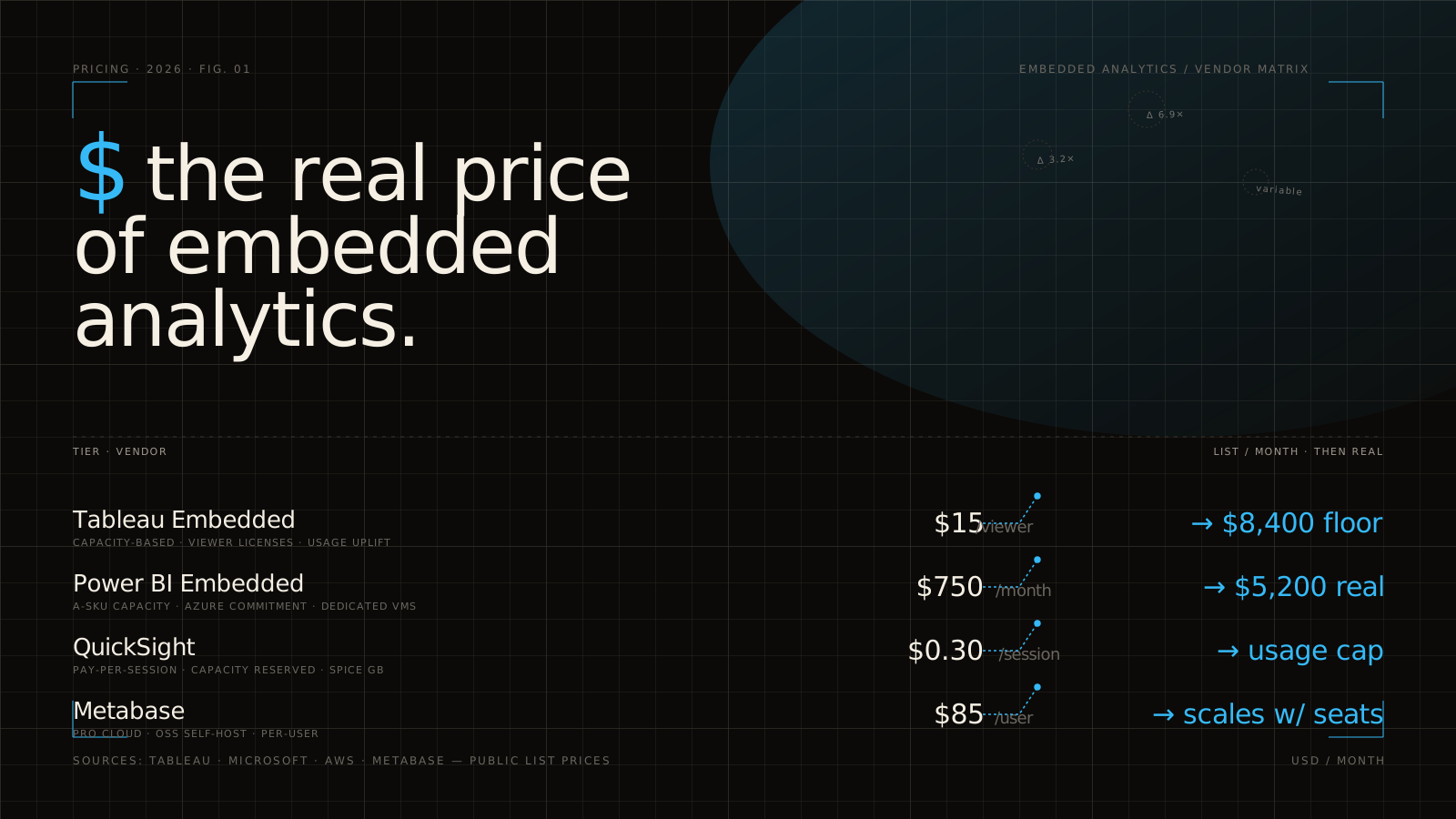
- Pricing Gates: Native multi-tenancy, row-level security, and full white-labeling are locked behind Metabase’s Pro and Enterprise plans. The Pro plan starts at $575 per month (plus $12 per user per month after the first 10 users), while Enterprise deployments with advanced security are typically priced in the tens of thousands of dollars per year. See Embedded Analytics Pricing for a broader market comparison.
- No Easy Tenant Switching: If a single user belongs to multiple customer organizations, Metabase does not support easy, real-time tenant switching within the same session. You must destroy the active session cookie and generate a completely new JWT token to switch contexts.
- Destructive Strategy Changes: Switching your Metabase instance from a multi-tenant strategy back to a single-tenant strategy is a destructive action. Doing so deactivates all tenant users and permanently hides tenant-specific collections.
Streamlining Multi-Vendor Embedded Analytics
For many SaaS teams, managing the infrastructure, licensing costs, and complex JWT handshakes of a native Metabase multi-tenant setup becomes a significant engineering burden. This is where a unified platform like Embedportal provides value.
Embedportal acts as an intelligent, white-label wrapper around your BI tools. Instead of spending weeks configuring custom JWT claims, troubleshooting CORS policies, and paying high enterprise licensing fees just to unlock basic security features, you can use Embedportal to handle the entire embedding lifecycle.
| Feature | Native Metabase Multi-Tenant Embedding | Embedportal Unified Embedding |
|---|---|---|
| Setup Complexity | High (Requires manual JWT configuration, CORS setup, and permission mapping) | Low (Plug-and-play integration in under an hour) |
| Multi-Vendor Support | Metabase only | Unified support for Metabase, Tableau, Power BI, and QuickSight |
| White-Labeling | Locked behind expensive Pro/Enterprise tiers | Fully white-labeled branding included out of the box |
| Row-Level Security | Complex database-level or attribute-level setup | Centralized, easy-to-manage RLS configuration |
| SDK Support | Basic iframe or newer modular JS | Robust, developer-friendly SDKs for modern frameworks |
By decoupling the visualization layer from the security and delivery layers, we help SaaS teams ship beautiful, secure Embedded BI portals to their customers in a fraction of the time.
Frequently Asked Questions about Metabase Multi-Tenant Embedding
Can tenant users create and save their own questions in Metabase?
Yes, but you have full control over this behavior. By default, if you grant “Curate” access to a tenant’s collection, users can build custom questions using the GUI query builder and save them to their private workspace. If you want a view-only experience, you can revoke the “Create Queries” permission for the tenant group and configure your embedded iframe parameters to hide the query editor UI entirely.
What happens if I switch from a multi-tenant to a single-tenant strategy?
Switching back to a single-tenant strategy is a destructive process. Metabase will deactivate all tenant users, and their dedicated tenant collections will become inaccessible. While the data itself remains in your database, the metadata associations within Metabase are severed. If you must do this, always back up your Metabase application database first.
How does Metabase handle separate databases per customer?
Metabase handles this through Database Routing. You configure a single master dashboard template. When a tenant user logs in via JWT, your application passes their specific database connection parameters or identifier within the token attributes. Metabase dynamically routes all queries generated by that user’s session to their isolated database, provided the database schemas are identical.
Conclusion
Implementing metabase multi tenant embedding is an excellent way to deliver secure, interactive data insights to your SaaS customers without building a reporting engine from scratch. By leveraging Metabase’s native tenant abstractions, sandboxed row-level security, and JWT-driven automatic provisioning, you can build an enterprise-grade analytics experience.
However, navigating the high pricing tiers, security configurations, and CORS limitations of self-hosted BI embedding can easily pull your engineering team away from your core product.
If you are looking for a simpler, more cost-effective way to deliver white-labeled, secure dashboards to your customers, we can help. With Embedportal, you can easily implement unified branding, centralized Row Level Security, and instant SSO for Metabase and other major BI tools in under an hour.