The Developer’s Guide to SSO Analytics Embedding
Why SSO BI Embedding Is the Foundation of Secure Analytics Portals
SSO BI embedding is the process of integrating single sign-on authentication into embedded business intelligence dashboards so users access reports inside your app without a separate login.
Here’s what you need to know at a glance:
| Question | Quick Answer |
|---|---|
| What is it? | Authenticating users into embedded BI dashboards using your existing identity provider |
| How does it work? | Your app passes a token or signed credential to the BI platform, which trusts it and loads the right data |
| Key protocols | OAuth 2.0, OpenID Connect, SAML, JWT, HMACSHA256-signed tokens |
| Main benefit | One login for your whole product, including embedded analytics |
| Biggest risk of skipping it | Users see each other’s data, or get prompted to log in twice |
If you’re building a customer-facing analytics portal, you’ve likely hit this wall: your app already handles authentication, but every embedded dashboard still demands its own login. Or worse — you share a public URL that shows the same data to everyone.
That’s the core problem SSO for BI embedding solves.
Single sign-on lets your application pass a user’s verified identity directly to the BI layer. The dashboard loads already knowing who the user is — what tenant they belong to, what data they’re allowed to see, and what actions they can take. No second login. No exposed credentials. No shared links that bypass access controls.
For SaaS teams embedding dashboards from tools like Power BI, Tableau, or Metabase, this isn’t just a convenience feature. It’s the difference between analytics that feel native to your product and analytics that feel bolted on.
The challenge is that every BI platform implements SSO slightly differently — different token formats, different signing methods, different restrictions on data sources and multi-tenancy. Getting it right across multiple tools takes real effort.
This guide walks you through exactly how to do it.
What is SSO in Embedded Analytics?
At its core, sso bi embedding is the practice of unifying your primary web application’s authentication system with your downstream analytics layer. In a traditional setup, when we wanted to display a report to a user, we had to rely on traditional authentication methods. This meant prompting the user to log in twice—once to access our core SaaS platform and a second time inside an iframe to authenticate with the BI tool.
If you have ever tried to explain to a frustrated customer why they need to log in twice to see a simple bar chart, you know exactly how painful this is.
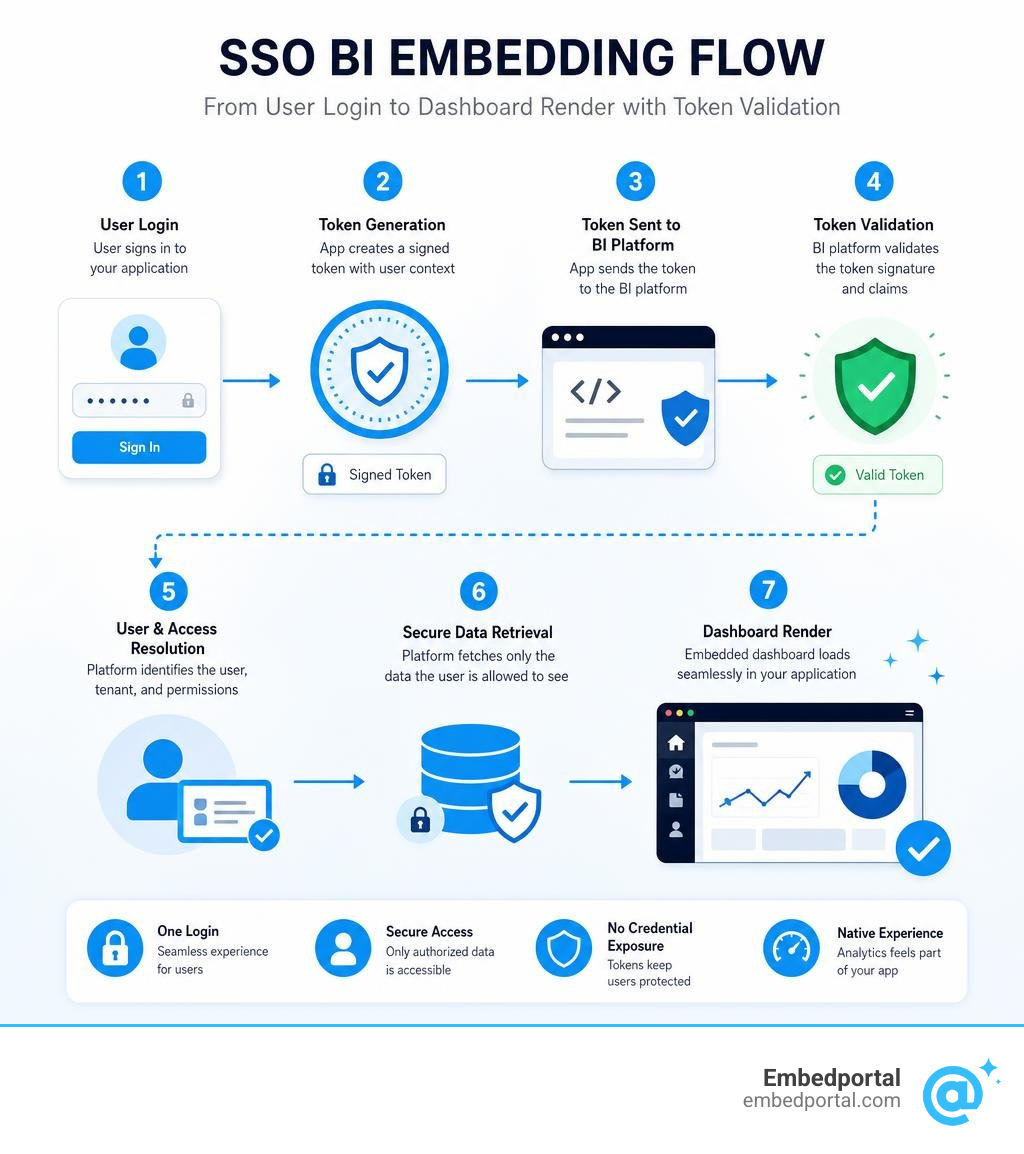
Instead of forcing users through multiple authentication loops, SSO enables seamless identity propagation. When a user logs into your primary application, your system acts as the source of truth. It verifies who the user is, gathers their permissions, and packages this identity data into a cryptographically secure token. When your application requests the embedded dashboard, it passes this token to the BI platform. The BI platform validates the token, trusts your application’s word, and displays the report instantly.
Without this secure handshake, teams are left with dangerous alternatives. Some developers resort to maintaining active user sessions across multiple domains, which exposes the application to session hijacking. If an attacker intercepts an unencrypted session cookie or a poorly protected session ID, they can easily impersonate the user and access sensitive corporate reports.
By implementing modern Embedded Analytics workflows powered by SSO, we completely eliminate these security vulnerabilities. The user’s credentials are never exposed, and their access is tightly bound to their active session within your parent application.
SSO vs. Public URL Embedding
When developers are under tight deadlines, the temptation to use public or “shared” URL embedding is incredibly strong. It is simple, requires zero backend code, and works instantly. However, this convenience comes with massive security tradeoffs.
To help you understand the architectural differences, let us break down how SSO-based embedding stacks up against public or simple signed URL embedding:
| Feature | SSO-Based BI Embedding | Public / Shared URL Embedding |
|---|---|---|
| Access Model | Identity-based access (tied to a specific verified user) | Capability-based access (anyone with the URL can view it) |
| Data Security | High. Data is filtered on the fly based on the user’s active session. | Low. Filters are often hardcoded in the URL and easily manipulated. |
| Multi-Tenancy | Dynamic. A single dashboard serves thousands of tenants securely. | Fragile. Requires creating and managing separate URLs for every single client. |
| Auditability | Full. Every query, export, and dashboard view is tied to a real user ID. | None. All views appear as anonymous traffic. |
| Compliance | Satisfies strict enterprise security audits (SOC2, HIPAA, GDPR). | Fails basic security reviews due to data exposure risks. |
This comparison highlights a fundamental architectural truth: public and simple shared URLs rely on capability-based access. In this model, the BI system recognizes the URL rather than the user. If a user copies that URL and emails it to a competitor, or if it gets cached by a search engine, your data is compromised.
Furthermore, URL-first embedding models fail spectacularly at scale. Because they often encode tenant IDs and filter parameters directly in the query string, tech-savvy users can easily alter those parameters in their browser console to view other customers’ data.
By contrast, SSO embedding enforces identity-based access. It relies on secure backend communication. The BI platform evaluates the user’s identity and active permissions at the query level. Even if a user tries to alter the iframe source URL, the backend will reject the request because the cryptographic signature does not match the tampered parameters.
Core Architecture of Secure SSO Embedding
To successfully build an sso bi embedding pipeline, we must understand the underlying security protocols that handle the handshakes. The exact architecture depends heavily on your identity provider (IdP) and your BI platform, but the general flow remains consistent.
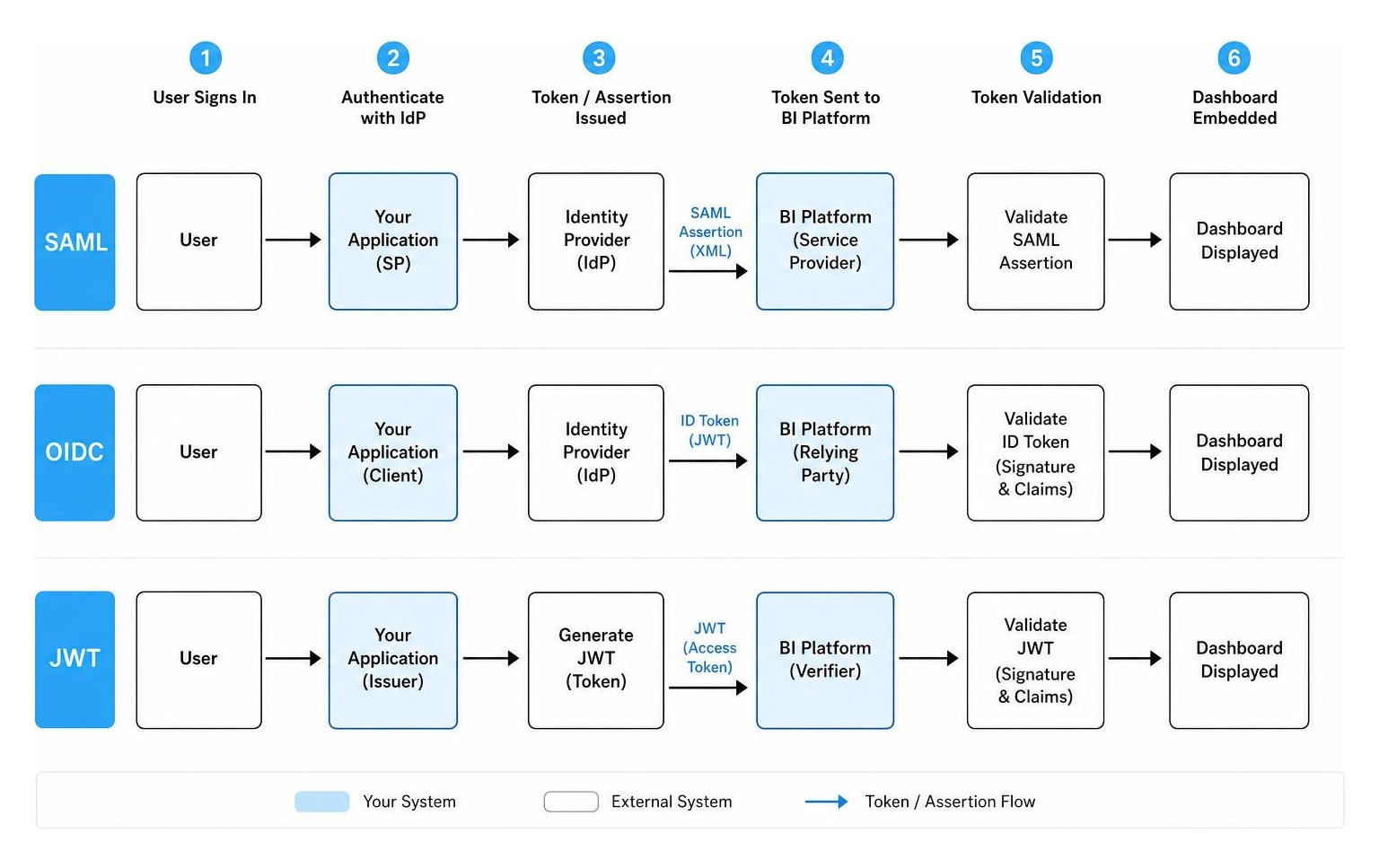
Most modern enterprise systems rely on one of three core authentication frameworks:
- SAML (Security Assertion Markup Language): An XML-based protocol commonly used in legacy enterprise environments and traditional Active Directory setups. It is highly secure but can be heavy and difficult to parse in modern single-page applications.
- OpenID Connect (OIDC): A simple identity layer built on top of the OAuth 2.0 protocol. It uses JSON Web Tokens (JWT) to pass user profile information securely, making it the preferred choice for modern web applications.
- JSON Web Tokens (JWT): A compact, URL-safe means of representing claims to be transferred between two parties. The claims in a JWT are digitally signed, allowing the BI server to verify that the identity payload has not been modified.
When integrating these protocols into your BI architecture, robust User Management for BI is essential. Your application must map its internal user roles and tenant IDs directly to the roles recognized by your BI server. This mapping ensures that when a user authenticates via OIDC or SAML, the BI engine instantly knows which workspace, folder, or dashboard they are allowed to access.
How Token-Based SSO BI Embedding Works
The magic of modern token-based SSO embedding happens entirely behind the scenes in a secure, server-to-server handshake. Let us look at how this works in a standard enterprise environment, such as a Power BI Embedding setup.
When a user requests a page containing an embedded report, your application backend does not just point the iframe to a static URL. Instead, it makes an API call to the BI platform’s REST API to request a short-lived, highly secure “embed token” or “bearer token.”
During this API call, your backend passes specific identity metadata. In advanced Microsoft Entra (formerly Azure AD) configurations, this includes a parameters block known as datasourceIdentities and an identityBlob. The identityBlob is a secure, encrypted token containing the user’s actual database credentials or OAuth2 access token.
For example, if your report uses DirectQuery to pull live data from an Azure SQL database, your application backend obtains an access token for the Azure SQL scope (using the database default URL) and packages it as an identityBlob inside the embed token request.
When the BI platform receives this request, it generates a unique, single-use embed token that is cryptographically signed. Your backend receives this token and passes it to your frontend application. The frontend then uses the BI platform’s client-side SDK to initialize the iframe, passing the embed token in the headers or initialization payload. The BI platform validates the token, extracts the identityBlob to authenticate against the database, and streams the live data directly to the user’s browser.
App-Owns-Data vs. User-Owns-Data Scenarios
When designing your embedding architecture, you must choose between two distinct integration patterns. This choice dictates how your SSO pipeline is constructed. To understand the tradeoffs, let us look at the differences between these two models:
- App-Owns-Data (User-Agent-Free / Service Principal): In this scenario, your customers do not have their own licenses or accounts with the BI platform. You, the software provider, own the BI license and the master workspace. Your application authenticates with the BI platform using a master user account or, preferably, an Azure Service Principal. Your backend handles all the SSO logic, generates the embed tokens, and serves them to your users. This is the ideal model for SaaS products, as it allows you to maintain complete control over the user experience and billing.
- User-Owns-Data (Interactive Login): In this model, your users are typically internal employees or external partners who already have their own individual licenses and accounts with the BI platform. When they open your application, they are prompted to log in directly with their corporate BI credentials via an interactive popup window.
For a deeper dive into these structural tradeoffs, you can read our comprehensive comparison of App Owns Data vs User Owns Data. For customer-facing SaaS portals, the App-Owns-Data model is almost always the correct choice, as it completely hides the complexity of the underlying BI platform from your end users.
Step-by-Step Implementation of SSO BI Embedding
Now that we have covered the theoretical architecture, let us roll up our sleeves and look at the actual implementation steps. While the exact code varies depending on your backend language, the core sequence for setting up an Embedded Analytics for SaaS portal remains identical.

The standard implementation process follows these four steps:
- Configure your Identity Provider (IdP): Register your application within your IdP (such as Microsoft Entra ID, Okta, or Auth0) and grant the necessary API permissions to access your BI platform.
- Generate a Secret Key: Navigate to your BI platform’s admin panel, enable embed authentication, and generate a secure master secret key. This key must be stored securely in your application’s environment variables.
- Build the Token Generator: Create a backend endpoint in your application that listens for dashboard requests, verifies the active user session, and uses your secret key to sign a secure payload.
- Initialize the Iframe: Pass the generated signature or token to your frontend, construct your secure embed URL, and render the iframe or container element.
Generating and Validating Embed Tokens
To secure your iframe from URL tampering, you must generate a unique cryptographic signature for every single embed request. Let us walk through how this is done mathematically using the HMAC-SHA256 algorithm.
When your user requests a dashboard, your backend compiles a set of mandatory query parameters. These parameters typically include:
embed_user_email: The verified email address of the logged-in user.embed_nonce: A random, unique GUID string generated for this specific request. This prevents replay attacks by ensuring that the URL cannot be reused if intercepted.embed_timestamp: The current UNIX timestamp representing when the request was made.embed_expirationtime: A short validity window (usually set between 86,400 seconds for 1 day, up to a maximum of 518,400 seconds for 6 days).
To generate the signature, your backend concatenates these parameters into a single, standardized query string. It then hashes this combined string using the HMAC-SHA256 algorithm, signing it with your master Embed Secret Key. The resulting hash is converted into a Base64 string, which becomes your embed_signature.
Finally, your backend appends this signature to the dashboard URL as an additional parameter: &embed_signature=YOUR_GENERATED_HASH.
When the iframe loads, the BI platform receives the URL, extracts the parameters, and runs the exact same HMAC-SHA256 hashing process using its copy of the secret key. If the generated signature matches the one in the URL, the BI platform knows the request is authentic. If a user tries to alter their email address in the URL to view a colleague’s data, the signatures will not match, and the server will return an HTTP 401 Unauthorized error.
Enforcing Row-Level Security and Multi-Tenancy
For SaaS providers, multi-tenancy is the ultimate test of an analytics architecture. You cannot afford to let Tenant A see Tenant B’s data under any circumstances.
To solve this, we combine our SSO pipeline with Row-Level Security (RLS). Instead of maintaining separate database tables or physical dashboards for every customer, we use Multi-Tenant Analytics patterns to filter a single, shared dashboard dynamically.
When generating your embed token, you inject the user’s role and tenant ID directly into the token payload. For example, if you are embedding a dashboard for a retail franchise, you can generate a role-filtered dashboard by injecting the store ID and user role directly into the token claims.
When the BI engine executes the underlying SQL queries, it automatically appends these values as filters (e.g., WHERE TenantID = 'Store_123'). This ensures that the database only returns the specific rows the user is authorized to see.
This approach is incredibly efficient. Instead of forcing your engineering team to manage hundreds of individual reports, you maintain a single master dashboard. The SSO token handles the heavy lifting of filtering the data on the fly, delivering sub-second load times and absolute data isolation.
Security Best Practices and Limitations
When dealing with sensitive corporate data, security is not just an item on a checklist—it is the entire foundation of your product’s trust. Implementing SSO is a massive step forward, but we must also configure our underlying infrastructure correctly to prevent sophisticated attacks.

When deploying your production environment, always implement these core security practices:
- Enforce Token Expiration: Never generate embed tokens that last indefinitely. Keep your token expiration windows as short as possible—ideally matching the active session length of your parent application.
- Utilize Nonces: Always include a unique
embed_noncein your token generation payload to neutralize replay attacks. - Restrict IP Ranges: If your BI platform supports it, configure your firewall node to only accept requests coming from your specific application server IP addresses.
- Use Constrained Delegation: When integrating with legacy enterprise environments, configure Kerberos constrained delegation to ensure that credentials are only forwarded to trusted services.
For a comprehensive deep dive into enterprise security configurations, we highly recommend reviewing the Oracle guide on Enabling SSO Authentication .
Limitations of Native SSO Configurations
While native SSO features are incredibly powerful, they do come with certain limitations that can catch development teams off guard.
One of the most common roadblocks is data source compatibility. For example, in Power BI App-Owns-Data scenarios, token-based identity SSO for DirectQuery is strictly limited to Azure SQL Database. If your data is hosted on-premises or on an unsupported database engine, you cannot pass the user’s identity token directly down to the database layer.
Additionally, managing external users who do not belong to your primary corporate directory requires careful planning. If you are sharing reports with partners or vendors outside your organization, you must design a robust architecture to handle Power BI External Users without compromising your internal network security.
Frequently Asked Questions about SSO BI Embedding
Let us tackle some of the most common questions developers ask when implementing SSO for their embedded dashboards.
- Do we need a separate BI license for every user in an App-Owns-Data model? No. In an App-Owns-Data scenario, your application authenticates via a single Service Principal or master account. You only pay for the dedicated capacity or server licensing, allowing you to scale to thousands of users without per-user licensing costs.
- Can we use SSO in cookie-restricted or incognito browser environments? Yes. While traditional cookie-based SSO can struggle in incognito mode due to third-party cookie blocking, token-based SSO embedding bypasses this issue entirely. Because the authentication token is passed directly in the URL query string or initialization payload, it does not rely on browser cookies to verify the session.
How do you handle SSO for external guest users?
Managing access for external clients and guest users can be tricky, especially in highly regulated B2B environments. If you are building a portal for joint ventures or external auditors, you can leverage Azure B2B collaboration features to grant secure access.
By utilizing Power BI Guest Access configurations, you can invite external users to access your tenant’s reports using their own corporate credentials. Your SSO pipeline can then recognize these guest identities, map them to the correct local security roles, and render the embedded dashboards seamlessly.
Troubleshooting Common SSO BI Embedding Issues
Even with a perfect architectural plan, you are bound to run into a few hurdles during implementation. Here is how to diagnose and fix the three most common SSO errors:
- HTTP 401 Unauthorized / Account Information Not Recognized: This is almost always caused by a mismatch in your cryptographic signature. Double-check that your backend is concatenating the query parameters in the exact alphabetical or required order before hashing. Also, ensure that your Embed Secret Key has not expired or been regenerated in the BI admin panel.
- Token Expiration / Expired Token Errors: If your dashboards load perfectly but throw errors after a few hours, verify that your backend is generating fresh tokens on every page refresh rather than caching them indefinitely.
- Kerberos / Active Directory Delegation Failures: If you are working in a distributed Windows environment, these errors are typically caused by missing Service Principal Names (SPNs) or incorrect delegation settings.
For a highly detailed, step-by-step troubleshooting guide for distributed enterprise environments, refer to the SAP Knowledge Base Article 2629070 – How to Securely Integrate BI 4.2 , 4.3 or BI 2025 with Windows Active Directory and SSO in Distributed Environments – Best Practices | SAP Knowledge Base Article .
Furthermore, modern enterprises, ranging from secure public sector networks to organizations like BI Incorporated – Strengthening Communities Through … , rely on these robust identity frameworks to protect sensitive data flow across complex distributed systems.
Can you white-label embedded dashboards with SSO?
Absolutely! In fact, SSO is the secret ingredient that makes white-labeling work so beautifully. When you combine single sign-on with custom CSS styling and custom domains, the underlying BI platform becomes completely invisible to your end users.
By utilizing White Label Power BI strategies, you can strip away all external branding, replace loading spinners with your own logo, and serve the entire experience from your own domain (e.g., analytics.yourcompany.com). Because the SSO token handles authentication silently in the background, your customers will assume your engineering team built the entire analytics engine from scratch.
Conclusion
Building a secure, high-performance analytics portal does not have to be a multi-month engineering headache. While setting up native sso bi embedding manually for individual tools like Power BI or Tableau requires wrestling with complex token payloads and security configurations, there is an easier way.
At Embedportal, we have built a white-label embedding platform designed specifically for modern SaaS teams.
Whether your data lives in Tableau, Power BI, QuickSight, or Metabase, Embedportal lets you embed multi-vendor analytics with unified branding, row-level security, and seamless SSO in under an hour. We handle all the complex cryptographic handshakes, token generation, and tenant isolation in the background, leaving your team free to focus on what you do best: building your core product.
Ready to see how easy secure embedding can be? Check out our platform and start building today at Embedded BI.