Securely Embedding Multi-Tenant Dashboards for Fun and Profit
Why Securely Embedding Multi-Tenant Dashboards Is Harder Than It Looks
When you embed multi-tenant dashboards into your SaaS product, you’re solving two problems at once: giving every customer a great analytics experience and making sure they never see each other’s data.
That’s a tougher engineering challenge than most teams expect.
Here’s the short answer for what it takes to embed multi-tenant dashboards securely:
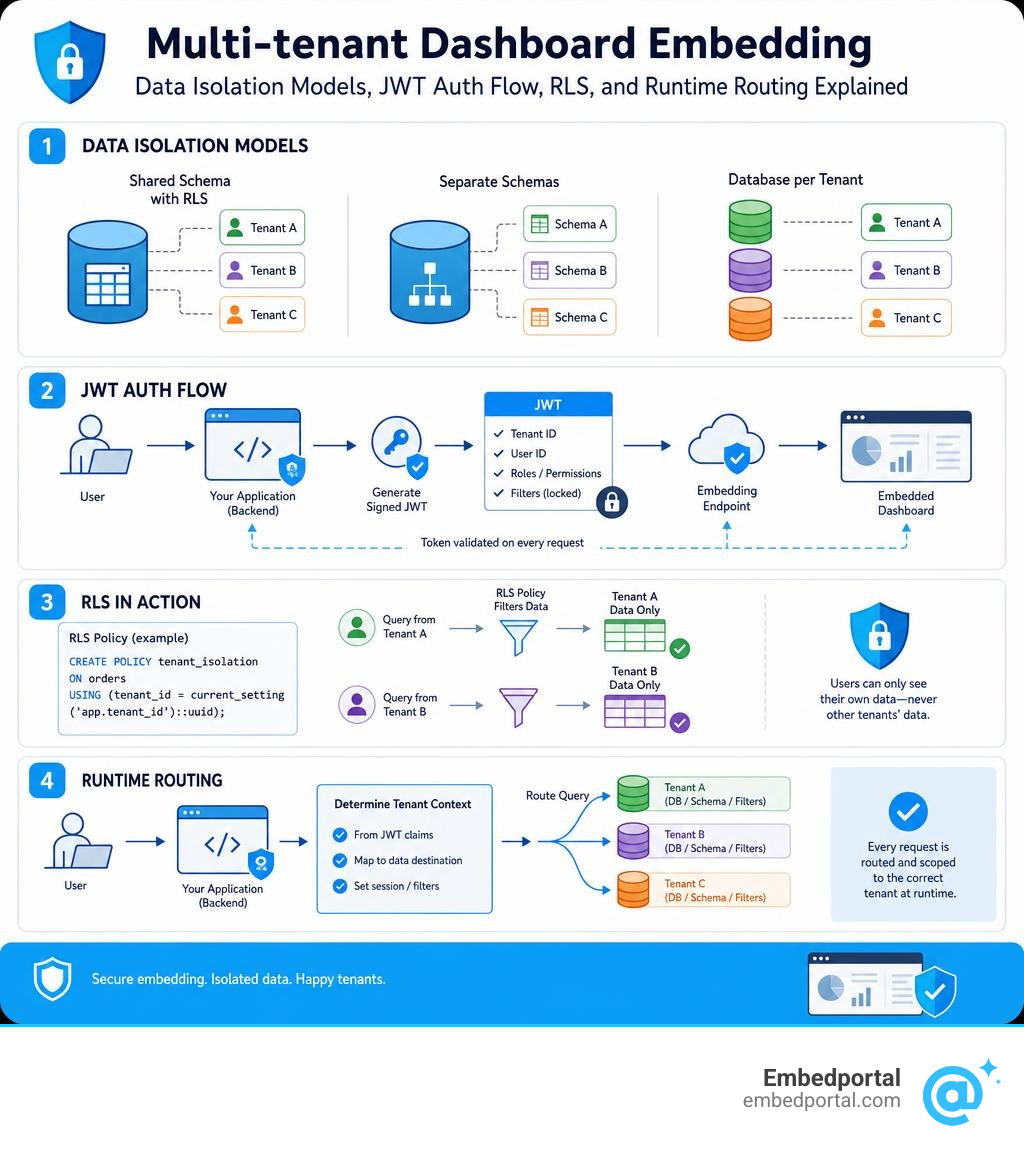
- Pick a data isolation model — shared schema with row-level security, separate schemas, or a dedicated database per tenant
- Generate signed JWTs server-side — lock tenant filters into the token so they can’t be tampered with from the browser
- Route queries to the right data at runtime — use parameterized connections or row-level security policies to scope every query to the authenticated tenant
- Choose your embedding method — SSO Embed API for full interactivity, or Secure URL Embed for simpler view-only access
- Test cross-tenant isolation — verify that no user can reach another tenant’s rows, schema, or database
Most SaaS teams hit the same wall: their BI tool handles single-tenant dashboards just fine, but multi-tenancy means stitching together row-level security, JWT auth, and vendor-specific embedding APIs — often for more than one BI tool at the same time. The maintenance burden grows fast.
One real-world example makes this concrete: a B2B analytics platform managing 1,000+ Snowflake databases uses a single dashboard template with runtime parameter tokens to route each customer to their own database. Zero dashboard duplication. Near-zero maintenance overhead.
That’s the goal. The sections below explain exactly how to get there.
Important embed multi tenant dashboards terms:
Database Architectures and Embedding Strategies
Choosing how to store and isolate your customers’ data is the single most important decision you will make when you embed multi-tenant dashboards. Your database architecture dictates your embedding strategy, your security model, and how much you will spend on cloud infrastructure.
In SaaS, data tenancy generally falls into three main buckets: a shared schema, separate schemas inside a shared database, or fully isolated databases for each customer. Each model comes with distinct trade-offs in terms of complexity, cost, and security.
For a deeper look into how these architectures function in the wild, check out this guide on Multi-tenant analytics for SaaS applications. When you are ready to implement these concepts, our breakdown of Embedded Analytics for SaaS offers a clear path forward.
Below is a comparison of the three primary database models and how they impact your embedding setup:
| Tenancy Model | Data Isolation Level | Operational Complexity | Cost Efficiency | Embedding Strategy |
|---|---|---|---|---|
| Shared Database, Shared Schema | Logical isolation via tenant ID column | Low (one database to maintain) | Extremely High (maximum resource sharing) | Row-Level Security (RLS) or signed JWT filters |
| Shared Database, Separate Schemas | Schema-level isolation | Medium (automated schema migration needed) | High (shared database resources) | Dynamic schema routing or namespace parameters |
| Isolated Database-per-Tenant | Physical isolation | High (hundreds or thousands of databases) | Low to Medium (idle database overhead) | Runtime database connection parameters |
Why SaaS Apps Need to Embed Multi Tenant Dashboards
Your customers do not want to export CSVs and build their own pivot tables in Excel. They expect native, interactive, and beautifully designed analytics directly inside your application. By embedding dashboards, you instantly increase the core value of your product, drive daily active usage, and significantly improve customer retention.
However, building an entire charting library, query engine, and permission layer from scratch is an engineering black hole. It can take months of dedicated development time away from your core product features. Leveraging a robust Multi-Tenant Analytics framework lets you skip the infrastructure headache. You can deliver polished, interactive, and secure dashboards in days rather than quarters.
Shared Database and Shared Schema
The shared database and shared schema model is the most common approach for early-to-mid-stage SaaS applications. In this setup, all of your customers’ data lives in the same tables, side-by-side. To differentiate between them, every single table includes a tenant identifier column, such as customerid or tenantid.
To isolate data in this model, you rely on logical separation. Your database queries must always include a filter like “WHERE tenantid = currenttenant”. If a single query forgets this clause, you risk a catastrophic cross-tenant data leak. To make this model safe for customer-facing analytics, you must implement database-level Row Level Security or use secure, server-side signed tokens to guarantee that users can never modify these filters from their web browsers.
Shared Database with Separate Schemas
If you want a stronger boundary between your customers without the overhead of managing separate database servers, separate schemas are an excellent compromise. In this model, every tenant has their own dedicated schema (or namespace) within a single database instance.
This approach simplifies database migrations and custom tenant configurations. For example, Tenant A’s tables live in the “tenanta” schema, while Tenant B’s tables live in the “tenantb” schema. When embedding dashboards, your query engine must dynamically route queries to the correct schema at runtime. This is typically achieved by setting a search path or substituting a schema namespace token in your SQL queries based on the authenticated user’s session.
Isolated Database-Per-Tenant Architecture
For enterprise SaaS applications, healthcare platforms, or products serving government agencies, physical data isolation is often a strict compliance requirement. Under a database-per-tenant architecture, every customer gets their own completely isolated database instance.
While this provides the absolute highest level of security and completely eliminates the risk of cross-tenant data leakage, it introduces a massive scaling challenge. How do you build analytics for thousands of customers without duplicating your dashboards thousands of times? The answer lies in runtime connection parameterization. You build a single, master dashboard template, and when a user logs in, your embedding platform dynamically swaps the underlying database connection string at query execution time.
How to Embed Multi Tenant Dashboards with Row-Level Security and JWTs
To securely embed multi-tenant dashboards, you must establish a trust relationship between your application backend, your BI rendering engine, and the user’s browser. This is accomplished using JSON Web Tokens (JWTs) and server-side signing.
The core rule of secure embedding is simple: the client browser must never be allowed to define or modify data filters. Instead, your backend validates the user’s session, determines which tenant they belong to, and signs those parameters into a short-lived JWT. The browser passes this token to the embedding iframe or web component, which the visualization engine uses to render only the permitted data rows.

To explore how to implement this end-to-end, read our comprehensive guide on Multi-Tenant Row Level Security.
Securing Tenant Data with Row-Level Security (RLS)
Row-level security acts as a gatekeeper at the database or semantic layer, ensuring that users only see the rows of data that match their assigned attributes. When configured correctly, RLS is enforced automatically on every query, making it impossible for a user to bypass filters.
For instance, if you are using Amazon QuickSight, you can configure tag-based RLS. You set up tag keys (like TenantID) on your dataset columns and pass those tag values at runtime via the GenerateEmbedURLForAnonymousUser API. QuickSight allows up to 50 tag keys per dataset, giving you the flexibility to filter across multiple dimensions like region, hospital ID, or department. For more details on this implementation, refer to the AWS Big Data blog on how to Embed multi-tenant dashboards in SaaS apps using Amazon QuickSight without provisioning or managing users.
To keep your RLS implementation clean and bulletproof, follow these industry best practices:
- Always enforce RLS at the database or semantic layer rather than relying on client-side frontend filters.
- Keep your RLS rules simple and index your tenant identifier columns to prevent query performance degradation.
- Regularly audit your RLS policies to ensure no edge cases allow empty or wildcard values to expose all tenant rows.
- Use a centralized dashboard management approach to apply security policies uniformly across all visualization assets.
You can learn more about these strategies in our deep dive on Row Level Security Best Practices.
Implementing JWT-Based Token Authentication
JWTs are the gold standard for securing embedded dashboards because they are signed using a server-side secret key that is never exposed to the client. If a user attempts to edit the tenant ID in their browser console to spy on another customer’s data, the signature verification will fail, and the dashboard will refuse to load.
When generating JWTs for your embedded dashboards, always include a short token expiration time, typically between 5 and 15 minutes. This ensures that even if a token is somehow intercepted, its window of utility is incredibly small. Additionally, configure your embedding platform to restrict allowed iframe origins to your specific application domains, preventing unauthorized sites from embedding your data portals. For a complete look at centralized token management, check out our resource on Centralized Row Level Security.
Dynamic Tenant Routing with Runtime Parameters
If your application uses a database-per-tenant or schema-per-tenant model, RLS alone isn’t enough. You need a way to change the actual database connection at runtime. This is where runtime parameters come into play.
Modern embedding platforms allow you to insert tokens, such as a database name placeholder, directly into your datasource connection configurations. When a query is executed, the platform replaces this token with the actual database name assigned to the authenticated user. This means a single dashboard template can dynamically run queries against Snowflake Database A for Tenant A, and Snowflake Database B for Tenant B, without requiring any dashboard duplication. Discover how this works in practice with our guide on SaaS BI Embedding.
Assigning and Managing Tenant-Specific Parameter Values
To make dynamic routing work at scale, you need a programmatic way to map your users to their respective tenant parameters. This mapping can be managed in two ways:
- Via the UI (User or Group Level): For smaller deployments, administrators can manually assign database names, schemas, or tenant IDs to specific user groups inside the BI tool’s admin panel.
- Via SSO API (Programmatic): For high-scale SaaS applications, this mapping must be automated. When a new customer signs up, your application backend calls our SSO API to provision their user group and automatically assign their database connection parameters. This ensures a seamless onboarding experience with zero manual intervention.
SSO Embed API vs. Secure URL Embed
When integrating dashboards, you will generally choose between two primary embedding methods: the SSO Embed API and the Secure URL Embed.
The SSO Embed API is the recommended approach for production SaaS applications. It offers full interactivity, enabling features like ad-hoc filtering, drilldowns, and deep integration with your application’s state. It uses signed tokens to authenticate users on the fly, creating a seamless, single-sign-on experience where the user doesn’t even realize they are looking at an embedded third-party tool.
The Secure URL Embed is a simpler, view-only approach. It is ideal for quick integrations, internal portals, or static reports where users do not need to interact heavily with the charts. While it is easier to set up initially, it lacks the advanced security context and interactive depth required by modern, user-facing SaaS products. To weigh your options, read more about Embedded BI.
Managing Filters, Drilldowns, and Self-Service Safely
One of the biggest risks of giving users interactive dashboard features — like custom filters, drilldowns, and self-service query builders — is that they might accidentally break out of their tenant sandbox.
To prevent this, your embedding platform must apply security rules at the data-model level rather than the visual level. If a user utilizes a self-service exploration tool to build a custom chart, the underlying query generator must automatically append the tenant-specific filters or connect to their dedicated database. This ensures that no matter how much they slice, dice, or drill down into the data, they are physically constrained to their own sandbox.
Performance, Scalability, and Maintenance at Scale
As your SaaS application grows from ten tenants to tens of thousands, the infrastructure supporting your embedded dashboards will face immense pressure. A single dashboard template query that runs fast for a small customer might grind to a halt when executed against an enterprise-sized tenant database.
Furthermore, managing connection pools for thousands of distinct databases can quickly exhaust database resources if not handled correctly.
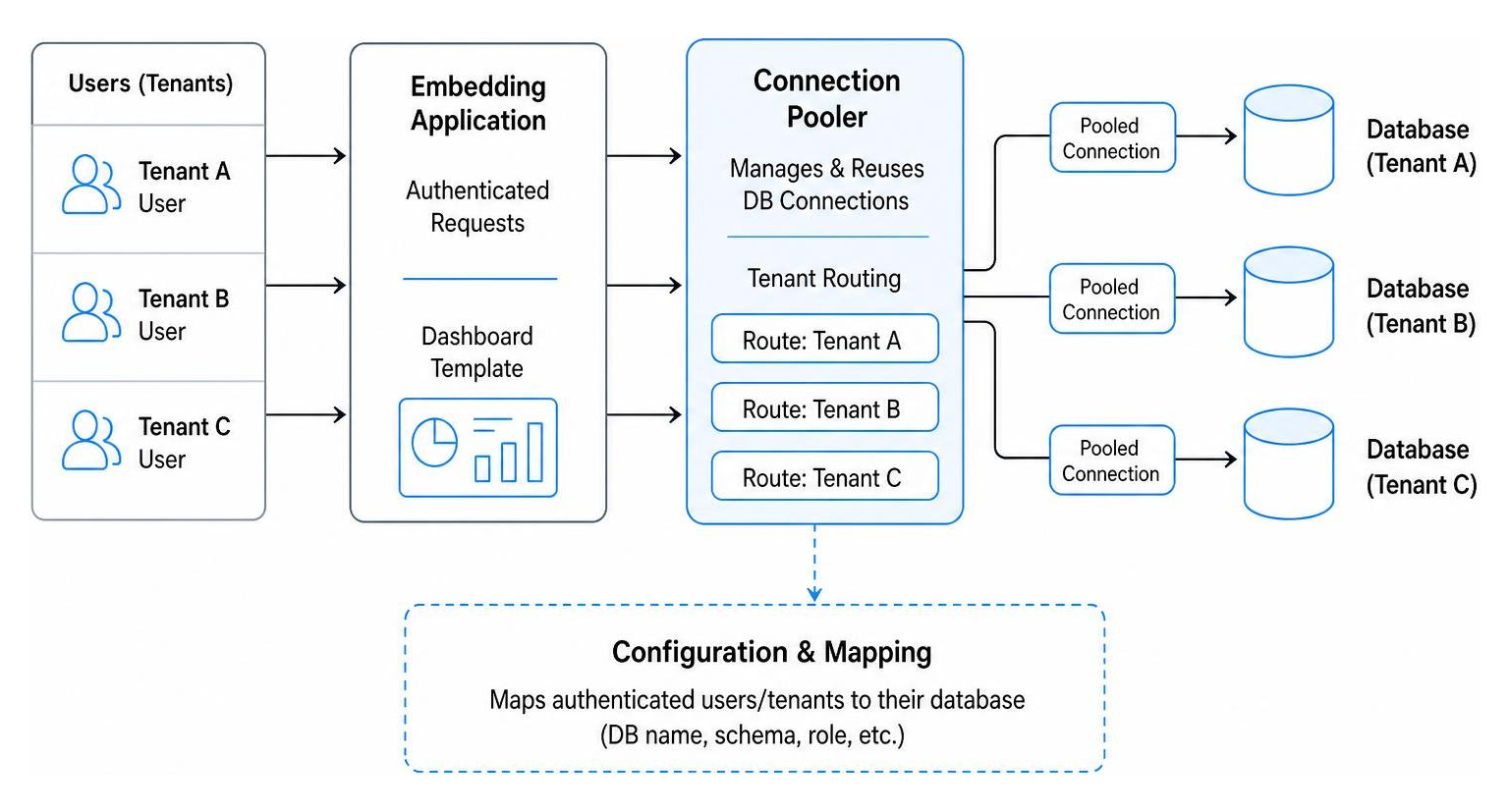
To scale your embedded analytics smoothly, you must focus on connection pooling, query optimization, and caching. Our guide on Embedded Analytics outlines the architectural foundations needed to support high-concurrency analytics without breaking your budget.
Here are the key performance optimizations you should implement:
- Connection Pooling: Do not open a fresh database connection for every single query. Use a centralized connection pooler to reuse connections across tenants, especially in database-per-tenant architectures.
- Server-Side Caching: Cache query results at the embedding platform level. If multiple users from the same tenant load the same dashboard within a short window, serve the cached result instead of hitting your warehouse again.
- Query Optimization: Keep your database indexes updated. Ensure that your tenant_id columns are indexed, and utilize date-partitioning on large event tables to keep query execution times under sub-second thresholds.
- Resource Isolation: Prevent a single, massive tenant from hogging all your database compute. Use resource groups or separate warehouse sizes (e.g., in Snowflake) to isolate heavy analytical workloads.
Frequently Asked Questions about Multi-Tenant Embedding
How do you prevent cross-tenant data leakage when embedding dashboards?
Preventing cross-tenant data leakage requires a multi-layered security approach. First, never rely on client-side filtering (like hiding a filter dropdown with CSS). All filtering must be enforced server-side.
Second, use signed JWTs to pass tenant identifiers. This ensures that the parameters cannot be altered in transit. Finally, leverage database-level row-level security or runtime parameter routing so that the database itself rejects any queries attempting to access unauthorized tenant data.
Can you embed multi tenant dashboards across different BI vendors?
Yes. While most traditional BI tools lock you into their specific ecosystem, Embedportal allows you to embed dashboards from multiple vendors — including Tableau, Power BI, QuickSight, and Metabase — inside a single, unified client portal.
We translate your centralized row-level security rules and tenant mappings into each vendor’s native security mechanism (such as Tableau User Filters, Power BI Effective Identities, or QuickSight session tags) automatically. This gives your development team a single API to manage, regardless of which BI tools your data analysts prefer to use.
How does database-per-tenant scaling affect query performance?
A database-per-tenant architecture actually helps query performance by keeping individual databases small and isolated. Because Tenant A’s queries never run against the same tables as Tenant B’s, there is no “noisy neighbor” effect at the table level.
However, it can strain your connection limits. To maintain fast query response times, you must use intelligent connection pooling and ensure that your embedding platform dynamically manages active database connections efficiently.
Conclusion
To embed multi-tenant dashboards successfully, you don’t need to rebuild your entire analytics stack or duplicate your dashboards for every new customer. By combining a clear database architecture with robust row-level security, signed JWTs, and runtime parameter routing, you can deliver a native, secure, and highly scalable analytics experience.
At Embedportal, we make this complex process simple. Our white-label embedding platform allows your team to embed multi-vendor analytics with unified branding, centralized Row Level Security, and seamless SSO in under an hour.
Whether your data lives in a single shared schema or across thousands of isolated databases, we handle the heavy lifting of security, tenant routing, and performance optimization so you can focus on building your core product. Ready to see how easy multi-tenant embedding can be? Contact us today to get started.