Tableau Row Level Security Made Simple
What Is Role Level Security in Tableau (And Why It Matters)
Role level security in Tableau — more commonly called row-level security (RLS) — is a way to control which rows of data each user can see when they view a dashboard or workbook.
By default, every user with access to a published Tableau workbook sees all the data in it. RLS changes that, so each person only sees the rows they’re authorized to view — without needing separate workbooks or dashboards for each user.
Quick answer: How does row-level security work in Tableau?
There are five main ways to implement it:
- Manual user filters — Map individual users to specific data values by hand
- Dynamic user filters — Use a security field in your data with a calculated field and
USERNAME() - Data policies on virtual connections — Centralized, server-side enforcement (requires Data Management license, Tableau 2021.4+)
- Database-level RLS — Leverage your database’s built-in security mechanisms
- User attributes via JWT — Pass user context for embedded Tableau content
Think of it this way: Tableau permissions control whether a user can view, edit, or download a workbook. Row-level security controls which rows of data that user actually sees once they’re inside it. These are two separate layers of protection, and you often need both.
This distinction matters a lot if you’re embedding Tableau dashboards into a customer-facing product. A regional sales manager should see only their region’s numbers. A client in your portal should see only their own account data. Without RLS, one misconfigured permission could expose every customer’s data to everyone.
The stakes are real — and the good news is Tableau gives you several solid tools to get this right.
Role level security tableau basics:
Understanding Row-Level Security in Tableau
To build a reliable data environment, we must distinguish between content access and data visibility. It is a common point of confusion for teams deploying BI dashboards: they assume that locking down folders or workbooks is enough.
Content permissions dictate whether a user can see a project folder, open a workbook, click “Web Edit,” or download a PDF. However, once that user opens the workbook, standard permissions do not filter the underlying data. If your sales workbook contains transactional data for the entire United States, any user with “View” permissions can see the entire dataset by default.
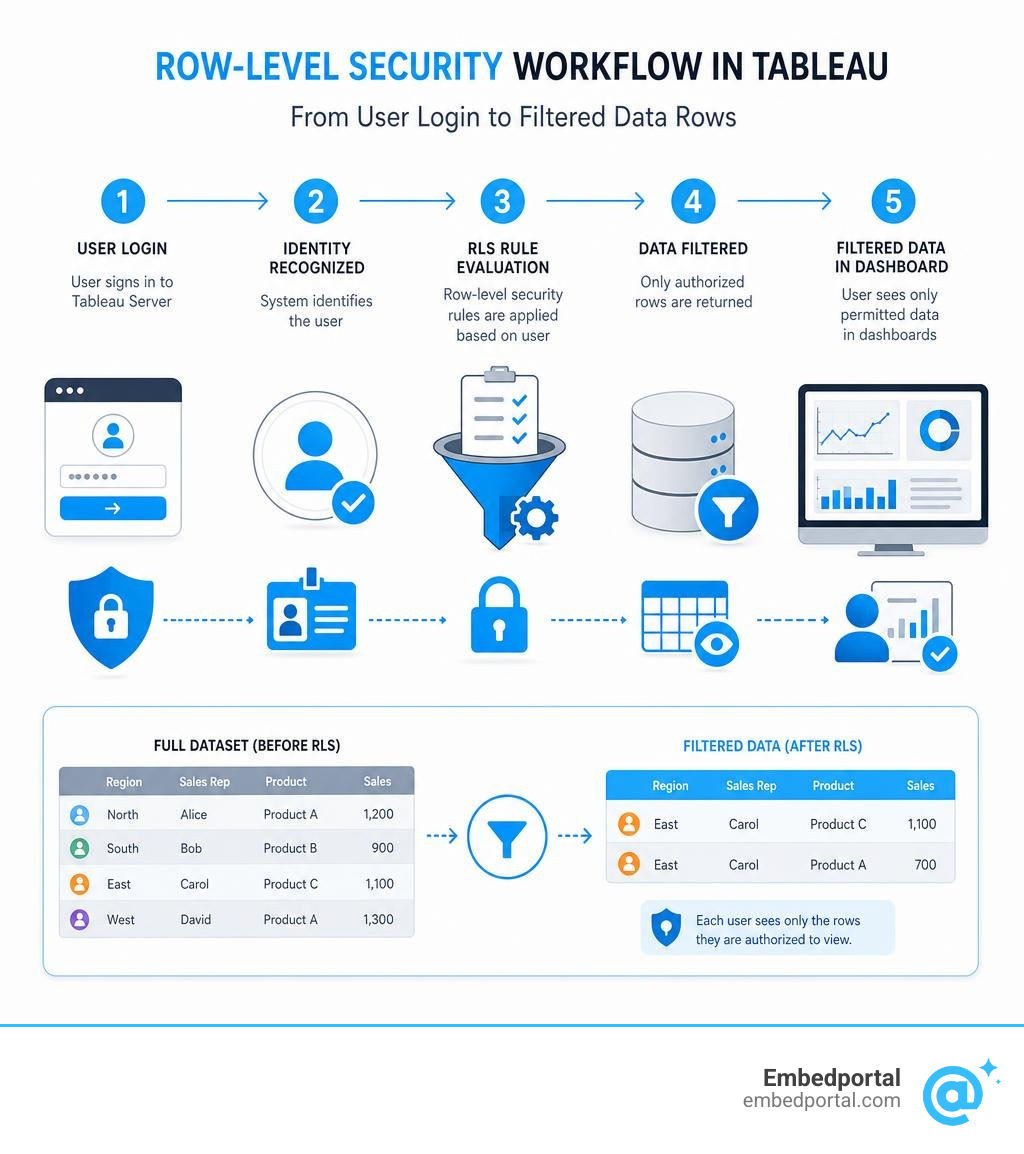
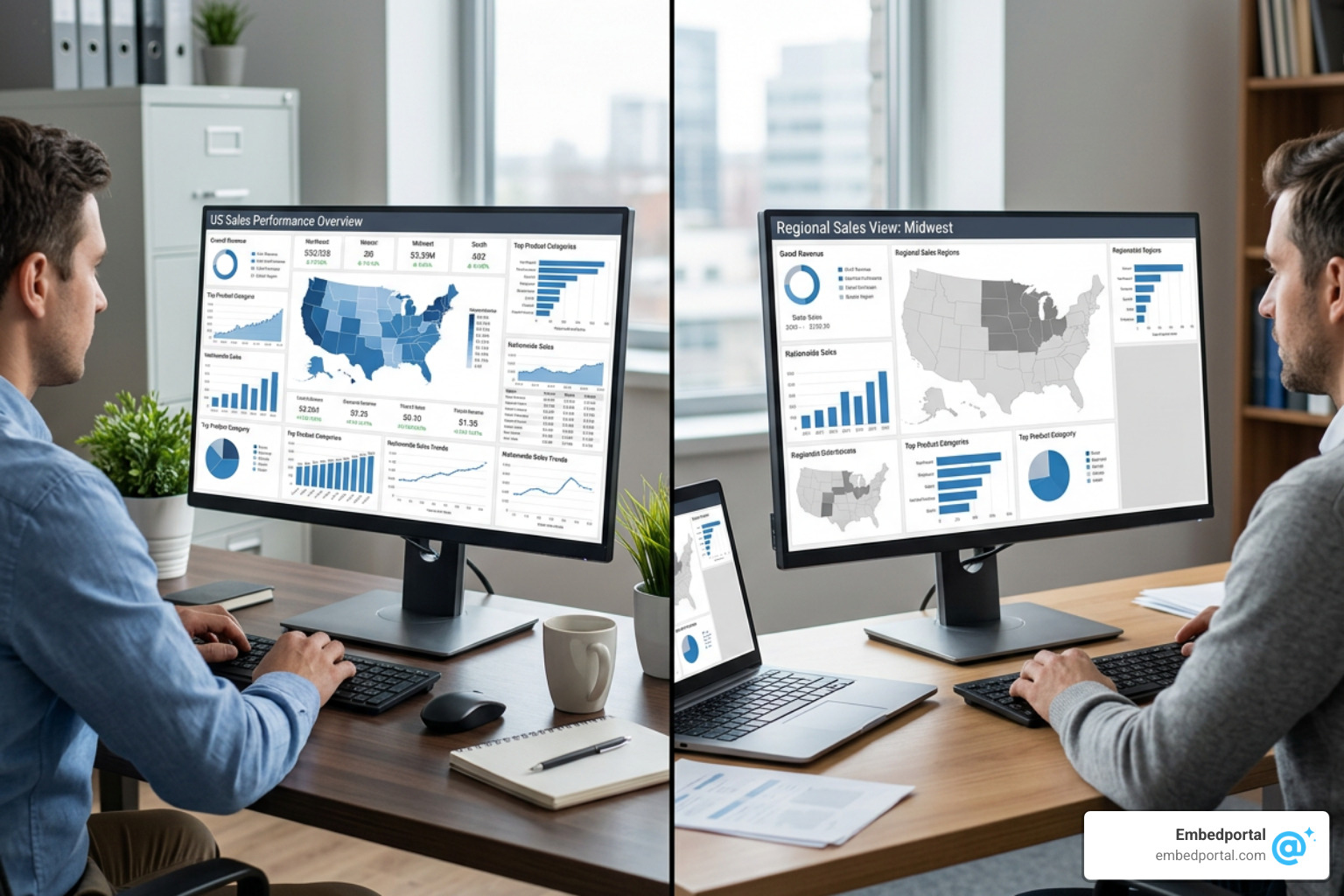
Implementing Row Level Security Tableau ensures that data visibility is evaluated dynamically at query time. When Alice logs in, the dashboard queries the database (or extract) and applies a filter so that only rows where Region equals “East” are returned. When Bob logs in, the exact same dashboard page displays only “West” region data. This creates a highly personalized, secure user experience while keeping your workbook inventory clean and easy to maintain.
Why Role Level Security Tableau is Essential for Data Governance
Data governance is not just about keeping bad actors out; it is about protecting your organization from accidental data exposure and ensuring compliance with privacy regulations.
When you Restrict Data Access with User Filters and Row Level Security – Tableau, you establish a robust security boundary. In many industries, showing one client another client’s proprietary metrics is a catastrophic breach of trust—and potentially a legal violation. Security filters applied at the row level prevent these mishaps.
Furthermore, relying on manual filtering (like expecting users to select their own name from a dropdown) is a major risk. A user could easily change the dropdown selection to view unauthorized data. True RLS is enforced behind the scenes, meaning the end-user has no way to bypass or disable the filter, even if they try to manipulate the dashboard.
How Tableau Handles RLS: Live Connections vs. Extracts
The way Tableau processes RLS depends heavily on whether your workbook uses a live connection or an extract. This choice has major implications for performance, security, and query design.
With a live connection, Tableau translates your RLS calculations into SQL queries and sends them directly to your source database. If your database has an efficient query optimizer, it can apply the security filters before executing complex joins. This keeps the database from doing unnecessary work and keeps your dashboards snappy.
With extracts, the security processing happens within Tableau’s Hyper engine. Historically, applying RLS to single-table extracts was incredibly slow because it required materializing massive, flattened tables with duplicate rows for every potential user-to-data mapping.
To solve this, modern versions of Tableau support multi-table extracts. Instead of flattening your data into a single table during the extract build, Tableau preserves the normalized structure of your physical tables. This lets you store your fact data in one table and your user entitlements in another, joining them only when the user views the dashboard. This approach dramatically improves performance and reduces extract generation times.
For a deeper dive into structuring these connections safely, you can refer to the RLS Best Practices for Data Sources and Workbooks – Tableau documentation.
Implementing Role Level Security Tableau: Core Methods
Choosing the right implementation path depends on your data architecture, your licensing model, and how frequently your user list changes.

Here is a quick breakdown of how the core methods compare:
| Method | Best Used For | Pros | Cons |
|---|---|---|---|
| Manual User Filters | Quick proofs of concept, static workbooks with few users | Very simple to set up, no database changes needed | High maintenance, must republish workbook when users change |
| Dynamic Filters | Scalable enterprise workbooks, changing user bases | Automated, secure, works with entitlement tables | Requires joining data to a security/reference table |
| Data Policies | Centralized security across multiple workbooks | Enforced server-side, managed in one place | Requires Data Management license |
| Database RLS | Organizations with pre-existing database security | Extremely secure, offloads processing to database | Only works with live connections, harder to set up |
| User Attributes via JWT | Embedded analytics and multi-tenant portals | Highly dynamic, scales perfectly for external users | Requires custom web development and SSO integration |
Manual User Filters and Static Mapping
Manual user filters are the easiest way to dip your toes into RLS, but they come with a catch. To set one up, you navigate to the Server menu in Tableau Desktop, select “Create User Filter,” and map your active Tableau Server users directly to specific dimension values (such as mapping Alice to the “East” region).
While this is excellent for a quick prototype or a static workbook with a small, unchanging group of users, it quickly becomes a headache at scale. Every time a new employee joins the team or someone changes departments, you have to open the workbook in Tableau Desktop, manually update the mappings, and republish it. For dynamic business environments, this manual maintenance overhead is rarely sustainable.
For more details on setting up these basic configurations, see the Overview of Row-Level Security Options in Tableau – Tableau guide.
Dynamic Filters with Entitlement Tables and User Functions
For a scalable, automated approach, dynamic filters are the gold standard. Instead of hardcoding user mappings inside the workbook, you store those mappings in an entitlement table (often called a security table or reference table) within your database.
This entitlement table typically contains two main columns: the user’s login ID (matching their Tableau username) and the attribute they are allowed to see (such as a Region, Department, or Client ID).
To enforce this, you join your main fact table to your entitlement table and use Tableau’s built-in user functions in a calculated field. The two most common functions are:
- USERNAME(): Returns the Tableau username of the logged-in user.
- ISMEMBEROF(): Returns true if the logged-in user belongs to a specific Tableau Server group.
For example, you can create a calculated field named “Security Filter” with the following formula:
[Entitlement Username] = USERNAME()
You then drag this calculated field to your Data Source Filters shelf and set it to TRUE. When Alice logs in, Tableau automatically detects her username, filters the entitlement table to only show her rows, and joins that filtered subset to your main data.
To learn more about structuring these relationships, check out the Whitepaper – Row Level Security in Tableau with Entitlements Tables and our Embed Tableau RLS Complete Guide.
Centralized Data Policies on Virtual Connections
If your organization has the Tableau Data Management license, you can take advantage of virtual connections and data policies. Introduced to address the limitations of workbook-level security, this method allows you to define your RLS rules in a single, centralized location.
Instead of writing RLS calculations in every single workbook, a Creator license user builds a virtual connection to the database and applies a data policy directly to it. This policy maps your entitlement tables to your physical tables server-side.
Any workbook or data source built on top of that virtual connection automatically inherits the security policy. Because the filtering is enforced at the connection level, there is zero risk of a workbook author accidentally deleting a filter or exposing raw data during web editing. This is a game-changer for large organizations looking to scale their Centralized Row Level Security efforts.
Database-Level RLS and User Attributes via JWT
Some organizations prefer to keep security logic completely out of the BI layer. If your database already has built-in RLS policies (such as Row-Level Security in PostgreSQL or SQL Server), Tableau can leverage them directly.
To make this work, you must use a live connection. When a user logs in to Tableau, Tableau passes their credentials (or a service account with delegated permissions) to the database, which then filters the rows before returning the query results. This is highly secure and ensures that your data policies apply consistently across all database clients, not just Tableau.
When embedding Tableau into customer portals or applications, you can also pass user attributes dynamically using JSON Web Tokens (JWT). When a user authenticates into your host application, your server generates a secure JWT containing custom claims (like the user’s region or tenant ID). Tableau reads these attributes at runtime, allowing you to filter data dynamically without needing to sync thousands of external users directly into your Tableau Server directory. This is highly effective for Tableau Embed scenarios.
Best Practices for Designing Entitlement Tables and Optimizing Performance
An RLS solution is only as good as the database model supporting it. Poorly designed entitlement tables can cause query times to skyrocket and put a massive strain on your database or Tableau Server.
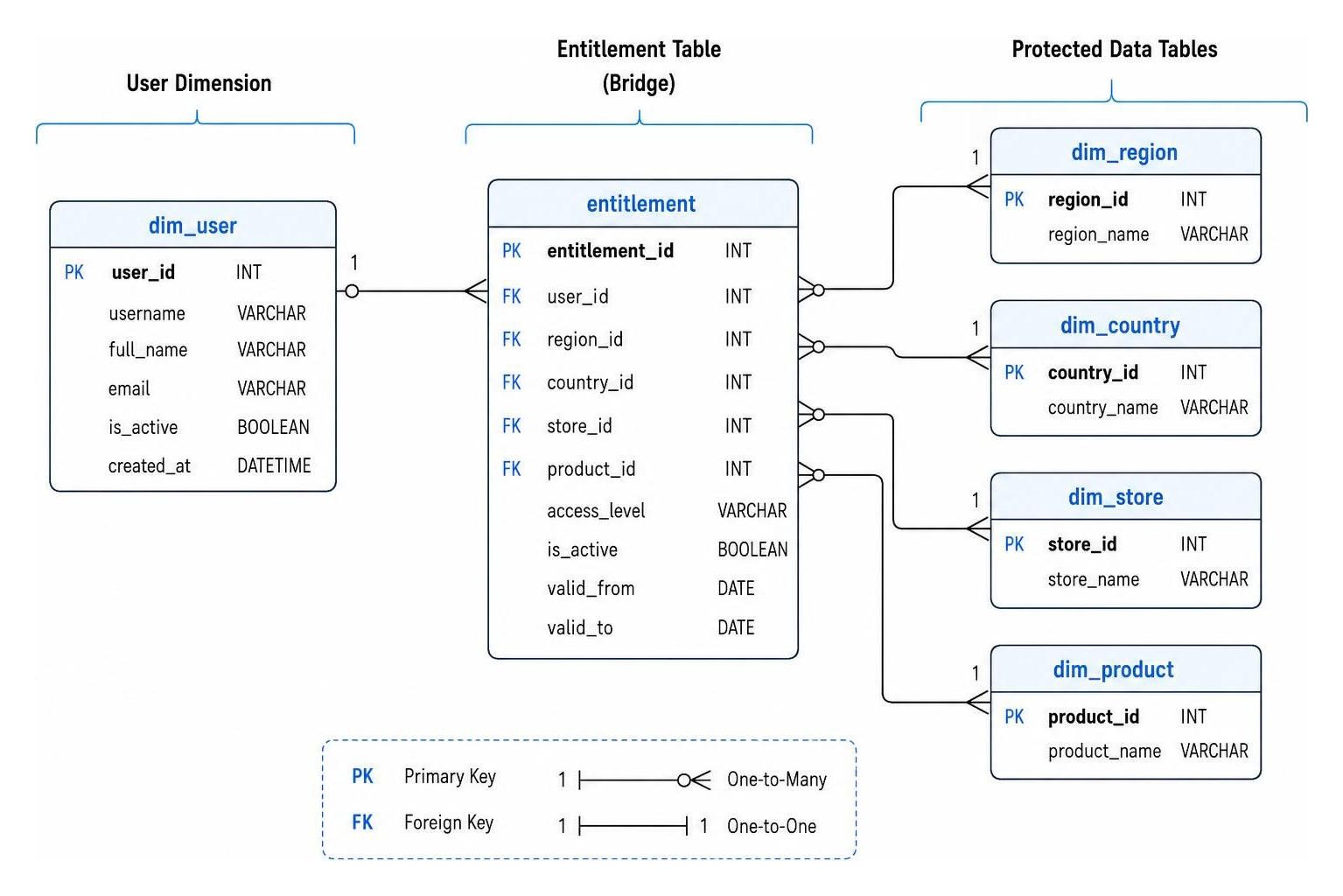
Deepest Granularity vs. Sparse Models
When designing your entitlement tables, you generally have to choose between two structural models:
Deepest Granularity (Full Mapping): In this model, you map every user explicitly to the lowest level of data they can see. If Bob has access to 500 individual stores, your entitlement table will have 500 rows for Bob. This model is highly explicit and secure, but it can lead to massive entitlement tables that slow down join performance.
Sparse Entitlements: This model uses wildcarding or NULL values to represent broader access. For example, if Bob can see all stores in the “West” region, you store a single row for Bob with Region = “West” and Store = NULL. While this keeps your entitlement table small, it requires more complex SQL or calculated fields to handle the NULL logic.
To handle “All Access” users (like executives who need to see everything), avoid creating a row for every single entity. Instead, use a left join combined with a Tableau group check. You can write a calculation that checks if a user is in an “All Access” group; if they are, the join bypasses the entitlement filters entirely, returning the full dataset instantly.
Optimizing Extract Performance with Multi-Table Storage
If you are using extracts, avoid the classic mistake of flattening your tables before generating the extract. If you join a 10-million-row fact table to a many-to-many entitlement table, the resulting joined table might balloon to 100 million rows. Materializing this join inside a single-table extract will destroy performance.
Instead, configure your extract to store data using Logical Tables (representing multiple physical tables). Keep your extract limited to exactly two logical tables: your main fact table and your entitlements reference table.
By keeping them separate, Tableau’s Hyper engine does not materialize the join during the extract build. It only evaluates the relationship at runtime when a user opens the dashboard, keeping your extract sizes small and your load times fast.
Frequently Asked Questions about Tableau RLS
What is the difference between Tableau permissions and row-level security?
Tableau permissions control access to content and features. They determine whether a user can see a workbook, edit a sheet, download a PDF, or post comments. Row-level security controls the actual data rows visible inside that workbook. Two users can have identical “View” permissions on a dashboard but see completely different data based on their user identity.
Can I use row-level security with Tableau extracts?
Yes. However, you should use multi-table extracts rather than single-table extracts. Storing your fact data and entitlements table as separate physical tables within the extract prevents massive data duplication and ensures optimal query performance.
Troubleshooting Common Role Level Security Tableau Mistakes
- Using Extract Filters Instead of Data Source Filters: This is a critical security mistake. An extract filter is applied while the extract is being generated. If you use an extract filter with USERNAME(), the extract will only contain data for the creator who ran the extract, and it will not adjust for other users. Always use Data Source Filters for RLS.
- Ignoring Case Sensitivity: Tableau user functions like USERNAME() and ISMEMBEROF() are case-sensitive. If your database entitlement table lists a user as “alice” but their Tableau login is “Alice”, the RLS join will fail, and they will see an empty dashboard.
- Exposing the Web Edit Feature: If you embed a workbook with RLS but allow users to “Web Edit” or download the workbook, they can easily open the data pane, remove the data source filter, and view the entire unfiltered dataset. Always lock down workbook permissions to prevent downloading or editing in production environments, especially when dealing with Multi Tenant Row Level Security.
Conclusion
Implementing role level security tableau does not have to be an overwhelming chore. By choosing the right method—whether that is dynamic entitlement tables, centralized virtual connections, or database-level security—you can build a secure, scalable, and highly personalized reporting environment.
If you are looking to simplify this process even further, especially when embedding dashboards into your own applications, we can help. Embedportal provides a white-label embedding platform that allows your team to embed multi-vendor analytics (including Tableau, Power BI, and QuickSight) with unified branding, robust row-level security, and seamless SSO integration in under an hour.
Ready to make your embedded analytics secure, beautiful, and completely hassle-free? Secure your embedded dashboards with Embedportal today.