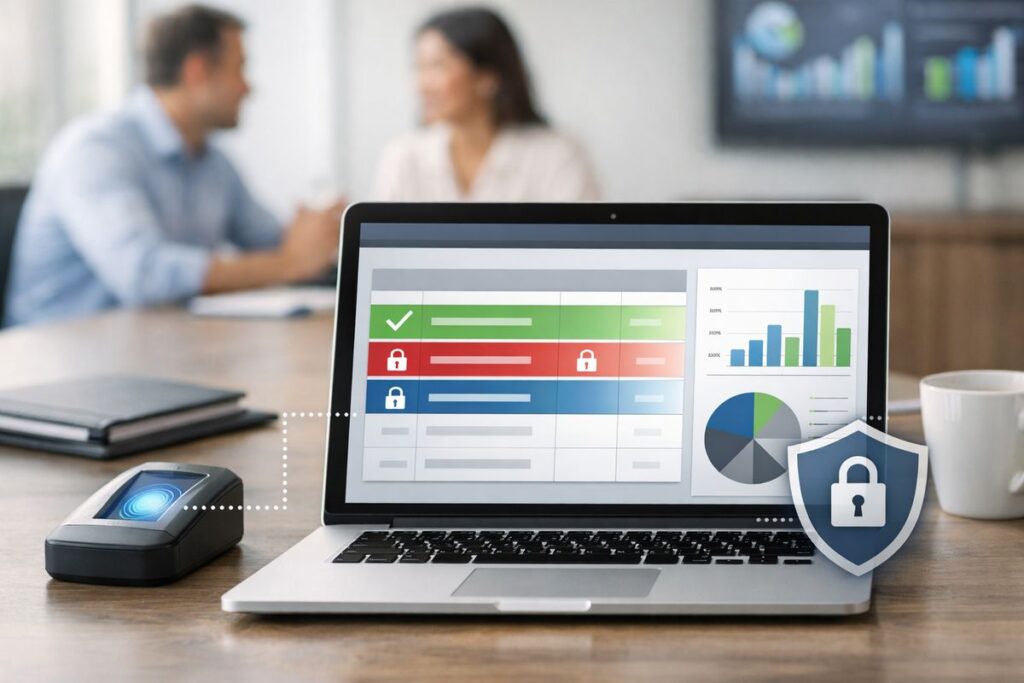
The No-Nonsense Guide to Row Level Security in Modern BI
What Row-Level Security Actually Does (And Why It Matters for Embedded BI)
Row level security (RLS) is a database access control that limits which rows of data a specific user can see or modify — without changing the underlying table structure or duplicating data.
Here’s the quick version:
- What it is: A filter applied at the database or BI layer that restricts data by row, based on who is asking
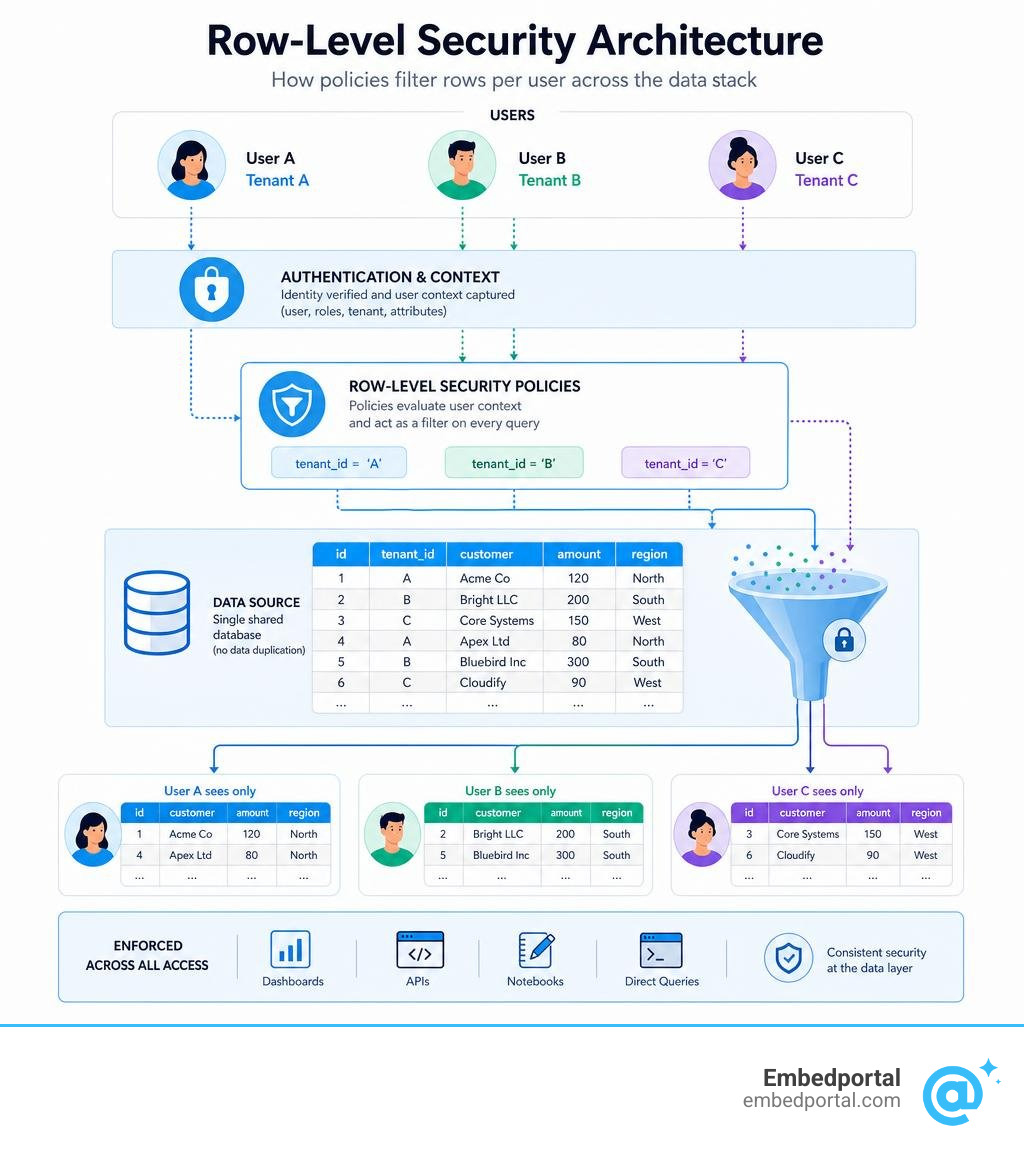
- What it does: User A and User B query the same table — but each sees only their rows
- What it isn’t: Column-level security (hiding fields), table-level security (hiding entire tables), or application-layer filtering
- Who it’s for: Any system where different users share the same data source but need different views — multi-tenant SaaS, healthcare, finance, retail, and more
The core idea: instead of building separate tables or databases for each user or tenant, you write a policy that says “only show rows where tenant_id matches the current user.” The database engine enforces that rule automatically, at query time, for every access path — dashboards, APIs, notebooks, and direct queries included.
This is what makes RLS powerful. The logic lives in the data layer, not scattered across your application code.
For analytics and product teams embedding dashboards into customer portals, this is where things get complicated fast. Every BI tool — Power BI, Tableau, Looker, Metabase — has its own RLS implementation. Keeping those policies consistent, synchronized with your identity layer, and working correctly across vendors is a real operational challenge.
This guide covers everything: how RLS works under the hood, how to implement it across major platforms, where it falls short, and how to manage it at scale.
What is Row Level Security and How Does It Differ from Other Access Controls?
To understand how to build robust Row Level Security policies, we first need to look at where RLS fits in the wider data governance landscape. In any modern organization, enforcing the principle of least privilege is non-negotiable. However, security controls operate at different layers of granularity.
| Security Level | What It Restricts | Common Use Case | Implementation Complexity |
|---|---|---|---|
| Table-Level | Access to an entire entity or table | Preventing marketing teams from accessing raw HR payroll tables | Low (handled via simple GRANT/REVOKE privileges) |
| Column-Level | Access to specific vertical attributes (fields) | Hiding Social Security Numbers or credit card columns from customer support agents | Medium (requires schema design or view configurations) |
| Row-Level | Access to horizontal records (rows) based on user identity or context | Ensuring a regional sales manager only sees transactions from their assigned territory | High (requires dynamic policies and database-level filters) |
Using What Is Row-Level Security? as a foundation for data segregation, we can see that RLS allows us to logically isolate data within a single physical table. Rather than spinning up separate physical databases for every single client, we store everyone’s data together and let the system filter it dynamically on the fly.
Row Level Security vs. Column-Level Security
While both are essential tools for data governance, row-level and column-level security solve completely different problems.
Column-level security (CLS) restricts access vertically. If a column contains sensitive fields like medical histories or salaries, CLS hides that entire column from unauthorized users while still letting them browse the rest of the table. It is about selective visibility of attributes. In some BI platforms, this is managed through object-level security, which completely hides the column metadata.
RLS, on the other hand, restricts access horizontally. A user with row-level security can see all the columns, but only for specific rows. For example, a doctor can see the salary, SSN, and diagnosis columns, but only for patients assigned directly to them. If you need to protect sensitive fields and restrict record access, you must use both controls in tandem.
Row Level Security vs. Role-Based Access Control (RBAC)
Role-Based Access Control (RBAC) is the standard method for managing user permissions based on organizational roles (such as Admin, Analyst, or Viewer). RBAC is great for determining what actions a user can perform and which tools they can use.
However, RBAC struggles with fine-grained, dynamic authorization. If you have 500 customers, creating 500 distinct database roles is an administrative nightmare. This is where RLS steps in. RLS uses the user’s execution context and session context to evaluate access dynamically at runtime. Instead of relying on a static role, the database looks at the signed-in user’s identity (or an passed-in tenant ID) and applies a matching filter to the query automatically.
How Row-Level Security Works at the Database Engine Level
To implement RLS securely, we have to look past the user interface and understand what happens inside the database engine when a query is executed.

When a user runs a query, it does not go straight to the storage engine. Instead, it passes through a query parser and a security policy manager. According to the technical documentation on Row-Level Security – SQL Server | Microsoft Learn , the database engine uses security predicates to control row visibility.
There are two primary types of security predicates:
- Filter Predicates: These silently filter the rows available to read operations (SELECT, UPDATE, and DELETE). If a row does not match the predicate, it is excluded from the result set as if it never existed.
- Block Predicates: These explicitly block write operations (INSERT, UPDATE, and DELETE) that violate the security policy, throwing a database error if a user tries to write data they do not own.
The Database Query Rewrite Process
Under the hood, the database engine performs a query rewrite. When a user submits a query like “SELECT * FROM sales_data”, the query optimizer intercepts it. It checks if there is an active security policy bound to the target table.
If a policy exists, the engine looks up the associated inline table-valued function or policy expression. It then rewrites the query to append the security predicate directly to the WHERE clause. The original query becomes something like “SELECT * FROM salesdata WHERE salesrepemail = SESSIONCONTEXT(N’user_email’)”.
Because this rewrite happens at the compilation stage, the query optimizer can analyze the updated query and build an efficient execution plan. However, this process does introduce some performance overhead. If your security predicates rely on complex subqueries or unindexed columns, your database will struggle to return results quickly.
Read Predicates vs. Write Predicates
Most advanced databases allow you to define separate policies for reading and writing data. For instance, in PostgreSQL: Documentation: 18: Row Security Policies , you can create specific policies using USING and WITH CHECK clauses:
- USING Clause (Read Predicates): Defines which existing rows are visible to the user. This applies to SELECT queries, as well as the rows targeted for UPDATE and DELETE.
- WITH CHECK Clause (Write Predicates): Defines which new or modified rows are allowed to be created. This applies to INSERT and UPDATE operations to prevent users from inserting data belonging to another tenant or updating a record to a value that would make it invisible to themselves.
Implementing Row-Level Security Across Modern BI and Data Platforms
In a modern data stack, data flows from warehouses to BI dashboards. Setting up a Centralized Row Level Security strategy means knowing how to configure these policies across different tools.

There are two main approaches to RLS:
- Static Policies: Where you manually map users to specific roles (e.g., creating a “West Region” role and adding West-coast managers to it).
- Dynamic Policies: Where a single, generic policy determines access at runtime by comparing the user’s session identity against a lookup table or metadata.
Implementing RLS in BI Dashboards
If you are displaying data in business intelligence tools, you can configure RLS directly within the semantic model.
Power BI (Microsoft Fabric)
In Power BI, you define roles and rules in Power BI Desktop using DAX (Data Analysis Expressions) filters. For example, to filter a table by region, you might use a static filter like [Region] = “West”.
For dynamic policies, you rely on user functions like USERPRINCIPALNAME() or USERNAME(). A common pattern is creating a user-mapping table and writing a DAX filter such as [UserEmail] = USERPRINCIPALNAME(). This allows a single role definition to filter data differently for every user who logs in.
However, there are several key platform limitations to keep in mind:
- DirectQuery and SSO: The “Test as role” feature does not work for DirectQuery semantic models with single sign-on (SSO) enabled.
- Direct Lake Fallback: RLS is supported for Direct Lake models in Microsoft Fabric, but if a DAX query falls back to DirectQuery mode due to unsupported features, your performance characteristics can degrade.
- Bi-Directional Filtering: Enabling bi-directional cross-filtering with RLS can severely hurt query performance, especially in models with complex relationships.
- Group Restrictions: Microsoft 365 groups are not supported for RLS role membership; you must use distribution groups, mail-enabled groups, or Microsoft Entra security groups.
- Service Principals: Service principals cannot be added to an RLS role, and RLS is not applied for apps using a service principal as the final effective identity.
For a deeper dive into these configurations, see our guides on Power BI Row Level Security and Row Level Security Tableau.
Implementing RLS in PostgreSQL and Cloud Data Warehouses
If you want to secure data at the source, you should implement RLS directly in your database or cloud data warehouse.
PostgreSQL
To secure a table in Postgres, you must explicitly run the command “ALTER TABLE tablename ENABLE ROW LEVEL SECURITY;”. By default, table owners and superusers bypass these rules. If you want to force the policies on the table owner as well, you must run “ALTER TABLE tablename FORCE ROW LEVEL SECURITY;”.
With the release of Postgres 15 and 16, you can also use security invoker views. Normally, views run with the permissions of the view creator (security definer). Setting security_invoker = true ensures the view respects the RLS policies of the user running the query.
Google BigQuery
In BigQuery, you manage row-level access policies using DDL statements. As explained in the Introduction to BigQuery row-level security , you can create a policy that filters rows using the SESSION_USER() function.
That BigQuery row access policies impose a 100 MB limit on results from top-level subqueries. Additionally, these policies are implicitly deleted if you overwrite a table using a WRITE_TRUNCATE operation.
To explore more database-specific setups, browse our dedicated Category Row Level Security resource library.
Key Benefits, Limitations, and Performance Risks of RLS
While RLS is an incredibly powerful tool for data security, it is not a silver bullet. It comes with clear trade-offs that you must plan for.

Core Benefits for Multi-Tenancy and Compliance
For modern cloud applications and enterprise analytics, RLS provides several key advantages:
- Logical Segregation: You can keep all customer data in a single table, reducing hosting costs, simplifying your database schema, and avoiding the operational complexity of physical data isolation.
- Centralized Auditing: Because security is handled at the database level, you have a single source of truth to audit. This makes demonstrating compliance with regulations like GDPR and HIPAA much simpler.
- Consistent Enforcement: No matter how a user accesses the data—whether through a BI dashboard, an API call, or a SQL client—the same security rules apply.
These benefits are especially critical when designing a Multi Tenant Row Level Security architecture, where accidentally leaking one customer’s data to another is a business-ending event.
Performance Overhead and Optimization Strategies
The most common issue with RLS is query latency. Because the database engine is rewriting queries and running extra checks on every row, performance can degrade quickly. Here are some proven RLS Best Practices to keep your queries fast:
- Index Policy Columns: Always add indexes to the columns referenced in your security policies (such as tenantid or useremail).
- Minimize Joins: Avoid joining heavy tables inside your policy functions. If you must check group memberships, try to select filter criteria into flat sets first.
- Wrap Auth Functions: In Postgres, helper functions like auth.uid() can cause performance penalties if they run for every row. Wrapping them in a subquery (e.g., SELECT auth.uid()) allows the database optimizer to cache the result as an initPlan, which can improve query times by over 90%.
- Avoid Type Conversions: Ensure that the data types in your security functions match your table columns exactly to prevent the engine from performing slow, row-by-row type conversions.
Security Risks: Admin Bypass and Covert Channels
Implementing RLS also introduces unique security risks that developers often overlook:
- Admin and Owner Bypass: By default, superusers and roles with the BYPASSRLS attribute bypass all row-level security checks. If your application connects to the database using an admin credential, RLS will not be enforced.
- Referential Integrity Bypass: To prevent data corruption, database engines often bypass RLS when performing referential integrity checks (like foreign key validations). This can create a “covert channel” where a malicious user could infer the existence of a restricted row by attempting to insert a child record and observing whether the database throws a foreign key error.
- Debugging Complexity: When RLS is active, an empty result set looks identical to a “no matching data” scenario. This makes troubleshooting broken queries incredibly difficult for developers who do not have bypass privileges.
Frequently Asked Questions about Row-Level Security
Can a user belong to multiple row-level security roles?
Yes. In most database engines and BI platforms, a user can belong to multiple roles, and the permissions are additive.
In PostgreSQL, multiple permissive policies are combined using an OR operator. This means if Policy A lets you see West-region data and Policy B lets you see East-region data, belonging to both roles allows you to see both regions. However, if you apply restrictive policies, they are combined using an AND operator, which further limits access.
Does row-level security affect query performance?
Yes, RLS does introduce some performance overhead because it modifies the query execution plan.
The exact impact depends on your policy design. Simple policies that check a session variable against an indexed column have negligible overhead. However, policies that require complex subqueries, unindexed table joins, or recursive checks can slow queries down significantly.
Can row-level security be bypassed by database administrators?
Yes. Database superusers, administrators, and roles explicitly granted the BYPASSRLS attribute will bypass row security policies by default. Additionally, table owners bypass policies unless the table is explicitly configured with FORCE ROW LEVEL SECURITY.
Conclusion
Row-level security is a cornerstone of modern data governance. By moving your access control logic down to the database tier, you ensure that security policies are consistently enforced, audits are simplified, and multi-tenant architectures remain secure.
But implementing RLS across a sprawling data stack is rarely straightforward. If your team is building customer-facing applications, trying to coordinate different RLS models across Power BI, Tableau, and Metabase can quickly drain your engineering resources.
At Embedportal, we help teams bypass this complexity. Our Embedded BI Platform is a white-label embedding solution that lets you embed multi-vendor analytics with unified branding, single sign-on (SSO), and centralized row-level security in under an hour. Instead of writing bespoke security policies for every BI tool in your stack, you can manage your user identities and data filters in one centralized hub.