No More Leaks: Secure Your Data Lake with Lake Formation Row-Level Security
Why AWS Lake Formation Row Level Security Is Essential for Modern Data Lakes
AWS Lake Formation row level security lets you control exactly which rows of data each user can see — without duplicating tables, building complex views, or writing custom middleware.
Here’s the quick answer if you need it fast:
- What it is: A feature in AWS Lake Formation that restricts data access at the row level using data filters — expressions like
marketplace='US'written in PartiQL syntax. - How it works: You create a data filter, attach it to a table, and grant SELECT permission to a specific IAM user or role. Lake Formation enforces the filter at query time.
- Where it’s enforced: Across services including Amazon Athena, Redshift Spectrum, Amazon QuickSight (via Athena), EMR, and Glue.
- Why it matters: One dataset. Many users. Each sees only the rows they’re authorized to access — no data duplication required.
Data lakes were supposed to democratize data access. In practice, they created a harder problem: how do you share data broadly without exposing everything to everyone?
The old answers — duplicate the dataset, filter it, and hand each team their own copy — don’t scale. You end up with dozens of nearly identical tables, each drifting out of sync, each requiring its own permissions setup.
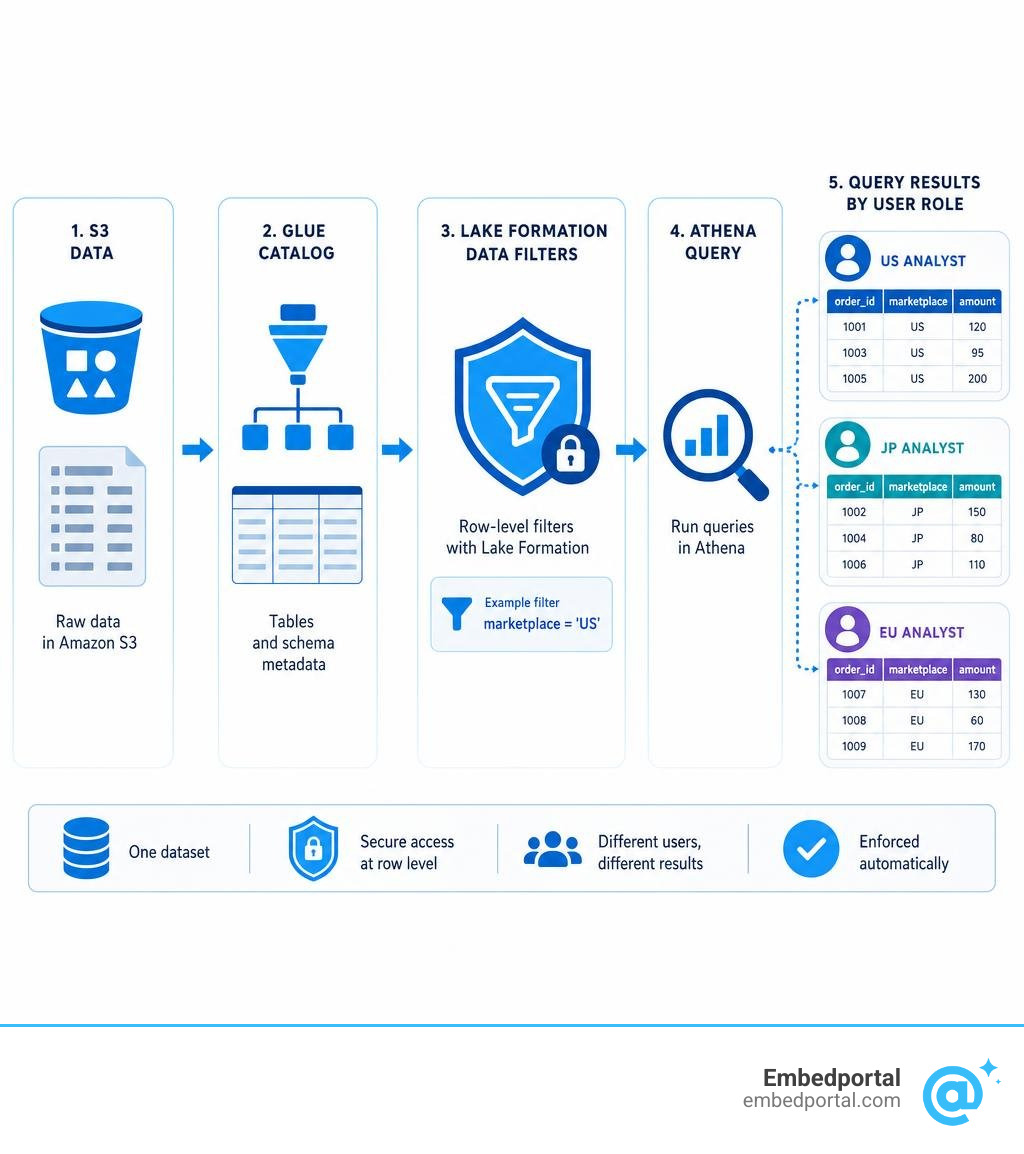
Lake Formation’s row-level security solves this at the source. A US data analyst queries the reviews table and sees only US rows. A Japanese analyst runs the same query and sees only Japanese rows. Same table, same query engine, different results — enforced automatically.
This matters especially if you’re embedding analytics into a customer-facing product. When multiple tenants share the same underlying dataset, leaking one tenant’s rows to another isn’t just a bug — it’s a breach.
Relevant articles related to aws lake formation row level security:
Securing Data Lakes with AWS Lake Formation Row Level Security
As organizations scale their modern data architectures, managing secure, fine-grained access to massive S3 data stores becomes a primary operational challenge. This is where What is AWS Lake Formation? – AWS Lake Formation becomes invaluable. It acts as a centralized governance layer over your AWS Glue Data Catalog, replacing complex IAM policies and bucket policies with database-style permissions.
When you configure Centralized Row Level Security through Lake Formation, you define security rules in one central place. These rules automatically apply down to the query layer, protecting your underlying S3 objects from unauthorized exposure.

Traditional Access Control vs. AWS Lake Formation Row Level Security
In traditional data lake setups, restricting row access required one of two approaches, both of which come with heavy operational penalties:
- Data Duplication: Running daily ETL jobs to split a master table into separate S3 folders (e.g., one folder for US data, one for Japan data) and managing different IAM policies on each folder. This leads to massive storage overhead, high ETL maintenance costs, and a high risk of configuration drift.
- Database Views: Loading data into a traditional data warehouse and creating custom SQL views with WHERE clauses for each user group. While this avoids data duplication, it forces you to manage security policies inside database engines rather than directly on your data lake, creating governance silos.
With aws lake formation row level security, security is enforced at query time. When an analyst queries a table via Amazon Athena, Lake Formation intercepts the request, evaluates the user’s active permissions, and dynamically applies a filter to the query plan. The query engine only retrieves and processes the authorized rows. This drastically simplifies your data architecture, keeping your storage clean while ensuring compliance. Implementing this strategy aligns perfectly with industry-standard Row Level Security Best Practices.
How Data Filters Enable Cell-Level and Row-Level Security
Lake Formation implements fine-grained access control using “Data Filters.” A data filter is a logical resource associated with a specific table in the AWS Glue Data Catalog. It consists of:
- A unique filter name.
- A target database and table.
- A row filter expression written in PartiQL syntax (a SQL-compatible query language).
- A column specification (allowing you to either include or exclude specific columns).
By combining these elements, you can achieve three distinct levels of security:
- Row-Level Security: You define a row filter expression (e.g., region = ‘West’) and include all columns.
- Column-Level Security: You leave the row filter blank (which defaults to all rows) but explicitly specify which columns are visible or hidden.
- Cell-Level Security: You define both a row filter expression and a column specification. For instance, you can restrict access so that a user can only view the customername column for rows where the producttype is set to ‘retail’, while completely hiding sensitive columns like SSN or credit card numbers.
To dive deeper into the underlying mechanics of how these policies are evaluated, you can read the official guide on Data filtering and cell-level security in Lake Formation – AWS Lake Formation .
Step-by-Step Tutorial: Implementing Row-Level Access Control
Let’s walk through how to build a secure, multi-country marketplace scenario where US and Japanese data analysts query the same table but only see their respective marketplace rows. This is a classic implementation of Multi Tenant Row Level Security on a shared S3 data lake.

This tutorial is designed for data stewards, data engineers, and data analysts who want a hands-on understanding of how to configure and verify these policies. For the complete official AWS walkthrough, refer to Securing data lakes with row-level access control – AWS Lake Formation .
Step 1: Provisioning Resources and Disabling Default IAM Settings
Before we create data filters, we must ensure that Lake Formation is actually in charge of our data catalog permissions. By default, AWS Glue databases use IAM-only access control, which bypasses Lake Formation.
First, provision your basic resources. You can use a CloudFormation template to set up:
- An S3 bucket containing a sample dataset (for example, product reviews with columns like reviewid, marketplace, and productcategory).
- A Glue Data Catalog database and a table pointing to the S3 location.
- Two IAM roles: one for a US analyst and one for a JP analyst.
Once your resources are ready, log into the AWS Lake Formation console. Under the “Data catalog” settings, make sure to disable the checkbox options for “Use only IAM access control for new databases” and “Use only IAM access control for new tables.” This ensures that Lake Formation permissions take precedence over global IAM policies for any new catalog resources.
Step 2: Creating Data Filters for AWS Lake Formation Row Level Security
Now, we will create the specific data filters that define our compliance boundaries. We can do this using either the AWS Lake Formation console or the CreateDataCellsFilter API.
To create the US filter in the console:
- In the Lake Formation navigation pane, choose “Data filters” under the “Data catalog” section.
- Click “Create filter.”
- Name the filter “amazonreviewsUS”.
- Select your target database and the product reviews table.
- Under column permissions, choose “Access to all columns” (or selectively exclude columns to implement cell-level security).
- Under row filter expression, write your PartiQL statement: marketplace = ‘US’
- Click “Create.”
Repeat this process to create a second filter named “amazonreviewsJP” with the row filter expression: marketplace = ‘JP’
These filters act as reusable security rules that are stored inside the Data Catalog metadata. They do not alter the underlying S3 files in any way.
Step 3: Granting Permissions and Querying with Amazon Athena
With our data filters created, we need to assign them to our analyst roles. In Lake Formation, you do this by granting SELECT permissions on the table, but instead of granting access to the whole table, you grant access through a specific data filter.
- In the Lake Formation console, go to “Tables”, select your product reviews table, and choose “Grant” under the “Actions” menu.
- Under “Principals”, select the IAM role representing your US analyst.
- Under “Table permissions”, select “SELECT”.
- Under “Data evaluation method”, choose “Data filters” and select the “amazonreviewsUS” filter we created in Step 2.
- Click “Grant.”
Repeat the grant process for your JP analyst role, assigning them the “amazonreviewsJP” filter.
To verify that the filters are working, log into Amazon Athena as the US analyst and run a simple aggregation query: SELECT marketplace, count(*) FROM product_reviews GROUP BY marketplace;
You will notice that the query returns only the rows where the marketplace is ‘US’. If you run the exact same query as the JP analyst, Athena returns only the ‘JP’ rows. Lake Formation has successfully intercepted the query at runtime and applied the data filter without requiring any changes to the query itself. For a detailed breakdown of this verification process, check out Part 2: Securing data lakes with row-level access control .
Advanced Integrations and Best Practices for Lake Formation RLS
Setting up row-level security for a single table in Athena is a great start, but real-world enterprise data lakes require complex integrations across multiple query engines, BI tools, and data warehousing platforms.
Let’s look at how to scale and optimize your Lake Formation RLS policies across a broader analytics ecosystem.
| Security Feature | Lake Formation Data Filters | Traditional Database Views |
|---|---|---|
| Storage Overhead | None (virtual filtering at query time) | High (requires duplicate tables or physical copies) |
| Enforcement Layer | Centralized in Glue Data Catalog | Siloed inside individual database engines |
| Supported Engines | Athena, Redshift Spectrum, EMR, Glue | Limited to the specific database hosting the view |
| Maintenance Effort | Low (reusable PartiQL expressions) | High (requires updating views when schemas change) |
Querying Multi-Tenant Data Lakes with Redshift Spectrum
If your organization uses Amazon Redshift as its central data warehouse, you likely use Redshift Spectrum to query cold or historical data stored directly in S3. Fortunately, Redshift Spectrum natively integrates with Lake Formation to enforce row-level and cell-level security.
To set this up, you create external schemas in Redshift that point to your Lake Formation database. By attaching tenant-specific IAM roles to your Redshift cluster, you can ensure that when a Redshift user queries an external table, Redshift Spectrum automatically honors the data filters defined in Lake Formation. For example, if Tenant 1 runs a query, the Redshift cluster assumes Tenant 1’s role, and Lake Formation filters out any rows belonging to other tenants.
You can read a complete architectural guide on this integration in the AWS blog post: Use Amazon Redshift Spectrum with row-level and cell-level security policies defined in AWS Lake Formation | AWS Big Data Blog . This is highly beneficial if you’re building comprehensive customer-facing portals using AWS Embedded Analytics.
Automating RLS Replication to Amazon QuickSight
While Lake Formation works beautifully with direct queries from Amazon QuickSight, a common challenge arises when you import data into QuickSight’s high-performance SPICE in-memory engine. Because SPICE imports and replicates data, the underlying source entitlements cannot be applied at query time.
To maintain consistent security without sacrificing SPICE’s sub-second performance, organizations can automate the replication of Lake Formation RLS rules to QuickSight.
You can achieve this by deploying an AWS Lambda function that runs on a schedule (or triggers on Lake Formation permission changes). The Lambda function calls the ListDataCellsFilter and ListPermissions APIs to extract the active data filters and their assigned principals. It then transforms these rules into a QuickSight-compatible format and writes them to an S3 bucket.
From there, QuickSight can read this rules dataset and apply it as a row-level security dataset to your SPICE datasets. This ensures that whether a user queries data directly via Athena or views an in-memory dashboard, the exact same compliance rules are enforced.
If your team also works with other BI vendors, you might want to compare how this process differs from configuring Row Level Security Power BI or managing Row Level Security Tableau.
Handling Nested Columns and Performance Optimization
Modern data lakes often store data in semi-structured formats like Parquet or ORC, which frequently utilize nested columns (structs and arrays).
When implementing row-level security on nested columns in Lake Formation, keep these guidelines in mind:
- Qualified Names: You must use qualified column names wrapped in double quotes to reference nested fields inside your PartiQL expressions (e.g., “customer”.”address”.”country” = ‘US’).
- Read Operations Only: Data filters in Lake Formation only apply to read operations (SELECT permissions). They cannot be used to filter write or update operations.
From a performance perspective, filtering billions of rows at query time can introduce latency if your underlying S3 storage is poorly optimized. In most analytics queries, up to 80% of rows retrieved from S3 are filtered away. To prevent query engines from scanning unnecessary data, leverage Lake Formation’s governed tables and automatic storage optimizer.
By enabling automatic file compaction, you can merge thousands of small, inefficient S3 files into larger, query-optimized files. In real-world testing, automatic compaction increased average file sizes from 3KB to 40MB, resulting in significantly faster query execution times over compacted tables compared to non-compacted datasets.
Centralized Auditing and Compliance
One of the biggest advantages of centralizing your row-level security in Lake Formation is simplified compliance auditing. Under a decentralized model, proving to an auditor that specific users cannot access PII requires reviewing IAM policies, bucket policies, database views, and BI tool configurations.
Lake Formation integrates natively with AWS CloudTrail to provide a single, centralized audit log. Every time a principal attempts to query a table protected by a data filter, Lake Formation records:
- The active principal identity.
- The specific table and columns accessed.
- The data filter that was applied to the query.
- Whether the access request was allowed or denied.
This centralized logging model makes it easy to enforce strict compliance boundaries (such as GDPR or HIPAA) and supports the governance requirements of a decentralized Data Lake Governance – AWS Lake Formation FAQs – AWS or data mesh architecture.
Frequently Asked Questions about AWS Lake Formation RLS
For more general guides and troubleshooting tips on managing data access, explore our Category Row Level Security archive.
What is the performance impact of row-level filtering in Lake Formation?
Because Lake Formation applies row-level filters at query time, there is a minor initial overhead as the query engine negotiates permissions with the Lake Formation service. However, because Lake Formation uses push-down filters, the query engine can skip reading S3 objects that do not match the filter criteria. To maximize performance, ensure your data is partitioned by the columns used in your filters and utilize Lake Formation’s storage optimizer to compact small files.
Can I combine row-level and column-level security in a single filter?
Yes. This is known as cell-level security. When creating a data filter in Lake Formation, you can specify a row filter expression (e.g., department = 'Sales') and simultaneously select which columns to include or exclude (e.g., excluding the salary column). Any principal assigned to this filter will only see sales department rows, and the salary column will return as null or be omitted entirely from their query results.
How does Lake Formation RLS handle nested JSON structures?
Lake Formation fully supports defining row-level and cell-level filters on nested structures (such as structs and maps) within Parquet or ORC files. You must reference the nested fields using dot notation wrapped in double quotes within your PartiQL expressions. Wildcards cannot be used to reference nested fields; you must explicitly define the path to the specific nested attribute you want to filter.
Conclusion
Implementing aws lake formation row level security is the most effective way to secure your S3 data lake without falling into the trap of data duplication or siloed database views. By centralizing your security policies in the AWS Glue Data Catalog, you can ensure consistent, compliant data access across Athena, Redshift, and your BI tools.
However, while Lake Formation handles the heavy lifting at the data lake level, presenting this filtered data securely to your end-users inside a web application can still be a massive engineering challenge.
This is where Embedportal comes in. As a white-label embedding platform for BI dashboards, we make it incredibly simple to deliver multi-vendor analytics (including Tableau, Power BI, QuickSight, and Metabase) directly to your customers. With Embedportal, you can set up unified branding, robust Row Level Security, and seamless Single Sign-On (SSO) in under an hour.
Instead of writing custom middleware to map your application users to AWS IAM roles and Lake Formation filters, let Embedportal handle the security bridging for you. Ready to secure and simplify your embedded analytics? Contact us today to see how we can streamline your dashboard delivery.