Row Based Security: The Ultimate Gatekeeper for Your Database Rows
Why Row Based Security Is the Foundation of Modern Data Access Control
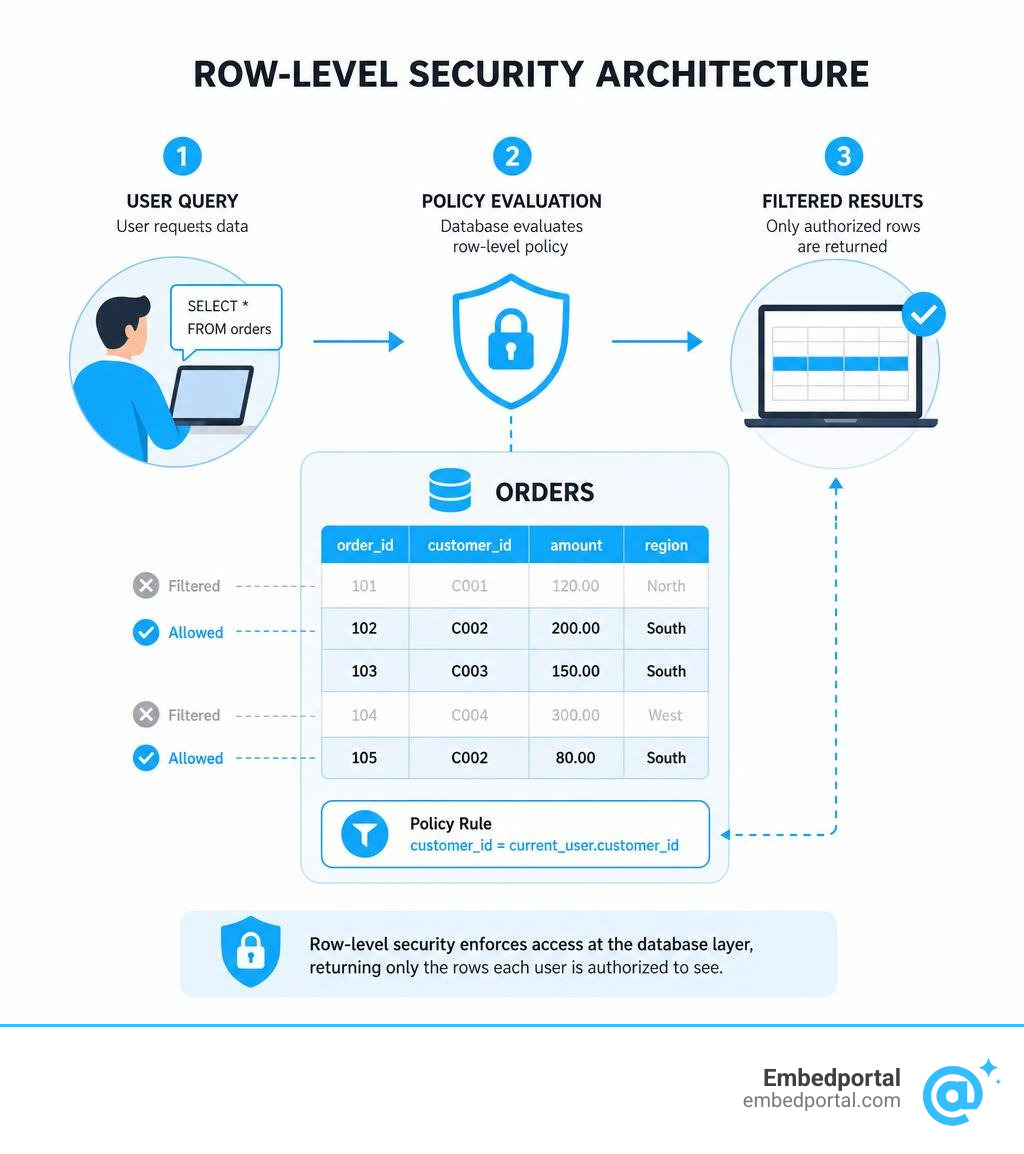
Row based security — also called row-level security (RLS) — is a database access control method that limits which rows a user can read or modify, based on their identity, role, or session context.
Here’s a quick summary before we dive in:
| Question | Answer |
|---|---|
| What does it do? | Restricts data access at the individual row level, not the whole table |
| Where is it enforced? | At the database tier — not in your app code |
| Who sees what? | Only the rows that match their identity, role, or tenant |
| Is it the same as table security? | No — table security is all-or-nothing; RLS is row-by-row |
| Does it affect performance? | Yes, slightly — but it’s manageable with good indexing |
Think about a SaaS product with thousands of customers sharing one database table. Without RLS, you’d need separate tables — or airtight application logic — to make sure Customer A never sees Customer B’s data. That’s expensive, complex, and fragile.
RLS solves this at the source. The database engine itself filters rows before any data reaches your app, your API, or your embedded dashboard. It doesn’t matter how a user accesses the data — through a BI tool, a notebook, or a direct query — the rules follow the data.
This is why teams building embedded analytics, multi-tenant portals, or compliance-sensitive products are making RLS a core part of their architecture in 2026.
What is Row Based Security and How Does It Work?
To understand how row based security works, we must first look at how database security has historically been handled. Traditional database access controls are often all-or-nothing. If you grant a user SELECT permissions on a table, they can see every single record in that table. If you revoke those permissions, they see absolutely nothing.
This blunt approach is no longer sufficient. Modern applications require fine-grained access control, which is where row-level and column-level security enter the picture.
| Security Level | Scope of Access Control | Common Use Case |
|---|---|---|
| Table-Level Security | Restricts access to the entire table. | Preventing marketing teams from accessing raw payroll tables. |
| Column-Level Security | Restricts access to specific vertical columns. | Hiding Social Security numbers or credit card columns while showing names. |
| Row-Level Security | Restricts access to specific horizontal rows. | Ensuring a regional sales rep only sees customer records for California. |
When we implement Row Level Security, we establish a system of logical segregation. Instead of physically splitting data into separate tables or databases for different users, we store all data with different security requirements in the same databases or tables. This drastically reduces the complexity of data storage systems and lowers hosting costs.
Enforcement happens dynamically at query runtime. When a user runs a query, the database engine automatically intercepts the query and appends a security predicate behind the scenes. The database engine acts as the ultimate gatekeeper, evaluating the user’s identity, group memberships, or session attributes to determine exactly which rows should be exposed or modified. Because this logic lives inside the database tier, it applies consistently across all access paths—including APIs, backend services, direct SQL clients, and business intelligence dashboards.
Understanding Filter Predicates vs. Block Predicates
Database engines typically enforce RLS policies using two distinct types of security predicates:
- Filter Predicates: These controls silently filter the rows available to read operations (such as SELECT, UPDATE, and DELETE). If a row does not satisfy the filter predicate, the database engine behaves as if the row does not exist at all. The application receives a clean, filtered dataset without throwing any errors or indicating that rows were omitted.
- Block Predicates: These controls explicitly block write operations (such as INSERT, UPDATE, MERGE, and DELETE) that violate the security policy. If a user attempts to insert or update a row with values that do not match the policy criteria, the database engine rejects the transaction and throws an explicit database error.
In many database systems, these security predicates are created using inline table-valued functions. These functions evaluate boolean expressions for each row, returning true if the user is authorized to interact with the row, and false if they are not.
How Row Based Security Differs from Column-Level Security
While RLS restricts access horizontally (by row), column-level security (CLS) restricts access vertically (by column). CLS is primarily used for data masking and redacting highly sensitive fields. For example, in a medical database, everyone might be allowed to see the patient treatment rows, but only authorized clinicians should see the column containing the patient’s actual medical history or billing details.
Using RLS in isolation is rarely enough to secure sensitive data. RLS handles row visibility but does not mask specific column values, block aggregate queries, or replace identity and access management (IAM). True fine-grained access control is achieved by combining RLS and CLS as part of a defense-in-depth security strategy. For a deeper dive into how these systems interact, you can read the guide on What is Row-Level Security?.
Implementing Row-Level Security Across Different Database Systems
Different database engines approach RLS in distinct ways. The underlying query planning and policy execution mechanisms vary, meaning that a policy that works seamlessly in one database might require a completely different implementation in another.
Let’s explore how several major database systems manage their access control policies, which we also cover extensively in our Category Row Level Security resources.
PostgreSQL Row Security Policies
PostgreSQL has built-in, robust support for row security policies. In modern releases like PostgreSQL 16 and PostgreSQL 18, row security is disabled by default. Even if you define policies, they will not be enforced until you explicitly enable them on the table.
To activate RLS on a table in PostgreSQL, you must run an ALTER TABLE command with the ENABLE ROW LEVEL SECURITY clause. Once enabled, if no security policy exists for the table, PostgreSQL defaults to a strict default-deny policy. This means that no rows will be visible or modifiable by standard users.
PostgreSQL policies can be configured in two ways:
- Permissive Policies: These are combined using the OR operator. If a user matches any permissive policy, they are granted access to the row.
- Restrictive Policies: These are combined using the AND operator. Restrictive policies act as a strict filter on top of permissive policies, meaning the row must satisfy all restrictive policies to be returned.
By default, superusers and roles created with the BYPASSRLS attribute will completely bypass row security policies. Table owners also bypass row security by default, but they can choose to subject themselves to the active policies by running an ALTER TABLE command with the FORCE ROW LEVEL SECURITY clause. For more detailed technical specifications, check out the official PostgreSQL: Documentation: 18: Row Security Policies.
SQL Server and Azure Synapse RLS
Microsoft introduced native RLS support in SQL Server 2016. In SQL Server and Azure Synapse, RLS relies on security predicates implemented as inline table-valued functions.
To configure RLS in SQL Server, you first create a predicate function that determines access based on group membership or execution context. Next, you create a security policy that binds this function to your target table.
A critical best practice in SQL Server is to define your security policies with SCHEMABINDING ON. This prevents users from altering or dropping columns that are referenced by your security predicate function.
For applications where users connect through a middle-tier application using a shared service account, SQL Server allows developers to use SESSION_CONTEXT to store the application user’s unique ID. The security predicate can then evaluate this session context at runtime to filter the rows accordingly. To learn more about setting up these policies, refer to the Row-Level Security – SQL Server | Microsoft Learn documentation.
Databricks and Snowflake Row Access Policies
In modern data lakes and warehouses like Databricks and Snowflake, row-level security is often managed through unified governance platforms.
In Databricks, Unity Catalog provides native row filters and Attribute-Based Access Control (ABAC) policies. These allow you to apply dynamic SQL functions directly to tables, filtering data based on the querying user’s group memberships or specific session attributes.
Similarly, other modern analytical engines like Databend support row access policies that filter rows during the query planning phase without modifying the stored data. In these systems, SELECT queries only return rows that satisfy the policy predicate. While UPDATE, DELETE, and MERGE operations respect the policy filters, INSERT operations typically bypass RLS filtering, allowing data to be written even if the inserting user cannot immediately read those rows. To see a practical workflow for this, you can read the docs/en/guides/56-security/data-protection/row-access-policy.md at main · databendlabs/databend-docs repository guide.
Metabase Row and Column Security
For teams looking to enforce security at the business intelligence layer, Metabase Pro and Enterprise plans offer native row and column security features, formerly known as “data sandboxing.”
Metabase allows administrators to map specific user attributes (such as a customer ID or department) to columns in a database table. When a user logs in, Metabase automatically injects these attributes into the query using SQL variables.
If you need more advanced, custom filtering, you can create a custom SQL question that acts as a secure view of a table. This SQL question can be saved in an admin-only collection to prevent unauthorized users from editing the underlying logic. Once configured, users in restricted groups will only see the filtered results of that SQL question, ensuring complete data isolation. For setup instructions, view the Row and column security | Metabase Documentation page.
Key Benefits and Real-World Use Cases of Row-Level Security
Implementing row based security provides massive benefits for compliance, security architecture, and system maintenance. By moving the security boundary to the database tier, organizations can guarantee consistent enforcement across all applications, simplify auditing, and achieve logical data segregation.
This approach is highly valuable for satisfying strict regulatory compliance frameworks, including GDPR, HIPAA, and FERPA, which mandate that users should only have access to the minimum amount of personal or sensitive data required to perform their roles.
Multi-Tenant SaaS Applications
In a multi-tenant Software-as-a-Service (SaaS) architecture, multiple customers (tenants) share the same underlying database infrastructure. Maintaining strict tenant isolation is critical; a single data leak between tenants can destroy a SaaS company’s reputation.
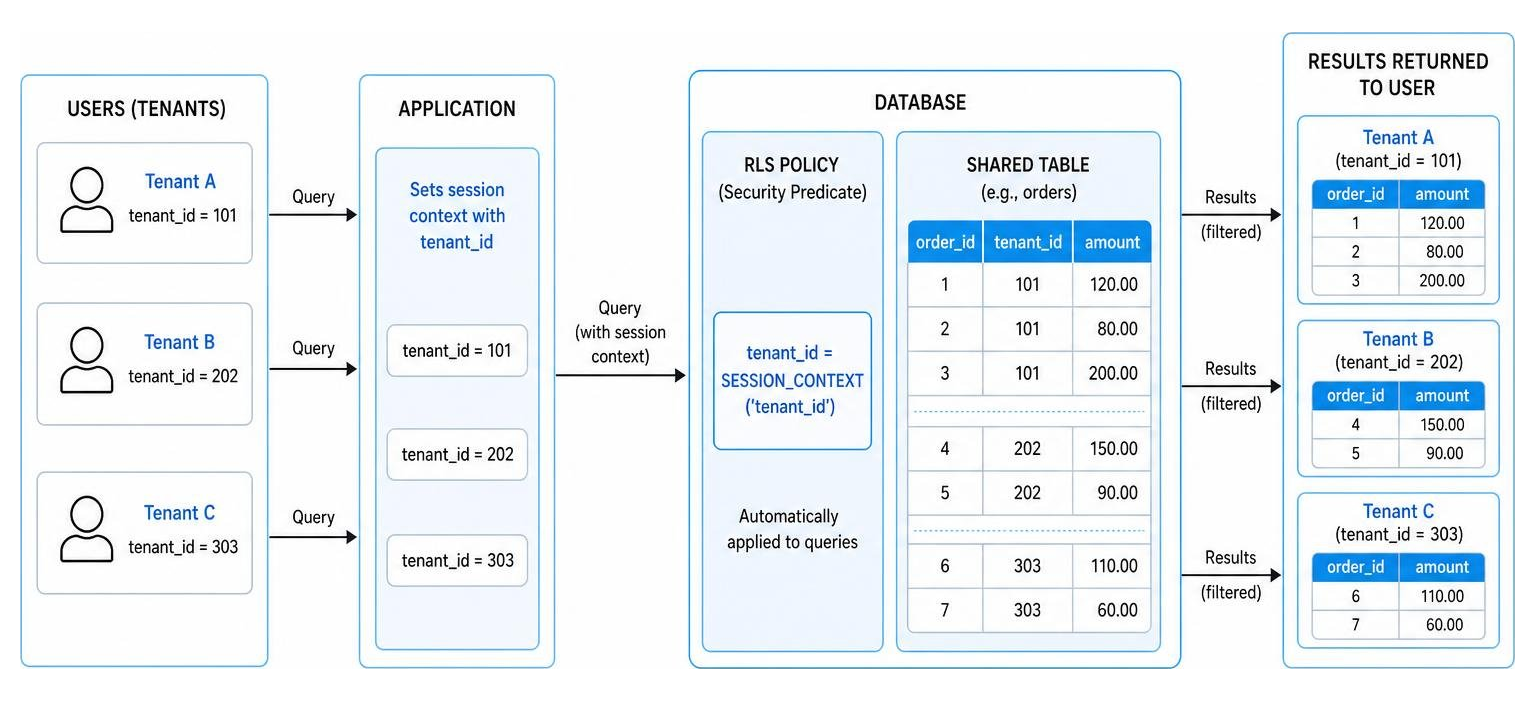
By using Multi Tenant Row Level Security, developers can store all tenant data in shared tables containing a tenantid column. When a tenant queries the database, the RLS policy automatically appends a filter restricting the query to that specific tenantid. This eliminates the need to maintain hundreds of separate database schemas or write complex, error-prone filtering logic in the application code.
Healthcare and Financial Services
In healthcare, patient privacy is paramount. RLS allows healthcare providers to implement rules where doctors and clinicians can only view the patient records of individuals currently under their active care. If a nurse logs in, they only see the rows of patients admitted to their specific department or ward.
In financial services, global institutions must frequently comply with strict data residency and regional segregation rules. RLS can be used to localize customer data access by region. For example, financial advisors based in the European Union can only query and view customer records originating from EU countries, while advisors in North America are restricted to US and Canadian records, ensuring compliance with local privacy laws.
Best Practices, Limitations, and Performance Considerations
While row based security is incredibly powerful, it is not a silver bullet. If designed poorly, security policies can introduce severe performance bottlenecks or even open up subtle security vulnerabilities.

When designing your system, we highly recommend reading our guide on Row Level Security Best Practices to ensure your database remains both secure and highly performant.
Performance Overhead and Optimization Strategies
Because RLS evaluates security predicates for every single row returned by a query, it inevitably introduces some performance overhead. The query optimizer must parse the security policy, generate an execution plan, and apply the filter.
To keep this overhead manageable, consider the following optimization strategies:
- Optimize Indexes: Ensure that the columns referenced by your security policies (such as userid, tenantid, or region) are properly indexed.
- Avoid Columnstore Index Issues: RLS is compatible with both clustered and nonclustered columnstore indexes. However, be aware that the query optimizer might modify the query plan so that it doesn’t use batch mode, which can slow down analytical queries.
- Keep Predicate Logic Simple: Avoid excessive table joins, complex subqueries, or recursion within your predicate functions.
- Prefer SQL UDFs: When using systems like Databricks, prefer SQL User-Defined Functions (UDFs) over Python UDFs, as SQL UDFs are much easier for the database query optimizer to analyze and optimize.
- Avoid Type Conversions: Ensure that data types in your predicate functions match the target table columns exactly to prevent costly runtime type conversions.
Security Risks and Side-Channel Attacks
One of the most overlooked risks of RLS is the potential for side-channel attacks and covert channels. A malicious user with query access can sometimes craft carefully designed queries to infer the existence of hidden rows.
For example, if a user queries a table with a search filter like “salary / 0 = 1” on a row they are not authorized to see, a naive database engine might evaluate the user’s filter before the security predicate. If the query throws a division-by-zero error, the user has successfully verified that a row matching their search criteria exists, even though they cannot read it directly.
Furthermore, in many database systems, referential integrity checks (such as foreign key constraints) always bypass row security to maintain data integrity. A malicious user could potentially exploit this behavior to verify the existence of specific primary keys in a protected table.
To mitigate these risks, always ensure that your database engine evaluates security predicates before running any user-defined filters, limit administrative permissions, and closely monitor for suspicious or repetitive query patterns.
Designing a Centralized Row Based Security Architecture
For large enterprises, managing security policies across dozens of separate database tables and applications can quickly become a nightmare. The best practice is to design a Centralized Row Level Security architecture.
By utilizing Attribute-Based Access Control (ABAC), organizations can dynamically evaluate attributes of both the data and the requesting user at runtime. Decoupling policy management from the application layer allows security teams to modify access rules centrally without requiring code changes, application redeployments, or system downtime.
Frequently Asked Questions about Row-Level Security
Does row-level security affect query performance?
Yes, RLS can affect query performance because the database engine must evaluate the security predicate for every row. However, the impact is usually minimal if you keep your predicate logic simple, index the referenced columns, and avoid complex table joins or implicit type conversions within your security functions.
Can row-level security be bypassed by database administrators?
By default, yes. In most database engines, superusers, database administrators, and table owners can bypass RLS policies. In PostgreSQL, roles with the BYPASSRLS attribute bypass security, though table owners can force policy enforcement on themselves using FORCE ROW LEVEL SECURITY. It is critical to restrict administrative privileges in production environments to prevent unauthorized data access.
How does row-level security integrate with BI tools like Power BI and Tableau?
When you embed analytics into your applications, RLS ensures that users only see their authorized data. If you are using Power BI, you can define roles and rules directly within the dataset using DAX, as explained in our guide on Row Level Security Power BI. For Tableau users, you can map user attributes to data filters to restrict dashboard access, which is detailed in our guide on Row Level Security Tableau.
Conclusion
Implementing row based security is the most reliable way to enforce granular, consistent, and audit-friendly data access controls directly within your database tier. By shifting this responsibility away from your application code, you eliminate security gaps and dramatically simplify your data architecture.
If you are building an application that requires secure, embedded dashboards for your customers, managing RLS across different database engines and BI tools can quickly become complex.
This is where Embedportal can help. As a white-label embedding platform for BI dashboards, we enable teams to embed multi-vendor analytics (including Tableau, Power BI, QuickSight, and Metabase) with unified branding, robust row-level security, and single sign-on (SSO) in under an hour.
Ready to simplify your analytics architecture? Explore how we handle Row Level Security to keep your data secure and your customers isolated.