The Ultimate Guide to Row-Level Security (RLS)
What Is RLS Row Level Security (And Why It Matters for Your Data)
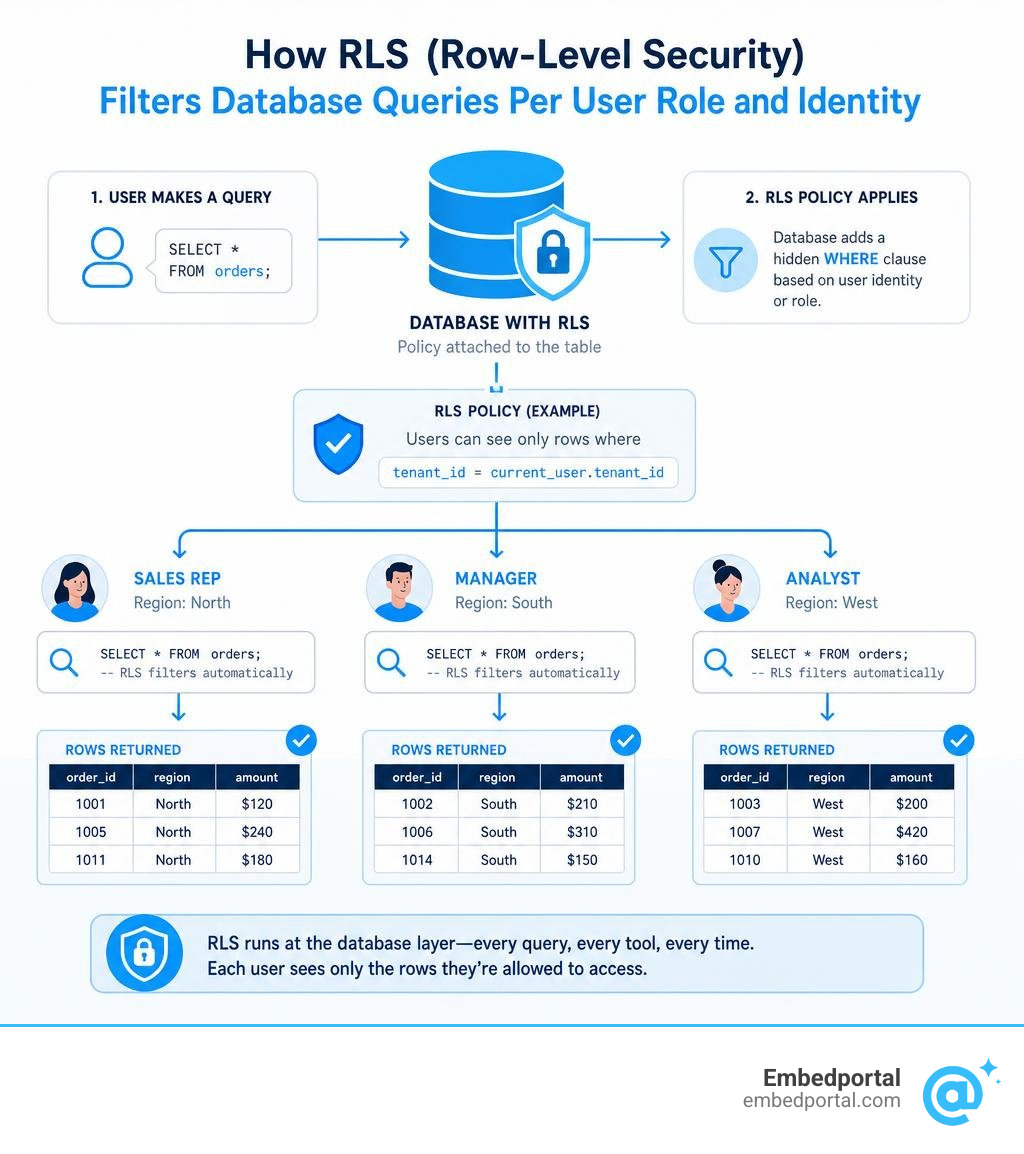
RLS row level security is a database feature that controls which rows of data each user can see or modify — automatically, at the database layer, without any extra application code.
In plain terms: when a user runs a query, the database silently adds a filter based on who they are. They only get back the rows they’re allowed to see.
Quick answer:
| Term | Meaning |
|---|---|
| RLS | Row-Level Security — filters table rows per user or role |
| How it works | A policy (a rule) is attached to a table; the database applies it as a hidden WHERE clause on every query |
| Who it’s for | Multi-tenant SaaS, healthcare, finance, compliance-heavy industries |
| Key benefit | One shared table, each user sees only their own data |
| Supported by | PostgreSQL, Supabase, SQL Server, Snowflake, Databricks, Power BI, Amazon Redshift |
This is different from locking down an entire table (table-level security) or hiding specific columns (column-level security). RLS works at the row level — so a salesperson sees only their region’s orders, a nurse sees only their patients, and a SaaS customer sees only their own records.
For analytics and product teams embedding dashboards into customer portals, this distinction is critical. You’re serving many customers from one data source. Without RLS, keeping tenant A’s data away from tenant B requires complex, brittle application logic. With RLS, the database enforces it for you — consistently, across every query, every tool, and every access path.
The stakes are real. A misconfigured access control in an embedded analytics product doesn’t just cause a bug — it causes a data breach.
Rls row level security vocab explained:
Understanding Row-Level Security (RLS) vs. Other Access Controls
When securing a database, we have several layers of defense. Understanding where RLS fits in relation to table-level and column-level controls is key to building a secure, scalable architecture.
Traditionally, database security relied heavily on table-level access. You either had access to the orders table, or you did not. If you did, you could see every order ever placed. If you did not, you saw nothing. This all-or-nothing approach forced developers to write complex application-level filtering logic or create thousands of separate database views to keep users isolated.
Column-level security (CLS) operates on a different axis. It restricts access to specific vertical columns in a table. For example, a customer support agent might have access to the users table to see names and email addresses, but the social_security_number column remains hidden from them.
RLS introduces logical data segregation. It lets us store data with completely different security requirements within the same physical table, dynamically filtering horizontal rows on the fly.
| Security Level | Scope of Control | Common Use Case | Bypassed By |
|---|---|---|---|
| Table-Level | Entire table / view | Restricting access to sensitive tables like salaries |
Database admins, superusers |
| Column-Level | Specific vertical columns | Hiding PII data like SSNs or credit card numbers | Authorized roles only |
| Row-Level (RLS) | Specific horizontal rows | Isolating tenant data in a multi-tenant SaaS application | Superusers, bypassrls roles |
By moving authorization logic into the database engine itself, RLS ensures consistent policy enforcement. Whether a user accesses data via a React frontend, a Python script, a SQL client, or an embedded BI dashboard, the same rules apply.
What is RLS Row Level Security and How Does It Work?
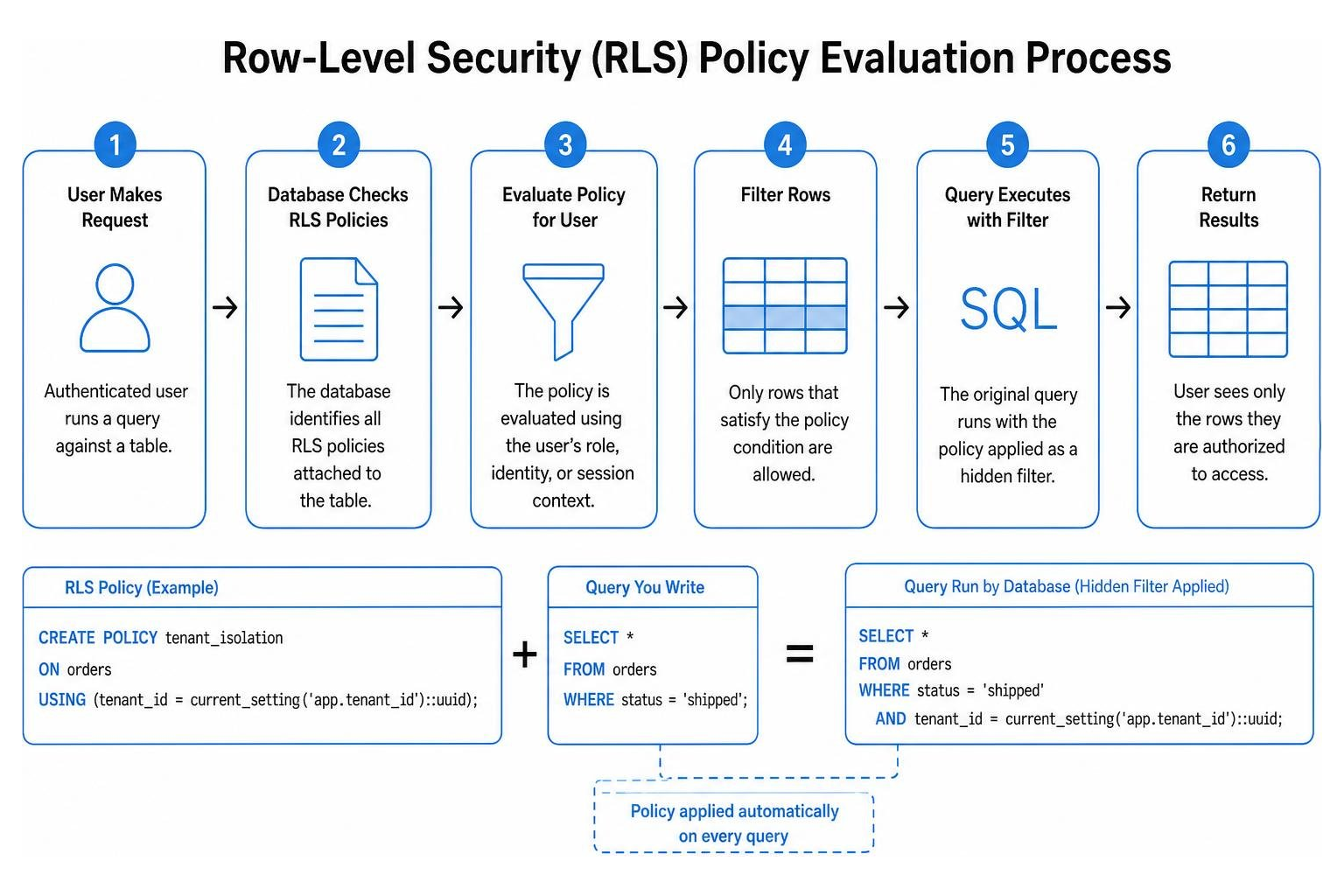
At its core, RLS works by intercepting incoming queries and appending security predicates (filters) before executing them. Think of it as an invisible, non-bypassable WHERE clause that the database engine injects behind the scenes.
For example, when a user queries a table using SELECT * FROM orders;, the RLS engine checks the user’s active session context or role. If the user is only authorized to see orders from their own department, the database rewrites the query internally to SELECT * FROM orders WHERE department_id = 'user_dept';.
Because this happens at the database tier, it acts as a powerful defense-in-depth mechanism. Even if a developer makes a mistake in the application code and forgets to filter a query, the database itself guarantees that unauthorized rows are never returned. To learn more about how this centralizes your security architecture, see our guide on Row Level Security and explore how platforms like Databricks define these policies at scale in What is Row-Level Security?.
Key Use Cases: Multi-Tenant SaaS, Healthcare, and Compliance
RLS is not just a nice-to-have feature; it is a foundational building block for modern software architectures, particularly in the following scenarios:
- Multi-Tenant SaaS Applications: Instead of provisioning a separate database for every customer (which is expensive and difficult to maintain), SaaS companies use a single shared table with a
tenant_idcolumn. RLS ensures that Tenant A can never see Tenant B’s records, even though they live in the same physical table. This logical segregation is highly cost-effective and simplifies schema migrations. For a deeper look at this architecture, see our breakdown on Multi Tenant Row Level Security. - Healthcare and HIPAA Compliance: Under regulations like HIPAA, patient data must be strictly protected. RLS policies can ensure that clinicians can only see records for patients currently assigned to their care or department, preventing unauthorized lookups of sensitive medical files.
- Regional and Departmental Segregation: Large global enterprises frequently must restrict sales, payroll, or operational data. By implementing RLS, regional managers can only view performance data and employee records for their specific country or region, satisfying local data residency and privacy laws.
Deep Dive: PostgreSQL and Supabase RLS Architecture
PostgreSQL has one of the most robust and flexible implementations of RLS in the industry. In Postgres, RLS is disabled by default. To activate it, you must explicitly run the command ALTER TABLE table_name ENABLE ROW LEVEL SECURITY;. If you enable RLS but do not define any policies, Postgres defaults to a strict “default-deny” state, meaning no rows are visible to non-owner roles.
For teams building on Supabase, RLS is a first-class citizen. Supabase leverages Postgres’s native RLS engine and pairs it with Supabase Auth to provide end-to-end security directly from the user’s browser to the database. To understand how Postgres handles these core mechanics under the hood, explore Postgres Row Security.
Understanding Policies: SELECT, INSERT, UPDATE, and DELETE
In PostgreSQL, RLS policies are highly granular. You can create different rules for different SQL operations using the CREATE POLICY command. These policies rely on two critical clauses: USING and WITH CHECK.
- USING Clause: This clause defines the visibility of existing rows. It applies to
SELECT,UPDATE, andDELETEcommands. If the expression in theUSINGclause evaluates to true for a row, the user can see or target that row. - WITH CHECK Clause: This clause acts as a validation check for new or modified data. It applies to
INSERTandUPDATEoperations. It ensures that any row being added or modified complies with the security policy. For example, a user cannot update their profile row to change theuser_idto someone else’s ID, because theWITH CHECKclause will fail.
For a detailed look at policy syntax and mechanics, refer to the official PostgreSQL: Documentation: 18: 5.9. Row Security Policies.
Roles and Helper Functions in Supabase Auth
Supabase makes RLS incredibly expressive by injecting session context directly into Postgres. When an API request comes in, Supabase maps the user’s JSON Web Token (JWT) to specific database roles:
- authenticated: Assigned to users who have successfully logged in.
- anon: Assigned to unauthenticated public visitors.
- service_role: A superuser-like role used by backend services that bypasses RLS entirely. This key must never be exposed to the browser.
Supabase also provides powerful helper functions to extract session details within your SQL policies:
auth.uid(): Extracts the unique user ID from the active JWT. This allows you to write simple policies likeUSING (user_id = auth.uid()).auth.jwt(): Accesses the full JWT payload, allowing you to check custom claims, multi-factor authentication (MFA) status, or organization IDs stored inraw_app_meta_data.
Using raw_app_meta_data is highly recommended for authorization rules because, unlike raw_user_meta_data, it cannot be modified directly by the end-user.
Implementing RLS Row Level Security Across Different Database Platforms
While PostgreSQL is a popular choice, RLS is widely supported across the modern data stack. Implementing centralized security at the database tier ensures that no matter how your BI tools, APIs, or analysts connect, the data remains protected. For a comprehensive strategy on managing these policies across multiple systems, check out our guide on Centralized Row Level Security.
SQL Server and Azure Synapse Security Policies
In Microsoft SQL Server and Azure Synapse, RLS is implemented using security predicates defined as inline table-valued functions. SQL Server supports two types of predicates:
- Filter Predicates: Silently filter rows available to read operations (
SELECT,UPDATE,DELETE). - Block Predicates: Explicitly block write operations (
INSERT,UPDATE,DELETE) that violate the defined policy, throwing an error.
To implement RLS in SQL Server, you create a helper function that evaluates the execution context (such as USER_NAME() or SESSION_CONTEXT()), and then tie that function to your target table using a CREATE SECURITY POLICY statement. For a full breakdown of the syntax and best practices, see the official Row-Level Security – SQL Server | Microsoft Learn.
Dynamic RLS in Power BI and BI Tools
Business intelligence platforms like Power BI, Tableau, and Metabase also support RLS to ensure that shared reports only display relevant data to the logged-in viewer.
In Power BI, you can define roles and rules using Data Analysis Expressions (DAX). There are two main approaches:
- Static RLS: You define roles (e.g., “West Region”) with hardcoded filters like
[Region] = "West". Users are manually assigned to these roles in the Power BI service. - Dynamic RLS: You use DAX functions like
USERPRINCIPALNAME()orUSERNAME()to filter a user-mapping table dynamically. This allows a single report and semantic model to serve thousands of users, automatically filtering the rows to match the viewer’s corporate email address.
This is especially powerful for external B2B guest users or embedded application scenarios. For step-by-step instructions on setting this up, read Microsoft’s official guide on Row-level security (RLS) with Power BI and explore our deep dives on Row Level Security Power BI and Row Level Security Tableau.
Performance Optimization and Best Practices for RLS
Because RLS policies are executed every single time a table is accessed, poorly written policies can severely degrade query performance. If a policy requires complex joins or scans on unindexed columns, your database performance will drop as your data grows. To keep your queries fast, you must follow established Row Level Security Best Practices.
Best Practices for Optimizing RLS Row Level Security Performance
- Index Policy Columns: Always add indexes to columns referenced in your RLS policies (such as
tenant_idoruser_id). Adding proper indexes can improve query performance by up to 99.94%. - Wrap Functions in SELECT Statements: In PostgreSQL/Supabase, calling helper functions like
auth.uid()directly in a policy can cause the function to be evaluated for every single row scanned. Wrapping the function in a subquery (e.g.,SELECT auth.uid()) allows the query planner to cache the result as an initPlan, executing it only once per statement. This simple tweak can reduce execution times from 178,000ms down to 12ms (a 99.993% improvement). - Specify Roles Using the TO Clause: By default, policies apply to all roles. If you have policies intended only for authenticated users, explicitly target them using
TO authenticated. This prevents the engine from evaluating the policy for other roles, reducing execution times from 170ms to less than 0.1ms (a 99.78% improvement). - Minimize Joins in Policies: Avoid performing heavy table joins inside your policy expressions. Instead, fetch authorization criteria into arrays or utilize security definer functions to look up permissions. Rewriting policies to avoid joins can reduce execution time from 9,000ms to 20ms (a 99.78% improvement).
- Add Explicit Filters to Queries: Even though RLS applies filters automatically, your application queries should still include explicit
WHEREclauses (e.g., queryingWHERE tenant_id = 'XYZ'). This helps the database query planner optimize index scans and execute queries significantly faster.
Common Pitfalls, Security Risks, and Mitigation Strategies
While RLS is an incredibly powerful security tool, it is not a silver bullet. Misconfigurations can lead to security vulnerabilities or hard-to-debug application errors.
- Admin and Owner Bypass: In many databases, table owners, superusers, and roles with specific privileges (like
BYPASSRLSin Postgres) bypass RLS by default. If you want to force RLS on table owners, you must explicitly runALTER TABLE table_name FORCE ROW LEVEL SECURITY;. - Write-Rule Misconfigurations: It is easy to accidentally configure a policy that allows users to read data but blocks them from writing it, or worse, allows them to insert data they cannot read. Always define both read (
USING) and write (WITH CHECK) predicates carefully, and write automated tests to verify them. - Debugging Empty Results: When RLS blocks access to rows, the database does not throw an error; it simply returns an empty result set. This can make debugging incredibly frustrating. When troubleshooting, verify your active session context and test queries using a non-privileged role to see exactly which rows are being filtered.
- Side-Channel and Covert Leaks: If your policies use complex subqueries or custom functions, malicious users might construct carefully crafted queries to infer the existence of hidden rows based on query execution times or error messages. To mitigate this, ensure your policy expressions are simple, performant, and do not rely on user-inputted predicate execution order.
Frequently Asked Questions about Row-Level Security
What happens if RLS is enabled but no policy is defined?
When you enable RLS on a table in PostgreSQL using ALTER TABLE ... ENABLE ROW LEVEL SECURITY, the database defaults to a strict “default-deny” policy. This means that all rows are hidden, and no read or write operations can be performed by non-owner roles until you explicitly create at least one permissive policy.
Does row-level security affect query performance?
Yes, RLS adds a small execution overhead because the database must evaluate the policy predicates for every query. However, this overhead is negligible if you follow performance best practices, such as indexing your policy columns, specifying roles, and wrapping authorization functions in SELECT statements to cache their results.
Can table owners bypass row-level security?
By default, table owners, superusers, and roles with the BYPASSRLS attribute bypass RLS policies. To enforce RLS on the table owner as well, you must execute ALTER TABLE table_name FORCE ROW LEVEL SECURITY;.
Conclusion
Implementing rls row level security is one of the most effective ways to secure your data at scale. By centralizing authorization logic inside your database, you create a robust, defense-in-depth security model that protects your data across every application, API, and BI tool.
But managing RLS across different databases and BI platforms can quickly become complex, especially when you need to embed analytics for external customers.
That is where we can help. Based in California, Embedportal provides a white-label embedding platform for BI dashboards. Our platform enables teams to embed multi-vendor analytics—including Tableau, Power BI, QuickSight, and Metabase—with unified branding, centralized row-level security, and seamless SSO integration in under an hour.
Instead of writing custom security wrappers for every dashboard and database combination, we let you manage your tenant mapping and RLS policies in one centralized place.
Ready to secure and simplify your embedded analytics? Secure your embedded dashboards with Embedportal Row Level Security today.