A Step-by-Step Guide to Row Level Dashboard Security
Why Row Level Embedding Is Non-Negotiable for Multi-Tenant Analytics
Row level embedding is the practice of enforcing data access rules at the database layer when serving embedded dashboards — so each user or tenant sees only the rows they are permitted to see, no matter what.
Here is a quick answer to what it means and why it matters:
- What it is: A security method that injects filters directly into every database query at runtime, based on who is viewing the embedded dashboard
- What it is not: A dashboard filter or a UI toggle — those can be bypassed
- How it works: User identity (via a JWT claim, session tag, or embed token) maps to a column in your dataset, restricting results before any data is returned
- Who needs it: Any SaaS product embedding analytics for multiple customers in a shared data environment
- Why it matters: Without it, a misconfigured embed or an inspected network request can expose one tenant’s data to another
If you are an analytics or product lead embedding dashboards into a customer portal, you have likely run into this problem: each BI tool handles row-level security differently, and stitching it all together across vendors is slow and fragile.
The stakes are high. A single data leak between tenants does not just cause a support ticket — it destroys trust.
This guide walks you through exactly how to configure row-level security across embedded BI platforms, how session tags and JWT claims map to dataset columns, and how the same principles extend to AI-powered search with vector databases.
What is Row Level Embedding and How Does It Work?
To understand row level embedding, we have to look at how modern multi-tenant SaaS applications handle data. In a typical database, you might store all your customers’ information in a single, massive table. To keep customer A from seeing customer B’s data, we rely on tenant isolation.
When you embed a Business Intelligence (BI) dashboard into your software, you are essentially opening a window from your application into your database. If you do not secure that window at the data layer, you risk exposing everything.
Row-level embedding solves this by enforcing data-layer security at the exact moment a query is executed. Instead of trusting the browser or the dashboard UI to hide the wrong data, the security rules are baked directly into the database queries themselves. This ensures that even if two different users open the exact same embedded dashboard template, they will only see the specific rows of data they are authorized to view.
If you want to dive deeper into these core concepts, you can explore What Is Row-Level Security for Embedding? or read our comprehensive guide on Row Level Security.
The Mechanics of Row Level Embedding in Modern BI
At its core, database-enforced RLS works through query injection. When an external user logs into your application and views an embedded dashboard, your backend application validates their identity. It then generates a secure token containing the user’s attributes (such as their tenant ID, region, or role).
When the embedded dashboard attempts to load, the BI platform intercepts the request, extracts the attributes from the secure token, and injects them directly into the SQL query as immutable filters.
For example, if the original query to populate a sales chart is “SELECT sales, region FROM transactions”, the BI tool dynamically rewrites this query on the fly to “SELECT sales, region FROM transactions WHERE tenantid = ‘TenantA'”. Because this filter is injected at the query generation phase, there is no way for the end user to alter, delete, or bypass it. The database itself handles the restriction, returning only the safe, filtered dataset back to the user’s browser. You can read more about how different platforms structure these access policies in our Category Row Level Security resources.
Dashboard Filters vs. True Row Level Embedding
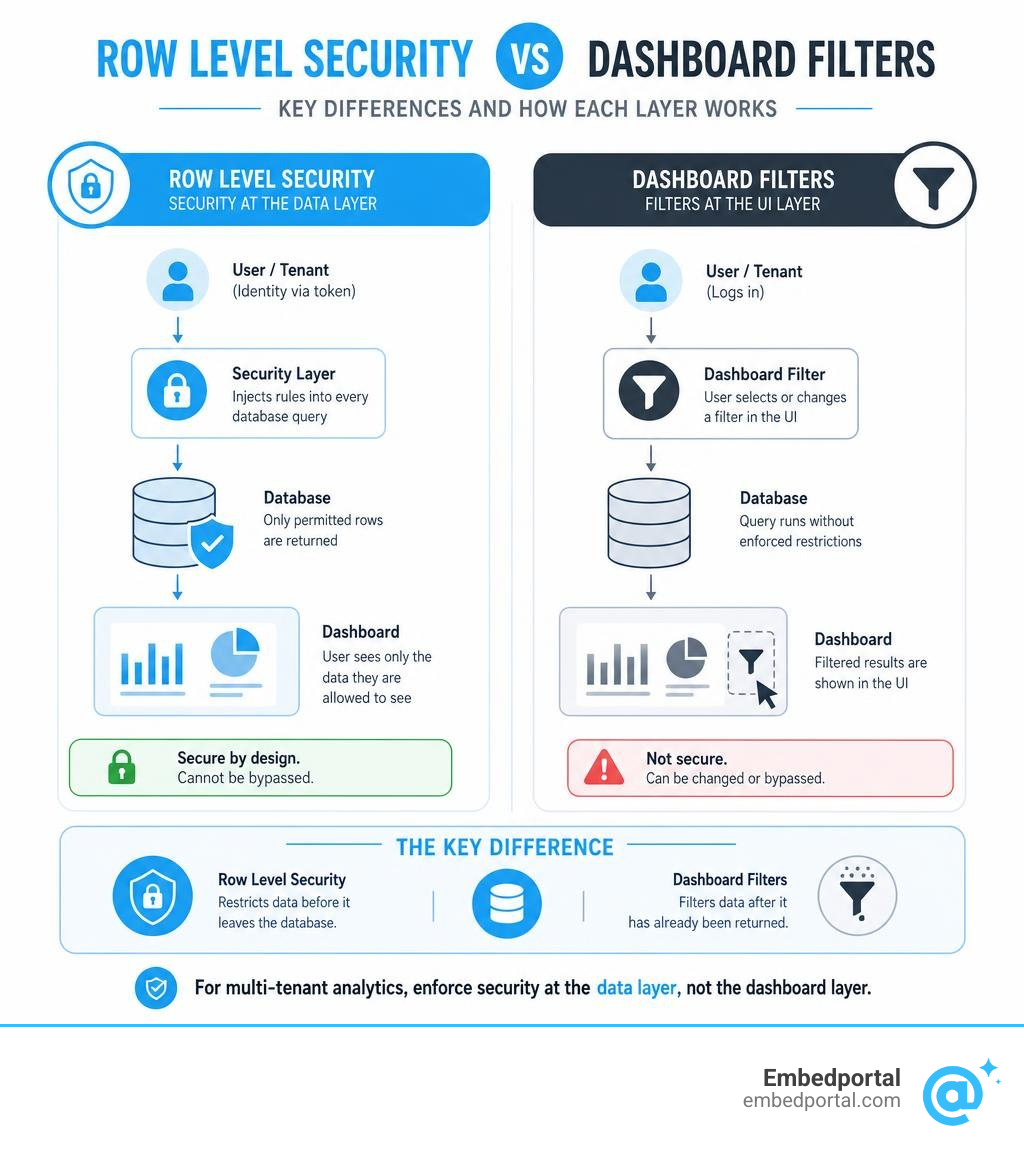
It is incredibly common for product teams to confuse user-facing dashboard filters with true row-level security. This misunderstanding is one of the leading causes of data leaks in customer-facing analytics.
Dashboard filters belong to the presentation layer. They are designed for user convenience, allowing someone to toggle between views, such as switching from “US-East” to “US-West”. However, because these filters are managed on the client side, they are easily bypassed. A tech-savvy user can simply open their browser’s developer tools, inspect the outgoing network requests, and modify the query parameters to view another customer’s data.
True database-enforced RLS, on the other hand, operates entirely behind the scenes. The user has no control over it, and the client-side browser never receives the unfiltered data.
| Feature | Dashboard Filters | Database-Enforced RLS |
|---|---|---|
| Enforcement Layer | Presentation Layer (Client-Side) | Data Layer (Database-Side) |
| Bypass Risk | High (Can be manipulated via browser tools) | Zero (Handled during query generation) |
| Primary Purpose | User experience, data exploration | Tenant isolation, data security |
| Data Transmission | Full dataset may be sent to the browser | Only authorized rows leave the database |
| Mutability | Highly mutable by the end user | Completely immutable |
Implementing Row-Level Security for Anonymous and External Users
When you are embedding dashboards for registered users who have accounts in your BI tool, managing security is relatively straightforward. But what happens when you need to embed dashboards for external users or anonymous visitors who do not have individual BI credentials?
In these scenarios, we rely on anonymous embedding. This process uses JSON Web Tokens (JWT) and dynamic session tags to pass security context from your application’s backend to the BI platform securely.
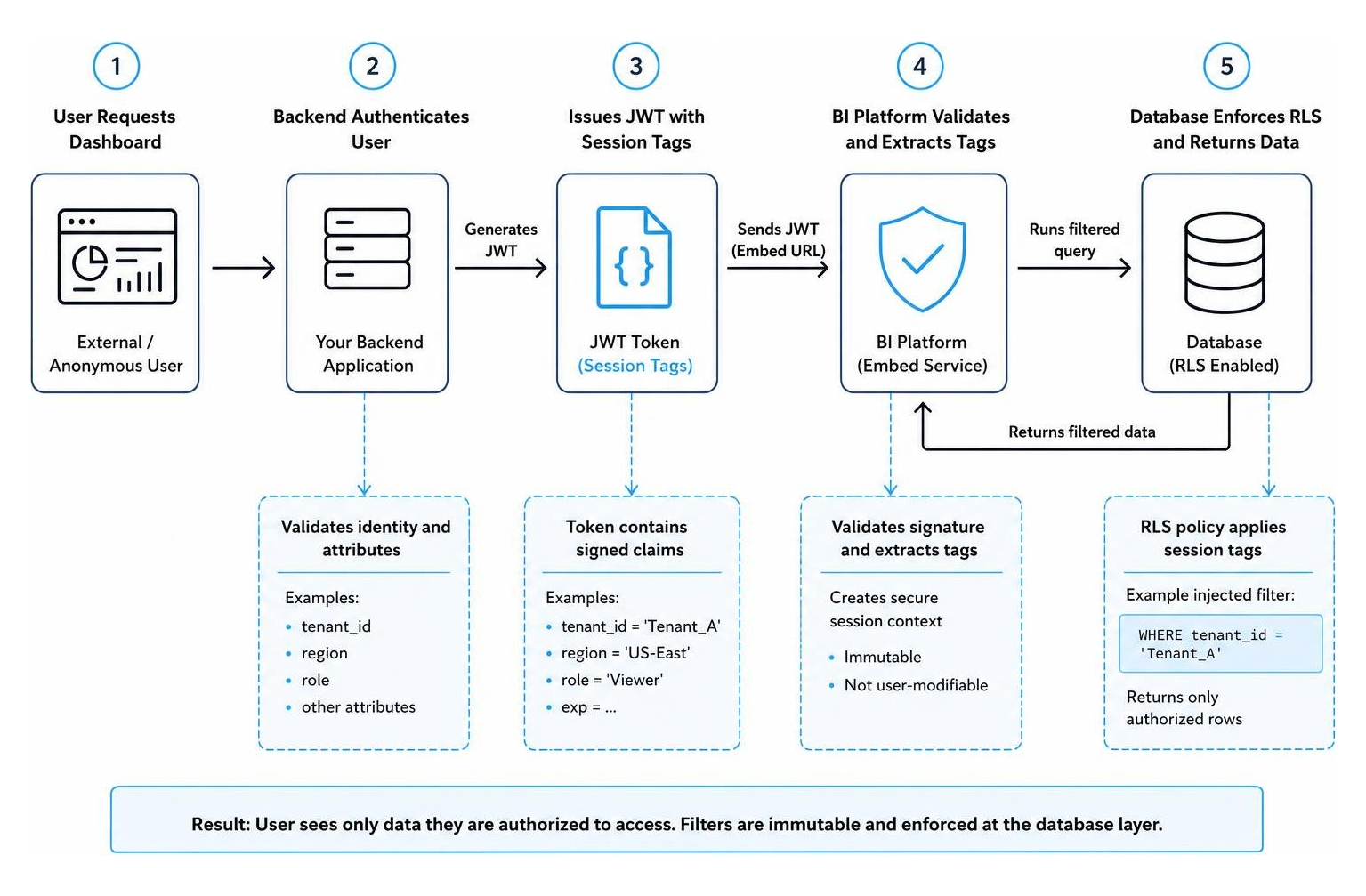
By using this flow, you can safely display personalized dashboards to thousands of external clients without the administrative headache or high licensing costs of registering each user individually. For platform-specific details, check out our guide on Row Level Security Power BI.
Tag-Based and Attribute-Based RLS Configurations
When working with Amazon QuickSight, tag-based RLS is the industry standard for securing anonymous embeds. This is achieved using the GenerateEmbedUrlForAnonymousUser API operation.
When configuring tag-based rules, you map specific session tags inside your API request to columns within your SPICE or direct query datasets. However, there are several strict technical limitations and specifications you must keep in mind:
- Tag Limits: You can add up to 50 tags to a single dataset.
- Character Limits: When applying SPICE datasets to row-level security, each field in the dataset can contain up to 2,047 Unicode characters.
- Delimiter Configuration: If a user belongs to multiple tenants or regions, you can pass multiple values using a delimiter. The TagMultiValueDelimiter can be up to 10 characters long.
- Match All Values: If a super-user needs access to all data, you can use a wildcard value. The MatchAllValue parameter must be at least one character and at most 256 characters long.
For alternative setups, you can compare this with Row Level Security Tableau configurations.
Mapping Session Tags and JWT Claims to Dataset Columns
To make row-level security work seamlessly, your backend must map user attributes directly to the dataset columns. In Power BI, this is accomplished through the App-Owns-Data embedding scenario using an Effective Identity.
When your application generates an embed token, it defines the effective identity within the request body. This identity includes the username, a list of roles, and the specific datasets to which those roles apply.
For example, if a user logs into your SaaS platform as an administrator for “Store 42”, your backend service principal generates an embed token that passes “Store 42” as the custom data attribute. Power BI receives this attribute, maps it to the store identifier column in your dataset, and dynamically filters the entire report. To learn how to implement this pattern step-by-step, see our guide on Power BI Row Level Security.
Step-by-Step Guide to Configuring Multi-Tenant RLS
Setting up a robust, multi-tenant RLS architecture requires clean coordination between your database, your backend application, and your embedded analytics platform.

Let’s break down the exact steps to implement this pattern securely and efficiently, ensuring your tenants’ data remains completely isolated. You can also read more about this architecture in our guide on Multi Tenant Row Level Security.
Step 1: Define the Tenant Column and Policy Rules
First, you must ensure that your database schema supports multi-tenancy. Every table containing tenant-specific data must include a dedicated tenant identifier column (such as tenantid or clientid).
Next, you will define the policy rules within your data model. If you are using a modern cloud data platform, you can configure these access rules directly in your BI tool or modeling layer. For instance, you can write rules that say: “If the user’s tenant attribute matches the tenant_id column, allow read access.” For a deeper dive into setting up these database policies, refer to Set up row-level security.
Step 2: Generate Secure Embed Tokens Server-Side
Never let your client-side application dictate security parameters. If your frontend code tells the BI tool which tenant ID to filter by, a user can easily tamper with that request.
Instead, always handle token generation on your trusted backend servers. When a user requests a dashboard, your backend service should verify their active session, look up their tenant ID from your database, and call the BI platform’s token generation API (such as generating an embed URL with session tags or an effective identity). Because these security credentials are set server-side, they are completely tamper-proof. For architectural blueprints, see our article on Centralized Row Level Security.
Step 3: Map Attributes and Enforce Filters at Query Time
Once the secure embed token is passed to the frontend, the BI tool’s rendering engine takes over. It sends the token to the BI server, which decrypts it, validates the signature, and extracts the tenant attributes.
During query generation, the BI server appends these attributes to the SQL query’s WHERE clause before sending it to your database. Finally, run thorough validation testing. We highly recommend writing automated tests that attempt to load dashboards using invalid or cross-tenant tokens to verify that your database execution successfully blocks unauthorized access. For more testing strategies, read Row Level Security Power BI 2.
Extending RLS to Vector Databases and AI Applications
As we move into an era dominated by Generative AI and Retrieval-Augmented Generation (RAG), the concept of row-level security is expanding. It is no longer limited to traditional SQL tables and BI dashboards.
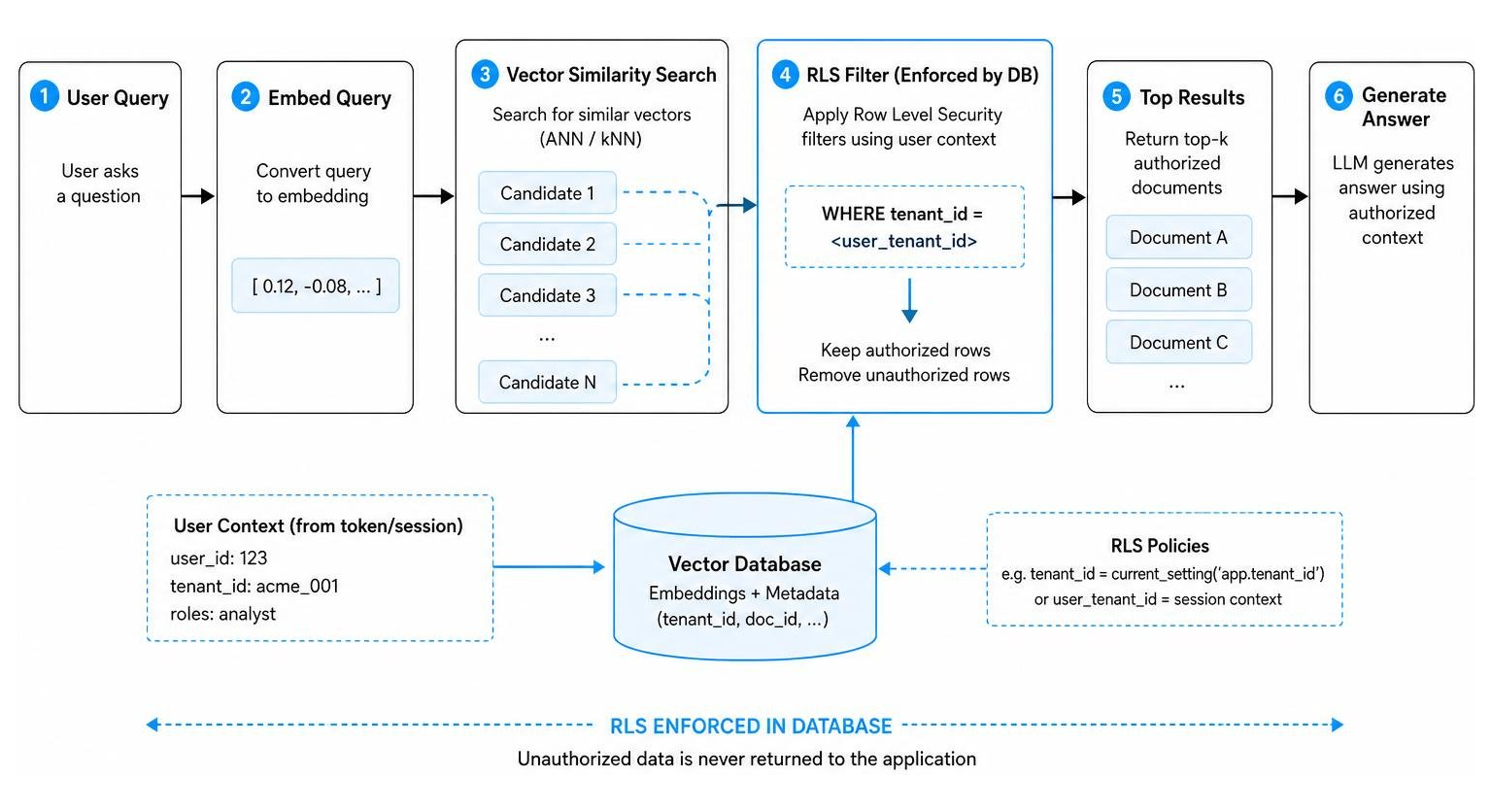
When you build an AI-powered search or chat application, you store document representations as vector embeddings in a vector database (such as PostgreSQL with the pgvector extension). If a user asks your AI assistant a question, the application performs a vector similarity search to find the most relevant documents.
Without RLS, your AI assistant might retrieve highly sensitive documents (like executive compensation plans or medical records) that the querying user has no right to see. Enforcing row-level security directly inside your vector database is critical to keeping your AI applications compliant and secure. For a detailed guide on this process, explore Row Level Security in Vector DBs for RAG and Postgres Row Security.
Generating and Storing Vector Embeddings with Security Metadata
To secure your AI applications, you must store security metadata alongside your vector embeddings. When you ingest documents, you generate vector embeddings for the text and store them in a database table that includes columns for owner, department, or classification level.
Modern databases make it incredibly easy to generate these embeddings natively. For example, you can use MySQL AI routines like MLEMBEDROW or MLEMBEDTABLE to generate vector representations of your text rows in parallel. If you are using Google Cloud SQL for MySQL, you can use the VECTOR data type and generate embeddings via Vertex AI models. Alternatively, MotherDuck allows you to generate embeddings directly within your SQL queries using its built-in EMBEDDING function integrated with OpenAI.
To learn more about how to set up these database-level vector pipelines, consult the guide on how to Generate and manage vector embeddings and review the academic benchmarks in Towards Universal Tabular Embeddings: A Benchmark Across Data Tasks.
Querying Secure Vector Embeddings in RAG Pipelines
When a user submits a query to your RAG pipeline, your application must perform a hybrid search that combines vector similarity with metadata filtering.
Using PostgreSQL with pgvector, you can enable native RLS on your embeddings table. When the user initiates a search, your application sets a session variable containing the user’s role or department. The database then automatically applies your RLS policy, ensuring that the similarity search (using operators like cosine distance) is restricted only to rows that match the user’s security clearance.
This database-level enforcement ensures that unauthorized documents are filtered out before the similarity math is calculated, protecting your LLM from ingestion leaks. To see a practical workflow of this in action, check out Google’s guide on how to Understand an example of an embedding workflow.
Architectural Considerations and Security Best Practices
When you are designing a multi-tenant embedded analytics system, security must be baked into every layer of your architecture. Here are the non-negotiable best practices we recommend to our partners:
- Implement Server-Side Controls exclusively: Never allow your client-side application to define, modify, or pass security attributes. All session tags and JWT claims must be generated and signed by your backend.
- Prevent Token Enumeration: Ensure that your tenant identifiers are not sequential integers (like 1, 2, 3). Use cryptographically secure UUIDs to prevent malicious actors from guessing other tenants’ values.
- Enable Comprehensive Audit Logging: Log every single request for an embed token, including who requested it, what tenant ID was applied, and the timestamp. This is essential for compliance and security forensics.
- Optimize Query Performance: Dynamic query injection can sometimes cause database performance bottlenecks. Ensure that your tenant identifier columns are properly indexed, and leverage high-performance cached datasets (like SPICE in QuickSight) to keep your dashboards snappy.
For an exhaustive checklist of security measures, read our dedicated guide on Row Level Security Best Practices.
Frequently Asked Questions about Row-Level Dashboard Security
How does row-level security differ for anonymous vs. registered users in embedded BI?
For registered users, RLS is typically tied directly to their BI tool user accounts or IAM identities. The BI platform knows exactly who they are based on their login. For anonymous users, the BI platform has no record of the user. Therefore, we must pass temporary security context at runtime using signed session tags or JWT claims generated by our application’s backend.
What are the performance implications of applying RLS to large datasets?
Applying RLS adds a WHERE clause to every query, which can increase database load if not properly optimized. To maintain sub-second load times, make sure your tenant columns are indexed. If you are using in-memory datasets like QuickSight’s SPICE, ensure your field lengths stay within the 2,047 Unicode character limit to keep memory usage efficient.
Can RLS be applied directly to vector similarity searches in AI applications?
Yes! By using vector databases like pgvector, you can enable native database RLS. This ensures that when you run a similarity search, the database filters out unauthorized rows based on metadata columns before returning the nearest-neighbor results to your AI pipeline.
Conclusion
Implementing row-level security is the single most critical step in building a secure, multi-tenant analytics experience for your customers. But as we have seen, configuring RLS across different BI tools, database engines, and vector stores can quickly become a complex, time-consuming engineering challenge.
That is where we can help. Embedportal is a white-label embedding platform designed specifically to take the pain out of embedded analytics.
Our platform allows product and engineering teams to embed multi-vendor analytics (including Tableau, Power BI, QuickSight, and Metabase) with unified branding, centralized row-level security, and seamless SSO integration — all in under an hour.
With us, you do not have to spend weeks writing custom backend wrappers for different BI APIs. We handle the heavy lifting of token generation, session tag mapping, and tenant isolation, so you can deliver a secure, world-class embedded BI experience to your customers with absolute peace of mind.