Amazon Redshift Row-Level Security Made Easy
Why AWS Redshift Row-Level Security Is Essential for Secure Data Access
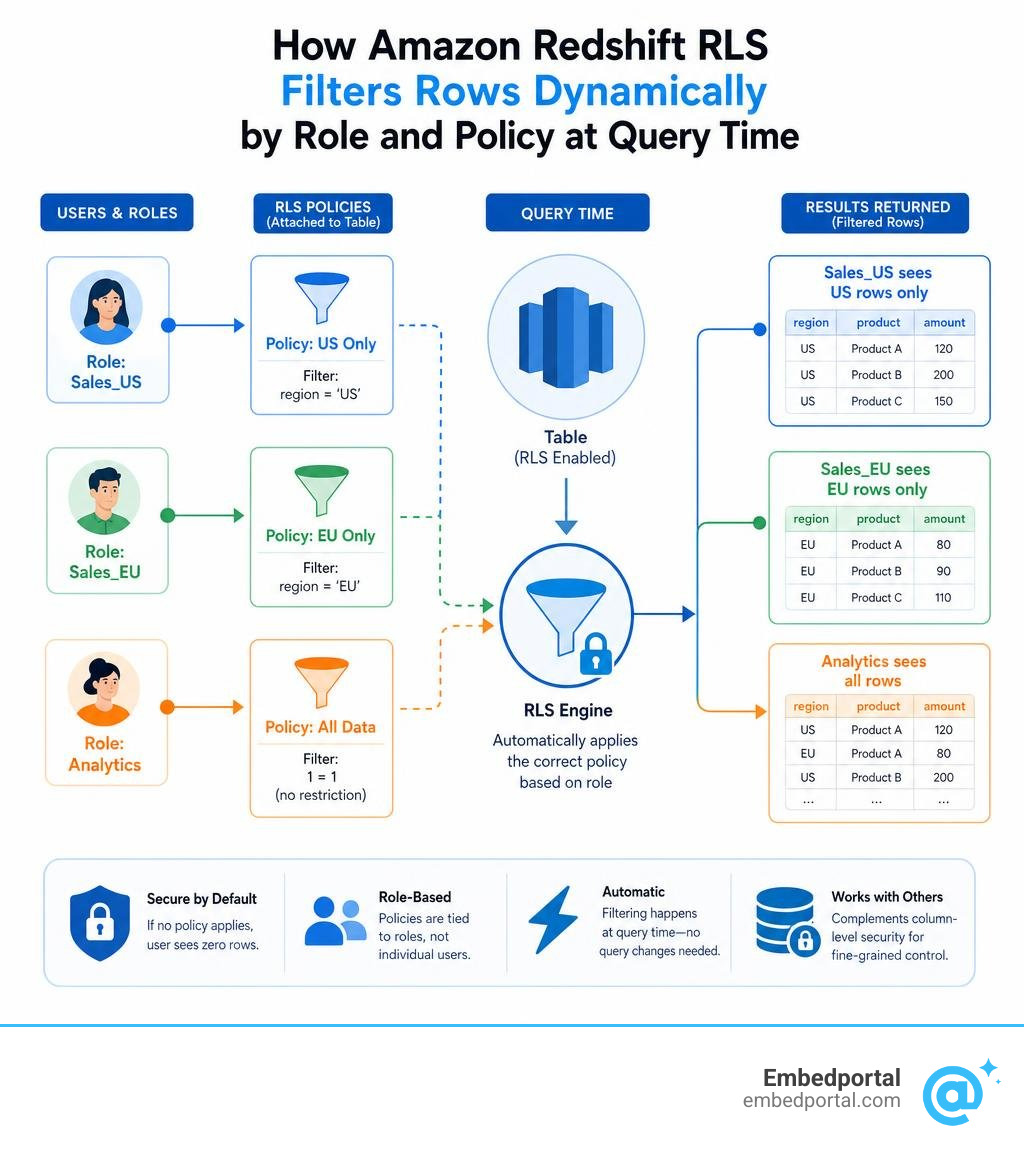
AWS Redshift row-level security (RLS) is a built-in feature that lets you control which rows of data each user or role can see — without changing your queries or duplicating your tables.
Here’s the quick version:
- RLS works by attaching filter policies to database tables
- Policies are tied to roles, not individual users
- When a user runs a query, Redshift automatically applies the right filter
- If no policy applies to a user on an RLS-protected table, they see zero rows by default
- RLS works alongside column-level security for full, fine-grained access control
This matters a lot if you’re embedding dashboards into a customer portal. Without row-level security, every tenant could potentially see every other tenant’s data — a serious compliance and trust problem.
Traditional workarounds like database views or separate schemas can work, but they don’t scale. You end up maintaining dozens (or hundreds) of views as your customer base grows. RLS solves this at the policy level, so your access rules stay centralized and manageable.
Amazon Redshift is a fully managed, petabyte-scale cloud data warehouse — and RLS is built directly on top of its role-based access control (RBAC) system, making it a natural fit for multi-tenant SaaS platforms.
Terms related to aws redshift row level security:
Understanding Row-Level Security in Amazon Redshift
To truly grasp how row-level security works inside Amazon Redshift, it helps to understand its architectural foundation. Redshift builds RLS directly onto its Role-Based Access Control (RBAC) engine. This means you do not have to map security policies to hundreds of individual database users. Instead, you define security policies, attach them to specific database roles, and then assign users to those roles.
When a query is executed, Amazon Redshift intercepts the SQL statement and automatically appends a hidden filter condition (a USING clause) before the query-level user predicates are evaluated. The user remains completely unaware that their query is being rewritten behind the scenes. They simply see the restricted slice of data they are authorized to view.
This architecture provides a clean separation of duties. Security administrators, specifically those holding the sys:secadmin role, can manage access policies independently of database developers who write queries or build pipelines.
Furthermore, RLS does not operate in a vacuum. It integrates seamlessly with Column-Level Security (CLS) and Dynamic Data Masking (DDM). While CLS prevents unauthorized roles from viewing entire columns (such as credit card numbers or social security numbers), RLS restricts which horizontal rows are returned. Together, they offer a complete grid of cell-level protection for sensitive enterprise data.
For a broader look at how this fits into overall security strategies, you can read more about Row-Level Security and the official AWS documentation on Row-level security – Amazon Redshift.
Why Use AWS Redshift Row Level Security Over Traditional Views?
Before native RLS was introduced, database administrators relied heavily on standard database views or separate schemas to restrict data access. While views can get the job done for small setups, they quickly become an administrative nightmare as your organization scales.
Imagine you are managing a multi-tenant SaaS application with 500 customers. If you use the view-based approach, you have to create and maintain 500 separate views, each with a hardcoded WHERE clause filtering for a specific tenant ID. If you need to alter the underlying table structure, you have to rebuild all 500 views. This approach is highly prone to human error and severely impacts query optimization.
Additionally, views require developers to explicitly rewrite their queries to point to the correct view instead of the base table. If a developer accidentally queries the base table directly, sensitive data could be leaked.
With native aws redshift row level security, there is no query modification required. Users and BI tools query the base table directly. Redshift handles the security filtering automatically at runtime. This significantly simplifies your database schema, reduces maintenance overhead, and ensures that security rules are consistently enforced regardless of how the database is accessed.
If you are coming from a PostgreSQL background, you might find it helpful to compare this approach to Postgres Row Security to see how Redshift adapts these concepts for a massive data warehouse environment.
Key Use Cases for Redshift RLS
Implementing row-level security is highly beneficial across several common business scenarios:
- Multi-tenant SaaS Applications: If your software serves multiple business clients from a single database, you must guarantee complete data isolation. Using RLS, you can ensure that Tenant A never catches a glimpse of Tenant B’s records, even though they reside in the same physical tables. You can explore this further in our guide on Multi Tenant Row Level Security.
- Healthcare Compliance: In clinical settings, patient privacy is heavily protected by regulations like HIPAA. In California, healthcare organizations must enforce strict boundaries on medical records. With RLS, you can restrict doctors and nurses so they only see the medical files of patients assigned directly to their specific department or facility.
- Regional Sales Operations: Large enterprises often divide their sales forces by geography. For instance, a sales representative based in California should only see transactions originating within California, while a regional manager might have access to the entire Western United States. RLS makes it simple to filter sales tables dynamically based on the user’s regional role.
- Payroll and HR Privacy: Human resources databases contain highly confidential compensation details. RLS can be configured to allow managers to view payroll information exclusively for their direct reports, while blocking them from seeing the salaries of peer managers or executive leadership.
Implementing AWS Redshift Row Level Security: A Step-by-Step Guide
Let us walk through the process of setting up and enabling aws redshift row level security from scratch. For this guide, we will use a real-world scenario: restricting sales data so that regional sales representatives can only view records from their assigned state, with a specific focus on California.

To get started, we will walk through the three essential steps: creating the policy, attaching it to a role, and enabling RLS on our target table. For a detailed SQL walkthrough, you can also refer to the Row-level security end-to-end example – Amazon Redshift.
Step 1: Creating the RLS Policy
The first step is to define our security policy using the CREATE RLS POLICY statement. This statement specifies the filtering logic that Redshift will apply to queries.
To create an RLS policy, you must log in as a superuser or a user with the sys:secadmin role. We will write a policy that filters rows based on the state column.
To define a policy named policy_california on a table containing a column named state, we use the following SQL structure:
CREATE RLS POLICY policy_california WITH (state VARCHAR) USING (state = ‘CA’);
In this statement, the WITH clause defines the input parameter and its data type, which must match the target column in our table. The USING clause contains the actual filter expression that will be dynamically injected into the SQL WHERE clause. All policies attached to a single table must use a consistent table alias if they reference multiple columns, and they cannot reference external tables, catalog tables, or temporary tables.
Step 2: Attaching the Policy to Roles
Once the policy is created, it remains inactive until we attach it to a database role or user. As a best practice, we always recommend attaching policies to roles rather than individual users to keep your security model clean and maintainable.
First, we create a role for our California sales team:
CREATE ROLE rolesalesca;
Next, we attach our newly created policy to this role for our target table, which we will call public.sales_records:
ATTACH RLS POLICY policycalifornia ON public.salesrecords TO ROLE rolesalesca;
This establishes a many-to-many relationship mapping. You can attach multiple policies to a single role, or attach the same policy to multiple roles. It is important to know that when RLS is active, a default deny-all policy is applied to any role that does not have an explicitly attached policy. This means if a user belongs to a role with no policy attached, they will see zero rows when querying the table, preventing accidental data exposure.
For more on managing these relationships at scale, check out our article on Centralized Row Level Security.
Step 3: Enabling RLS on the Target Table
Creating and attaching the policy is not enough to start filtering data. By default, Redshift does not enforce RLS on tables until you explicitly turn it on. This allows you to set up and test your policies in the background without disrupting active users.
To turn on row-level security for our sales table, run the following command:
ALTER TABLE public.sales_records ROW LEVEL SECURITY ON;
Once this command executes, Redshift immediately begins filtering rows for any non-superuser querying public.sales_records. Regular users will also need explicit SELECT permissions granted on the table to run queries, but their results will now be dynamically filtered according to the roles they belong to. If you ever need to temporarily disable RLS for maintenance, you can turn it off by running:
ALTER TABLE public.sales_records ROW LEVEL SECURITY OFF;
Advanced Integrations: Native IdP and Redshift Spectrum
As modern data architectures grow, security boundaries must extend beyond the core data warehouse. Let us look at how Redshift RLS integrates with external identity providers and external data lakes.
Integrating with Native IdP Authentication
Many enterprises rely on centralized Identity Providers (IdPs) like Microsoft Azure AD (Entra ID) or Okta to manage user identities and group memberships. Rather than duplicating these groups manually inside Redshift, you can use Redshift’s native IdP authentication.
When a user logs in to a BI tool or dashboard using SSO, the native IdP integration automatically maps their corporate group memberships to Redshift database roles. To make this work seamlessly with RLS, you name your Redshift roles using a specific namespace prefix that matches your IdP groups, such as:
aad:sales_california
When a user belonging to the Azure AD group “sales_california” authenticates, Redshift automatically assigns them the matching database role at session startup. Because your RLS policies are attached to that role, the user’s data access is immediately restricted without any manual administrative intervention in Redshift.
This is incredibly powerful for keeping security policies synchronized in real time as employees join, change departments, or leave the company. For a deep dive into setting up this flow, read the AWS Big Data Blog on how to Integrate Amazon Redshift row-level security with Amazon Redshift native IdP authentication | AWS Big Data Blog.
To see how this maps to BI tools, you can also explore our guides on Row Level Security Power Bi and Row Level Security Tableau.
Securing Redshift Spectrum with AWS Lake Formation
Amazon Redshift Spectrum allows you to query exabytes of unstructured and semi-structured data directly in Amazon S3 using external tables. However, because native Redshift RLS policies cannot be attached directly to external tables, you must leverage AWS Lake Formation to secure this data.
AWS Lake Formation serves as a centralized governance layer for your S3 data lake. Inside Lake Formation, you can define data filters that specify both row-level filtering expressions (like state = ‘CA’) and cell-level security (which columns to include or exclude).
When a Redshift Spectrum query is executed, Redshift coordinates with Lake Formation to enforce these filters. The IAM role attached to your Redshift cluster acts as the principal, passing the active user’s context to Lake Formation, which then returns only the authorized subsets of S3 data.
To learn how to implement this end-to-end architecture, check out the AWS guide on how to Use Amazon Redshift Spectrum with row-level and cell-level security policies defined in AWS Lake Formation | AWS Big Data Blog.
Best Practices, Limitations, and Performance Considerations
While aws redshift row level security is incredibly powerful, it does introduce query-time overhead. Every time a query is run, Redshift has to evaluate your policy conditions. Let us examine how to design your policies to maintain high performance.
| RLS Policy Design Type | Query Execution Overhead | Join Complexity | Recommended Use Case |
|---|---|---|---|
| Simple Static Filter | Very Low | None | Filtering by static values (e.g., state = ‘CA’) |
| Session Variable Filter | Low | None | Multi-tenant apps using session context variables |
| Dynamic Lookup Table | Moderate to High | High (Requires Joins) | Complex, frequently changing user-to-data mappings |
To learn more about optimizing these structures, you can read the AWS Big Data Blog on how to Achieve fine-grained data security with row-level access control in Amazon Redshift | AWS Big Data Blog.
Best Practices for Optimizing AWS Redshift Row Level Security Performance
To keep your Redshift cluster running fast while enforcing strict security, keep these best practices in mind:
- Keep Policies Simple: Avoid writing complex logical expressions inside your USING clauses. The simpler the expression, the easier it is for the Redshift query planner to optimize.
- Minimize Table Joins: It is highly tempting to write RLS policies that join your main tables against large lookup tables to determine access. However, these joins are executed on every single query, which can severely degrade performance on large datasets. If you must use lookup tables, keep them small and ensure they are properly indexed or distributed.
- Use Session Context Variables: For multi-tenant applications, you can use session context variables to pass the active tenant ID directly from your application to Redshift using the setconfig and currentsetting functions. This avoids the need for complex database joins to look up the user’s tenant ID.
- Test with Explain Plans: Before deploying RLS to production, run EXPLAIN on your queries. If you have the EXPLAIN RLS permission, you can see exactly how the RLS filter predicates are being applied and whether they are causing inefficient nested loop joins.
For a comprehensive checklist, refer to our guide on Rls Best Practices.
Key Limitations and Constraints
When planning your aws redshift row level security implementation, be aware of the following technical limitations:
- Python UDF Deprecation: Historically, developers used custom Python User-Defined Functions (UDFs) to build complex masking and filtering logic. However, Amazon Redshift has officially discontinued support for creating new Python UDFs starting with Patch 198. Furthermore, existing Python UDFs have reached their absolute end-of-life as of June 30, 2026. You must use SQL-based UDFs or native Redshift SQL functions instead.
- Datasharing Restrictions: Redshift does not support sharing RLS-protected tables or views via native Redshift Datasharing. If you attempt to query an RLS-enabled relation over a datashare, the query will fail.
- Cross-Database Queries: If you perform cross-database queries, Redshift will block access to RLS-protected relations by default unless the querying user has been explicitly granted the IGNORE RLS permission.
- Column Alteration: You cannot alter, rename, or drop any table columns that are actively referenced inside an attached RLS policy. You must detach the policy before making schema changes.
Auditing and Monitoring RLS Policies
To maintain compliance, security administrators must be able to audit who has access to what, and which policies are actively being applied. Redshift provides several system views for this exact purpose:
- SVVRLSPOLICY: Lists all RLS policies that have been created in the database.
- SVVRLSRELATION: Shows which tables, views, or materialized views have RLS enabled.
- SVVRLSATTACHED_POLICY: Displays the mapping of which policies are attached to which roles or users.
- SVVRLSAPPLIED_POLICY: A dynamic run-time view that records which RLS policies were actually executed during a specific query session.
By regularly querying these views, security teams can verify that access controls are working exactly as intended.
Frequently Asked Questions about Redshift RLS
What happens if a table has RLS enabled but no policy is attached?
If you turn row-level security on for a table using ALTER TABLE but do not attach any policies to the querying user’s roles, Amazon Redshift applies a strict “default deny” rule. The query will run successfully, but it will return exactly zero rows. This secure-by-default behavior ensures that data is never accidentally exposed during policy misconfigurations.
Can I combine row-level security with column-level security in Redshift?
Yes, absolutely. Redshift allows you to combine RLS, Column-Level Security (CLS), and Dynamic Data Masking (DDM) on the same table. For example, you can use RLS to restrict a sales representative to only see rows where state is California, while simultaneously using CLS or DDM to mask the credit card numbers column so they only see the last four digits.
Are Python UDFs supported in Redshift RLS policies?
No. Amazon Redshift discontinued the creation of new Python UDFs starting with Patch 198, and all existing Python UDFs ceased functioning after the June 30, 2026 deprecation deadline. If you are designing RLS policies today, you must use standard SQL expressions or SQL-based UDFs for your filtering logic.
Conclusion
Implementing aws redshift row level security is one of the most effective ways to secure sensitive data at scale, especially for multi-tenant applications and highly regulated industries. By moving security rules out of your application code and BI tools and directly into your data warehouse, you ensure consistent, foolproof protection.
However, setting up and maintaining RLS across multiple database roles, identity providers, and BI dashboards can still take significant engineering time.
That is where we can help. Embedportal is a SaaS company that provides a white-label embedding platform for BI dashboards. Our unique platform enables your team to embed multi-vendor analytics — including Tableau, Power BI, QuickSight, and Metabase — with unified branding, centralized row-level security, and seamless SSO in under an hour.
With Embedportal, you do not have to spend weeks writing complex database policies or mapping identity provider groups to individual dashboard configurations. We handle the heavy lifting, allowing you to deliver secure, beautifully integrated dashboards to your customers instantly.
Ready to simplify your analytics security? Explore our platform and learn more about Row Level Security with Embedportal today!