Row Level Security AWS: A Practical Guide for Multi-Tenant Databases
Why Row Level Security in AWS Is Critical for Multi-Tenant SaaS
Row level security in AWS lets you control which rows of data each user can see — directly at the database level, without changing your application queries.
Here’s a quick overview of what that means in practice:
- What it is: A security mechanism that filters table rows based on the identity or attributes of the user running a query
- Where it applies in AWS: Amazon Redshift, Aurora PostgreSQL, RDS PostgreSQL, Aurora MySQL (via workarounds), and Amazon QuickSight
- How it works: Policies or rules attach to tables and silently filter results — users only ever see the rows they’re allowed to see
- Why it matters for SaaS: Each tenant in a shared database sees only their own data, enforced at the database layer rather than relying solely on application code
- Key AWS services involved:
| AWS Service | RLS Support | Method |
|---|---|---|
| Amazon Redshift | Native | CREATE RLS POLICY |
| Aurora / RDS PostgreSQL | Native | PostgreSQL CREATE POLICY |
| Aurora / RDS MySQL | Workaround | Views + triggers |
| Amazon QuickSight | Native | Permissions datasets |
| Redshift Spectrum | Via Lake Formation | Data filters |
If you’re building a multi-tenant SaaS product with embedded analytics, you’ve likely run into this problem: your database holds data for dozens or hundreds of customers, all in the same tables. Keeping each customer’s data completely separate — while still running a shared infrastructure — is one of the hardest security problems to solve cleanly.
The traditional fix is to filter data in application code. But that approach is fragile. One missed WHERE clause and a tenant sees another tenant’s records.
Row-level security moves that enforcement down to the database itself. It’s harder to bypass, easier to audit, and doesn’t depend on every developer remembering to add the right filter every time.
AWS offers RLS across multiple services, but the implementation details — and the gotchas — differ significantly between Redshift, Aurora PostgreSQL, RDS MySQL, and QuickSight. This guide walks through each one so you can choose and implement the right approach for your stack.
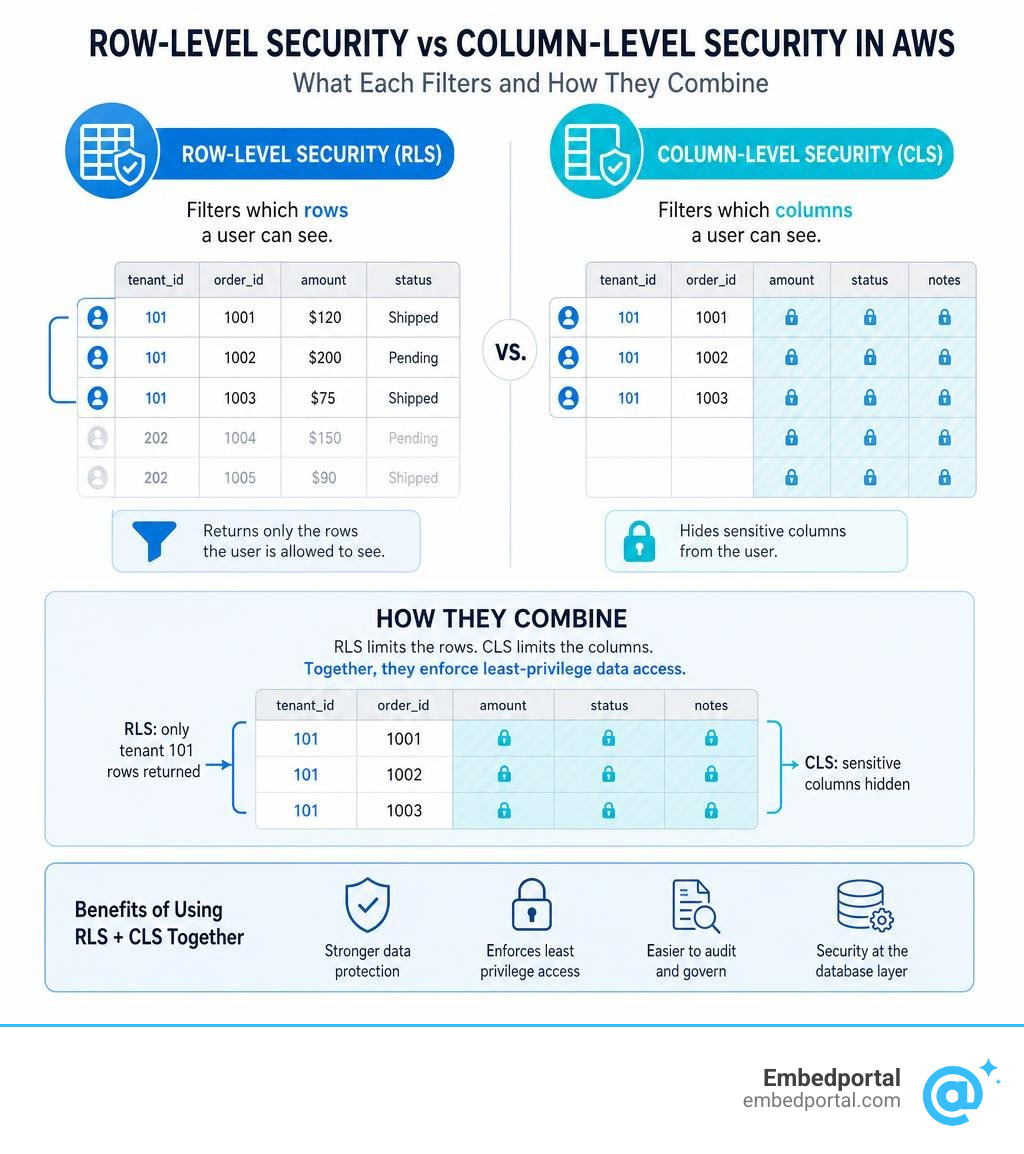
Glossary for row level security aws:
Understanding Row Level Security AWS: RLS vs. Column-Level Security
When designing a secure data architecture on AWS, you must decide how to slice and dice access controls. Security features generally fall into horizontal filtering (rows) or vertical filtering (columns). Understanding how these mechanisms interact is key to building a robust Multi Tenant Row Level Security architecture.
To learn more about the fundamentals, you can read about What Is Row-Level Security And How Does It Work.
Core Differences Between RLS and Column-Level Security
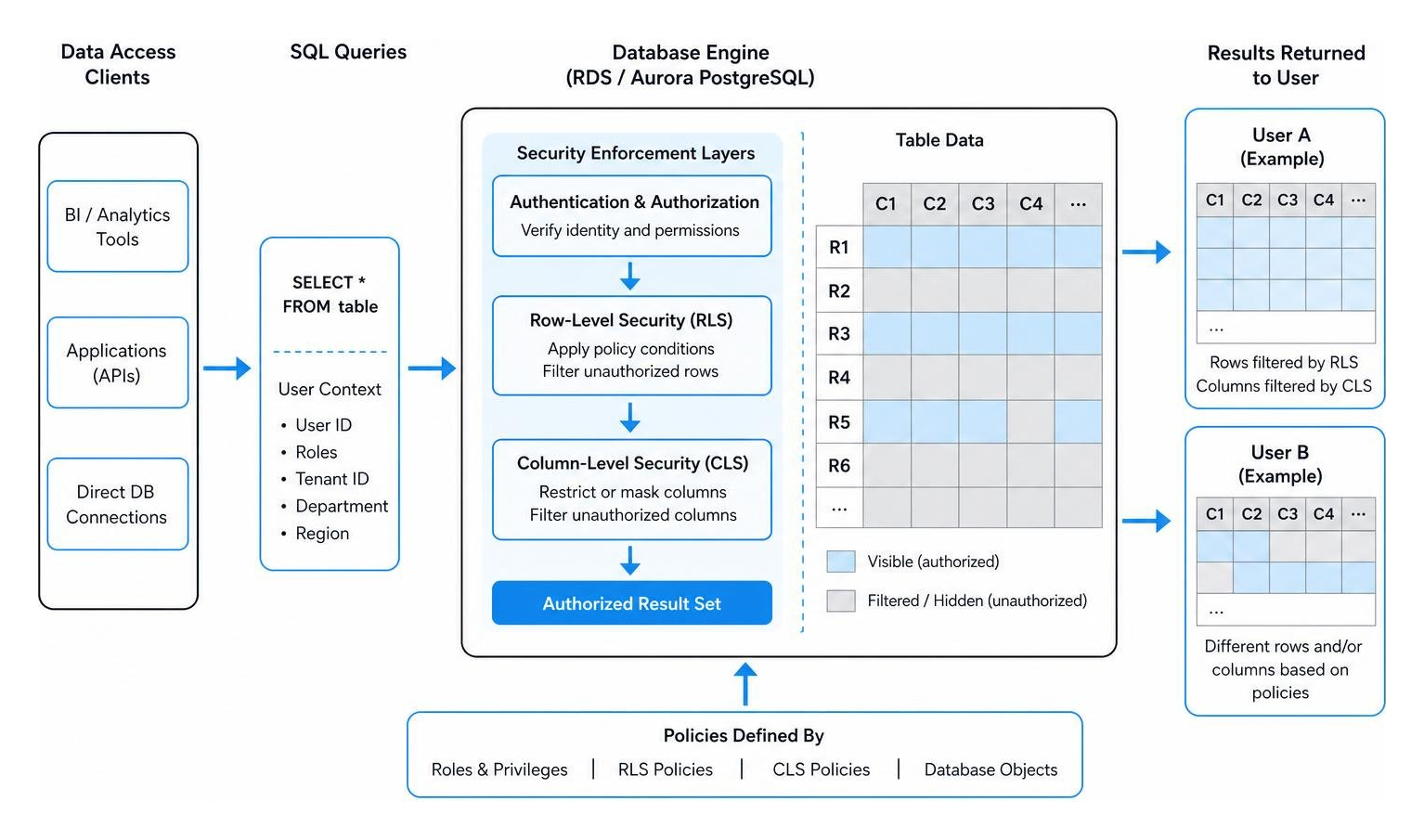
Row-level security acts as a horizontal filter. It restricts access to specific rows in a table based on user attributes, such as a tenant ID, department, or geographic region. The user runs a standard SELECT * FROM table query, and the database engine transparently filters out unauthorized rows before returning the dataset.
Column-level security (CLS) is a vertical filter. It restricts access to specific columns (such as social security numbers, credit card details, or medical records) regardless of which rows are returned. If a user lacks permission for a restricted column, the database will either block the query entirely, return null values, or mask the data.
| Feature | Row-Level Security (RLS) | Column-Level Security (CLS) |
|---|---|---|
| Filtering Direction | Horizontal (filters rows) | Vertical (filters columns) |
| Primary Use Case | Multi-tenant isolation, regional data segregation | PII protection, masking sensitive attributes |
| Database Action | Excludes unauthorized rows from result set | Excludes or masks unauthorized columns |
| Query Modification | Transparently appends policy conditions | Restricts column selection or returns nulls |
Achieving Cell-Level Security by Combining RLS and CLS
By combining both approaches, you can achieve cell-level security. This is the most granular form of access control, where specific data points are hidden or shown based on a combination of who is asking, which row is being accessed, and which column is requested.
For example, in a healthcare application, a doctor might have access to all patient rows and can see the “medicalhistory” column. However, a billing clerk might only have access to patient rows in their specific clinic (enforced by RLS) and cannot see the “medicalhistory” column at all (enforced by CLS).
For data lakes on AWS, this combination is often managed centrally. You can read more about this in the AWS guide Part 1: Implementing cell-level and row-level security.
Implementing Row Level Security Across AWS Databases
Enforcing security policies directly in your database engine ensures that no matter how a user accesses the data — whether through an API, a BI tool, or a direct database connection — the same rules apply.
Native Row Level Security AWS Implementations in Aurora and RDS PostgreSQL
PostgreSQL has built-in, native support for row-security policies. In Amazon Aurora PostgreSQL and Amazon RDS for PostgreSQL, you can activate this feature on a table-by-table basis.
To implement RLS in PostgreSQL, you first enable it on your target table:
ALTER TABLE sales_data ENABLE ROW LEVEL SECURITY;
Next, you create a policy using the CREATE POLICY command. This command defines a USING clause that acts as an implicit WHERE clause on all queries:
CREATE POLICY tenantisolationpolicy ON salesdata FOR SELECT USING (tenantid = currentsetting(‘app.currenttenant’));
The current_setting function retrieves a runtime session variable set by your application when it opens a connection. By default, superusers and database roles with the BYPASSRLS attribute bypass these policies. If you want to force RLS rules on table owners as well, you must execute:
ALTER TABLE sales_data FORCE ROW LEVEL SECURITY;
For a comprehensive breakdown of PostgreSQL-native policy syntax, permissive vs. restrictive policies, and avoiding race conditions, see the official PostgreSQL Row Security Policies documentation.
Custom Row Level Security AWS Workarounds for Aurora and RDS MySQL
Unlike PostgreSQL, MySQL (including Aurora MySQL and RDS MySQL) does not natively support row-level security policies. To achieve the same isolation, you must implement a custom workaround using database views, triggers, and the CURRENT_USER() function.
The standard pattern involves adding an “owner” or “tenant_id” column directly to your tables. Instead of granting users direct access to the raw tables, you revoke table access and expose a security view:
CREATE VIEW employeedataview AS SELECT * FROM employeedata WHERE ownerusername = CURRENT_USER();
To automate this without requiring your application code to manually write the username on every write, you can use BEFORE INSERT and BEFORE UPDATE triggers to automatically assign row ownership:
CREATE TRIGGER beforeemployeeinsert BEFORE INSERT ON employeedata FOR EACH ROW SET NEW.ownerusername = CURRENT_USER();
For a step-by-step guide on setting up these permissions, views, and triggers, refer to the AWS Database Blog on how to Implement row-level security in Amazon Aurora MySQL and Amazon RDS for MySQL.
Redshift RLS Policies and Spectrum Integration
Amazon Redshift supports native row-level security through database-level policies. This allows you to secure massive data warehouses without maintaining complex, nested views.
To create an RLS policy in Redshift, you define the policy expression using the CREATE RLS POLICY command:
CREATE RLS POLICY regional_filter USING (region = ‘US-West’);
You then attach this policy to specific roles or users using the ATTACH RLS POLICY command:
ATTACH RLS POLICY regionalfilter ON salessummary TO ROLE analyst_role;
If a table has RLS enabled but no policy is actively attached to the querying user or role, Redshift defaults to a “default deny” posture, returning zero rows to prevent accidental data exposure. That a single Redshift user can have a maximum of 999 rule records applied, which includes rules assigned directly to their username plus rules inherited through group memberships.
Additionally, note that Amazon Redshift will no longer support Python UDFs after June 30, 2026, so make sure your policies rely on SQL-native expressions.
To read more about managing the lifecycle of these policies, check out the blog post on how to Achieve fine-grained data security with row-level access control in Amazon Redshift.
For external data queried via Redshift Spectrum, you can define and enforce row-level and cell-level security policies using AWS Lake Formation data filters. This secures your S3 data lake directly, as detailed in the guide on how to Use Amazon Redshift Spectrum with row-level and cell-level security policies defined in AWS Lake Formation.
Enforcing RLS with the RDS Data API for Aurora PostgreSQL
If you are running a serverless application using AWS Lambda and Aurora PostgreSQL, managing traditional connection pools (like pgBouncer) can be a headache. The RDS Data API solves this by allowing you to run SQL queries over stateless HTTP requests.
However, because HTTP requests are stateless, you cannot simply run a SET app.current_tenant command and expect it to persist for your next query. To enforce RLS with the RDS Data API, you must use explicit transactions.
By calling begintransaction, you receive a transaction ID. You then pass this transaction ID to subsequent executestatement calls to keep your session state alive:
- Call begin_transaction to get a transactionId.
- Run executestatement with the command: SET LOCAL app.currenttenant = ‘tenant_123’; (using your transactionId).
- Run your SELECT query (using the same transactionId).
- Call commit_transaction.
Alternatively, you can create a PL/pgSQL database function that accepts the tenant ID as a parameter, sets the local context, and returns the filtered query results in a single API call.
From a cost perspective, the RDS Data API is charged per million requests, metered in 32 KB increments. It costs $0.35 per 1 million requests in us-east-1. Here is how that scales for different tenant workloads:
- A tenant making 10 requests per second (under 32 KB payload size) generates 26.28 million requests per month, costing roughly $9.20.
- A tenant making 6 requests per second with larger payloads between 32 KB and 64 KB is metered as 2 requests per call. This generates 15.76 million physical requests (metered as 31.52 million), costing approximately $11.03 per month.
For an in-depth implementation guide, read the AWS Database Blog on how to Enforce row-level security with the RDS Data API.
Row-Level Security in Amazon QuickSight
When you build dashboards for business intelligence, you need to make sure your visualizations respect the same row-level restrictions as your backend database. Amazon QuickSight Enterprise Edition provides robust, native support for RLS on both SPICE (in-memory) and Direct Query datasets.
If you are embedding these dashboards into your SaaS product, you can explore the options available in AWS Embedded Analytics to see how QuickSight handles user sessions.
User-Based vs. Tag-Based RLS Rules
QuickSight supports two primary methods for restricting dataset access:
- User-Based RLS: This method matches the logged-in QuickSight user’s UserName or GroupName against a permissions dataset. It is ideal for internal business intelligence where every viewer has a registered QuickSight account.
- Tag-Based RLS: Designed specifically for Embedded Analytics for SaaS where dashboards are embedded for anonymous, unregistered users. You define session tags (e.g., TenantID) and pass the values dynamically when generating the embedded dashboard URL via the QuickSight API.
For a detailed walkthrough of user-based rules, see the official AWS guide on Using row-level security with user-based rules to restrict access to a dataset.
Best Practices for Permissions Datasets and SPICE Quotas
To set up user-based RLS, you must create a target dataset and a separate permissions dataset (historically referred to as a Rules Dataset).
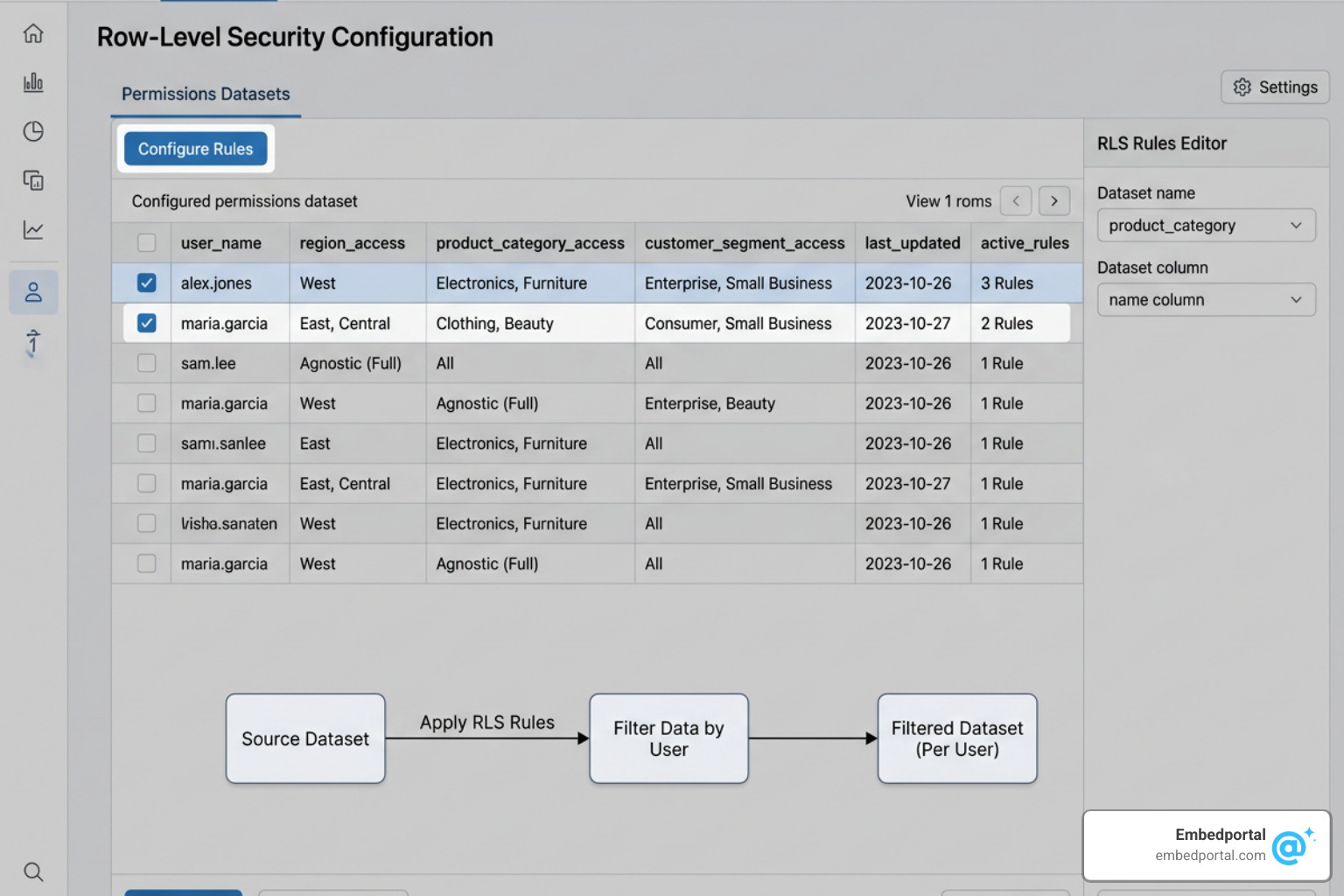
When configuring your permissions dataset, keep these critical details in mind:
- Exact Column Names: The username column in your permissions dataset must be named exactly UserName (case-sensitive).
- Lowercase Values: QuickSight evaluates usernames in lowercase. If your permissions file contains “JohnDoe” but the QuickSight login record is “johndoe”, the match will fail and the user will see no data.
- Data Types: Restricted fields (like departmentid or regioncode) must be uploaded as string/text data types. If you upload them as integers, QuickSight will throw a DatasetRulesInvalidColType error.
- SPICE Limits: For SPICE datasets, the number of filter values applied per user cannot exceed 192,000 for each restricted field. If a user belongs to multiple groups and the accumulated rules exceed this limit, the dataset ingestion or query will fail.
Auditing, Monitoring, and Troubleshooting AWS RLS
A security policy is only as good as your ability to prove it works. Setting up centralized auditing is essential for compliance and debugging.
To understand how to manage security policies across different business units, you can read about Centralized Row Level Security.
Monitoring Redshift and PostgreSQL RLS Policies
To audit RLS in Amazon Redshift, you can query system views to inspect which policies are active and how they are being applied:
- SVVRLSPOLICY: Lists all defined row-level security policies.
- SVVRLSAPPLIED_POLICY: Displays which policies were actually applied to a specific query run by a user.
In PostgreSQL, you can query the pg_policies system catalog to verify your rules:
SELECT * FROM pg_policies;
Additionally, you should configure PostgreSQL database logging to capture query plans and check for any unexpected sequential scans caused by poorly optimized policy expressions.
Troubleshooting Common QuickSight RLS Errors
If your users are reporting that they cannot see any data in their dashboards, or if they are seeing too much, check these common issues:
- The “Empty Rule” Gotcha: In QuickSight, if a user is listed in the permissions dataset but has a blank or NULL value for a restricted field, they are granted access to all data for that field. However, if a user is not listed in the permissions dataset at all, they are blocked from seeing any data.
- Child Dataset Inheritance: Child datasets in QuickSight inherit RLS rules from their parent datasets, but this inheritance only works if the child dataset is configured to use Direct Query.
- Case Sensitivity: Always double-check that your database usernames match the lowercase format used by QuickSight’s identity provider.
Frequently Asked Questions About AWS Row-Level Security
Does Amazon RDS MySQL support native row-level security?
No, MySQL (including Aurora MySQL and RDS MySQL) does not have native support for row-level security policies. You must implement a custom workaround using database views that filter data using the CURRENT_USER() function, paired with BEFORE INSERT triggers to automatically set row ownership.
What are the main limits of RLS in Amazon QuickSight?
For registered users, you are limited to 999 rule records per user (including group-level rules). For SPICE datasets, you cannot exceed 192,000 filter values per restricted field per user. Additionally, RLS only works on textual fields, not numeric or date fields, and anomaly detection is not supported on RLS-enabled datasets.
How does RLS affect query performance in Amazon Redshift?
Because RLS policies silently append conditions to your SQL queries, they can impact performance if your policies are overly complex. Avoid referencing large lookup tables or using heavy subqueries inside your CREATE RLS POLICY statements, as these can force Redshift to perform nested loop joins on every query.
Conclusion
Implementing row level security in AWS is one of the most effective ways to secure multi-tenant SaaS applications and business intelligence dashboards. By moving access controls down to the database and dataset layers, you reduce the risk of accidental data exposure and simplify your application code.
However, managing different RLS implementations across PostgreSQL, MySQL, Redshift, and QuickSight can quickly become complex, especially when you need to embed these analytics for your end users.
If you are looking for an easier way, Embedportal offers a white-label embedding platform designed for multi-vendor analytics. Whether your team uses Tableau, Power BI, QuickSight, or Metabase, Embedportal allows you to embed dashboards with unified branding, robust row-level security, and seamless single sign-on (SSO) in under an hour.
Ready to simplify your analytics security? Secure your dashboards with row-level security using Embedportal today.