The Developer’s Guide to Metabase Enterprise Embedding
Why Getting Metabase Secure Embedding Right Matters for SaaS Teams
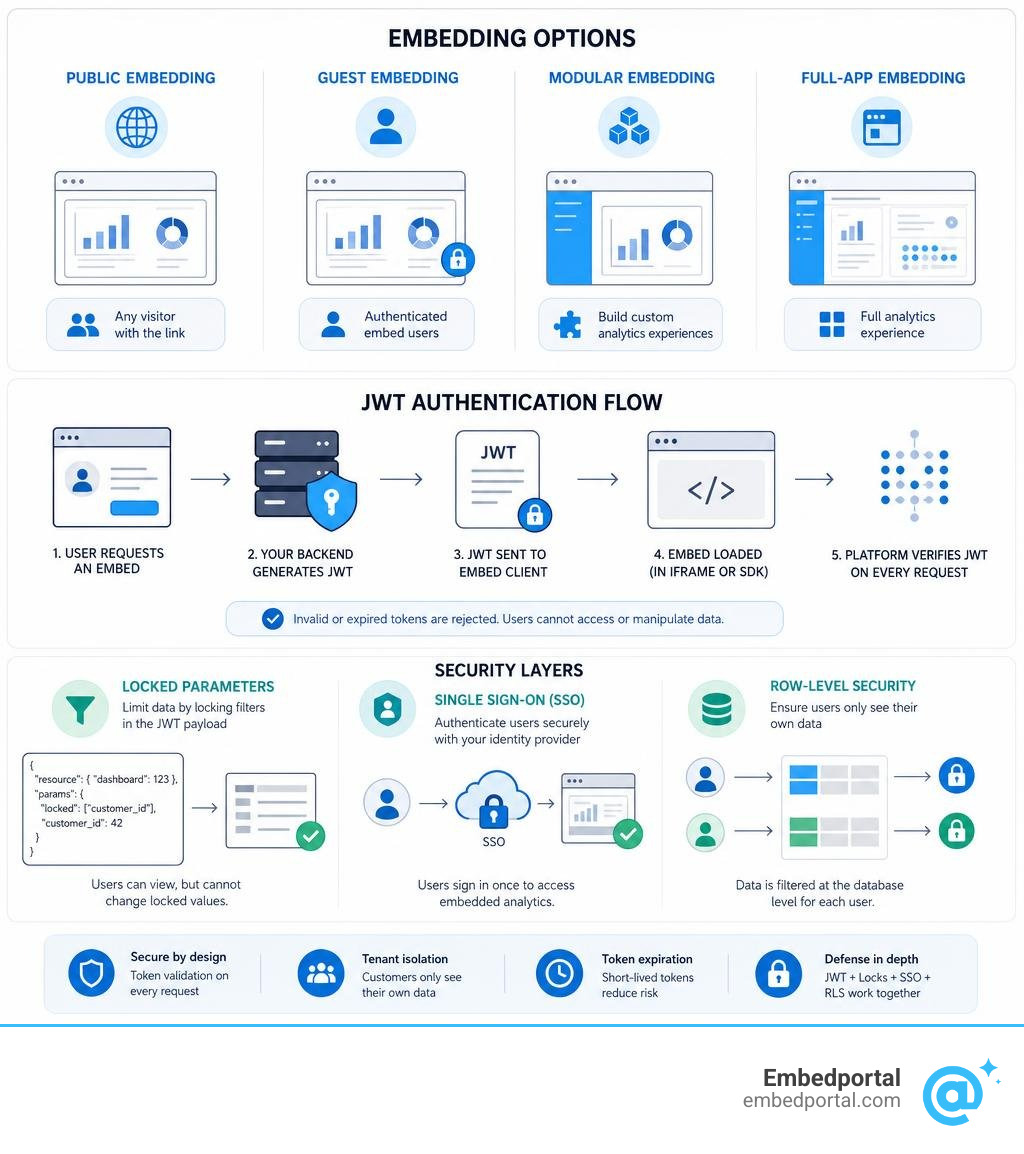
A metabase secure embedding solution lets you display Metabase dashboards and questions inside your own application — with proper authentication, data isolation, and access control — so customers only ever see their data.
Quick answer: How does Metabase secure embedding work?
- Enable embedding in your Metabase admin panel
- Choose an embedding type — guest embed, modular embed, or full-app embed
- Generate a signed JWT token on your backend using your Metabase secret key
- Lock parameters in the token payload to filter data per user or tenant
- Render the embed via iframe or the Modular Embedding SDK in your app
- Set token expiration to limit how long each embed session is valid
The core idea: Metabase verifies the JWT signature on every request, so users can’t manipulate what data they see.
If you’re building a customer-facing analytics portal, you’ve probably already hit the same wall most SaaS product teams hit. Embedding a Metabase dashboard publicly is fast — but it exposes every row of data to anyone with the URL. That’s not acceptable when Customer A must never see Customer B’s numbers.
The secure path involves JWT-signed tokens, locked filter parameters, and — for multi-tenant products — SSO-based row and column-level security. Each layer adds real protection, but also real complexity.
The stakes are high. Metabase is SOC 2 Type II, GDPR, and CCPA compliant, and its embedding features are built to support that compliance posture. But the tool being compliant doesn’t make your implementation compliant — that part is on you.
This guide walks through every layer of a production-ready Metabase embedding setup: from basic JWT configuration to multi-tenant data sandboxing, SSO integration, CORS settings, and token lifecycle management.
Simple guide to metabase secure embedding solution:
Understanding Embedding Types: Public vs. Secure Embeds
When sharing Metabase charts and dashboards outside of the core Metabase interface, you have several options. Deciding which path to take depends entirely on who is viewing the data and how sensitive that data is.
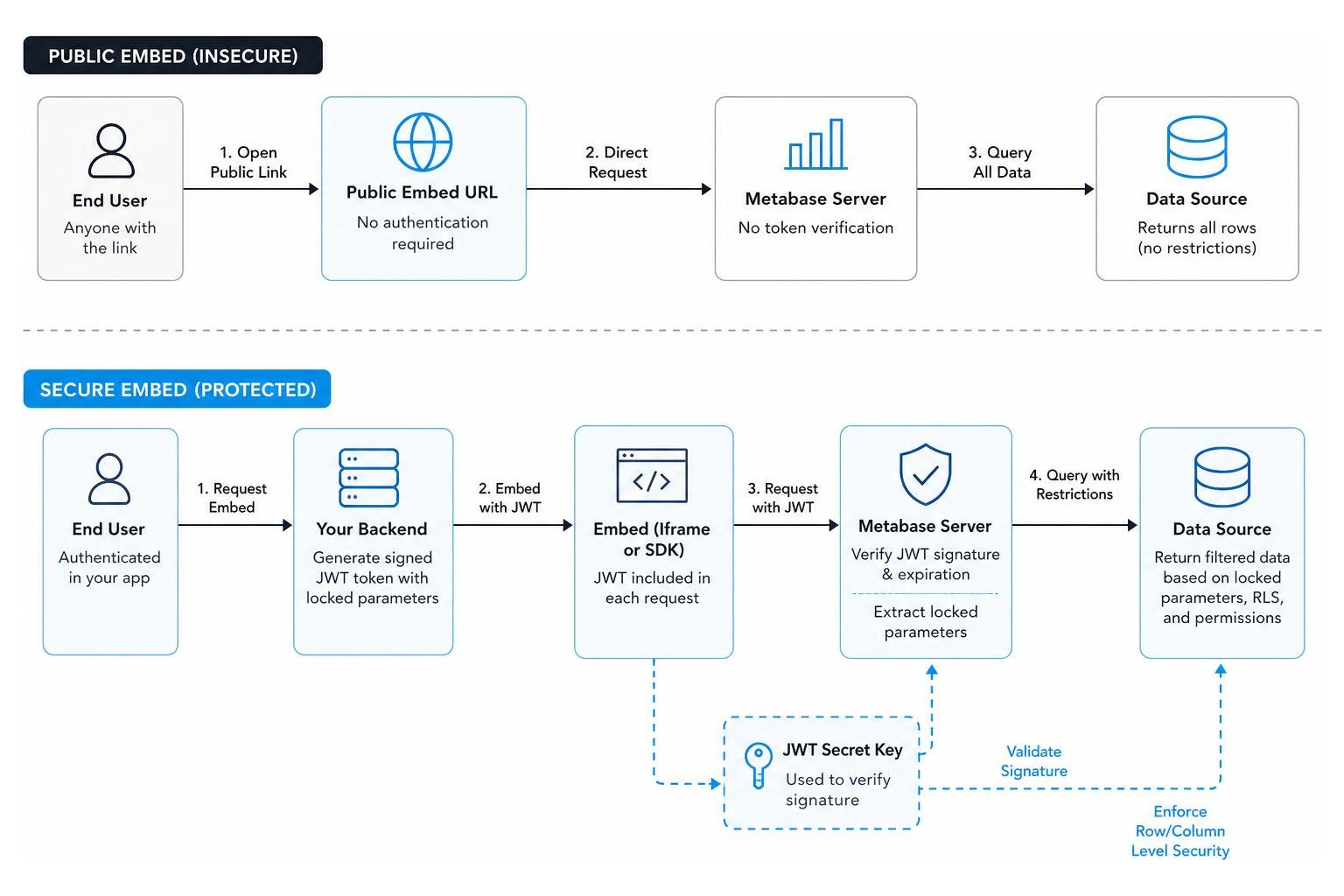
At a high level, Metabase breaks down its sharing mechanisms into public links, guest embedding, modular embedding, and full-app embedding. While public links require zero setup, they lack any form of protection. Secure embeds, on the other hand, require cryptographic handshakes to guarantee that only authorized eyes can access your dashboards.
For a deeper dive into how embedded analytical architectures are structured, you can read our guide on Embedded Analytics. To understand the baseline definition of secure data sharing, check out this reference on What is a secure embed? .
Why Public Embeds Fail as a Metabase Secure Embedding Solution
Public embedding is the simplest way to get a Metabase chart onto a website. You toggle a setting, copy an iframe code snippet, and paste it into your HTML. However, public embeds are completely unauthorized. This means Metabase generates a static, unchangeable URL that anyone on the internet can visit.
If you attempt to use public embeds for customer-facing dashboards by appending query parameters to filter the data (for example, adding ?tenant_id=124 to the URL), you are exposing your application to severe security risks. Because there is no cryptographic signature verifying the URL, any user can open their browser’s developer tools, inspect the iframe, and change the tenant ID parameter to view another customer’s data.
Furthermore, public URLs are easily shareable and indexable by search engines. If a customer copies the iframe source URL and posts it online, your internal database metrics become public knowledge. To prevent this, you must implement a system that validates the user’s identity and permissions on every single query. You can read the official guidelines on this topic in the documentation for Securing embedded Metabase | Metabase Documentation .
Guest Embedding vs. Modular and Full-App Embedding
To move beyond public embeds, Metabase provides three secure embedding options. The right choice depends on whether your users have individual accounts in Metabase and how deeply you need to integrate the analytics experience into your SaaS app. For SaaS platforms supporting external business clients, selecting the correct mode is critical to maintaining clean multi-tenant isolation. You can explore these strategies further in our article on Embedded Analytics for SaaS.
The differences between these three secure embedding types are summarized in the comparison table below:
| Feature / Capability | Guest Embedding (Signed Embeds) | Modular Embedding | Full-App Embedding |
|---|---|---|---|
| Authentication Method | Signed JWT (Shared Secret) | SSO (JWT or SAML) | SSO (JWT or SAML) |
| User Sessions | No user sessions in Metabase | Individual Metabase user accounts | Individual Metabase user accounts |
| Licensing Requirements | Available on all plans | Pro or Enterprise plans | Pro or Enterprise plans |
| Data Isolation Mechanism | Locked parameters in JWT payload | Row-level security (Data Sandboxing) | Row-level security (Data Sandboxing) |
| Customization Level | Static dashboards and questions | Interactive components (SDK-driven) | Entire Metabase UI inside iframe |
| Interactive Query Building | Not supported | Supported via embedded Query Builder | Fully supported |
While guest embedding is a fantastic starting point because it does not require provisioning user accounts in Metabase, it relies entirely on your application backend to sign parameters. Modular and full-app embedding, on the other hand, treat your application users as actual Metabase users, allowing you to leverage Metabase’s native, granular permission structures.
Implementing a Metabase Secure Embedding Solution: Step-by-Step
Setting up a robust metabase secure embedding solution requires establishing a secure bridge between your application’s backend server and your Metabase instance.
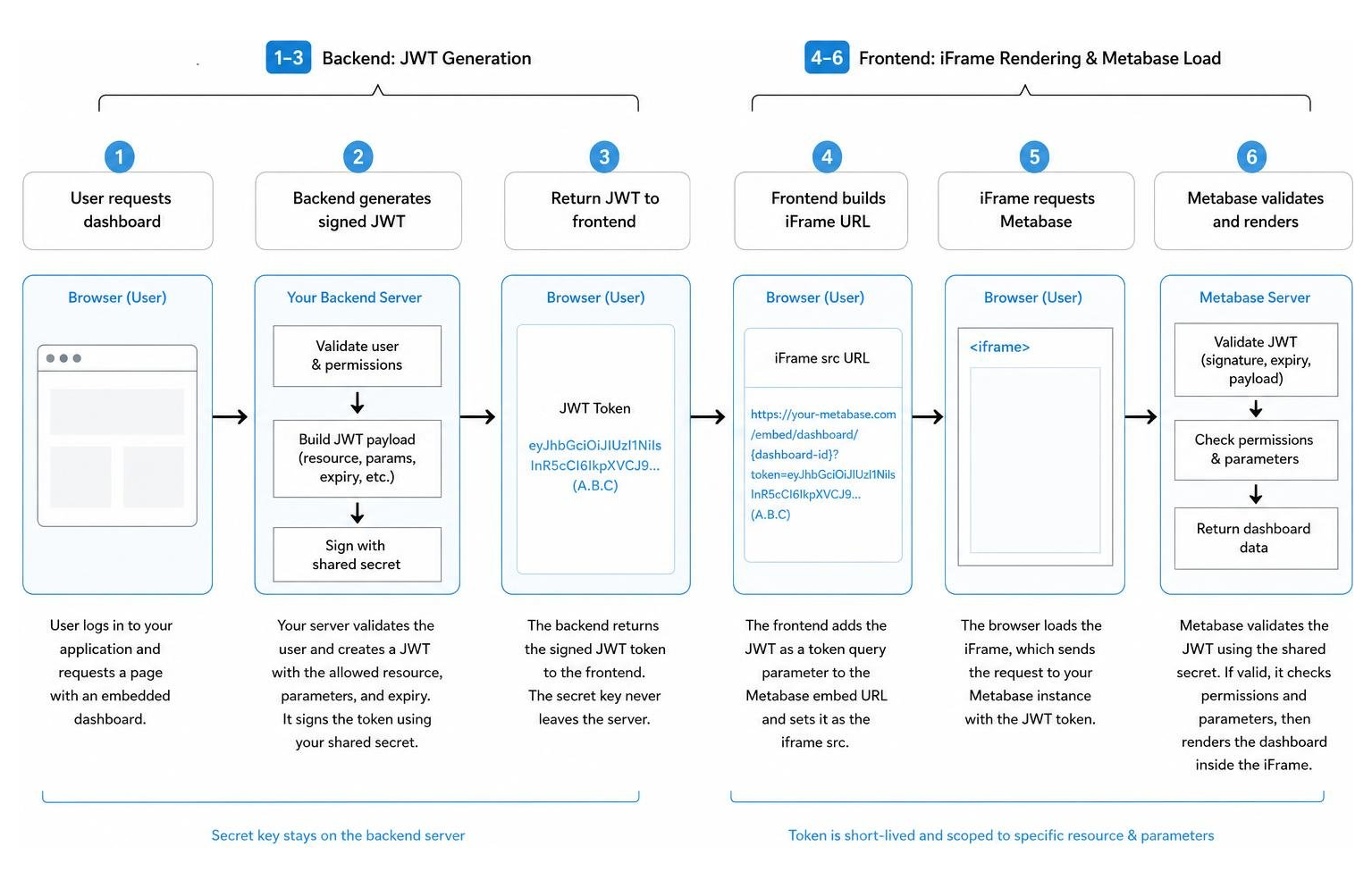
This process ensures that your secret key is never exposed to the client-side browser. For a general overview of embedding setup steps, refer to the Embedding introduction | Metabase Documentation .
Configuring JWT for Your Metabase Secure Embedding Solution
The foundation of secure guest embedding is the JSON Web Token (JWT). When a user requests a page containing an embedded dashboard, your backend server generates a signed JWT that authorizes the viewer to see a specific Metabase resource.
To configure this, you first need to log into your Metabase instance as an administrator, navigate to Settings, and then select Embedding. From there, enable guest embedding and generate your unique embedding secret key. This secret key must be kept secure on your application server, as anyone with access to it can sign tokens and view any data in your connected databases.
When your backend generates the JWT, it creates a payload containing three core components:
- Resource: This specifies what you are embedding. For example, a dashboard with an ID of 12.
- Params: This is an object containing any filters you want to pass to the dashboard. To make these secure, they must be configured as locked parameters in Metabase.
- Expiration (exp): A Unix timestamp defining when the token becomes invalid. It is highly recommended to set this to a short duration, such as 10 minutes from the time of issuance, to prevent token reuse.
Once your backend signs this payload with your secret key using the HMAC SHA-256 algorithm, it appends the resulting token to your Metabase site URL, forming a safe embed URL. Your frontend application then receives this URL and loads it inside an iframe. Because the signature is verified by Metabase upon loading, your users get a seamless, branded experience without ever seeing a login screen. To understand how this fits into a broader white-label strategy, read about White Label Analytics.
Managing Token Expiration, Refresh, and Revocation
While JWTs are highly secure, they are not completely immune to interception if a user extracts the iframe URL from their browser’s DOM. If an iframe URL has no expiration, that URL remains valid indefinitely, allowing unauthorized users to access the dashboard outside of your app. This vulnerability is a common topic of discussion among developers looking to implement Improved Embed Security .
To mitigate this risk, you must implement the following token management strategies:
- Set Tight Expiration Claims: Always include an exp (expiration) claim in your JWT payload. Setting the expiration to 5 or 10 minutes ensures that if a URL is intercepted, it will quickly become useless.
- Implement Not-Before (nbf) Claims: Include an nbf claim set to 10 or 20 seconds before the current time to account for slight clock drift between your server and the Metabase server, while still keeping the validity window extremely narrow.
- Leverage Automatic JWT Refresh: If a user is viewing an interactive dashboard for an hour, a 10-minute token will eventually expire, causing the dashboard to show an error when they try to filter or navigate. To solve this, configure the guestEmbedProviderUri setting in your Metabase configuration. This tells the embedded iframe to automatically request a fresh JWT from your backend API before the current one expires, ensuring a seamless user experience without full page reloads.
- Secret Key Rotation: If you suspect that your Metabase secret key has been compromised, you must immediately regenerate it in the Metabase admin panel. This instantly revokes all active guest embed tokens, forcing your backend to use the new key for all subsequent requests.
Multi-Tenancy and Row-Level Security in Metabase
In a multi-tenant SaaS application, ensuring strict data isolation is the most critical requirement of your analytics infrastructure. You must guarantee that Customer A can never access Customer B’s records, even if they share the same database tables and dashboards.
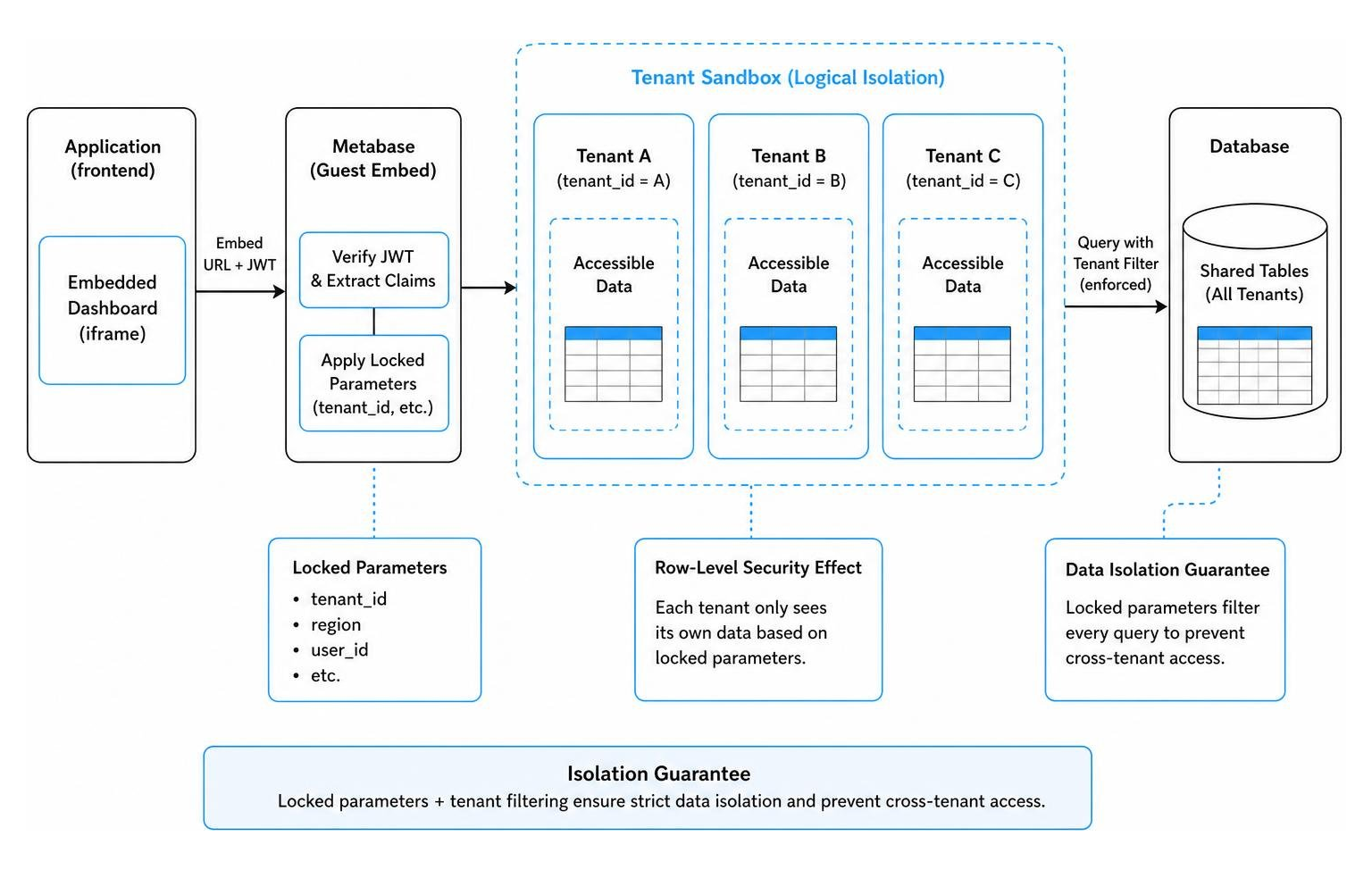
To explore multi-tenant strategies in depth, you can read our guides on Row Level Security and Multi Tenant Analytics.
How Locked Parameters Prevent Unauthorized Data Access
For guest embeds, where users do not have individual Metabase accounts, the primary mechanism for enforcing row-level security is locked parameters.
When you configure a dashboard in Metabase, you can add filters (such as Tenant ID or Region). In the embedding settings for that dashboard, you can set the visibility of each filter to one of three states:
- Editable: The user can see and change the filter inside the embedded iframe.
- Disabled: The filter is ignored, and all data is shown.
- Locked: The filter is hidden from the user, and its value must be provided programmatically inside the signed JWT payload.
When a parameter is locked, Metabase will refuse to render the dashboard unless a valid value for that parameter is included in the signed JWT. If a malicious user attempts to modify the tenant ID in the iframe URL, the cryptographic signature of the JWT becomes invalid, and Metabase blocks the request.
This approach allows you to build a single master dashboard in Metabase and safely reuse it across thousands of different customers. Your backend simply inserts the active user’s tenant ID into the JWT params object during token generation, ensuring server-side filtering before any data is sent to the browser.
Enforcing Column-Level Security and Group Permissions
While guest embeds rely on locked parameters, modular and full-app embedding allow you to use Metabase’s native, enterprise-grade permission engine. Because these advanced embedding types require user sessions, you can map your application’s users directly to Metabase groups.
By organizing your customers into specific Metabase groups, you can define granular access policies directly within the Metabase UI:
- Row-Level Security (Data Sandboxing): You can configure a table so that members of a specific group can only view rows where a certain column matches their user attributes (such as tenantid = user.tenantid). This occurs automatically at the database query level, meaning you don’t have to manually pass parameters for every single question.
- Column-Level Security: If certain tables contain sensitive information, such as personally identifiable information (PII) or financial data, you can restrict access to specific columns. Members of restricted groups will still be able to view the dashboard and run queries, but the protected columns will be completely hidden or masked.
- SSO Attribute Mapping: When users log in via SAML or JWT SSO, your identity provider can pass custom user attributes (like department, role, or tenant ID). Metabase reads these attributes in real-time and uses them to dynamically filter queries and assign group memberships, eliminating manual user administration.
Advanced Configuration: SSO, CORS, and Domain Restrictions
As you move your metabase secure embedding solution toward a production environment, you will run into browser-level security controls, cross-origin policies, and session management requirements. Properly configuring these settings is essential for maintaining a secure and reliable integration.
For a deeper look at enterprise-grade embedding platforms, you can review our thoughts on the Embedded Analytics Platform.
Integrating SSO (JWT/SAML) for Modular and Full-App Embedding
Modular and full-app embedding require a Single Sign-On (SSO) integration to authenticate users and establish secure sessions. This is typically achieved using either SAML or JWT-based SSO. For detailed setup instructions regarding full-app setups, see the documentation on Full app embedding | Metabase Documentation .
When a user logs into your SaaS application, your backend generates an SSO request. If you are using JWT SSO, your server signs a token containing the user’s email, first name, last name, and any custom attributes (such as their tenant ID or user group). Your application then points the embedded iframe to Metabase’s SSO endpoint, passing this token.
Metabase validates the SSO token, automatically provisions a user account if it doesn’t already exist, assigns the user to their designated permission groups, and sets an authenticated session cookie in their browser.
To maintain tight security, you should configure the MAXSESSIONAGE environment variable on your Metabase server. By default, Metabase sessions can last up to two weeks. For sensitive enterprise applications, reducing this session age to 24 hours (1440 minutes) or less ensures that inactive sessions are cleaned up quickly, forcing re-authentication through your secure SSO flow.
Handling Cross-Origin Resource Sharing (CORS) and Browser Cookies
Because your embedded Metabase instance will run inside an iframe hosted on your application’s domain (e.g., app.yourservice.com), while Metabase itself may run on a different domain (e.g., analytics.yourservice.com), you must configure cross-origin settings correctly to prevent browser-level blocks.
- Configure CORS Origins: In your Metabase Admin settings under Embedding, you must explicitly list your application’s domain in the Authorized Origins list. This prevents other unauthorized websites from attempting to embed your Metabase components.
- Set SameSite Cookie Policies: Metabase relies on HTTP cookies to maintain authenticated user sessions inside iframes. Modern web browsers block third-party cookies by default unless they are explicitly configured. To ensure cross-browser compatibility (especially in Safari and Chrome), you must set Metabase’s SameSite cookie configuration to None and ensure that your Metabase instance is served entirely over secure HTTPS connections.
- Utilize postMessage for Secure Communication: If your parent application needs to interact with the embedded Metabase iframe (for example, to dynamically change filters, listen to size changes, or trigger custom actions), you should use the HTML5 postMessage API. Metabase supports a variety of secure postMessage events, allowing your parent document and the iframe to communicate securely without exposing sensitive session tokens or bypassing cross-origin security boundaries.
Evaluating the Trade-offs of Metabase Embedding
While Metabase offers an incredibly fast path to getting interactive charts and dashboards in front of your customers, it is important to weigh the trade-offs of this approach against building custom analytics from scratch or utilizing other BI tools. To see how Metabase compares to other market options, check out our guide on the Best Embedded Analytics Tools.
To help guide your decision, we’ve broken down the key pros and cons of using Metabase for embedded analytics:
The Advantages of Metabase Embedding
- Rapid Speed to Market: You can connect Metabase to over 20 data sources and have your first secure, embedded dashboard running in your application in under an hour.
- Empowers Non-Technical Teams: Once the developer sets up the secure embedding wrapper, Customer Success and Product teams can modify dashboards, add new charts, and update filters directly inside the Metabase UI. This can reduce engineering maintenance overhead significantly, turning days of work into hours.
- Flexible Customization: Through white-labeling and the Modular Embedding SDK, you can customize colors, fonts, and interactive capabilities to make the charts feel like a native part of your application.
The Challenges of Metabase Embedding
- Iframe Limitations: Because traditional Metabase embedding relies on loading the Metabase web application inside an iframe, it can sometimes impact page load speeds and limit your ability to deeply customize the user interface or build highly bespoke interactive workflows.
- Licensing Costs: While basic guest embedding is available on all open-source tiers, advanced features like authenticated modular embedding, full-app embedding, white-labeling, and native data sandboxing require upgrading to Metabase’s Pro or Enterprise plans, which can become costly as your user base scales.
- Maintenance of SSO and Cookie Policies: Managing JWT generation, token refresh lifecycles, and browser cookie workarounds across different devices and browser updates requires ongoing developer attention.
If you love the ease of Metabase but need absolute control over your frontend styling, page load speeds, and multi-vendor integrations without the licensing headaches, this is exactly why we built Embedportal.
Embedportal acts as a unified, white-label embedding layer that allows you to embed dashboards from Metabase, Power BI Embedding, Tableau Embed, or QuickSight with a single, highly optimized integration. We handle the complex SSO configurations, cross-origin cookie policies, and row-level security mapping in under an hour, giving you the perfect balance of speed and customizability.
Frequently Asked Questions about Metabase Embedding
How do I prevent users from sharing secure embed URLs?
To prevent users from extracting and sharing secure embed URLs, you must use signed guest embeds or SSO-authenticated embeds rather than public embeds. Always set a short expiration claim (such as 5 to 10 minutes) on your JWT tokens. This ensures that even if a user extracts the iframe source URL from their browser’s developer console, the URL will quickly become invalid.
For maximum security, you can also implement server-side checks that bind the generated JWT to the user’s active session, IP address, or user agent, rejecting any requests that originate from unauthorized environments.
Can I use row-level security with guest embedding?
Yes, you can enforce row-level security with guest embedding by using locked parameters. When setting up your dashboard filters in Metabase, set the visibility of your tenant identifier filter (like Customer ID or Organization ID) to Locked.
When generating the signed JWT on your backend, you must include the active user’s specific filter value inside the params object of the token payload. Metabase will securely apply this filter to the SQL query on the database side, ensuring that the user only sees their own data while completely hiding the filter control from their user interface.
What are the licensing requirements for authenticated embedding?
Basic guest embedding (which uses signed JWTs to display read-only dashboards without user sessions) is available on all Metabase plans, including the free, open-source version.
However, if you want to use authenticated modular embedding or full-app embedding — which assign individual Metabase accounts to your end-users, support native SSO (SAML/JWT), and enable advanced features like data sandboxing, self-service query building, and complete white-labeling — you must purchase a Pro or Enterprise license, whether you are self-hosting or using Metabase Cloud.
Conclusion
Building a secure, scalable, and high-performing analytics experience for your SaaS customers doesn’t have to be a multi-month engineering headache. By utilizing a robust metabase secure embedding solution, you can leverage your existing dashboards, keep your data securely in your own database, and deliver valuable insights to your users.
However, as your product grows, managing multiple BI tools, complex SSO integrations, and custom CSS overrides can quickly consume valuable engineering cycles.
If you are looking for a simplified, enterprise-grade alternative, Embedportal is here to help. Our white-label embedding platform allows SaaS teams to integrate dashboards from Metabase, Tableau, Power BI, and more with unified branding, robust Row Level Security, and seamless SSO in under an hour.
Ready to streamline your embedded analytics architecture? Learn more about our Row Level Security features, or get started today by visiting https://embedportal.com/row-level-security/ to see how we can help you build the ultimate data experience for your customers.