How to Implement SQL Server RLS Without Breaking Your Database
What Is RLS in SQL Server (And Why It Matters for Your Data)
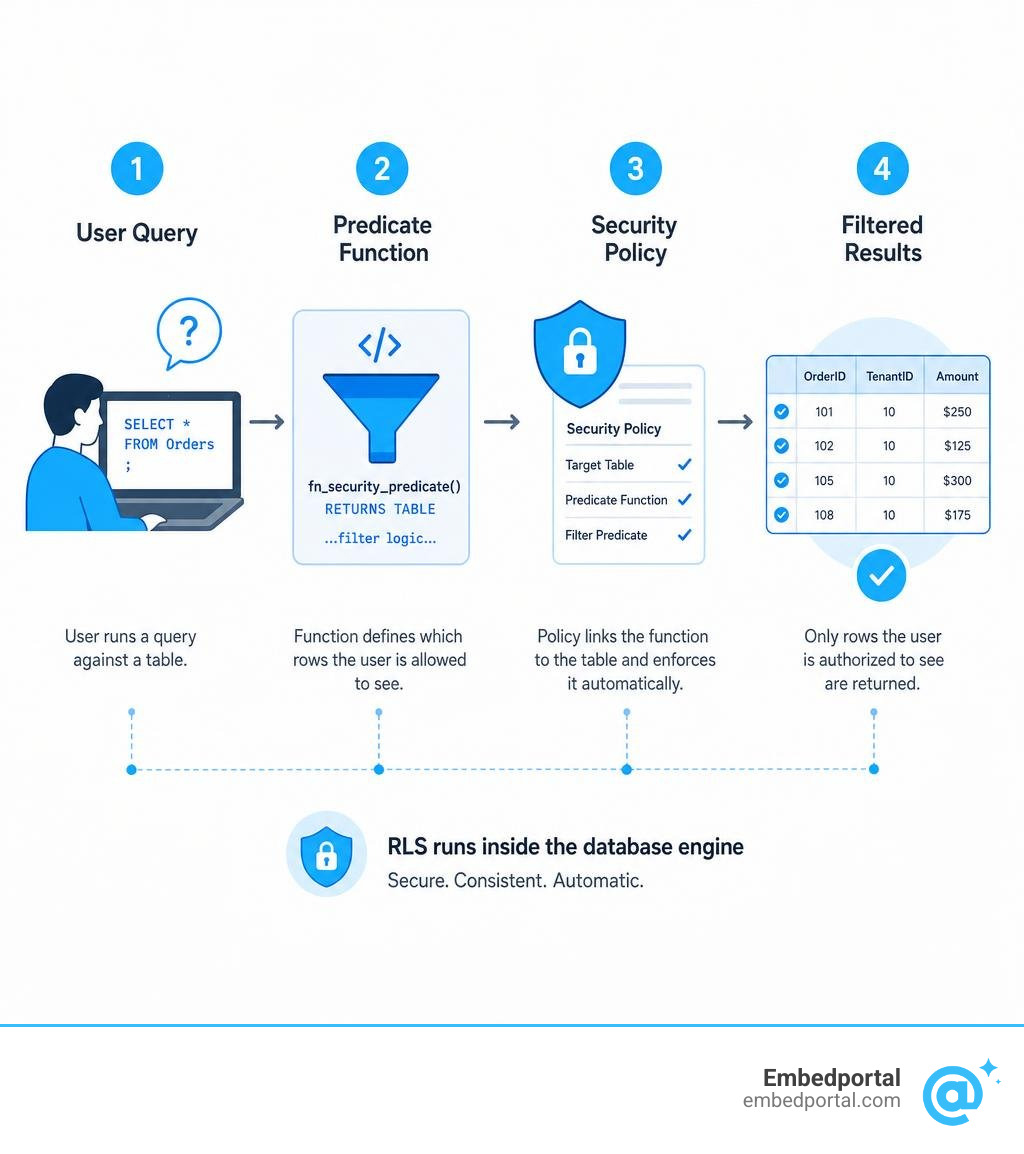
RLS in SQL Server is a built-in security feature that controls which rows of data each user can see or modify — enforced directly at the database engine level, not in your application code.
Quick answer for those searching “rls sql server”:
- What it is: Row-Level Security (RLS) filters table rows automatically based on who is querying the data
- Introduced in: SQL Server 2016, also available in Azure SQL Database, Azure SQL Managed Instance, and Azure Synapse Analytics
- How it works: You define a predicate function, attach it to a security policy, and SQL Server silently applies it to every query on that table
- Two predicate types: Filter predicates (control what users read) and block predicates (control what users write)
- Key benefit: Security logic lives in the database — not scattered across apps — so it can’t be bypassed
Think of it like a library where each librarian is only allowed to access the shelves assigned to their section. No matter which door they enter through, the same rule applies. RLS works the same way — regardless of which app, tool, or connection a user comes through, the database enforces the rule every single time.
For analytics and product teams embedding dashboards into customer portals, this matters a lot. When you’re serving multiple tenants from a single database, you need a reliable guarantee that Tenant A never sees Tenant B’s data — even if a query is misconfigured at the app layer.
Without RLS, that guarantee lives in your application code. With RLS, it lives in the database itself.
Core Concepts of RLS SQL Server
To successfully configure row-level security, we must first understand how the SQL Server database engine handles data restriction under the hood. Unlike traditional views or stored procedures that require users to query a specific virtual table, rls sql server relies on predicate-based access control.
When a user executes a query against a table protected by RLS, the database engine transparently intercepts the query and appends a security filter. This process provides complete logical separation of data without requiring you to split your physical tables or build separate databases for each user or tenant. This is particularly valuable for multi-tenancy architectures where logical data isolation is paramount.
According to the official documentation on Row-Level Security – SQL Server | Microsoft Learn, RLS is fully transparent to the client application. This means you do not have to rewrite complex SELECT queries in your application code to append WHERE clauses manually. Instead, the database engine enforces the rules silently. To understand how to structure these multi-tenant environments effectively, you can read more about designing a Multi Tenant Row Level Security model.
Step-by-Step Tutorial: How to Configure Row-Level Security
Implementing RLS in SQL Server is a structured process. We will walk through a real-world scenario where we have a Sales table containing sales transactions from various representatives. Our goal is to ensure that sales representatives can only view and modify transactions assigned to their own database user accounts.
To keep our database security schema clean, we always recommend creating a dedicated schema for all RLS-related objects. This isolates security functions and policies from your standard application tables, preventing accidental modifications. Learn more about organizing your security architecture by exploring Centralized Row Level Security.
First, let us set up our sample table and insert some mock data.
We create a schema named Security to hold our security objects. Next, we create a table named SalesData in our dbo schema. This table contains columns for SalesID, SalesPerson, Country, and SalesAmount.
Once the table is created, we insert three test rows:
- SalesID 1 for SalesPerson ‘Fred’ in the ‘USA’ with an amount of 5000.
- SalesID 2 for SalesPerson ‘Chris’ in the ‘UK’ with an amount of 7500.
- SalesID 3 for SalesPerson ‘CEO’ in the ‘Global’ region with an amount of 15000.
After populating the table, we create three distinct database users without logins: Fred, Chris, and CEO. We then grant SELECT permissions on dbo.SalesData to all three users so they have the basic rights to query the table.
Step 1: Creating the Security Predicate Function for RLS SQL Server
The heart of RLS is the inline table-valued function (iTVF), which serves as the security predicate. This function contains the logical rules that determine whether a user has access to a specific row.
For our function, we must use the SCHEMABINDING option. This is a strict requirement for security predicates because it binds the function to the database structure, preventing any user from altering the underlying table definitions in a way that would break or bypass the security policy.
We use the built-in USER_NAME() function to evaluate the current execution context. If the executing user is ‘CEO’, the function returns a 1 (granting access to all rows). If the executing user is not the CEO, the function only returns a 1 for rows where the SalesPerson column matches the user’s database name.
For a deeper dive into how Microsoft designed these functions to prevent security bypasses, refer to the Limiting access to data using Row-Level Security – Microsoft SQL Server Blog.
To implement this, we define our inline table-valued function inside the Security schema. The function accepts a parameter representing the SalesPerson name from the target table. Inside the function, we select a return value of 1 where the current database user is ‘CEO’, or where the current database user matches the passed SalesPerson parameter.
Step 2: Creating and Enabling the Security Policy
Now that our security predicate function is defined, we must bind it to our target table. This is done by creating a security policy using the CREATE SECURITY POLICY command.
To manage security policies, a user must have the ALTER ANY SECURITY POLICY permission. The security policy acts as the glue, taking our inline table-valued function and applying it as a filter predicate on the SalesData table.
When creating the policy, we explicitly set the STATE to ON. If you ever need to perform administrative maintenance, you can toggle the policy off by running an ALTER SECURITY POLICY command and setting the STATE to OFF. For more details on managing policies, see our guide on Row Level Security.
We write our CREATE SECURITY POLICY statement in the Security schema, naming it SalesFilterPolicy. Within the policy definition, we add our filter predicate, passing the SalesPerson column from dbo.SalesData into our security predicate function. We then specify STATE = ON to activate the policy immediately.
Step 3: Testing and Verifying the RLS SQL Server Implementation
With the policy active, we must verify that the security filters are behaving exactly as intended. We can test this by impersonating our database users using the EXECUTE AS USER command and then reverting the context with the REVERT command.
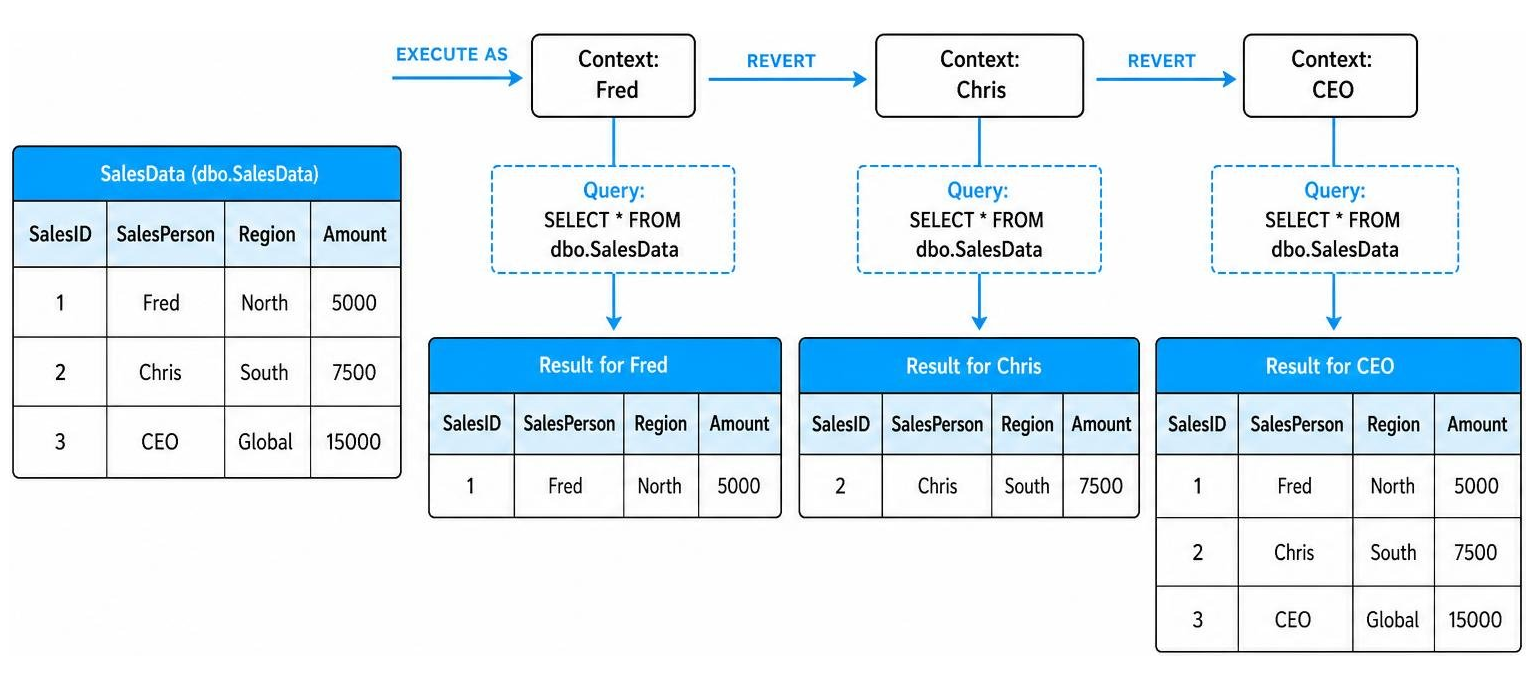
First, we impersonate user Fred. We execute a standard SELECT query on the SalesData table. Because RLS is active, Fred only sees the row where the SalesPerson is ‘Fred’.
Next, we run the REVERT command to return to our administrative context, and then impersonate user Chris. Executing the same SELECT query reveals only the row belonging to Chris.
Finally, we revert and execute the query as the CEO user. The CEO is able to see all three rows in the table. This confirms that our security predicate function is dynamically evaluating the user context and enforcing the rules correctly.
Filter vs. Block Predicates and Cross-Feature Compatibility
When configuring RLS, you can apply two types of security predicates: filter predicates and block predicates. Understanding the difference between them is crucial for maintaining both data read security and data write integrity.
Filter predicates apply to read operations, such as SELECT, UPDATE, and DELETE. They silently filter out rows that do not meet the security criteria, meaning the application is completely unaware that those rows even exist.
Block predicates, on the other hand, apply to write operations. They explicitly block operations like AFTER INSERT, AFTER UPDATE, BEFORE UPDATE, and BEFORE DELETE if the resulting row would violate the security policy. Instead of silently ignoring the operation, SQL Server throws an explicit database error and rolls back the transaction.
Here is a comparison of how these two predicate types operate across different database actions:
| Database Operation | Filter Predicate Behavior | Block Predicate Behavior |
|---|---|---|
| SELECT | Silently filters out unauthorized rows | No effect on read operations |
| INSERT | No effect on insertion | Blocks inserts that fail predicate rules |
| UPDATE | Filters rows before they can be updated | Blocks updates that would make rows unauthorized |
| DELETE | Filters rows before they can be deleted | Blocks deletion attempts on protected rows |
Beyond basic queries, RLS interacts with several other SQL Server database engine features, some of which require careful planning:
- DBCC SHOW_STATISTICS: Database statistics are built on unfiltered table data. If a user has permission to run statistics commands, they could theoretically infer information about restricted rows.
- Filestream: RLS is completely incompatible with Filestream. If your tables rely on Filestream for binary large object storage, you cannot apply native RLS.
- Temporal Tables: RLS is fully compatible with temporal tables, but the security policy must be applied to both the parent table and the historical archive table to prevent historical data leaks.
To explore these compatibility matrices in detail, refer to the documentation on Row-Level Security – SQL Server.
Performance Optimization and Application-Layer Trade-offs
A common concern when implementing RLS is the performance impact. Because SQL Server must evaluate a function for every row in a query, poorly designed predicates can slow down database execution.
To optimize performance, we highly recommend using the Query Store to monitor execution plans and find bottlenecks. You can read more about how to set up this empirical testing process in Optimizing RLS performance with the Query Store | Microsoft Learn.
Here are the best practices for keeping your RLS implementation fast:
- Indexes: Always create nonclustered indexes on the columns used as lookup keys in your security predicates (such as SalesPersonID or TenantID). Adding these indexes can improve query performance by up to 50% across duration, CPU time, and logical reads.
- Avoid Complex Joins: Keep your security functions as simple as possible. Avoid excessive joins and nested queries inside the inline table-valued function.
- Batch Mode Limitations: Be aware that the query optimizer might bypass batch mode on columnstore indexes when row-level security is active, as applying the security function forces row-by-row processing.
You should also weigh the pros and cons of database-level RLS against application-layer security:
- Database-Level RLS (Pros): Centralized security that cannot be bypassed by direct database connections (like SSMS); survives database backup and restore operations; reduces application code complexity.
- Database-Level RLS (Cons): Harder to debug and audit for non-database developers; can introduce performance overhead on highly complex schemas.
- Application-Layer Security (Pros): Easier to log, audit, and debug within your standard application framework; simple to scale horizontally.
- Application-Layer Security (Cons): Highly vulnerable if a developer forgets to apply the security filter to a new query or API endpoint.
For most modern applications, a hybrid defense-in-depth approach is best: enforce filters at the application layer for user experience, but keep RLS active at the database layer as a bulletproof safety net. Review more engineering guidelines on our RLS Best Practices page.
Frequently Asked Questions
Does RLS prevent database administrators from seeing data?
No, native RLS does not fully prevent database administrators (DBAs) or users with high-level privileges (like sysadmin or db_owner) from accessing data. Users with bypass permissions can view all rows. Furthermore, determined administrators can sometimes infer filtered data through side-channel attacks by analyzing execution times or carefully crafting queries that trigger error messages based on filtered values. For comprehensive safety, follow the SQL Server Security Best Practices and combine RLS with column-level encryption or dynamic data masking. You can find more security tutorials in the Category Row Level Security archive.
How does RLS interact with connection pooling in middle-tier apps?
Most modern web applications use a single database connection pool with a service account login. To implement RLS in this environment, you cannot rely on database-level users like USERNAME(). Instead, use the SESSIONCONTEXT feature. When a user logs into your app, the middle-tier application sets a session-scoped key-value pair (such as TenantID) using the spsetsessioncontext system stored procedure. Your security predicate function can then query SESSIONCONTEXT to filter rows dynamically. This allows you to maintain efficient connection pooling while ensuring robust data isolation. For a breakdown of this implementation, check out Row-Level Security Implementations in MSSQL – Satori Blog.
What is the performance overhead of enabling RLS?
In general, the performance overhead of RLS is comparable to querying data through a database view. The exact impact depends heavily on the complexity of your predicate functions and whether your tables are properly indexed. By keeping your security functions simple and adding nonclustered indexes on your filter columns, the overhead is usually negligible. For a step-by-step optimization workflow, refer to Optimizing RLS performance with the Query Store | Microsoft Community Hub.
Conclusion
Implementing rls sql server is one of the most effective ways to secure your database and protect multi-tenant environments from data leaks. By moving your security logic into the database engine, you create a robust, centralized defense system that protects your data regardless of how it is accessed.
However, setting up and maintaining RLS across multiple database systems and business intelligence tools can quickly become complex. If you are building customer-facing analytics portals and want to bypass the headache of manual security configurations, we can help.
At Embedportal, we provide a white-label embedding platform for BI dashboards. Our platform allows your team to embed multi-vendor analytics — including Tableau, Power BI, QuickSight, and Metabase — with unified branding, centralized row-level security, and single sign-on (SSO) in under an hour. Let us handle the complex security logic so you can focus on building great products. Discover how we simplify data access controls by exploring our Row Level Security solutions today.