Stop Password Sharing: Use Tableau Connected Apps Instead
Why Password Sharing is Killing Your Embedded Analytics Security
Tableau Connected Apps give you a secure, token-based way to embed Tableau dashboards and authorize API access — no passwords, no IdP headaches.
Here’s the quick answer for anyone who needs it fast:
- What they are: Tableau Connected Apps create an explicit trust relationship between your Tableau Cloud site or Tableau Server and your external application.
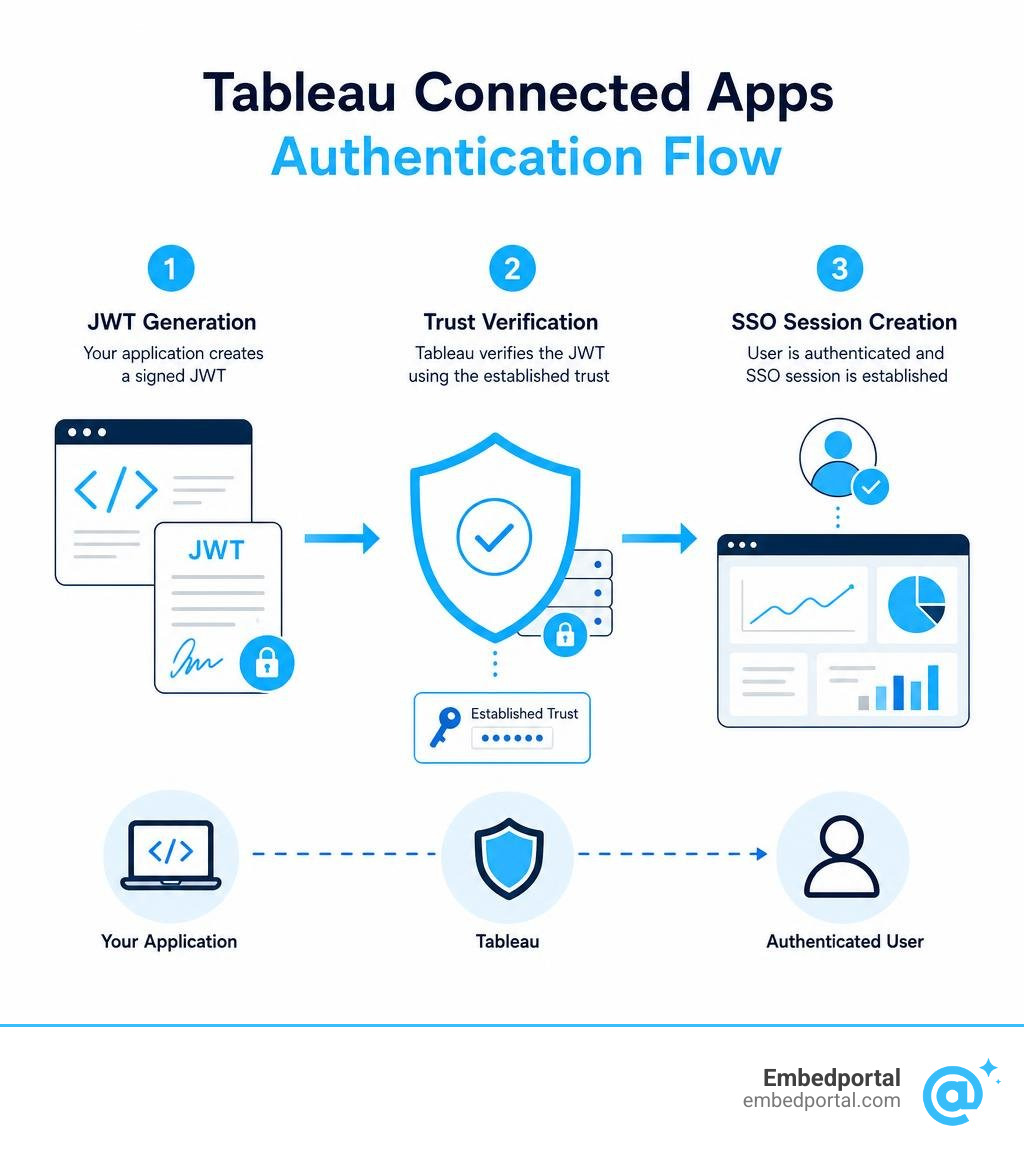
- How they work: Your app generates a signed JWT (JSON Web Token), which Tableau validates. The user gets a seamless SSO experience.
- Two trust models: Direct Trust (shared secret, no IdP needed) and OAuth 2.0 Trust (uses an existing identity provider).
- What they unlock: Secure embedding, REST API authorization, Metadata API access, and VizQL Data Service access — all without sharing admin credentials.
- When they launched: January 2022 for Tableau Cloud, Tableau Server 2022.1.
So why does this matter for your team?
If you’re embedding Tableau dashboards inside a customer-facing product, there’s a good chance someone on your team has done something like this: stored an admin username and password in a .env file, passed credentials through a backend service, or leaned on a brittle workaround to authenticate external users. It works — until it doesn’t.
Password sharing creates real security exposure. It’s hard to audit, hard to rotate, and impossible to scope. When something breaks, you don’t always know why.
Tableau Connected Apps solve this cleanly. Instead of credentials, your application generates a short-lived signed token. Tableau verifies the signature using a shared secret. The user gets in. No passwords change hands.
For analytics and product leads building multi-tenant portals, this is the difference between a security liability and a production-ready embedded analytics setup.
Securing Embedded Analytics with Tableau Connected Apps
When building a modern portal, security cannot be an afterthought. Relying on legacy authentication methods like trusted tickets (which are not supported on Tableau Cloud) or hardcoded credentials puts your customer data at risk. By implementing tableau connected apps, we establish an explicit trust relationship between our server and Tableau.
This trusted relationship is the foundation of secure Single Sign-On (SSO) for Tableau Embedded Analytics. By using a token-based handshake, we can provide a completely seamless, White Label Tableau experience where users never see a secondary login screen, nor do they ever have to input credentials.
According to the official guide on how to Use Tableau Connected Apps for Application Integration, this framework allows us to safely bypass traditional, heavy security setups while maintaining absolute control over who sees what.
Tableau Connected Apps vs. Salesforce Connected Apps
It is common to confuse Tableau Connected Apps with Salesforce Connected Apps, given that Tableau is a Salesforce company. However, they serve entirely different purposes and operate on distinct architectures:
- Salesforce Connected Apps: These are designed to integrate external applications with the core Salesforce platform using standard OAuth flows. They manage access to Salesforce metadata, APIs, and lightning components, operating within the Salesforce user directory.
- Tableau Connected Apps: These are built specifically for Tableau Cloud and Tableau Server. They establish a direct trust relationship to authenticate users into Tableau environments. They handle Tableau-specific access scopes, such as embedding views and authorizing REST API commands on behalf of Tableau users.
Eliminating IdP Complexity for Seamless SSO
Setting up Single Sign-On historically meant spending weeks configuring SAML or OpenID Connect (OIDC) with an Identity Provider (IdP) like Okta, Azure AD, or Ping Identity. If your external customers belonged to different corporate directories, you faced the nightmare of multi-tenant IdP federation.
Connected Apps eliminate this complexity entirely. Because the trust is established directly between your application backend and Tableau, your application acts as the ultimate gatekeeper. Once your application authenticates a user (by whatever means you choose), it simply generates a signed token telling Tableau, “We have verified this user; please let them in.”
This drastically simplifies your network topology. Your application does not need to communicate directly with Tableau Server or Tableau Cloud at the exact moment the user’s browser requests the session. The browser simply presents the signed token, and Tableau validates it independently.
Trust Models and the JWT Authentication Flow
To implement this security model on our Embedded Analytics Platform or within a custom Embedded BI portal, we must understand how trust is structured.
For a deep dive into the underlying mechanics, you can review the official instructions to Configure Connected Apps with Direct Trust. Let us look at how the two primary trust models compare:
Direct Trust vs. OAuth 2.0 Trust
| Feature | Direct Trust | OAuth 2.0 Trust (EAS) |
|---|---|---|
| Primary Mechanism | Shared secrets generated in Tableau | External Authorization Server (EAS) integration |
| Authentication Standard | JSON Web Tokens (JWT) signed via HS256 | OAuth 2.0 / OpenID Connect |
| IdP Requirement | None (Your application acts as the trust authority) | Requires an external identity provider |
| Setup Complexity | Very Low (Generate secret, write token code) | Medium to High (Configure JWKS endpoints and EAS registration) |
| Best Use Case | Custom SaaS portals, multi-tenant apps | Enterprise environments with centralized identity teams |
Under the Direct Trust model, we use shared secrets and the HS256 algorithm to sign our JWTs. Under the OAuth 2.0 Trust model, we register an External Authorization Server (EAS). Site-level EAS registration was introduced in September 2022 for Tableau Cloud and expanded to Tableau Server in version 2024.2, allowing site administrators to manage OAuth trust locally.
JWT Structure: Required Claims and Scopes
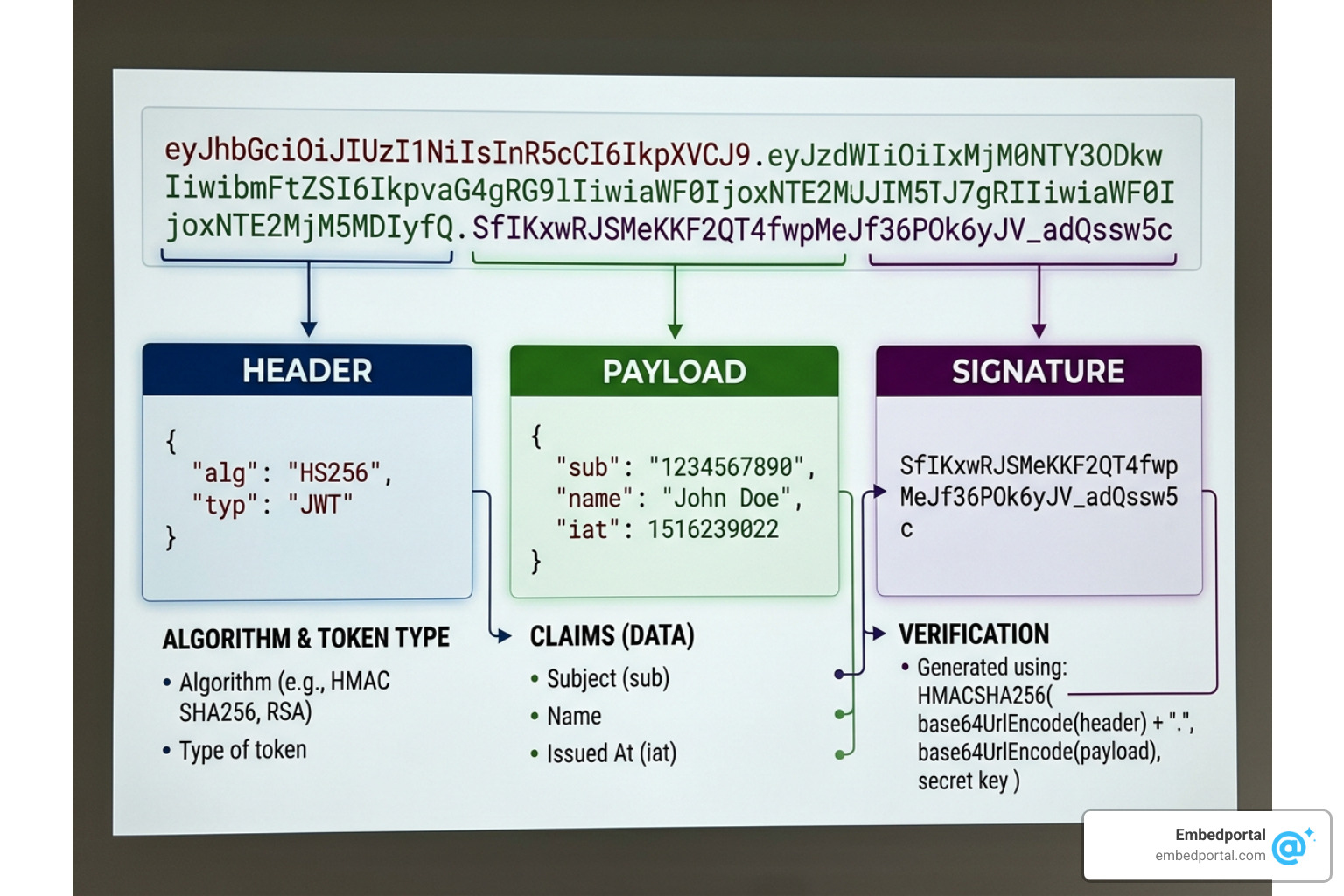
The JSON Web Token (JWT) is the passport that allows your application to communicate with Tableau. It consists of three parts: a header, a payload, and a signature. Because we cannot use code blocks here, let us look at the exact keys and values required in this token structure:
The Header Keys:
- alg: The hashing algorithm used. This must always be HS256.
- typ: The token type, which must be set to JWT.
- kid: The Secret ID generated inside your Tableau Connected App settings.
The Payload Claims:
- iss: The Issuer claim. This must be the Client ID of your Tableau Connected App.
- sub: The Subject claim. This is the username or email of the Tableau user you are authenticating.
- aud: The Audience claim. This must always be set to the string value: “tableau”.
- exp: The Expiration time. This is a Unix epoch timestamp that must not exceed 10 minutes from the token’s generation.
- jti: A unique token identifier. This is a random string (like a UUID) used to prevent replay attacks.
- scp: The Scopes claim. This must be formatted as an array of strings representing the permissions granted.
For embedding dashboards, the required scope is typically “tableau:views:embed” or “tableau:views:embed_authoring” if you want to enable web edit. For a complete list of valid scopes, refer to the documentation on Access Scopes for Connected Apps.
Authorizing REST API, Metadata API, and VizQL Data Service
Connected Apps are not just for embedding dashboards; they are also highly effective for backend API authorization. This allows your backend to make programmatic calls without storing a master administrator password.
The timeline of these API expansions shows how central Connected Apps have become to the Tableau ecosystem:
- June 2022: REST API authorization via Connected Apps launched for Tableau Cloud, expanding to Tableau Server in 2023.
- October 2023: The Tableau Metadata API began respecting Connected App JWTs, allowing secure querying of data lineage and metadata.
- February 2025: The Tableau VizQL Data Service began respecting Connected App authorization, allowing developers to query underlying curated data directly from dashboards using high-performance APIs.
To use this, your application signs in using the JWT to obtain a temporary Tableau credentials token. This token is then passed in the “X-Tableau-Auth” header for subsequent API requests.
Advanced Features: Dynamic Groups and User Attributes
Connected Apps also support dynamic personalization features that make implementing Row Level Security and following RLS Best Practices incredibly straightforward.
Instead of creating hundreds of static groups in Tableau, you can pass custom user attributes directly inside the JWT payload. These attributes can then be referenced inside your Tableau workbooks using user attribute functions.
Additionally, on-demand access and dynamic group membership claims allow you to temporarily assign users to specific Tableau groups at the moment they log in, ensuring they only see the data they are authorized to access.
Step-by-Step Guide to Configure Tableau Connected Apps
Now let us walk through the process of setting up a Connected App. This ensures proper User Management for BI and secures External User Access to our dashboards.
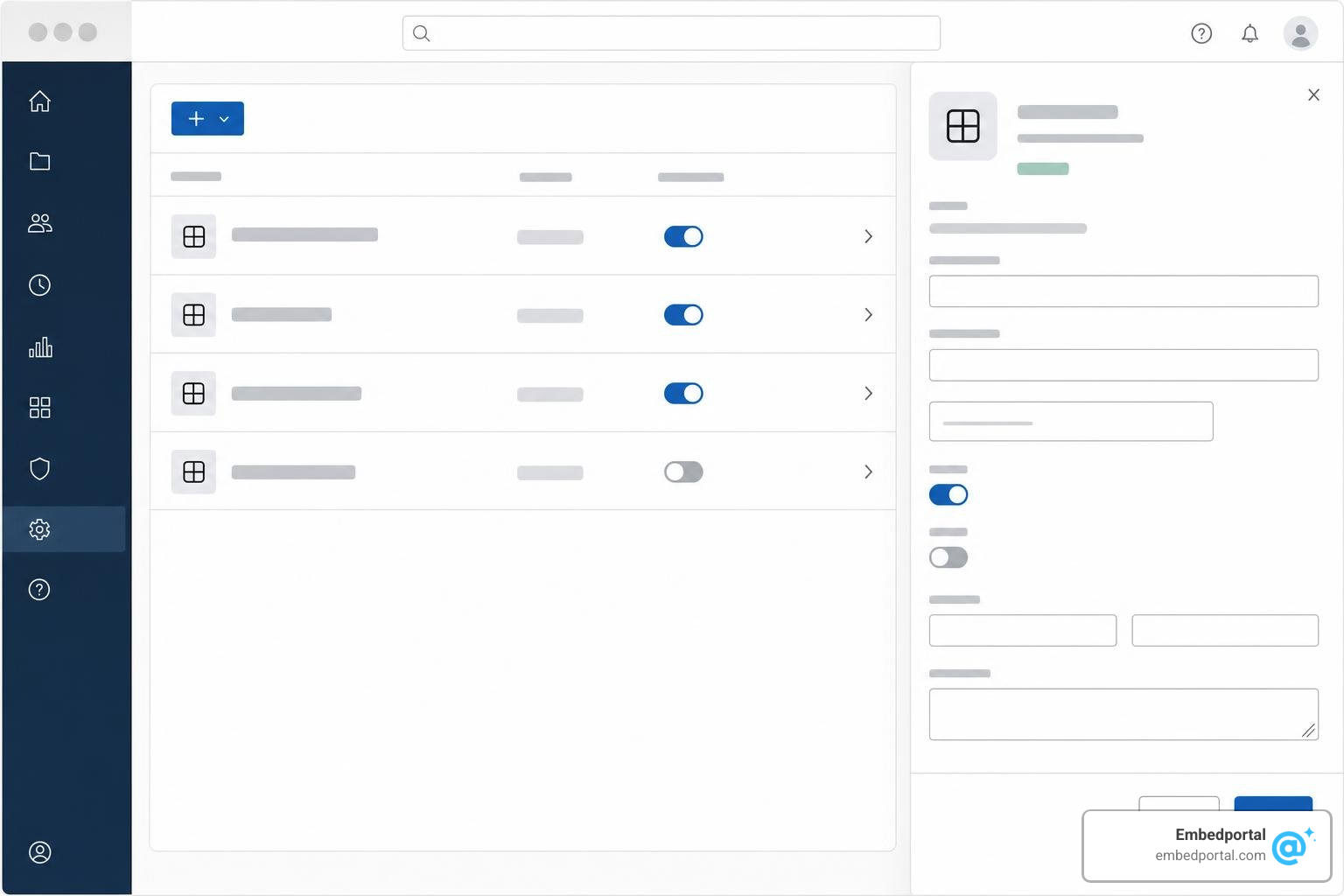
Step 1: Creating Tableau Connected Apps in the Admin Console
First, we need to register the app in the Tableau interface. For a hands-on walk-through, you can consult the official Connected Apps Tutorial.
- Log in to your Tableau Cloud or Tableau Server site as an Administrator.
- Navigate to Settings and click on the Connected Apps tab.
- Click New Connected App and select Direct Trust.
- Give your app a descriptive name (e.g., “Customer Portal Embedding”).
- Under Access Level, choose whether this app can access all projects or only specific, scoped projects.
- Click Create.
Step 2: Generating Secrets and Configuring the JWT
Once the app is created, you will see a Client ID. Next, we must generate a secret.
- Inside your newly created Connected App page, click Generate New Secret.
- Copy the Secret ID and the Secret Value immediately. Tableau will not show the secret value again.
- A maximum of two secrets can be associated with each connected app. This is designed to allow seamless secret rotation without downtime.
Next, configure your backend application to generate the JWT using these credentials. Ensure your system clock is synchronized to UTC, as clock drift is the most common reason tokens are rejected.
Step 3: Restricting Access with Domain Allowlists and Project Scopes
To prevent bad actors from copying your embed code and running it on unauthorized sites, you must configure security restrictions:
- Domain Allowlist: Enter the exact domains where your embedded dashboards are allowed to load. You can use wildcards (e.g., “*.yourcompany.com”) and specify ports if testing locally.
- Project Scopes: Limit the Connected App’s access to only the specific projects containing the relevant dashboards. This ensures that even if a token is compromised, the attacker cannot access other sensitive projects on your Tableau site.
Programmatic Management via the Tableau REST API
If you manage a large-scale multi-tenant application, configuring Connected Apps manually in the UI is inefficient. Tableau introduced programmatic connected app methods in version 2021.4.
By utilizing the endpoints documented in the Connected App Methods – Tableau reference, we can programmatically:
- Create and update Connected Apps with specific project scopes.
- Generate, retrieve, and delete secrets.
- Register and manage External Authorization Servers (EAS).
This allows us to automate tenant provisioning, making onboarding new customers completely hands-off.
Frequently Asked Questions About Tableau Connected Apps
Managing Dashboard Data Access can sometimes lead to implementation hurdles. Here are the answers to the most common questions our team encounters.
Troubleshooting Common Issues with Tableau Connected Apps
- The dreaded 403 Error: This usually means the Connected App is disabled. By default, newly created Connected Apps are set to “Draft” status. You must manually click the actions menu (…) next to your app in the Tableau Admin Console and select Enable.
- Clock Drift / Invalid Token Errors: If your server’s clock is off by even a few seconds, Tableau will reject the JWT. Always ensure your application servers use Network Time Protocol (NTP) to synchronize their clocks to UTC.
- Toolbar Feature Failures: Some features on the Tableau toolbar (such as downloading PDFs or exporting data) can behave unexpectedly when embedded. As a best practice, we recommend hiding the default toolbar parameter in your embed code and building custom controls using the Tableau Embedding API v3.
- Prompt User for Credentials: If your embedded dashboard is backed by a live database connection, users may still be prompted to log in to the database. To solve this, configure your published data sources to use embedded database credentials instead of prompting the user.
What happens if I disable or delete a Connected App or its secrets?
- Disabling an App: Immediately blocks all active and future sessions authenticated via that app. Users will receive an authentication error.
- Deleting a Secret: Instantly invalidates any JWT signed with that specific secret. If you have two secrets active and delete one, tokens signed with the remaining active secret will continue to work without interruption.
- Deleting the App: Permanently revokes all access, deletes all associated secrets, and breaks any embedded views using those credentials.
What is the maximum validity period for a Connected App JWT?
The maximum validity period for a Tableau Connected App JWT is exactly 10 minutes. The “exp” (expiration) claim in your token payload must be set to a timestamp no further than 10 minutes from the time it was generated. For optimal security, we recommend setting this window to 1 or 2 minutes to minimize the risk of token interception.
Conclusion: Simplify Your Embedded Analytics with Embedportal
Tableau Connected Apps are a massive step forward for securing embedded dashboards and programmatic API integrations. They eliminate the security risks of password sharing and the frustrating complexity of traditional IdP setups.
But even with Connected Apps, building a secure, performant, and beautiful portal requires writing backend token-generation code, managing secret rotation, configuring domain restrictions, and handling embedding APIs. If you are also embedding dashboards from other tools like Power BI or AWS QuickSight, you have to write entirely different integration code for each vendor.
This is why we built Embedportal.
Embedportal is a SaaS platform that provides a white-label embedding platform for BI dashboards. Our unique value is enabling teams to embed multi-vendor analytics (including Tableau, Power BI, QuickSight, and Metabase) with unified branding, robust row-level security, and seamless SSO in under an hour. We handle the heavy lifting of JWT generation, secret management, and multi-tenant isolation so you can focus on building your core product.
Ready to stop wrestling with embed codes and secure your dashboards? Explore our Tableau Embed solutions and start your free trial today.