The Ultimate Guide to Postgres Row Security Policies
Why Postgres Row Security Is Essential for Modern Data Access Control
Postgres row security — officially called Row Level Security (RLS) — is a built-in PostgreSQL feature that lets you control which rows a user can see or modify in a table, enforcing access rules directly at the database level.
Here’s a quick summary of what you need to know:
- What it does: Adds an invisible filter to every query, so users only see rows they’re allowed to access
- How you enable it:
ALTER TABLE my_table ENABLE ROW LEVEL SECURITY; - How you define rules:
CREATE POLICYstatements usingUSING(for reads) andWITH CHECK(for writes) - Who it’s for: Multi-tenant SaaS apps, compliance-sensitive systems, and any app where different users should see different data
- Key difference from table privileges: GRANT/REVOKE controls whether a user can touch a table — RLS controls which rows they can touch
If you’re building a SaaS product where each customer should only see their own data, RLS enforces that isolation inside the database itself — not just in your application code.
That matters because application-layer security can be bypassed. A misconfigured API, a rogue query, or a direct database connection can all expose rows you never intended to share. RLS closes that gap.
The challenge is that RLS isn’t always straightforward. Policies interact with each other, performance can degrade without the right indexes, and features like views, triggers, and foreign keys all have their own quirks when RLS is in play.
This guide walks through everything — from basic setup to advanced optimization — so you can implement row security with confidence.
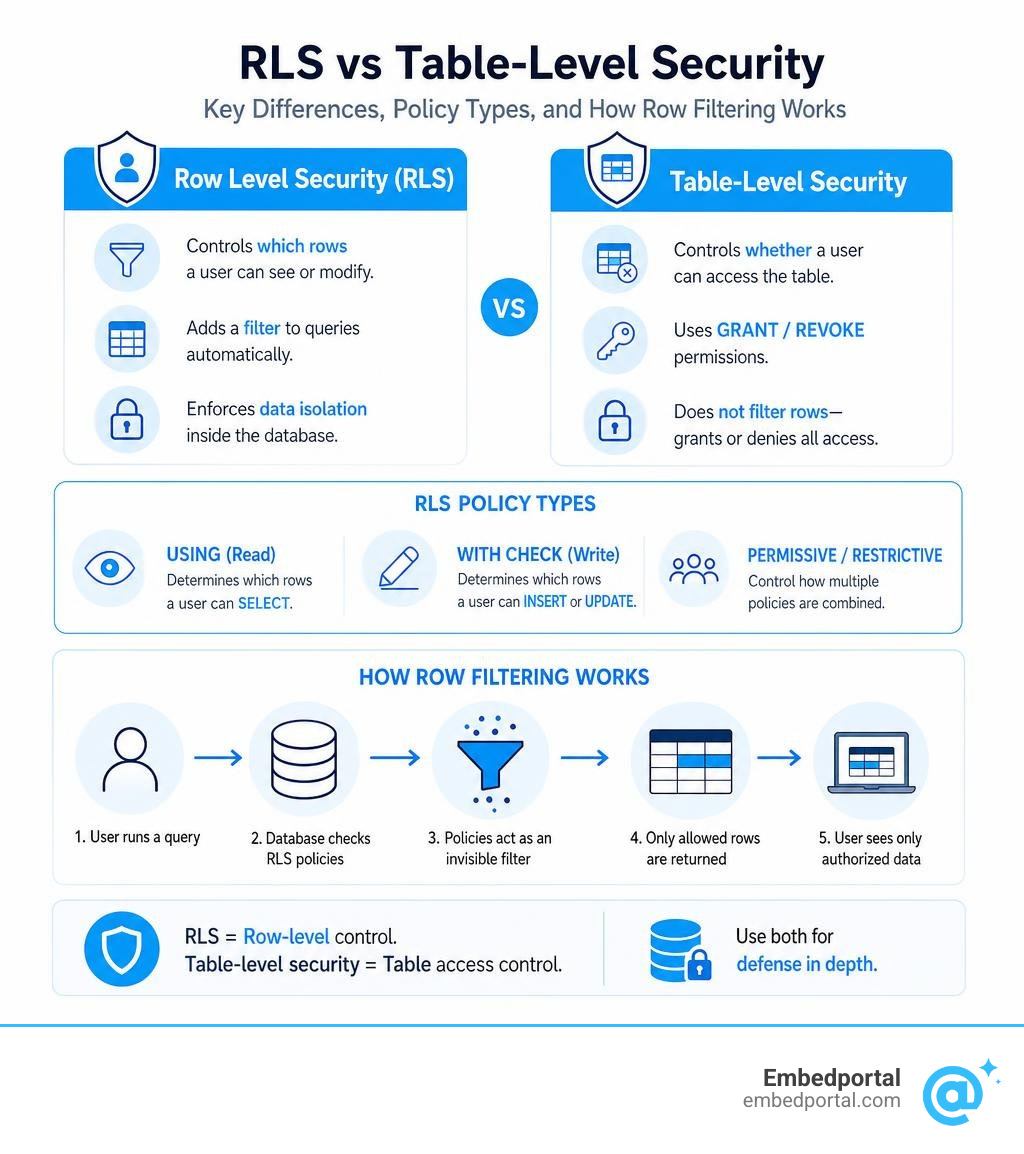
What is Postgres Row Security?
At its core, postgres row security is a fine-grained access control mechanism. Rather than restricting access to entire tables, it dynamically modifies queries on the fly to filter out rows that the current user is not authorized to see.
When you query a table with RLS enabled, PostgreSQL automatically appends security predicates to your WHERE clause. This query modification happens under the hood, meaning your application developers don’t have to manually write filters like WHERE user_id = current_user in every single database interaction. If you want to learn more about how this fits into broader application patterns, check out our comprehensive guide on Row Level Security.
Core Differences: Table-Level Privileges vs. Postgres Row Security
To understand why RLS is so powerful, we have to look at traditional SQL privileges.
Standard SQL uses commands like GRANT and REVOKE to control permissions. If you grant a role SELECT access to a table, that user can read every single row in that table. It is an all-or-nothing approach. If you want to restrict access to specific rows, you traditionally had to build complex views, partition your tables, or handle the filtering entirely in your backend code.
RLS acts as an advanced security barrier. While table-level privileges control who can access the table as a whole, RLS policies control which specific rows are returned. According to the Row-security – PostgreSQL wiki , these policies supplement traditional privileges. For any query to succeed, the database user must first have the table-level privilege (e.g., SELECT or UPDATE) and the row-level security policy must evaluate to true for the target rows.
Real-World Use Cases for Postgres Row Security
- Multi-Tenant SaaS Applications: Instead of spinning up a separate database or schema for every single customer, you can store all tenant data in a single shared table. By applying a policy that checks the tenant ID, Postgres guarantees that Tenant A can never see Tenant B’s data—even if your application server has a bug that forgets to filter by tenant.
- Compliance and Audit Auditing: In highly regulated industries like healthcare or finance, access must be tightly controlled. RLS ensures that only assigned account managers can access sensitive customer records, aligning directly with strict data privacy requirements.
- Classified Environments: You can restrict row visibility based on security clearance levels. For example, users with a “Secret” clearance level can only see rows tagged as “Secret” or “Unclassified,” while “Top Secret” users can see everything.
- User-Specific Data: Social platforms, to-do apps, and personal dashboards can use RLS to ensure that normal users can only view and edit their own personal records, while administrators retain broader access.
Enabling and Configuring Row Level Security
By default, newly created tables in PostgreSQL do not have row-level security enabled. This means that if a user has table-level permissions, they can access all rows.
To turn on row security, you must explicitly alter the table using the following syntax:
ALTER TABLE your_table_name ENABLE ROW LEVEL SECURITY;
Once you run this command, Postgres immediately applies a default-deny behavior. If no policies are defined on the table, any non-owner or non-superuser trying to read or write to the table will see zero rows. It acts as a complete lock.
To grant access, you must define one or more policies using the CREATE POLICY command. As outlined in the official Documentation: 18: 5.9. Row Security Policies , you can target specific roles, commands, or write conditions that dictate exactly who gets to see what.
Understanding USING and WITH CHECK Clauses in Postgres Row Security
When writing a policy, you will use two primary clauses: USING and WITH CHECK. Understanding the distinction between them is critical to avoiding security leaks or unexpected database errors.
- The USING Clause: This defines the condition (read predicate) that existing rows in the database must satisfy to be visible to the user. It applies to
SELECToperations, as well as the rows that are being targeted forUPDATEorDELETE. If a row does not satisfy theUSINGexpression, it is treated as if it does not exist. - The WITH CHECK Clause: This defines the condition (write predicate) that new or modified rows must satisfy when you run
INSERTorUPDATEcommands. If you try to insert a row (or update an existing row) so that it violates theWITH CHECKexpression, Postgres will reject the transaction with anew row violates row-level security policyerror.
For a deeper dive into structuring these clauses safely, explore our guide on Row Level Security Best Practices.
Permissive vs. Restrictive Policies
When you create a policy in PostgreSQL, it can be defined as either permissive or restrictive. By default, all policies are created as permissive.
- Permissive Policies (Default): These policies grant access. If multiple permissive policies apply to a given query, PostgreSQL combines them using OR logic. If a row satisfies any of the permissive policies, access is granted.
- Restrictive Policies: These policies restrict access. If you add restrictive policies, they are combined with other policies using AND logic. A row must satisfy all restrictive policies in addition to at least one permissive policy to be accessible.
This distinction is fully documented in the PostgreSQL: Documentation: 16: 5.8. Row Security Policies page.
How Multiple Policies Interact
To visualize this, imagine you have a table containing internal documents. You might have:
- A permissive policy allowing members of the “Marketing” department to view marketing documents.
- Another permissive policy allowing members of the “Product” department to view product documents.
- A restrictive policy stating that “No archive documents can be viewed by anyone except managers.”
If a marketing employee queries the database, they will match the first permissive policy (OR logic). However, the restrictive policy (AND logic) will also apply, ensuring that even if a document is a marketing document, they cannot see it if it is archived.
Multi-Tenant Data Isolation and Session Variables
In modern web development, creating a separate database user for every single tenant in a SaaS application is highly impractical. It breaks connection pooling, increases overhead, and makes database maintenance a nightmare.
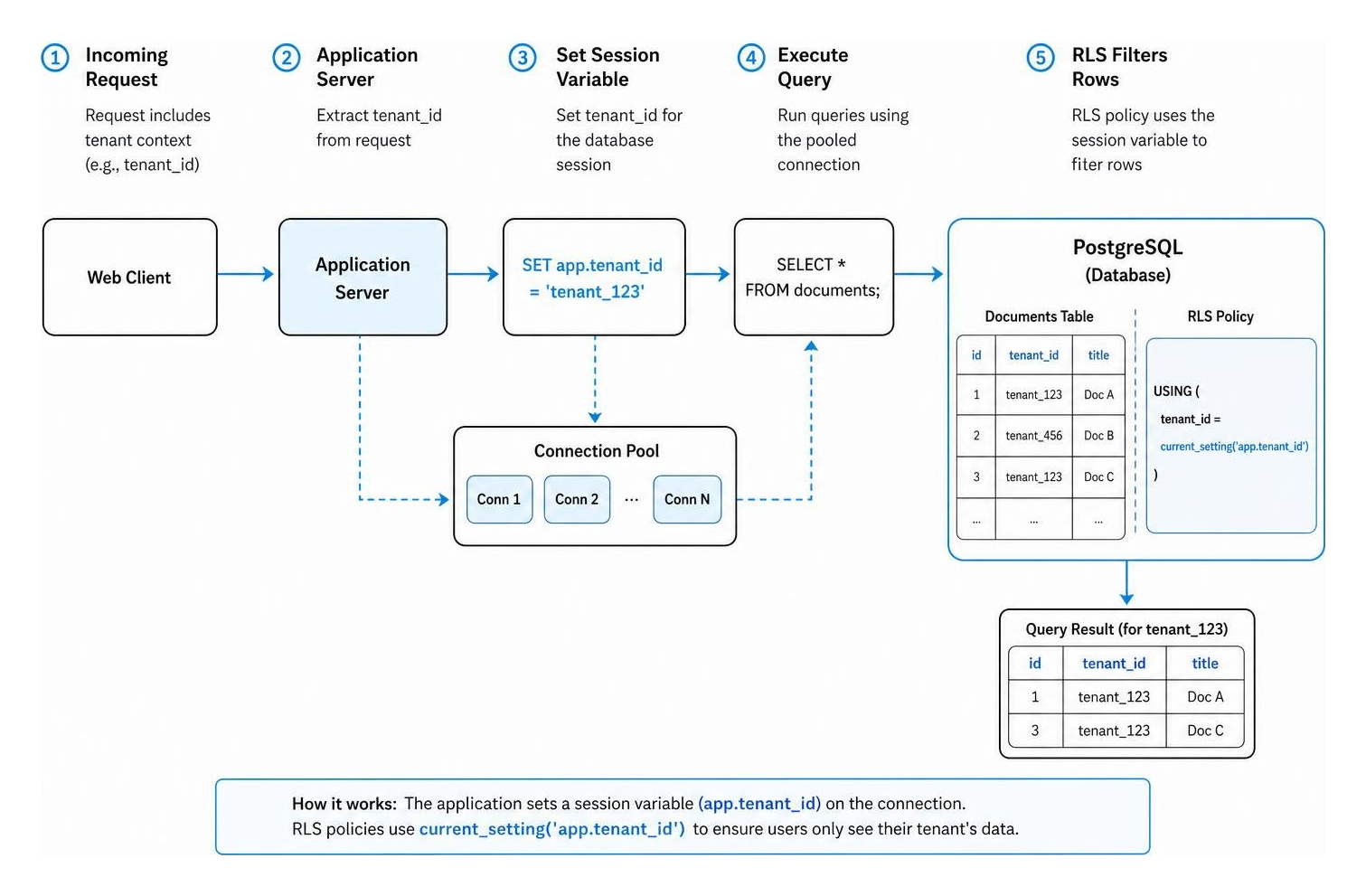
Instead, we can use session variables to implement robust Multi Tenant Row Level Security using a single shared database connection pool.
Implementing Tenant Isolation Without Per-Tenant DB Users
To make this work, we use Postgres’s built-in session configuration parameters. When your application server checks out a database connection from its pool to handle an incoming web request, it should immediately set a session variable containing the current tenant’s ID.
You can set this in your database transaction using the set_config function:
SELECT set_config('app.current_tenant_id', 'tenant_12345', true);
The third parameter (true) ensures that this configuration is local to the current transaction, meaning it will automatically reset once the transaction ends—preventing accidental data leaks to the next request using that pooled connection.
Your RLS policy on your multi-tenant tables can then look like this:
CREATE POLICY tenant_isolation_policy ON tenant_data USING (tenant_id = current_setting('app.current_tenant_id', true));
Now, even though your backend connects to Postgres using a single, shared database user, the database itself will isolate data on a row-by-row basis using the active session variable.
Performance Implications and Optimization Best Practices
While postgres row security is incredibly powerful, it is not free. Because RLS policies act as implicit WHERE clauses, they are evaluated for every single row accessed by your query. If you write inefficient policies, your database performance will suffer.
Here is a quick comparison of optimization techniques and their performance impacts:
| Optimization Technique | Why It Matters | Expected Performance Gain |
|---|---|---|
| Add Indexes on Policy Columns | Avoids sequential scans when RLS filters rows | Up to 99.9% improvement |
| Wrap Context Functions in SELECT | Caches function results per-statement rather than per-row | Up to 94% improvement |
| Use Security Definer Functions | Bypasses RLS on complex join tables | Up to 99.9% improvement |
| Minimize Joins in Policies | Prevents nested loop execution on large tables | Up to 99.7% improvement |
For more details on keeping your database fast, check out our curated Row Level Security Best Practices guide.
Advanced Optimization: Wrapping Functions and Minimizing Joins
One of the biggest performance traps is calling complex functions directly inside your policy. For example, if your policy calls a custom function like auth.uid() or checks user roles on every row, Postgres may execute that function millions of times during a large table scan.
To fix this, you can wrap the function call in a subquery:
CREATE POLICY fast_policy ON orders USING (user_id = (SELECT auth.uid()));
By wrapping the function in a SELECT statement, Postgres creates an initPlan. This caches the result of the function once per query execution instead of evaluating it for every row, drastically reducing CPU overhead.
Additionally, avoid joining tables inside your policies wherever possible. If you need to check if a user belongs to a specific organization, consider selecting their organization IDs into an array or a session variable at the beginning of the request rather than joining the membership table on every single row check.
Feature Interactions, Security Pitfalls, and Bypass Mechanisms
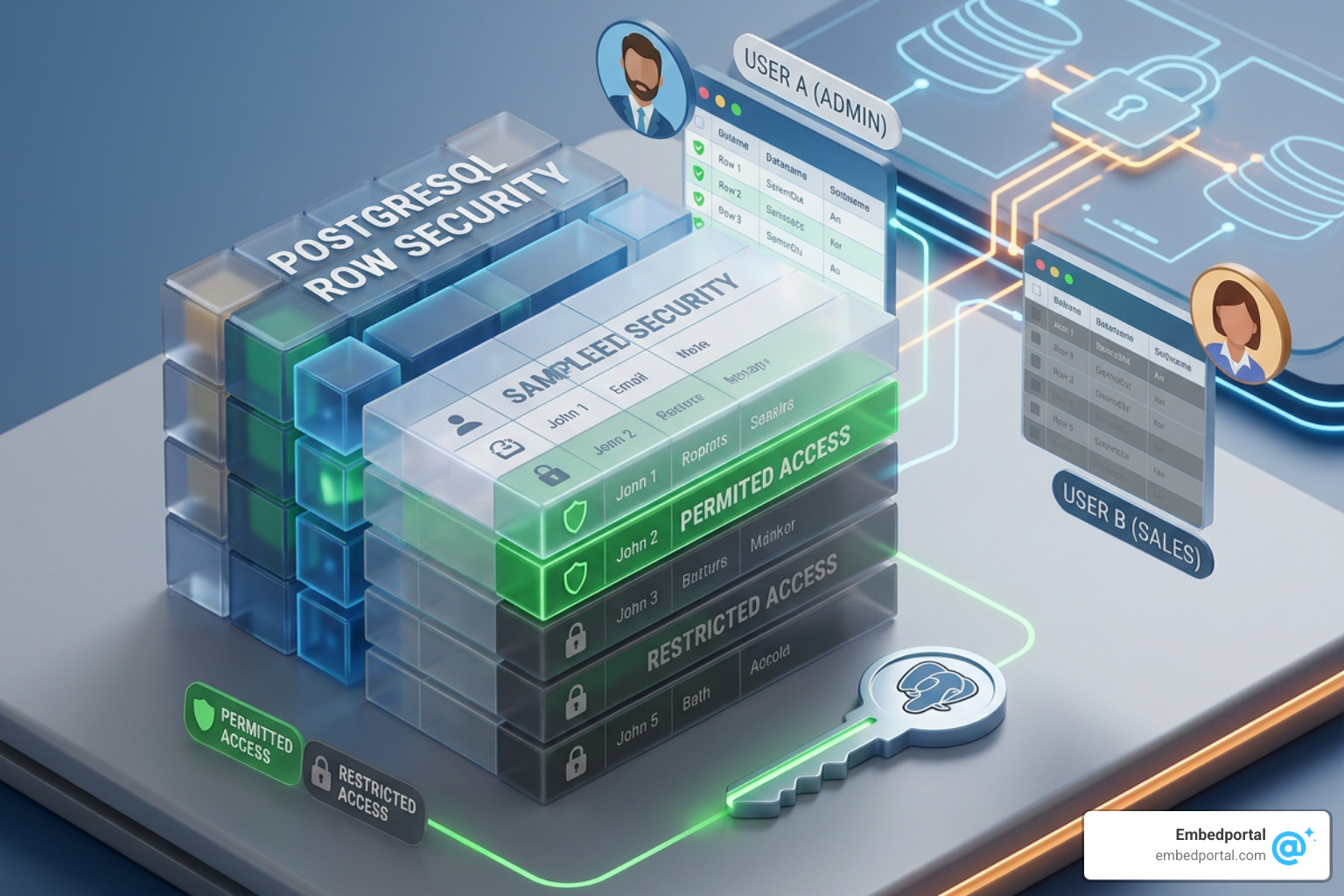
When implementing RLS, you must be aware of how it interacts with other core PostgreSQL features. As noted in the PostgreSQL: Documentation: 13: 5.8. Row Security Policies , certain actions bypass RLS entirely to protect database integrity:
- Referential Integrity Checks: Foreign key constraints, unique constraints, and primary keys always bypass row security. This is to ensure that referential integrity is maintained. If a user inserts a row with a foreign key that references a row they are not allowed to see, Postgres will still validate the reference under the hood. This can lead to minor side-channel information leaks if not accounted for.
- Table Owners and Superusers: By default, superusers and roles with the
BYPASSRLSattribute always bypass row-level security. Additionally, the owner of a table is exempt from RLS policies. If you want to force the table owner to be subject to the policies, you must run:ALTER TABLE your_table FORCE ROW LEVEL SECURITY; - Views and Security Contexts: Traditionally, Postgres views are executed with the permissions of the view owner (
security_definer). This means views can accidentally bypass RLS. In PostgreSQL 15 and newer, you should define your views withsecurity_invoker = trueto force the view to respect the underlying RLS policies of the user querying it.
Frequently Asked Questions about Postgres Row Security
How do you handle soft deletes with RLS?
Implementing soft deletes (marking a row as deleted via a column like deleted_at rather than physically removing it) can be tricky with RLS. If your default SELECT policy filters out deleted records (e.g., USING (deleted_at IS NULL)), a simple UPDATE statement to set deleted_at = NOW() might fail. This is because the new version of the row no longer matches the SELECT policy, violating the write checks.
To solve this, as discussed in community guides like An introduction to Postgres Row Level Security (RLS) , you can implement a BEFORE DELETE trigger paired with a SECURITY DEFINER function. The trigger intercepts the deletion, performs the soft-delete update under a privileged context, and returns NULL to halt the actual deletion.
Does RLS apply to table owners and superusers?
No, not by default. Superusers and roles explicitly granted the BYPASSRLS attribute will always bypass RLS. Table owners also bypass RLS unless you explicitly force it using the ALTER TABLE ... FORCE ROW LEVEL SECURITY command.
How do views interact with RLS policies?
By default, views run with the privileges of the user who created them (security_definer). If a superuser creates a view, anyone querying that view will bypass RLS. To ensure views respect RLS in modern Postgres environments, always configure them with security_invoker = true.
Conclusion
Implementing postgres row security is one of the most robust ways to protect your application’s data at the source. By enforcing isolation rules directly inside your database, you create a fail-safe security layer that protects against application bugs, API vulnerabilities, and unauthorized access.
However, designing, optimizing, and maintaining database-level security policies across multiple tables and visualization tools can quickly become complex. This is especially true when you need to extend those same security rules to your embedded analytics and business intelligence dashboards.
This is where we can help. Embedportal is a SaaS company based in California, USA, that provides a white-label embedding platform for your BI dashboards. Our unique platform allows your team to embed multi-vendor analytics — including Tableau, Power BI, QuickSight, and Metabase — with unified branding, robust row-level security, and seamless Single Sign-On (SSO) in under an hour.
By centralizing your security rules, we ensure that your embedded dashboards respect the exact same row-level boundaries defined in your database. If you are ready to simplify your analytics security and deliver a seamless, white-labeled experience to your customers, explore our resources on Row Level Security to see how we can streamline your deployment today.