RLS best practices stop feeling abstract the minute one external customer opens a dashboard and sees the wrong rows. Everything can look perfect in staging, then break at 4:45 PM when a customer in Chicago reports blank charts, leaked totals, or data from the wrong account. Row-level security is just the set of rules that decides which records each user can see, and for customer-facing analytics in Tableau, Power BI, and Amazon QuickSight, those rules need to be boringly reliable.
1. Start with a clear access model before touching policies
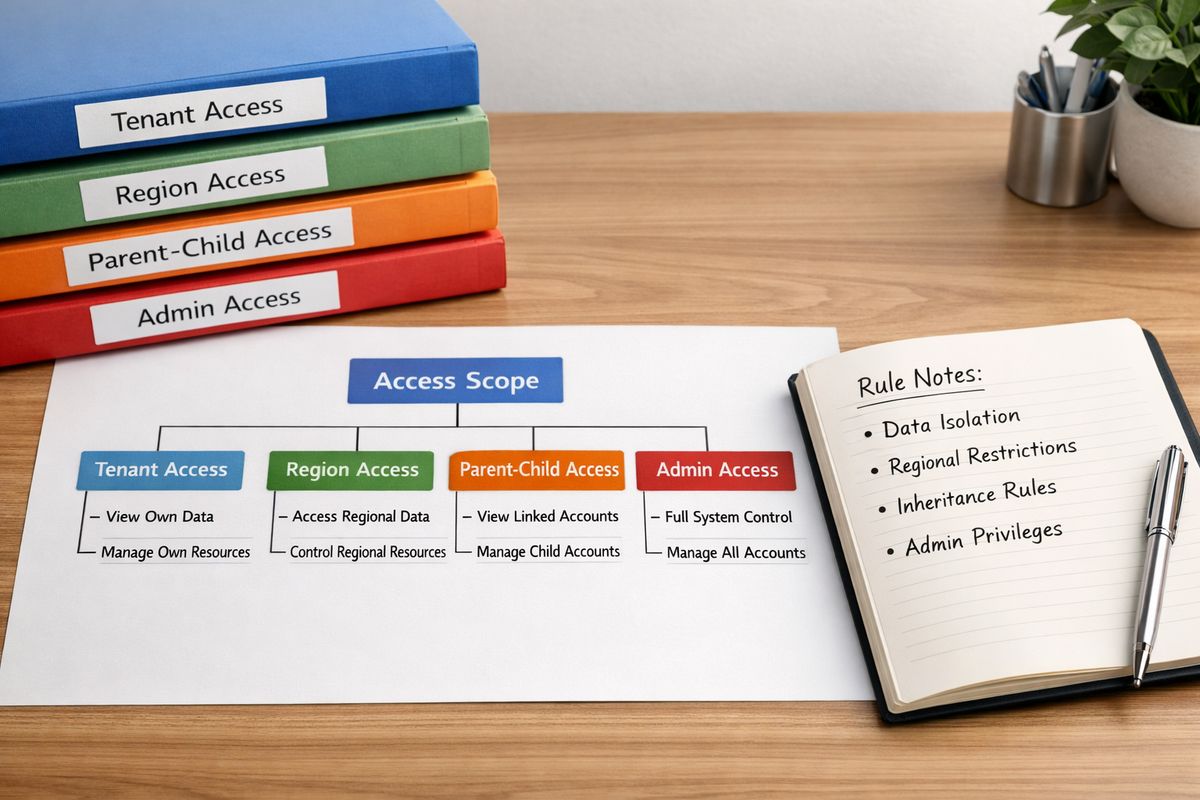
The fastest way to create brittle RLS is to jump straight into filters, roles, and calculated logic before deciding who should see what. External analytics usually follows a handful of patterns: tenant-based access, parent-child account access, region-based visibility, role-based exceptions, and a small number of admin users who need broader scope. The trick is to lock those down before any tool-specific setup starts.
Messy access rules create messy dashboards fast. If one account manager can see all sites except archived ones, another can see only the Midwest, and support users get temporary all-access during escalations, that complexity will show up somewhere. Better to name it early than let it leak into ten different workbooks.
Write down your visibility rules in plain English first
Before writing a single policy, write the rules the way you would explain them to a teammate in the hallway. “Customer admins can see all rows for their account.” “Regional managers can see only rows tied to assigned regions.” “Support can see a customer only during an approved time window.” Plain English exposes ambiguity fast.
That matters because vague requests turn into security bugs. “Give this user broader access” sounds simple until you have to decide whether broader means all child accounts, all regions, or one specific project. If you can’t say the rule clearly, the dashboard won’t enforce it clearly either.
Decide the grain of access upfront
RLS gets harder when the real access level is deeper than the model assumes. If visibility actually belongs at the site, store, project, or individual record level, don’t fake it with tenant-only rules and hope exceptions stay rare. They won’t.
The grain affects everything downstream: Tableau relationships and data source design, Power BI role filters in the semantic model, and QuickSight rules datasets. A shallow model feels easy for about a week, then the first exception forces a redesign. Start at the deepest practical level instead.
2. Use an entitlement table as your source of truth
If there is one habit that consistently makes RLS easier to manage, it’s this: keep access mappings in an entitlement table. That table connects a user to the account, tenant, region, site, or project that user is allowed to see. Centralized rules beat scattered logic every time.
Without that source of truth, access decisions end up split across app code, custom SQL, BI roles, and workbook filters. Good luck debugging that on a Friday afternoon. A single entitlement table gives you one place to inspect, update, and audit.
Keep the structure simple and auditable
A clean entitlement table usually includes a user identifier, a tenant or account identifier, a role, an access scope, and optional effective dates. That’s enough for most customer-facing use cases. Keep it narrow, readable, and easy to query.
This is also where operational sanity comes from. When a customer says a dashboard is blank, you want one obvious place to check. If the table clearly shows user X has access to account Y through next month, debugging moves fast. If access is hidden in workbook logic and naming conventions, it turns into detective work.
Design for direct access and inherited access
Some users need direct access to one exact entity. Others need inherited access through a hierarchy, like a parent account that should also see child accounts. Your entitlement model needs room for both.
Here’s where it gets interesting: inherited access can create sparse entitlements and many-to-many relationships, especially in B2B account structures. Model that deliberately. If you need more depth on keeping one rules layer across customer-facing dashboards, a centralized access pattern for embedded analytics is worth borrowing from early.
3. Match identities consistently across your app, BI tool, and data layer
Identity mismatch breaks more RLS setups than policy syntax does. That is the blunt truth. Your app knows one username, the BI platform knows an email address, and the warehouse joins on a different user key. Then access fails in ways that look random.
For external users, this gets worse because embedded analytics often adds another layer of session identity. If the login identity, embedded session identity, and entitlement record don’t align exactly, the policy can return too much data, no data, or the wrong tenant’s data.
Pick one durable user key
Use a stable internal user ID or customer user ID as the main access key. Email feels convenient, but it changes. Aliases get added. SSO providers normalize fields differently. A durable key avoids all of that avoidable trouble.
You can still store email for display or lookup, but don’t build your RLS foundation on it. Security logic tied to mutable identity fields is like labeling apartment keys with sticky notes. It works right up until one falls off.
Normalize tenant and role claims
Embedded sessions often pass tenant, account, or role context into Tableau, Power BI, or QuickSight. Keep the names, values, and casing consistent all the way through. “Acme-East” and “acme-east” might look close enough to a person, but not to a join condition.
That consistency matters especially when managing access for customer users without breaking permissions. The fewer translation layers between your auth system and your BI model, the fewer strange edge cases you’ll spend time chasing.
4. Push security as close to the data as you can
If you can enforce RLS in the warehouse or database, that is usually the safer default for external users. Security at the data layer protects every surface that consumes the data, not just one dashboard. If a new report, API, or analyst query appears later, the restriction still holds.
BI-layer RLS can still work well, but it should be a deliberate choice, not an accident. The closer security sits to the data, the harder it is to bypass through a forgotten view, export, or alternate report path.
Know when BI-layer RLS is enough
For simpler customer-facing analytics, BI-layer security can be perfectly reasonable. Power BI roles, Tableau user filters, and QuickSight rules datasets can all do the job if governance is tight and the access model is straightforward.
The catch is scope. If the BI tool is the only place external users ever touch that dataset, and the model is simple enough to validate thoroughly, BI-layer enforcement may be enough. Just don’t confuse “works in one dashboard” with “secured everywhere.”
Avoid duplicate logic in three places
One rule in app code, another in SQL views, and another in dashboard filters is how access drift starts. Eventually one gets updated, another does not, and nobody notices until a customer does.
Keep one source of truth and one primary enforcement layer whenever possible. If you need a refresher on how shared dashboards can still keep data private, the same principle applies: fewer duplicated rules, fewer surprises.

5. Build policies around the deepest practical granularity
Broad filters feel elegant until real customers ask for exceptions. If access truly needs to work at the site, location, department, or project level, build it there from the start. Tenant-wide access sounds simple, but it often collapses under actual account structures.
This is one of the most reliable RLS best practices because exceptions tend to grow, not shrink. A model built at the right depth absorbs those requests cleanly. A model built too high up turns every exception into a hack.
Handle “all access” without weakening the model
Admin and support access should be explicit, not implied. Give elevated users a clear entitlement path instead of sneaking in broad filters that accidentally widen visibility for everyone else.
In practice, that usually means an admin flag, a dedicated role, or explicit entitlement records that map to broader scopes. Keep it obvious. “All access” should be easy to spot, easy to review, and easy to revoke.
Plan for exceptions without special-case sprawl
Some customers will need one-off overrides. That’s normal. The mistake is hardcoding those exceptions in report logic or workbook calculations.
Put overrides in the entitlement model itself. That keeps your access logic inspectable and prevents dashboards from becoming a museum of special cases. If your setup already feels tangled, it helps to revisit the basics of who should see which rows before adding more exceptions.
6. Optimize for performance from day one
https://www.youtube.com/watch?v=Z0eeTTL7EhQ
Secure dashboards that load slowly still feel broken. External users don’t care whether the problem is a fan-out join, a bad predicate, or a rules dataset with unnecessary columns. They just see spinning charts.
RLS adds overhead, so assume performance work is part of the design, not a cleanup task for later. That means testing early, measuring often, and keeping access joins as lean as possible.
Index and partition the columns your policies hit
Columns used in joins and filters need support at the database or warehouse level. Tenant IDs, user IDs, account keys, region IDs, and date partitions matter because those are the columns your RLS logic touches again and again.
If a policy has to scan too much data to decide what a user can see, every dashboard interaction gets slower. That drag adds up fast in embedded analytics, especially during morning login spikes.
Keep entitlement joins lean
Narrow entitlement tables perform better and are easier to reason about. Precompute mappings when helpful. Avoid unnecessary fan-out joins that multiply rows before the final filter kicks in.
Every extra join becomes visible to customers before it becomes visible in your backlog. If you are evaluating architecture options, what makes an embedded analytics setup easier to run often comes down to how simply you can connect identity, entitlements, and query paths.
Measure the cost of RLS separately
Test the same dashboard with and without RLS so you can isolate the true performance impact. Otherwise, slow visuals get blamed on security even when the problem lives in the model itself.
Do this in Tableau, Power BI, and QuickSight using the nearest realistic embedded scenario you have. Desktop previews can hide problems that only show up under customer-shaped queries.
7. Validate every role with real user scenarios, not just happy paths
RLS often fails silently. A user sees nothing, too much, or something that looks mostly right but includes one extra region. Those are the bugs that slip through if you only test with admin accounts and ideal sample users.
Scenario-based validation catches what unit logic misses. Build tests around actual external roles, tenant structures, and lifecycle states, including suspended users and recently moved accounts.
Test positive, negative, and boundary cases
A good validation set includes users who should see exactly one account, users who should inherit child account access, users who should lose access after deprovisioning, and users who should not see archived tenant data. Boundary cases matter because RLS breaks at edges more often than in the middle.
If your model supports partial visibility, test that too. Half-access cases are where totals, filters, and drilldowns often get weird.
Use impersonation or “view as role” features
Power BI’s “view as” feature is useful, and similar impersonation patterns in Tableau and QuickSight help too. But don’t stop at design-time previews. Test with live embedded session context whenever possible.
That extra step matters because session tokens, namespaces, and passed identity claims often behave differently from desktop testing. The dashboard is only secure if the embedded version is secure.
8. Treat extracts, caches, and snapshots carefully
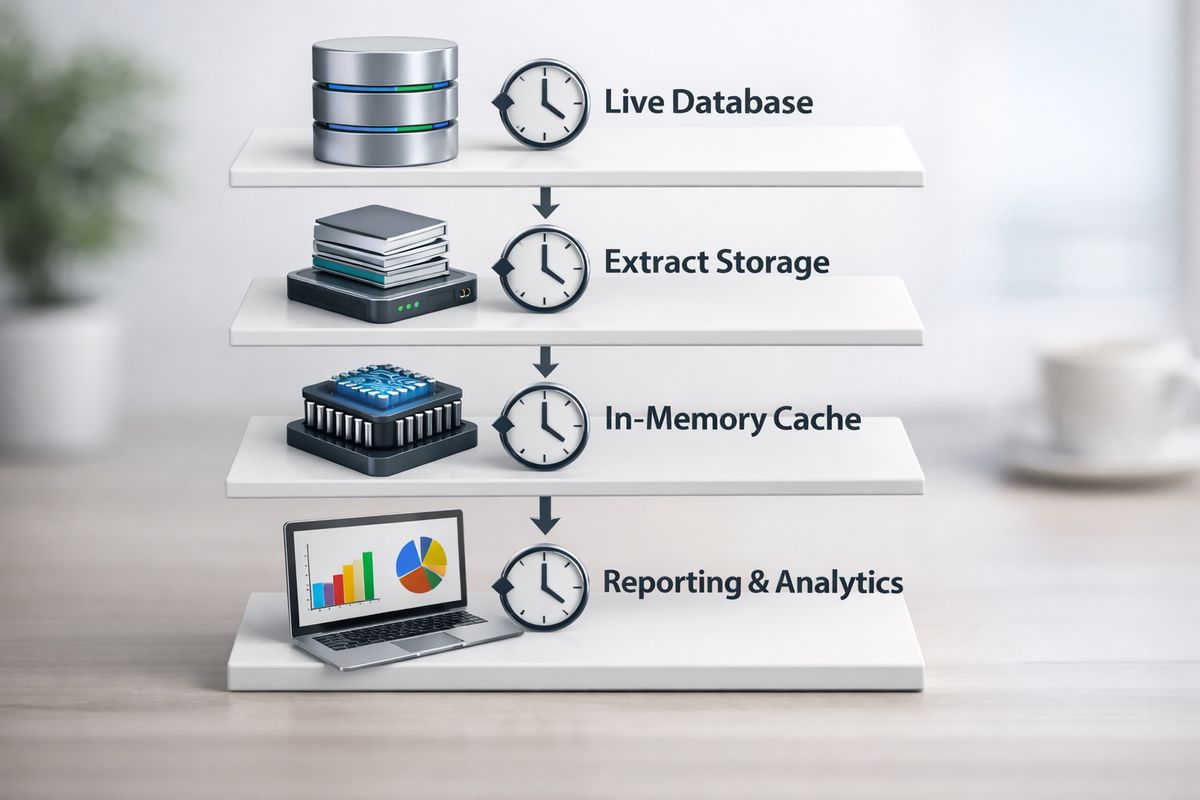
Sometimes the policy is correct and the delivered data is wrong anyway. That usually means extracts, caches, or snapshots are involved. Tableau extracts, Power BI semantic models, and QuickSight SPICE can all speed things up, but they also add one more layer where access can drift from expectation.
You want cached speed without cached mistakes. That means checking how restrictions are applied at query time, not assuming refresh logic magically preserves intent.
Make sure cached layers preserve user-level restrictions
Verify that extracts and in-memory layers still enforce user-specific restrictions when the dashboard runs. Preprocessed data should not flatten away the attributes your RLS logic depends on.
This is especially important in shared embedded environments where many users hit the same underlying model. A fast cache is great. A fast cache with the wrong visibility is a support fire.
Align refresh timing with entitlement changes
If a user loses access, that change should show up quickly. If an account gets reassigned, the dashboard should not keep old visibility for hours just because an extract or SPICE import refreshes later.
For customer-facing analytics, refresh discipline is part of security discipline. Access changes that lag behind reality create exactly the kind of “why can this account still see that?” message you want to avoid.
9. Separate authentication, authorization, and presentation
Authentication is who the user is. Authorization is what the user can access. Presentation is what the dashboard shows on screen. Keep those layers separate.
When those layers get mixed together, debugging becomes miserable. A hidden filter looks like security. A UI toggle looks like authorization. Then one bypassed front-end control exposes data that should never have depended on the front end in the first place.
Pass trusted identity into embedded sessions
Embedded Tableau, Power BI, and QuickSight setups need a trusted identity path into the session. Session tokens and signed access should carry the right user and tenant context cleanly, without ad hoc translation.
This is one reason keeping BI user administration under control matters so much. If embedded session identity and access provisioning drift apart, RLS starts failing for reasons that look unrelated.
Avoid relying on front-end filters for security
Visible filters are for usability, not protection. Hidden UI controls are not a security boundary either. If someone can bypass the dashboard interface and still access restricted data, the model is not secure.
Security has to hold below the presentation layer. Always.
10. Design for partial access and blank-state behavior
External users often have incomplete access by design. Some can see one region, others one location, others nothing yet because onboarding is mid-flight. The dashboard should still feel intentional in all of those cases.
A blank state without explanation feels broken. Partial access without careful totals feels suspicious. Thoughtful behavior here reduces support noise and improves trust.
Make “no data” distinguishable from “no permission”
Say clearly whether a dashboard is empty because there is no data in scope or because the user does not have permission. That distinction saves time for both support and customer admins.
Even a simple message helps: access pending, no records available for this account, or insufficient permissions for this view. Silence just creates confusion.
Avoid totals that leak restricted data
Grand totals, subtotals, benchmarks, and denominators can leak more than the filtered detail rows do. A user may only see one region, but a page-level total could still reveal company-wide numbers if you are not careful.
Check every aggregate with partial-access users. Totals are a common leak path because they look harmless until someone notices the math.
11. Watch for common RLS pitfalls that create accidental exposure
Most access bugs are not exotic. They come from predictable mistakes: null handling, unsecured views, incorrect join direction, broad default roles, and assumptions about how different query paths behave.
That is good news, honestly, because predictable mistakes are fixable. But only if you actively look for them.
Be careful with NULLs, default values, and fallback logic
“Null means unrestricted” becomes a security bug fast unless that behavior is deliberate and documented. The same goes for catch-all defaults that grant broad access when a mapping is missing.
Fail closed where you can. If the entitlement path is incomplete, showing nothing is safer than showing everything.
Review views and derived tables
A secure base table does not guarantee a secure view. Derived tables, workbook custom SQL, and semantic model shortcuts can bypass the intended restriction path if they are built carelessly.
Audit the objects that sit between source data and the final dashboard. Those are often where accidental exposure sneaks in.
12. Put monitoring, audits, and change control around your policies
RLS is not a one-time build. Customers move, roles change, accounts merge, support needs temporary access, and entitlements drift unless you watch them. Good policy design without monitoring is only half a solution.
You need enough visibility to answer simple questions quickly: who got access, when it changed, and what unusual patterns showed up afterward.
Log access-related changes
Version entitlement changes. Track admin updates. Keep a clear audit trail for who got access to what and when. It does not need to be fancy, but it does need to exist.
That record helps with debugging, compliance conversations, and basic operational sanity. When something changes unexpectedly, a log turns guessing into checking.
Alert on unusual visibility patterns
Watch for sudden spikes in returned rows, unexpected empty-dashboard incidents, and mismatched tenant-to-session mappings. Lightweight alerts catch issues before customers escalate them.
A small amount of monitoring goes a long way here. You are looking for patterns, not perfection.
13. Choose tool-specific patterns that fit Tableau, Power BI, and QuickSight
https://www.youtube.com/watch?v=-MwysbrdVO0
Trying to force one identical RLS pattern across Tableau, Power BI, and QuickSight usually creates more friction than consistency. The better approach is to keep the access model consistent while adapting the implementation to each tool’s strengths.
Your semantic layer, embedding setup, and refresh model all affect what “best” looks like. Use the same principles, not the same exact wiring.
Tableau: favor entitlement-driven data source design
In Tableau, entitlement-driven data source design usually beats workbook-by-workbook tricks. User filters, data source filters, relationships, and carefully planned joins can all help, but the cleanest setups usually start with a well-modeled data source.
If database-native RLS is available and reliable, that can be even better. Tableau works nicely when it consumes already-secured data instead of reinventing access rules in every workbook.
Power BI: use roles carefully and keep models simple
Power BI roles are useful, but role logic can get messy fast inside a complicated semantic model. Keep role definitions readable, avoid unnecessary table complexity, and test with “view as” using realistic scenarios.
Partial RLS is where model simplicity really pays off. The more tangled the relationships, the harder it becomes to predict filter behavior.
Amazon QuickSight: keep rules datasets clean and session mapping predictable
QuickSight works best when the rules dataset is clean, current, and mapped predictably to session identity. Namespace consistency, user mapping, and refresh timing matter more than most teams expect at the start.
If your environment spans multiple customers and one shared analytics layer, handling multi-tenant access without duplicating every dashboard becomes the practical goal.
14. Simplify user management so RLS stays maintainable at scale
The technical policy is only half the job. The other half is user provisioning, offboarding, tenant reassignment, support exceptions, and making sure embedded sessions reflect real-world access. That operational layer is where many external analytics programs start to wobble.
You can write elegant RLS and still end up with fragile delivery if user management lives in too many places. Fewer moving parts usually means fewer permission mistakes.
Reduce manual mapping work
Manual onboarding and offboarding across your app, BI tool, and entitlement tables is a recipe for drift. Every spreadsheet import, one-off update, and support shortcut adds another chance for access to break.
The less hand-mapping you do, the more stable your RLS stays over time. Repetition is good here. Custom exceptions as a workflow are not.
Keep RLS and customer access in one repeatable workflow
Provisioning and permissions should move together. If a customer gets access to a dashboard, the entitlement path should update as part of the same workflow, not as a separate cleanup step.
That is exactly why tools that simplify external access management matter. embedportal.com helps reduce the manual glue across Tableau, Power BI, and Amazon QuickSight so user management and RLS stay aligned as your customer base grows.
15. Try one fix this week: audit your entitlement path end to end
Pick one external user and trace the whole path: app login, identity key, tenant mapping, entitlement record, BI role or rule, embedded session, and final row visibility. That single walkthrough will tell you more than another theoretical policy review.
Try that this week, then look at embedportal.com if you want to simplify the part that usually causes the most operational drag. It makes external user management and RLS easier to keep in sync across Tableau, Power BI, and Amazon QuickSight, which means fewer broken permissions and fewer late-night messages about the wrong rows showing up.
Frequently Asked Questions
What is the most common cause of RLS failures for external users?
Identity mismatch is the most common cause. If your app, BI tool, and data layer use different user keys or tenant identifiers, access breaks even when the policy logic itself is correct.
Should you enforce RLS in the database or in the BI tool?
Database or warehouse enforcement is usually safer for external users because it protects every downstream surface. BI-layer RLS can work well for simpler setups, but only if governance is tight and the dashboard is the only access path.
How often should entitlement data refresh?
As often as your customer access changes require. For customer-facing analytics, waiting hours for offboarding or account reassignment to show up is usually too slow. Fast refresh or near-real-time sync is better when access changes are frequent.
Can dashboard filters replace row-level security?
No. Dashboard filters are presentation controls, not security controls. RLS has to hold even if someone bypasses the front end or accesses the data through another path.
What should an entitlement table include?
At minimum, include a durable user ID, the tenant or account scope, role or access type, and effective dates if access can expire. Keep the structure simple enough to audit quickly.
How do you test RLS properly in embedded analytics?
Test with real user scenarios, not just admin previews. Validate positive, negative, and boundary cases using impersonation, “view as role,” or live embedded sessions so the identity passed at runtime matches what customers actually use.