QuickSight Multi-Tenant Embedding Without Provisioning Users
Why QuickSight Multi-Tenant Embedding Is Hard to Get Right
QuickSight multi-tenant embedding lets you serve separate, data-isolated dashboards to many different customers — all from a single Amazon QuickSight account, without creating individual QuickSight user accounts for each viewer.
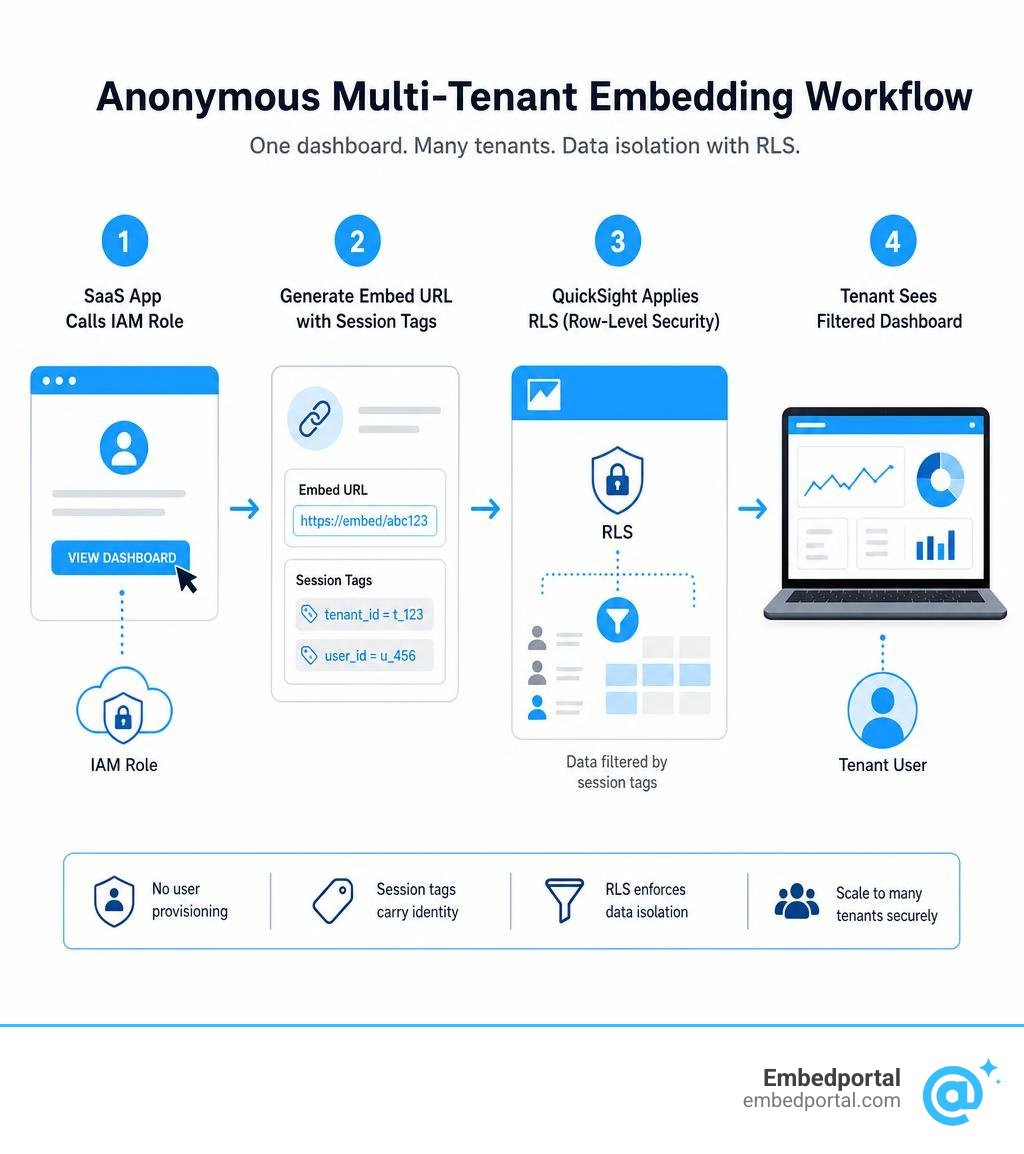
Here’s the quick answer on how it works:
- Choose a tenancy model — use namespaces for full tenant isolation (especially if users need to author dashboards), or groups for simpler reader-only scenarios.
- Pick a data isolation strategy — either separate datasets per tenant, or one shared dataset protected by row-level security (RLS).
- Enable anonymous embedding — use the
GenerateEmbedUrlForAnonymousUserAPI so you never have to provision QuickSight users at all. - Apply tag-based RLS — configure tag keys on your dataset columns, then pass per-user
SessionTagsat runtime so each viewer only sees their own data. - Lock it down with IAM — use scoped IAM roles with
AllowedEmbeddingDomainsto control who can generate embed URLs and from where.
For SaaS product and analytics teams, this setup solves a real pain point. You might have tens of thousands of end users across hundreds of customer accounts. Provisioning a QuickSight identity for every single one of them is slow, expensive, and hard to maintain.
The good news: QuickSight supports scaling to hundreds of thousands of embedded users through anonymous embedding with session-based pricing — meaning your QuickSight account never needs to know most of your users exist.
But getting the architecture right matters. Choosing the wrong tenancy model early on can lead to data leaking between tenants, runaway SPICE costs, or authors accidentally sharing dashboards outside their company. This guide walks you through every layer — from dataset configuration to IAM policies to automated deployment — so you can build it correctly from the start.
Quicksight multi tenant embedding terminology:
Architectural Approaches to QuickSight Multi-Tenant Embedding
When building a SaaS application in July 2026, designing the correct logical separation is the foundation of your analytics stack. If your application serves multiple business customers (tenants), you must ensure that Tenant A can never catch even a passing glimpse of Tenant B’s data.
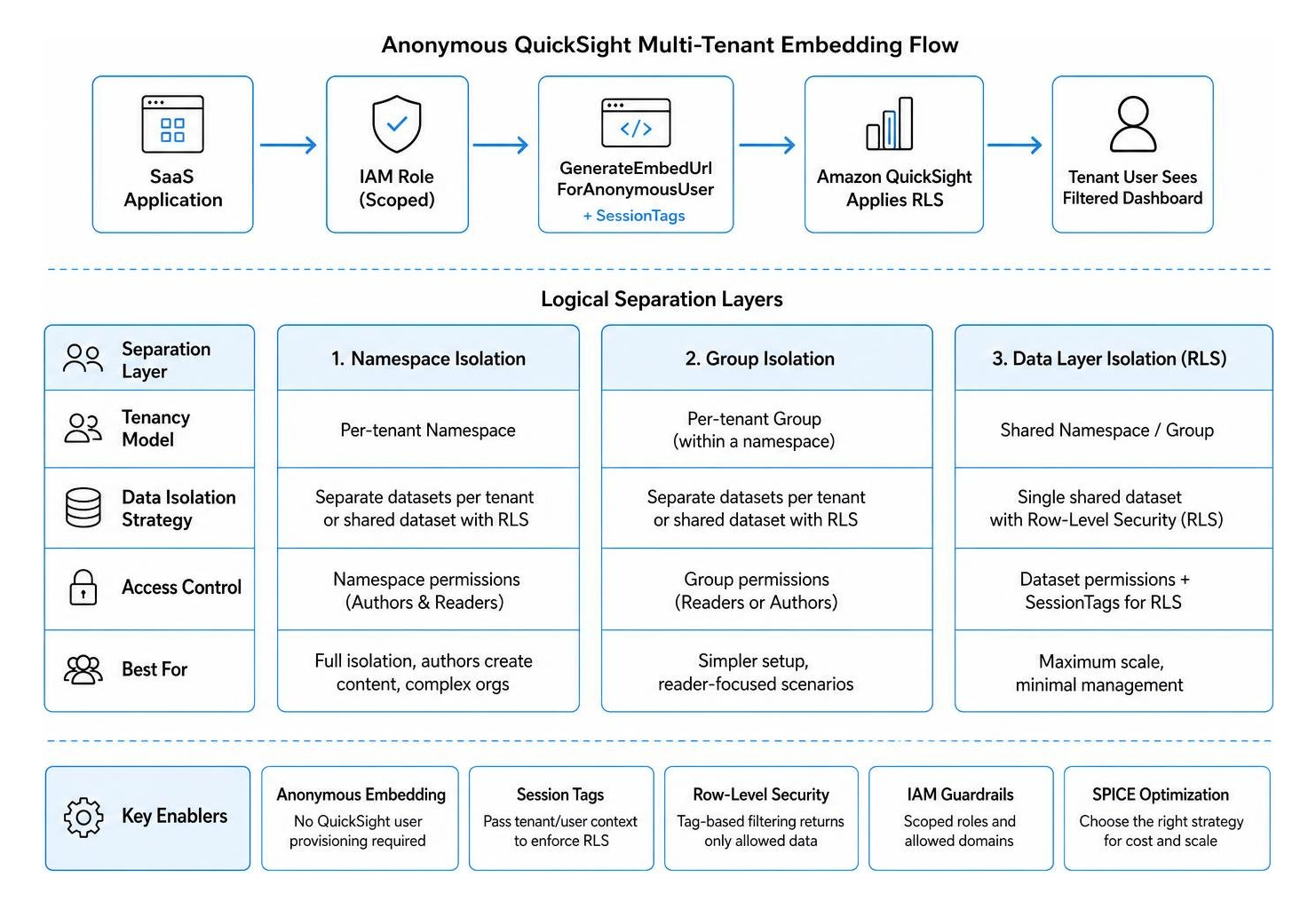
In QuickSight, this multi-tenant boundary can be established at different layers of the AWS ecosystem. We can isolate tenants at the user directory level, the dashboard level, or directly at the data layer.
To explore these options fully, you can read our guide on SaaS BI Embedding or review the official AWS strategies in the Support multi-tenant applications for SaaS environments using Amazon QuickSight | AWS Business Intelligence Blog .
Namespaces vs. Groups for Tenant Isolation
QuickSight provides two primary mechanisms for organizing users within a single AWS account: Namespaces and Groups.
- Namespaces: These are completely isolated, virtualized partitions of a single QuickSight account. Think of them as secure, logical walls. Users, groups, and directory assets in Namespace A are entirely invisible to users in Namespace B.
- Groups: These are standard user directories within a single namespace. You can place users into groups (e.g., Tenant-A-Group, Tenant-B-Group) and share dashboards with those specific groups.
So, when should you use each?
The decision hinges on whether your tenants only need to read dashboards, or if they need to author their own reports.
If your SaaS application provides embedded self-service authoring (where power users at your customer companies can build their own charts), you must use namespaces. This is because of a critical limitation of groups: QuickSight authors within the same namespace can see and share assets with any other user or group in that same namespace. If you only use groups to segment tenants, an author from Tenant A could search for and share a custom analysis with a user from Tenant B. Namespaces completely eliminate this risk by ensuring that an author’s search query and sharing permissions are strictly bound to their own namespace.
For standard, reader-only scenarios where users only view dashboards embedded in your portal, groups or even a single shared namespace using anonymous embedding are often simpler and highly cost-effective. For more details on configuring author environments, see the guide on how to Embed multi-tenant analytics in applications with Amazon … .
Dataset Isolation: Per-Tenant Datasets vs. Shared Datasets with RLS
Once you have chosen your user isolation method, you must decide how to structure your underlying data assets. You have two primary paths:
- Separate datasets per tenant: Every tenant gets their own dedicated QuickSight dataset pointing to their own database, schema, or filtered file.
- A single shared dataset with Row-Level Security (RLS): All tenants query a single, unified dataset, and QuickSight filters the rows dynamically based on who is looking at the dashboard.
To help you weigh these options, we have structured their key trade-offs in the table below:
| Architectural Dimension | Separate Datasets Per Tenant | Shared Dataset with RLS |
|---|---|---|
| Data Isolation Strength | Extremely high. Physical or logical separation at the source database level prevents cross-tenant leaks. | High, but relies on software-defined RLS rules. A misconfigured rule could expose data. |
| SPICE Capacity & Cost | Higher SPICE usage. Each dataset consumes its own SPICE memory, leading to duplicate storage overhead. | Highly optimized. One shared dataset in SPICE serves all users, lowering memory costs. |
| Development & Deployment Overhead | High. You must programmatically provision and update datasets for every new tenant. | Low. You manage a single dataset and dashboard template for your entire SaaS platform. |
| SPICE Cost Tracking | Straightforward. You can track exactly how much SPICE memory each tenant dataset consumes. | Difficult. SPICE costs are pooled together under a single, shared dataset. |
| Single Point of Failure | Low. If one tenant’s dataset fails to refresh, other tenants are unaffected. | High. If the shared dataset or the RLS rules dataset corrupts, all tenants lose access. |
If your SaaS application has strict compliance requirements (such as healthcare or finance apps that mandate physical separation of customer databases), separate datasets are often required. However, if you are looking to build a highly scalable, low-maintenance dashboard experience for thousands of users, a single dataset paired with Row Level Security is the gold standard.
Implementing Tag-Based Row-Level Security for Anonymous Users
If you want to offer embedded analytics to thousands of users without the operational headache of registering, syncing, and provisioning user accounts in AWS, anonymous embedding is your best friend.
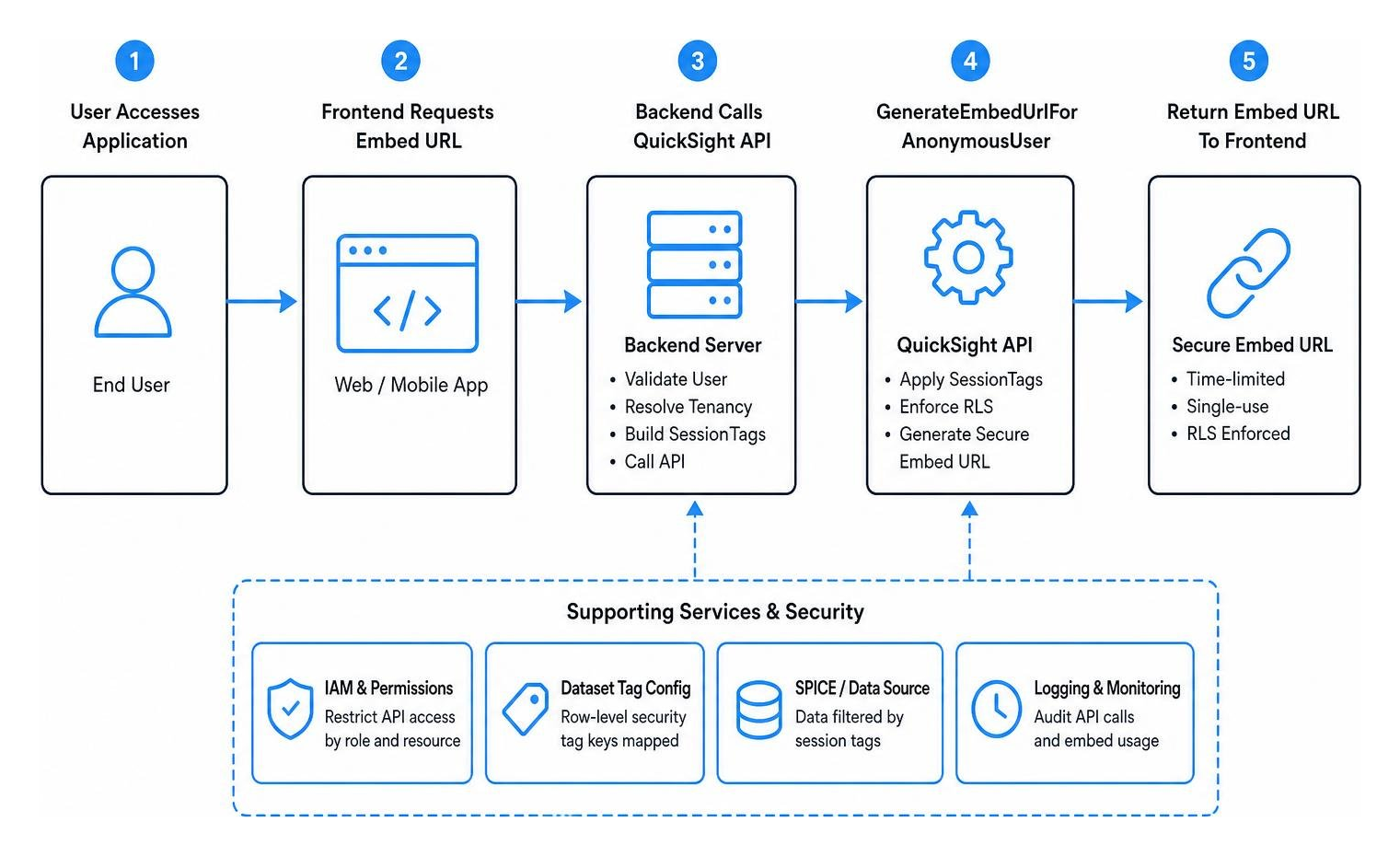
With anonymous embedding, your web application handles the authentication. When a user logs in, your server verifies their identity and requests a temporary, single-use embed URL from QuickSight. To ensure the user only sees their own data, we use tag-based row-level security.
This setup relies on session-based capacity pricing, allowing you to scale up to hundreds of thousands of users seamlessly. To read more about how this functions at the visual level, see Embedding Amazon Quick Sight visuals for anonymous (unregistered) users – Amazon Quick and check our resources on Embedded Analytics.
Configuring Tag Keys on Dataset Columns
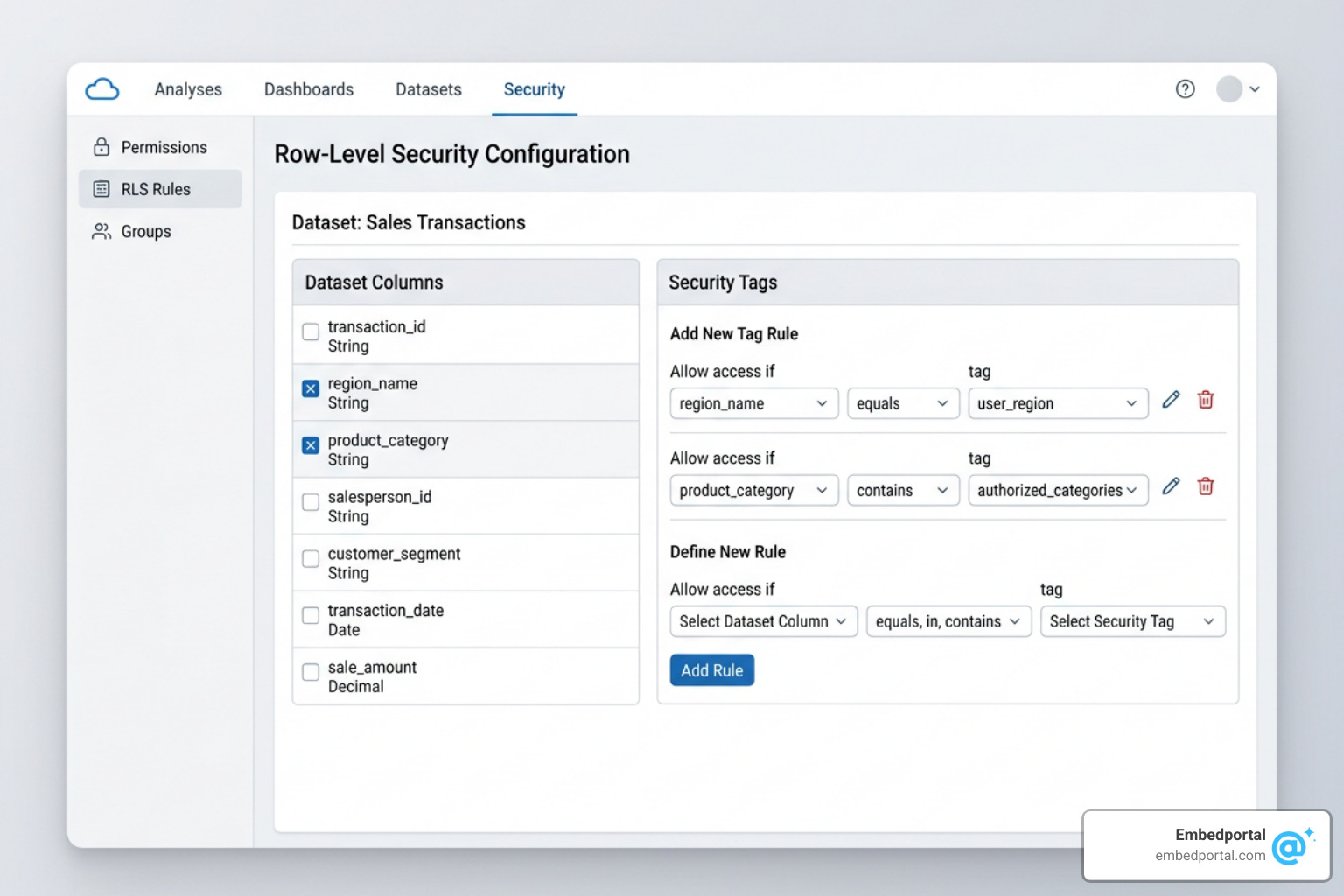
To make tag-based RLS work, you must first tell your QuickSight dataset which columns should be mapped to security tags. Each dataset supports up to 50 tag keys, which is more than enough for even the most complex multi-tenant hierarchies.
You configure these tags using the QuickSight CreateDataset or UpdateDataset APIs. Within the API payload, you define a RowLevelPermissionTagConfiguration block.
For example, if you have a database column named tenant_id_column, you can map it to a tag key called TenantID. You also define how QuickSight should handle these tags:
- TagRules: This array maps the dataset column to your logical tag key. You set the
ColumnNameto your actual database column name and theTagKeyto the custom string you want to use at runtime. - TagMultiValueDelimiter: If a user belongs to multiple tenants or regions, you can pass multiple values in a single tag string (e.g., “TenantA,TenantB”) by specifying a delimiter like a comma.
- MatchAllValue: You can define a special wildcard value (like “*”) that, when passed at runtime, allows a super-user or internal admin to see all rows in the dataset.
Once this configuration is set to ENABLED on your dataset, any query run against it will look for matching tags before returning data.
Passing Session Tags at Runtime via API in QuickSight Multi-Tenant Embedding
Once your dataset is configured to expect tags, your backend application must supply those tags every time it requests a dashboard for a user. This is done at runtime when calling the GenerateEmbedUrlForAnonymousUser API.
In your API request, you will populate the SessionTags parameter. This is an array of key-value pairs. For example, if a user from “Acme Corp” opens your app, your server will make an API call containing a session tag where the Key is TenantID and the Value is AcmeCorp.
When QuickSight receives this request, it generates a highly secure, temporary URL. When the user’s browser loads this URL, QuickSight automatically injects the AcmeCorp value into the query filters, ensuring that only Acme Corp’s rows are retrieved from SPICE or your direct-query database.
To see how to initialize this URL on your frontend using the SDK, refer to the step-by-step guide on Step 3: Embed the dashboard URL – Amazon Quick . You can also learn more about the underlying architecture in the discussion on Multi-tenant embedding – Q&A – Amazon Quick Community .
Securing and Automating the Multi-Tenant Pipeline
Building a manual proof of concept is easy, but running a secure, automated multi-tenant pipeline at scale requires proper IAM scoping and deployment automation.
If you have ever had to manage RLS across other platforms, you know that keeping policies clean is critical. For comparison, you can look at our Embed Tableau RLS Complete Guide.
IAM Policies and Dynamic Access Control for GenerateEmbedUrlForAnonymousUser
Because the GenerateEmbedUrlForAnonymousUser API allows access to your dashboards without user sign-in, you must tightly control which backend servers can call it, and which resources they can request.
Your backend application should assume an IAM role specifically configured for embedding. The IAM policy attached to this role must include the following permissions:
- Allowed Resources: Restrict the
Resourceblock to only the specific dashboard ARNs you wish to embed. Never use a wildcard (*) for dashboards in production. - AllowedEmbeddingDomains: Use the
Conditionblock in your IAM policy to restrict URL generation to your official SaaS application domains. This prevents malicious actors from extracting your embed URLs and loading them on unauthorized websites. - Unique Role Session IDs: When your backend assumes the IAM role to call the API, always pass a unique, traceable
RoleSessionName(such as a hashed tenant ID or user ID). This makes auditing your AWS CloudTrail logs straightforward if you ever need to trace an API request back to a specific tenant session.
Automating Deployments with Asset Bundle APIs
As your SaaS application grows, you will need to deploy new dashboards, update existing datasets, and manage permissions across multiple tenants. Doing this manually in the AWS Console is a recipe for configuration drift.
Instead, use QuickSight’s Asset Bundle APIs:
- Export: Use the
StartAssetBundleExportJobAPI to bundle your dashboard, its underlying datasets, analysis templates, and themes into a single.qsfile. This API supports up to 5 concurrent runs. - Customize: Download the bundle via the presigned S3 URL (valid for 5 minutes). Your deployment script (such as an AWS Lambda function) can unpack the bundle and dynamically update tenant-specific parameters, such as database connection strings or dataset names.
- Import: Use the
StartAssetBundleImportJobAPI to deploy the customized assets into your target namespaces or tenant environments. - Permissions: Once imported, run
UpdateDashboardPermissionsandUpdateDataSetPermissionsto grant the appropriate groups or namespaces access to the newly deployed assets.
This automated pipeline ensures that every tenant receives a consistent, tested version of your dashboard with zero manual intervention.
Authoring Dashboards with Tag-Based Row-Level Security in QuickSight Multi-Tenant Embedding
One common challenge with tag-based RLS is the authoring experience. If a dataset is protected by tag keys, how can your internal BI authors build and test dashboards? If they open the analysis, they won’t have active “session tags” applied, which means they might see an empty screen or be blocked from viewing the data.
To solve this, use rules datasets during the authoring phase. A rules dataset is a separate mapping table that grants specific QuickSight usernames or group names access to the protected data.
When your authors are building analyses, QuickSight checks the rules dataset, recognizes their developer account, and displays the sample data they need to design the visuals. Once the dashboard is published and shared with anonymous readers, QuickSight seamlessly switches to evaluating the runtime SessionTags passed by your SaaS application.
Frequently Asked Questions about QuickSight Multi-Tenant Embedding
What are the SPICE capacity and cost implications of shared vs. separate datasets?
Using a single shared dataset with tag-based RLS is highly cost-effective because SPICE capacity is pooled. You only pay for the storage of a single dataset, regardless of how many thousands of tenants query it.
However, because the data is commingled, you cannot easily break down your AWS bill to see exactly how much SPICE memory or query power Tenant A is consuming compared to Tenant B. If your business model requires charging customers based on their exact data footprint, separate datasets per tenant make tracking and chargebacks much simpler, though at a higher total SPICE cost.
How long are QuickSight anonymous embedding URLs and sessions valid?
When your backend calls the GenerateEmbedUrlForAnonymousUser API, the returned URL is valid for 5 minutes. If the user does not load this URL in an iframe within that window, it expires, and your app must request a new one.
Once the URL is successfully loaded, the resulting embedded session can last anywhere from 15 minutes to 10 hours (600 minutes), depending on the SessionLifetimeInMinutes parameter you specify in your API call. If a user keeps your app open longer than the specified lifetime, your frontend must handle session refresh by requesting a new URL.
When should I use namespaces instead of groups for tenant isolation?
You should use namespaces whenever your tenants have Author licenses and need to build, edit, or share their own analyses. In QuickSight, groups do not prevent authors from seeing or sharing assets with users in other groups within the same namespace. Namespaces provide the strict logical isolation required to prevent accidental cross-tenant data sharing in self-service BI scenarios. If your tenants are strictly Readers viewing pre-built dashboards, groups or tag-based RLS in a single namespace are easier to manage.
For general information about the platform’s features, you can also check out What is Amazon Quick? – Amazon Quick or read the high-level capabilities overview in What is Amazon Quick?.
Conclusion
Setting up quicksight multi tenant embedding using anonymous users and tag-based RLS is a powerful way to deliver secure, scalable analytics to your SaaS customers. By bypassing individual user provisioning, you eliminate identity synchronization headaches and benefit from predictable, session-based capacity pricing.
However, building and maintaining this pipeline in-house — writing custom Lambda functions for asset deployment, managing complex IAM role assumptions, designing RLS fallback rules, and building custom iframe wrappers — can take weeks of dedicated engineering time.
That is where we come in. At Embedportal, we provide a fully white-labeled embedding platform designed to simplify this entire process. We enable product teams to embed multi-vendor analytics (including Tableau, Power BI, QuickSight, and Metabase) with unified branding, robust row-level security, and seamless SSO in under an hour.
With our platform, you can focus on building great dashboards while we handle the secure token generation, tenant isolation, and frontend SDK integration.
Ready to see how we can accelerate your embedded analytics roadmap? Explore our platform and get started today:
- Learn more about our Row Level Security Solutions
- See our transparent Pricing
- Book a live Demo
- Read through our developer Docs
- Reach out to our engineering Support team