Postgres Column Level Security and How to Implement It Flexibly
Why Postgres Column Level Security Matters for Your Data Stack
Postgres column level security gives you control over which columns a user can see or modify — not just which rows. If you’re trying to lock down sensitive fields like salaries, SSNs, or internal pricing without hiding entire records, this is the tool for the job.
Here’s what you need to know at a glance:
- Row-Level Security (RLS) controls which rows a user can access
- Column-level privileges control which columns within those rows a user can access
- PostgreSQL supports column-level grants for four operations:
SELECT,INSERT,UPDATE, andREFERENCES - You grant column access using
GRANT SELECT (column_name) ON table TO role; - Restricted users cannot use
SELECT *on tables with column restrictions — they must name columns explicitly - Column privileges can coexist with table-level privileges on the same table
- For most use cases, combining RLS with views is safer and simpler than column-level grants alone
The core methods for implementing column-level security in Postgres:
- Column-level GRANT/REVOKE — native SQL syntax to restrict specific columns per role
- Security-barrier views — expose only allowed columns through a view with
security_barrier = on - RLS policies + column grants — layer both for defense-in-depth
- Column encryption — encrypt sensitive columns at the type level using extensions like
pgcryptoorcolumn_encrypt - Dynamic data masking — mask column values at query time using extensions like
pg_columnmask
For analytics and product teams embedding dashboards into customer portals, this matters a lot. Your embedded reports may query the same underlying tables that store sensitive internal data. Without column-level controls, a misconfigured role could expose fields your customers were never meant to see.
RLS handles the row problem well. But it doesn’t stop a user from reading every column in the rows they’re allowed to see. That’s the gap this guide addresses.
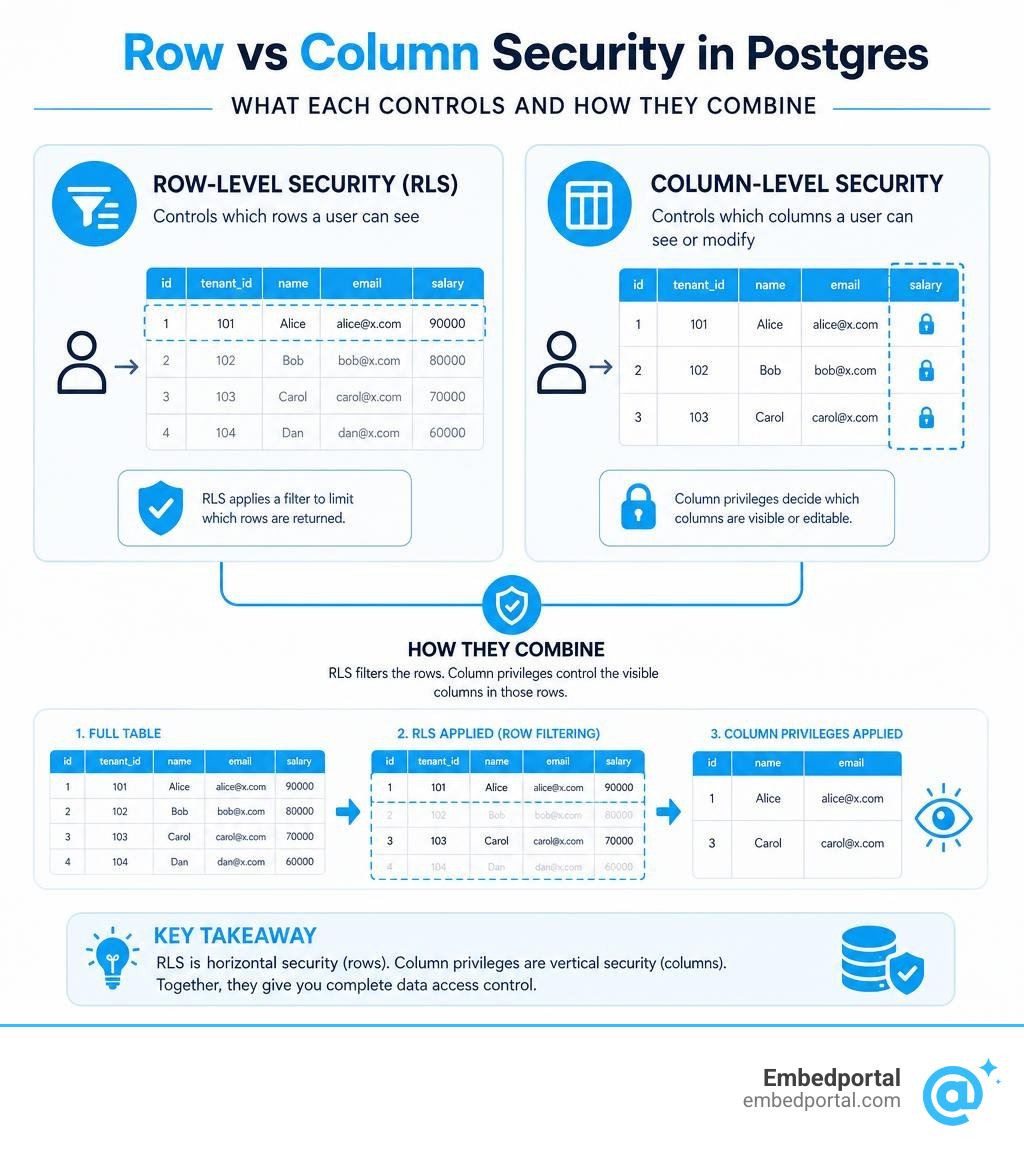
What is Postgres Column Level Security and How Does It Differ from RLS?
To secure a database effectively, we must think in two dimensions: horizontal (rows) and vertical (columns).
Row-Level Security (RLS) acts as a horizontal filter. When RLS is enabled on a table, Postgres automatically appends a implicit WHERE clause to every query executed by a restricted role. This ensures that a user only sees rows matching specific criteria, such as data belonging to their own tenant ID. You can read more about how this is configured in the official PostgreSQL: Documentation: 18: 5.9. Row Security Policies .
In contrast, postgres column level security acts as a vertical filter. It does not look at the values of the rows to decide if they should be hidden. Instead, it looks at the schema itself. It restricts access to specific columns across the entire table, regardless of which row is being accessed.
| Security Feature | Control Dimension | Mechanism | Common Use Case |
|---|---|---|---|
| Row-Level Security (RLS) | Horizontal (Rows) | Dynamic query rewriting via WHERE policies | Multi-tenant isolation (e.g., users only see their own accounts) |
| Column-Level Privileges | Vertical (Columns) | Role-based SQL permissions (GRANT/REVOKE) | Hiding sensitive fields (e.g., SSN, salary) from general staff |
While RLS is dynamic and evaluates expressions on a per-row basis at runtime, native column-level security in Postgres relies on the standard SQL privilege system. This means permissions are evaluated during the query planning phase. If a role lacks permission to read a column, the query planner rejects the query immediately before even looking at the data.
Implementing Column-Level Privileges with GRANT and REVOKE
Implementing native column-level security in Postgres relies on the GRANT and REVOKE commands. However, unlike table-level permissions, we specify the target columns in parentheses directly after the privilege type.
By default, Postgres supports only four privilege types at the column level:
- SELECT: Read data from the column.
- INSERT: Provide a value for the column when creating a new row.
- UPDATE: Modify the value of the column in an existing row.
- REFERENCES: Create a foreign key constraint that references the column.
To set this up, we must first ensure the target role does not have table-level access. If a user already has table-level SELECT access, column-level restrictions will have no effect.
First, we revoke any existing table-level permissions: REVOKE SELECT, INSERT, UPDATE ON employees FROM analyst_role;
Next, we grant SELECT privileges only on the non-sensitive columns: GRANT SELECT (employeeid, firstname, lastname, department) ON employees TO analystrole;
If the analystrole needs to update only the department column, we can grant column-specific update permissions: GRANT UPDATE (department) ON employees TO analystrole;
This granular control is highly effective but requires careful planning. If you want to see a step-by-step walkthrough of setting up these permissions on a sample database, you can refer to the guide on How to implement Column and Row level security in PostgreSQL .
Managing Postgres Column Level Security via Migrations vs Dashboards
As your application grows, managing these permissions manually via a SQL terminal becomes difficult to track. We recommend managing your column-level privileges using migration files within your version control system rather than relying solely on database dashboards.
When you use migration files (for example, with toolchains like Supabase or standard active-record migrations), every change to your schema and column privileges is documented, testable, and reproducible across development, staging, and production environments. You can easily write migration scripts that revoke table-level privileges and apply column-specific grants.
On the other hand, managing privileges via a database dashboard (like the Supabase dashboard or pgAdmin) is excellent for rapid prototyping and quick audits. It gives you a visual overview of which roles have access to what. However, making manual changes in a production dashboard introduces the risk of configuration drift, where your local development database no longer matches the security posture of your production environment.
For a deeper dive into managing these configurations in both environments, check out the Column Level Security documentation.
Limitations and Gotchas of Native Column-Level Privileges
While native column-level privileges are powerful, they come with several strict limitations that often surprise developers.
The biggest gotcha is the wildcard operator. If a role has restricted access to a table, executing a wildcard query like SELECT * FROM employees; will result in a “permission denied” error. Postgres does not automatically filter out the restricted columns and return the rest; it rejects the entire query. Restricted users must explicitly name every column they want to query: SELECT employeeid, firstname, last_name FROM employees;
Another major limitation is how column-level grants interact with table-level grants. Table-level privileges always override column-level restrictions. If you grant table-level SELECT to a role, and later try to revoke SELECT on a single column, that user will still be able to read the column. This is because Postgres checks if the user has permission at either the table level or the column level. To restrict a column, you must revoke table-level access entirely and rebuild your permissions from the ground up using column-specific grants.
Because of these usability challenges, many teams choose view-based security instead of native column privileges. By creating a standard Postgres view that only selects safe columns, you can grant table-level SELECT on the view to your restricted roles, avoiding the wildcard error entirely.
Auditing Permissions with the Postgres Column Level Security View
To keep your database secure, you need to regularly audit who has access to what. Postgres tracks all column-level grants in a system view called informationschema.columnprivileges.
This view contains one row for every combination of column, grantor, grantee, and privilege type. The primary columns in this view include:
- grantor: The role that granted the privilege.
- grantee: The role receiving the privilege.
- table_catalog: The database name.
- table_schema: The schema name.
- table_name: The table name.
- column_name: The specific column name.
- privilege_type: The type of privilege (SELECT, INSERT, UPDATE, or REFERENCES).
- is_grantable: Whether the grantee can grant this privilege to others (YES or NO).
You can query this view to quickly see which columns are accessible to a specific role: SELECT columnname, privilegetype FROM informationschema.columnprivileges WHERE grantee = ‘analystrole’ AND tablename = ’employees’;
This query provides a clean, auditable list of exactly what the role can do, helping you verify that your security policies are correctly applied.
Advanced Architectures: Combining Column Privileges with RLS and Views
For complex applications, relying on a single security mechanism is rarely enough. The most robust setups combine RLS, column privileges, and database views to build a layered defense-in-depth architecture.

When you combine RLS with column-level grants, Postgres evaluates both. First, the query planner checks if the role has column-level permission to access the requested fields. If it does, Postgres then applies the RLS policies to filter the rows returned by the query.
However, if you want to conditionally mask a column—for example, showing a full phone number to managers but returning NULL or a masked string (like XXX-XX-1234) to support agents—native column-level privileges cannot help you. Native privileges are binary: you either have access to the column or you do not.
To solve this, we can use security-barrier views. A security-barrier view prevents malicious users from using optimization side-channels to guess hidden data. Within the view, we can use CASE WHEN logic to conditionally expose data: CREATE VIEW secureemployees WITH (securitybarrier = on) AS SELECT employeeid, firstname, lastname, CASE WHEN pghasrole(currentuser, ‘manager_role’, ‘member’) THEN salary ELSE NULL END AS salary FROM employees;
By granting SELECT on this view to our users instead of the base table, we achieve flexible, conditional column-level security without throwing permission errors. For a detailed comparison of how these architectural patterns compare to other major database systems, see Row-level and Column-level Security – Oracle vs PostgreSQL .
Alternative Approaches: Encryption and Dynamic Data Masking
If native privileges and views do not fit your workflow, PostgreSQL supports several advanced alternatives for securing columns at rest and during transit.
One approach is transparent column-level encryption. Instead of relying on access control lists, you can encrypt the data directly within the column using custom types. The open-source extension vibhorkum/column_encrypt provides custom base types like encrypted_text and encrypted_bytea. This extension uses a two-tier key model (Key Encryption Key and Data Encryption Key) to encrypt and decrypt data at the type I/O level. If a user queries the column without loading the correct decryption key into their session, Postgres simply returns an error or ciphertext.
Another modern alternative is Dynamic Data Masking (DDM). If you are running your database on AWS, you can leverage features designed to mask sensitive data on the fly. You can read about how to Protect sensitive data with dynamic data masking for Amazon Aurora PostgreSQL | AWS Database Blog . This approach uses the pg_columnmask extension to rewrite queries at the database level, automatically applying masking functions based on the user’s active database role.
For highly secure environments, you can also look into mandatory access control systems. Postgres supports this via the PostgreSQL: Documentation: 18: SECURITY LABEL command, which allows external security providers to label database objects. This is often paired with specifications defined in the SEPostgreSQL Specifications – PostgreSQL wiki to enforce security policies directly through the operating system’s security kernel.
Frequently Asked Questions about Postgres Column Security
Can I use SELECT * on a table with column-level restrictions?
No. If a role does not have SELECT privileges on every single column in a table, running a wildcard query like SELECT * FROM table_name; will fail with a “permission denied” error. Postgres requires restricted roles to explicitly list the allowed columns in their SELECT statements. If you want to allow wildcard queries while still hiding columns, you should create a view that contains only the allowed columns and grant access to that view instead.
How do column-level privileges interact with table-level grants?
Table-level privileges always take precedence. If a role has been granted table-level SELECT access, revoking access to a specific column will not block them from reading it. To implement column-level restrictions, you must first revoke all table-level privileges on that table and then grant permissions column-by-column.
Is there a performance penalty for using column-level security?
Native column-level privileges have virtually zero performance overhead because they are evaluated once during the query compilation and planning phase. However, if you implement column-level security using security-barrier views or complex RLS policies that execute subqueries, you may experience a slight performance penalty. Standard views with simple CASE WHEN logic perform incredibly well and are highly recommended for production use.
Conclusion
Securing your database at the column level is essential for protecting sensitive user data, maintaining compliance, and building robust multi-tenant applications. Whether you choose native column-level privileges, security-barrier views, or advanced encryption extensions, PostgreSQL provides all the tools necessary to build a highly secure data layer.
At Embedportal, we understand how challenging it can be to manage complex security models—especially when embedding BI dashboards and analytics into your customer-facing SaaS applications.
Embedportal is a white-label embedding platform that allows your team to embed multi-vendor analytics (including Tableau, Power BI, QuickSight, and Metabase) with unified branding, robust row-level security, and single sign-on (SSO) in under an hour. We handle the heavy lifting of mapping user roles to secure data queries so you can focus on building your core product.
Ready to simplify your analytics security? Secure your embedded analytics with Row-Level Security and see how Embedportal can streamline your data stack today.